Can't Pair Skullcandy Hesh 2 Headphones with PC

flashdrive

New member
Member
Local time
10:37 PM
Messages
75
I just bought a pair of Skullcandy Hesh 2 BT headphones and I've spent the last hour trying to get them to pair with my Win 7 PC to no avail.

I put the headphones into pairing mode by holding the button and then it appears in the "add a device" window on my PC and says the device has been successfully added to the computer...

hesh2_a.png


hesh2_b.png


...but then it never "pairs" - all the BT drivers are unsuccessful and I have this long list of yellow exclamation marks in Device Manager. I can see the headphones in Devices & Printers, but when I click on it it says "needs troubleshooting".

hesh2_c.png


hesh2_d.png


I've tried for the last hour to try an fix this but I haven't been able to. I have a Targus BT dongle in the PC and all my other BT devices are paired with the PC and working perfectly. I was able to pair the headphones to my Note 5 without any issues - music, videos, etc. all work great.

Any help would be appreciated.
 
Last edited:

My Computer My Computer

At a glance

Windows 7 Home Premium 64BitIntel Core 2 Quad Q6600G.Skill PC2-6400 DDR2 8GBASUS NVIDIA GeForce 9600 GSO
Computer type
PC/Desktop
OS
Windows 7 Home Premium 64Bit
CPU
Intel Core 2 Quad Q6600
Motherboard
GIGABYTE P35-DS4
Memory
G.Skill PC2-6400 DDR2 8GB
Graphics Card(s)
ASUS NVIDIA GeForce 9600 GSO
Sound Card
Diamond XS51 Xtreme 5.1
Monitor(s) Displays
(2) DELL S2340M 23" HD LEDs
Hard Drives
Seagate ST1000DM003-1ER162 1TB | Seagate ST500DM002-1BD142 500GB | ASUS DRW-24B1ST DVD+R DL
PSU
PC Power & Cooling Silencer 610
Case
Ultra m998
Cooling
ThermalRight Ultra 120E
Keyboard
Logitech K811, K360
Mouse
Logitech Performance MX
Hello flashdrive now mate this might sound too simplistic but have you tried changing the battery in the device?

The other thing is I have had similar issues with Blu tooth mice and and have found that sometimes it takes a few goes at adding the device followed by a reboot to get the device going. That is after removing the device first of course.

Now in the attachment what are all those yellow triangles referring to because there are quite a few listed - 8 to be precise??
 

My Computer My Computer

At a glance

Desk1 7 Home Prem / Desk2 10 Pro / Main lap A...Desk1 i5 3750K / Laptop i7 GTX 860M / Desk2 i...Desk1 8GB (1866) / Desk2 16GB (1333) / Laptop...Desk 1& 2NVidia GTX 650 & Laptops on board Intel
Computer type
PC/Desktop
Computer Manufacturer/Model Number
Own build (new) Desk1 / Asus ROG Win 7 / Desk2 1st build
OS
Desk1 7 Home Prem / Desk2 10 Pro / Main lap Asus ROG 10 Pro 2 laptop Toshiba 7 Pro Asus P2520 7 & 10
CPU
Desk1 i5 3750K / Laptop i7 GTX 860M / Desk2 i5 2500
Motherboard
Desk1 Asus P877-V / Desk2 Gigabyte H67 UD3H / Laptop ?
Memory
Desk1 8GB (1866) / Desk2 16GB (1333) / Laptop 8Gb DDR3
Graphics Card(s)
Desk 1& 2NVidia GTX 650 & Laptops on board Intel
Sound Card
Desk 1 & 2 -XONAR DG Realtek High Def audio Laptop
Monitor(s) Displays
Desk 1 Benq HD 2450 / Desk2 Philips 24" / Laptop 17.5"
Screen Resolution
1920x1080 D1 & D2 & Laptop 1
Hard Drives
Desk1 Samsung 120GB 830 SSD
Asus ROG 256GB 850 Pro SSD
Desk2 Samsung 840 256 SSD
Toshiba 120GB EVO
PSU
Desk 1 Corsair HX 1050/ Laptop ? / Desk 2 Corsair HX 650
Case
Desk 1 Cooler HAF XM ? Toshiba laptop / Desk2 Coolermaster
Cooling
Fans on all Desk1 -2 Desk2 - all Coolermasters 5 Laptop ?
Keyboard
Desk 1 MS Sidewinder X6 Desk 2 MS Sidewinder X 4
Mouse
Desk 1&2 - Gigabyte MS 900 gamer - laptop - Logitec wireless
Internet Speed
ADSL2+
Other Info
One other Desktop (tester) and spare Toshba laptop both with SSD's
Running Kaspersky 2016 ISS on all machines config'd identically
Logitec audio stereo systems on each machine (x3)
Canon MG5250MFC
Router/modem TP-Link running WPA2SK
When I go to pair the device with the PC it does recognize the device, but then it starts trying to download drivers and these all fail. Why it has so many of them I don't know. I have removed the device quite a few times and uninstalled all the drivers that failed and rebooted, but it just does the same thing again after reboot.
 

My Computer My Computer

At a glance

Windows 7 Home Premium 64BitIntel Core 2 Quad Q6600G.Skill PC2-6400 DDR2 8GBASUS NVIDIA GeForce 9600 GSO
Computer type
PC/Desktop
OS
Windows 7 Home Premium 64Bit
CPU
Intel Core 2 Quad Q6600
Motherboard
GIGABYTE P35-DS4
Memory
G.Skill PC2-6400 DDR2 8GB
Graphics Card(s)
ASUS NVIDIA GeForce 9600 GSO
Sound Card
Diamond XS51 Xtreme 5.1
Monitor(s) Displays
(2) DELL S2340M 23" HD LEDs
Hard Drives
Seagate ST1000DM003-1ER162 1TB | Seagate ST500DM002-1BD142 500GB | ASUS DRW-24B1ST DVD+R DL
PSU
PC Power & Cooling Silencer 610
Case
Ultra m998
Cooling
ThermalRight Ultra 120E
Keyboard
Logitech K811, K360
Mouse
Logitech Performance MX
I tried some advice I found on another website where they said update driver, then chose "Let me pick from a list..." and select 'Bluetooth Radio' from the list and then in the next window, it will show a list of drivers with Company Names in one list and Drivers in another. In the Company List choose Microsoft and then in the second column chose Windows Mobile Device Support. But that didn't work, either.

I took the headphones back because it was too much of a hassle trying to get them to work, but it would be nice to find out what was going on with those BT drivers in case I run into this problem again.
 
Last edited:

My Computer My Computer

At a glance

Windows 7 Home Premium 64BitIntel Core 2 Quad Q6600G.Skill PC2-6400 DDR2 8GBASUS NVIDIA GeForce 9600 GSO
Computer type
PC/Desktop
OS
Windows 7 Home Premium 64Bit
CPU
Intel Core 2 Quad Q6600
Motherboard
GIGABYTE P35-DS4
Memory
G.Skill PC2-6400 DDR2 8GB
Graphics Card(s)
ASUS NVIDIA GeForce 9600 GSO
Sound Card
Diamond XS51 Xtreme 5.1
Monitor(s) Displays
(2) DELL S2340M 23" HD LEDs
Hard Drives
Seagate ST1000DM003-1ER162 1TB | Seagate ST500DM002-1BD142 500GB | ASUS DRW-24B1ST DVD+R DL
PSU
PC Power & Cooling Silencer 610
Case
Ultra m998
Cooling
ThermalRight Ultra 120E
Keyboard
Logitech K811, K360
Mouse
Logitech Performance MX
Hmm sounds like you may have got a dud with that device as it would be the only explanation. It would be interesting if there was another one of those phones to try but that means shelling out more money.

As for finding out just what the cause was well will only be seen when you try another Blu tooth device I suppose itf it installs and works ok then you will know the dud was the problem.
 

My Computer My Computer

At a glance

Desk1 7 Home Prem / Desk2 10 Pro / Main lap A...Desk1 i5 3750K / Laptop i7 GTX 860M / Desk2 i...Desk1 8GB (1866) / Desk2 16GB (1333) / Laptop...Desk 1& 2NVidia GTX 650 & Laptops on board Intel
Computer type
PC/Desktop
Computer Manufacturer/Model Number
Own build (new) Desk1 / Asus ROG Win 7 / Desk2 1st build
OS
Desk1 7 Home Prem / Desk2 10 Pro / Main lap Asus ROG 10 Pro 2 laptop Toshiba 7 Pro Asus P2520 7 & 10
CPU
Desk1 i5 3750K / Laptop i7 GTX 860M / Desk2 i5 2500
Motherboard
Desk1 Asus P877-V / Desk2 Gigabyte H67 UD3H / Laptop ?
Memory
Desk1 8GB (1866) / Desk2 16GB (1333) / Laptop 8Gb DDR3
Graphics Card(s)
Desk 1& 2NVidia GTX 650 & Laptops on board Intel
Sound Card
Desk 1 & 2 -XONAR DG Realtek High Def audio Laptop
Monitor(s) Displays
Desk 1 Benq HD 2450 / Desk2 Philips 24" / Laptop 17.5"
Screen Resolution
1920x1080 D1 & D2 & Laptop 1
Hard Drives
Desk1 Samsung 120GB 830 SSD
Asus ROG 256GB 850 Pro SSD
Desk2 Samsung 840 256 SSD
Toshiba 120GB EVO
PSU
Desk 1 Corsair HX 1050/ Laptop ? / Desk 2 Corsair HX 650
Case
Desk 1 Cooler HAF XM ? Toshiba laptop / Desk2 Coolermaster
Cooling
Fans on all Desk1 -2 Desk2 - all Coolermasters 5 Laptop ?
Keyboard
Desk 1 MS Sidewinder X6 Desk 2 MS Sidewinder X 4
Mouse
Desk 1&2 - Gigabyte MS 900 gamer - laptop - Logitec wireless
Internet Speed
ADSL2+
Other Info
One other Desktop (tester) and spare Toshba laptop both with SSD's
Running Kaspersky 2016 ISS on all machines config'd identically
Logitec audio stereo systems on each machine (x3)
Canon MG5250MFC
Router/modem TP-Link running WPA2SK
I have a Targus bluetooth dongle in the PC. I spent a little extra to get a good one, because the last one I had was garbage. I do not know what version this is, since there's no info on the dongle. I'm assuming that those cans were probably duds, but (like you said) I'll know for sure when I get another pair and try this again.
 

My Computer My Computer

At a glance

Windows 7 Home Premium 64BitIntel Core 2 Quad Q6600G.Skill PC2-6400 DDR2 8GBASUS NVIDIA GeForce 9600 GSO
Computer type
PC/Desktop
OS
Windows 7 Home Premium 64Bit
CPU
Intel Core 2 Quad Q6600
Motherboard
GIGABYTE P35-DS4
Memory
G.Skill PC2-6400 DDR2 8GB
Graphics Card(s)
ASUS NVIDIA GeForce 9600 GSO
Sound Card
Diamond XS51 Xtreme 5.1
Monitor(s) Displays
(2) DELL S2340M 23" HD LEDs
Hard Drives
Seagate ST1000DM003-1ER162 1TB | Seagate ST500DM002-1BD142 500GB | ASUS DRW-24B1ST DVD+R DL
PSU
PC Power & Cooling Silencer 610
Case
Ultra m998
Cooling
ThermalRight Ultra 120E
Keyboard
Logitech K811, K360
Mouse
Logitech Performance MX
Ok mate keep us posted.
 

My Computer My Computer

At a glance

Desk1 7 Home Prem / Desk2 10 Pro / Main lap A...Desk1 i5 3750K / Laptop i7 GTX 860M / Desk2 i...Desk1 8GB (1866) / Desk2 16GB (1333) / Laptop...Desk 1& 2NVidia GTX 650 & Laptops on board Intel
Computer type
PC/Desktop
Computer Manufacturer/Model Number
Own build (new) Desk1 / Asus ROG Win 7 / Desk2 1st build
OS
Desk1 7 Home Prem / Desk2 10 Pro / Main lap Asus ROG 10 Pro 2 laptop Toshiba 7 Pro Asus P2520 7 & 10
CPU
Desk1 i5 3750K / Laptop i7 GTX 860M / Desk2 i5 2500
Motherboard
Desk1 Asus P877-V / Desk2 Gigabyte H67 UD3H / Laptop ?
Memory
Desk1 8GB (1866) / Desk2 16GB (1333) / Laptop 8Gb DDR3
Graphics Card(s)
Desk 1& 2NVidia GTX 650 & Laptops on board Intel
Sound Card
Desk 1 & 2 -XONAR DG Realtek High Def audio Laptop
Monitor(s) Displays
Desk 1 Benq HD 2450 / Desk2 Philips 24" / Laptop 17.5"
Screen Resolution
1920x1080 D1 & D2 & Laptop 1
Hard Drives
Desk1 Samsung 120GB 830 SSD
Asus ROG 256GB 850 Pro SSD
Desk2 Samsung 840 256 SSD
Toshiba 120GB EVO
PSU
Desk 1 Corsair HX 1050/ Laptop ? / Desk 2 Corsair HX 650
Case
Desk 1 Cooler HAF XM ? Toshiba laptop / Desk2 Coolermaster
Cooling
Fans on all Desk1 -2 Desk2 - all Coolermasters 5 Laptop ?
Keyboard
Desk 1 MS Sidewinder X6 Desk 2 MS Sidewinder X 4
Mouse
Desk 1&2 - Gigabyte MS 900 gamer - laptop - Logitec wireless
Internet Speed
ADSL2+
Other Info
One other Desktop (tester) and spare Toshba laptop both with SSD's
Running Kaspersky 2016 ISS on all machines config'd identically
Logitec audio stereo systems on each machine (x3)
Canon MG5250MFC
Router/modem TP-Link running WPA2SK
I have a USB hub sitting on my desk which my BT dongle (the Targus) it's plugged into. I have two external HDs, one of which (a small slim SeaGate) I just plug into this whenever I need to access it. This morning I plugged the SeaGate in and for some reason it started searching for a driver. I'm assuming because I recently reformatted although I've plugged the SG in before without anything looking for drivers.

Anyway, once again I get this long list of Bluetooth Peripheral Devices in Device Manager (five in all) that did not install correctly. This is certainly strange, since I've used this setup for quite a while and have never had these bizarre BT driver problems. I'm wondering if there's some Microsoft Win7 update I need in order to fix it, but then I spent a day and a half getting all the updates after I reformatted.

It's very odd. The external SG HD isn't even BT so it's weird that it would try to install BT drivers.
 

My Computer My Computer

At a glance

Windows 7 Home Premium 64BitIntel Core 2 Quad Q6600G.Skill PC2-6400 DDR2 8GBASUS NVIDIA GeForce 9600 GSO
Computer type
PC/Desktop
OS
Windows 7 Home Premium 64Bit
CPU
Intel Core 2 Quad Q6600
Motherboard
GIGABYTE P35-DS4
Memory
G.Skill PC2-6400 DDR2 8GB
Graphics Card(s)
ASUS NVIDIA GeForce 9600 GSO
Sound Card
Diamond XS51 Xtreme 5.1
Monitor(s) Displays
(2) DELL S2340M 23" HD LEDs
Hard Drives
Seagate ST1000DM003-1ER162 1TB | Seagate ST500DM002-1BD142 500GB | ASUS DRW-24B1ST DVD+R DL
PSU
PC Power & Cooling Silencer 610
Case
Ultra m998
Cooling
ThermalRight Ultra 120E
Keyboard
Logitech K811, K360
Mouse
Logitech Performance MX
Well this is a curly one mate and while I am not surprised that plugging in the external drives pops up installing software why it didn't before is strange.

I am beginning to think maybe the OS needs a check so can you run these please
SFC /SCANNOW Command - System File Checker
Disk Check < if necessary include the /f and /r in the command line as per Option2 (if you are going to use the /r switch there is no need for the /f switch)
Run these in safe mode and the sfc often best run for two to three runs – you can leave out the /r switch in ckdsk if you feel it not necessary

Personally I would be inclined to update the chipset driver too GIGABYTE - Motherboard - Socket 775 - GA-P35-DS4 (rev. 2.1)

As a matter of curiosity what security stuff are you running??
 

My Computer My Computer

At a glance

Desk1 7 Home Prem / Desk2 10 Pro / Main lap A...Desk1 i5 3750K / Laptop i7 GTX 860M / Desk2 i...Desk1 8GB (1866) / Desk2 16GB (1333) / Laptop...Desk 1& 2NVidia GTX 650 & Laptops on board Intel
Computer type
PC/Desktop
Computer Manufacturer/Model Number
Own build (new) Desk1 / Asus ROG Win 7 / Desk2 1st build
OS
Desk1 7 Home Prem / Desk2 10 Pro / Main lap Asus ROG 10 Pro 2 laptop Toshiba 7 Pro Asus P2520 7 & 10
CPU
Desk1 i5 3750K / Laptop i7 GTX 860M / Desk2 i5 2500
Motherboard
Desk1 Asus P877-V / Desk2 Gigabyte H67 UD3H / Laptop ?
Memory
Desk1 8GB (1866) / Desk2 16GB (1333) / Laptop 8Gb DDR3
Graphics Card(s)
Desk 1& 2NVidia GTX 650 & Laptops on board Intel
Sound Card
Desk 1 & 2 -XONAR DG Realtek High Def audio Laptop
Monitor(s) Displays
Desk 1 Benq HD 2450 / Desk2 Philips 24" / Laptop 17.5"
Screen Resolution
1920x1080 D1 & D2 & Laptop 1
Hard Drives
Desk1 Samsung 120GB 830 SSD
Asus ROG 256GB 850 Pro SSD
Desk2 Samsung 840 256 SSD
Toshiba 120GB EVO
PSU
Desk 1 Corsair HX 1050/ Laptop ? / Desk 2 Corsair HX 650
Case
Desk 1 Cooler HAF XM ? Toshiba laptop / Desk2 Coolermaster
Cooling
Fans on all Desk1 -2 Desk2 - all Coolermasters 5 Laptop ?
Keyboard
Desk 1 MS Sidewinder X6 Desk 2 MS Sidewinder X 4
Mouse
Desk 1&2 - Gigabyte MS 900 gamer - laptop - Logitec wireless
Internet Speed
ADSL2+
Other Info
One other Desktop (tester) and spare Toshba laptop both with SSD's
Running Kaspersky 2016 ISS on all machines config'd identically
Logitec audio stereo systems on each machine (x3)
Canon MG5250MFC
Router/modem TP-Link running WPA2SK
I ran those recently after the reformat and it didn't find anything. I'm not sure which download on the Gigabyte page is for the chipsets. I'm using avast (the free version).
 

My Computer My Computer

At a glance

Windows 7 Home Premium 64BitIntel Core 2 Quad Q6600G.Skill PC2-6400 DDR2 8GBASUS NVIDIA GeForce 9600 GSO
Computer type
PC/Desktop
OS
Windows 7 Home Premium 64Bit
CPU
Intel Core 2 Quad Q6600
Motherboard
GIGABYTE P35-DS4
Memory
G.Skill PC2-6400 DDR2 8GB
Graphics Card(s)
ASUS NVIDIA GeForce 9600 GSO
Sound Card
Diamond XS51 Xtreme 5.1
Monitor(s) Displays
(2) DELL S2340M 23" HD LEDs
Hard Drives
Seagate ST1000DM003-1ER162 1TB | Seagate ST500DM002-1BD142 500GB | ASUS DRW-24B1ST DVD+R DL
PSU
PC Power & Cooling Silencer 610
Case
Ultra m998
Cooling
ThermalRight Ultra 120E
Keyboard
Logitech K811, K360
Mouse
Logitech Performance MX
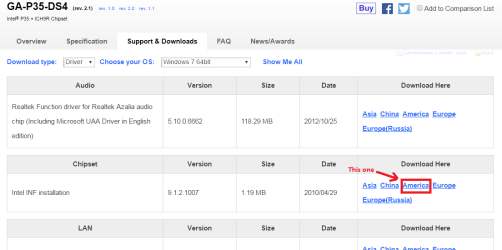
Ok Flash mate in my pic you will see the one you want and why I ask re the AV is because sometimes it is worth a try at disabling an AV when you have issues.

But first lets do the chipset it may cure the problem if not try the AV thing.

Edit: Now I read through the post again and I was wondering if you have tried plugging that dongle into the machine itself in effect not using the hub??
 

Attachments

  • CHIPSET.PNG
    CHIPSET.PNG
    21.6 KB · Views: 0

My Computer My Computer

At a glance

Desk1 7 Home Prem / Desk2 10 Pro / Main lap A...Desk1 i5 3750K / Laptop i7 GTX 860M / Desk2 i...Desk1 8GB (1866) / Desk2 16GB (1333) / Laptop...Desk 1& 2NVidia GTX 650 & Laptops on board Intel
Computer type
PC/Desktop
Computer Manufacturer/Model Number
Own build (new) Desk1 / Asus ROG Win 7 / Desk2 1st build
OS
Desk1 7 Home Prem / Desk2 10 Pro / Main lap Asus ROG 10 Pro 2 laptop Toshiba 7 Pro Asus P2520 7 & 10
CPU
Desk1 i5 3750K / Laptop i7 GTX 860M / Desk2 i5 2500
Motherboard
Desk1 Asus P877-V / Desk2 Gigabyte H67 UD3H / Laptop ?
Memory
Desk1 8GB (1866) / Desk2 16GB (1333) / Laptop 8Gb DDR3
Graphics Card(s)
Desk 1& 2NVidia GTX 650 & Laptops on board Intel
Sound Card
Desk 1 & 2 -XONAR DG Realtek High Def audio Laptop
Monitor(s) Displays
Desk 1 Benq HD 2450 / Desk2 Philips 24" / Laptop 17.5"
Screen Resolution
1920x1080 D1 & D2 & Laptop 1
Hard Drives
Desk1 Samsung 120GB 830 SSD
Asus ROG 256GB 850 Pro SSD
Desk2 Samsung 840 256 SSD
Toshiba 120GB EVO
PSU
Desk 1 Corsair HX 1050/ Laptop ? / Desk 2 Corsair HX 650
Case
Desk 1 Cooler HAF XM ? Toshiba laptop / Desk2 Coolermaster
Cooling
Fans on all Desk1 -2 Desk2 - all Coolermasters 5 Laptop ?
Keyboard
Desk 1 MS Sidewinder X6 Desk 2 MS Sidewinder X 4
Mouse
Desk 1&2 - Gigabyte MS 900 gamer - laptop - Logitec wireless
Internet Speed
ADSL2+
Other Info
One other Desktop (tester) and spare Toshba laptop both with SSD's
Running Kaspersky 2016 ISS on all machines config'd identically
Logitec audio stereo systems on each machine (x3)
Canon MG5250MFC
Router/modem TP-Link running WPA2SK
Thanks, I'll go back to the site and get those files. Is it just a zip file that I unzip and install?

I unplugged the hub from the computer and ran Device Cleanup from an admin command prompt. It removed fifty devices ... O_o

After that I rebooted and plugged the BT dongle into the front USB port on the PC. It installed fine, but once again I got the five Bluetooth Peripheral Device drivers that didn't install.

btinstall.png


I was thinking of getting a cheap BT dongle, running Device Cleanup again, plugging the cheapo in and seeing if this problem repeats. If it doesn't then at least I would know it's an OS problem.

As for the headphones I just ordered the Sony MDR7506. They should be here Saturday. Reviews are pretty good on these headphones and I can just plug the cord into my speakers.
 

My Computer My Computer

At a glance

Windows 7 Home Premium 64BitIntel Core 2 Quad Q6600G.Skill PC2-6400 DDR2 8GBASUS NVIDIA GeForce 9600 GSO
Computer type
PC/Desktop
OS
Windows 7 Home Premium 64Bit
CPU
Intel Core 2 Quad Q6600
Motherboard
GIGABYTE P35-DS4
Memory
G.Skill PC2-6400 DDR2 8GB
Graphics Card(s)
ASUS NVIDIA GeForce 9600 GSO
Sound Card
Diamond XS51 Xtreme 5.1
Monitor(s) Displays
(2) DELL S2340M 23" HD LEDs
Hard Drives
Seagate ST1000DM003-1ER162 1TB | Seagate ST500DM002-1BD142 500GB | ASUS DRW-24B1ST DVD+R DL
PSU
PC Power & Cooling Silencer 610
Case
Ultra m998
Cooling
ThermalRight Ultra 120E
Keyboard
Logitech K811, K360
Mouse
Logitech Performance MX
I installed the new chipset drivers then rebooted. I removed the BT dongle and ran DeviceCleanup, then rebooted again. I installed the dongle in the PC and got the same results (five BT drivers that didn't install).
 

My Computer My Computer

At a glance

Windows 7 Home Premium 64BitIntel Core 2 Quad Q6600G.Skill PC2-6400 DDR2 8GBASUS NVIDIA GeForce 9600 GSO
Computer type
PC/Desktop
OS
Windows 7 Home Premium 64Bit
CPU
Intel Core 2 Quad Q6600
Motherboard
GIGABYTE P35-DS4
Memory
G.Skill PC2-6400 DDR2 8GB
Graphics Card(s)
ASUS NVIDIA GeForce 9600 GSO
Sound Card
Diamond XS51 Xtreme 5.1
Monitor(s) Displays
(2) DELL S2340M 23" HD LEDs
Hard Drives
Seagate ST1000DM003-1ER162 1TB | Seagate ST500DM002-1BD142 500GB | ASUS DRW-24B1ST DVD+R DL
PSU
PC Power & Cooling Silencer 610
Case
Ultra m998
Cooling
ThermalRight Ultra 120E
Keyboard
Logitech K811, K360
Mouse
Logitech Performance MX
Ok mate now for what it is worth I have had problems with Blu tooth stuff and have bought quite expensive devices such as Microsoft and Logitec mice and where they did not not a very cheap brand I found that were made for a store that is something like Walmart have worked every time I have had one I am using one right now;).

In fact I now have three that work on whatever machine I pair them to. So I think your idea of getting a cheap dongle is worth a try and if does not work then it has to be an OS issue like you say. Having said that from the attached pic it looks to me that the Broadcomm device ? dongle is installed and it is the headphones that are the issue and why five?? are there more Blu tooth devices in your home??.

The DeviceCleanup is that a software you have added? as I haven't come across it before. I would be inclined to remove drivers using either the Control Panel or Revo uninstaller or even the reg keys.
 

My Computer My Computer

At a glance

Desk1 7 Home Prem / Desk2 10 Pro / Main lap A...Desk1 i5 3750K / Laptop i7 GTX 860M / Desk2 i...Desk1 8GB (1866) / Desk2 16GB (1333) / Laptop...Desk 1& 2NVidia GTX 650 & Laptops on board Intel
Computer type
PC/Desktop
Computer Manufacturer/Model Number
Own build (new) Desk1 / Asus ROG Win 7 / Desk2 1st build
OS
Desk1 7 Home Prem / Desk2 10 Pro / Main lap Asus ROG 10 Pro 2 laptop Toshiba 7 Pro Asus P2520 7 & 10
CPU
Desk1 i5 3750K / Laptop i7 GTX 860M / Desk2 i5 2500
Motherboard
Desk1 Asus P877-V / Desk2 Gigabyte H67 UD3H / Laptop ?
Memory
Desk1 8GB (1866) / Desk2 16GB (1333) / Laptop 8Gb DDR3
Graphics Card(s)
Desk 1& 2NVidia GTX 650 & Laptops on board Intel
Sound Card
Desk 1 & 2 -XONAR DG Realtek High Def audio Laptop
Monitor(s) Displays
Desk 1 Benq HD 2450 / Desk2 Philips 24" / Laptop 17.5"
Screen Resolution
1920x1080 D1 & D2 & Laptop 1
Hard Drives
Desk1 Samsung 120GB 830 SSD
Asus ROG 256GB 850 Pro SSD
Desk2 Samsung 840 256 SSD
Toshiba 120GB EVO
PSU
Desk 1 Corsair HX 1050/ Laptop ? / Desk 2 Corsair HX 650
Case
Desk 1 Cooler HAF XM ? Toshiba laptop / Desk2 Coolermaster
Cooling
Fans on all Desk1 -2 Desk2 - all Coolermasters 5 Laptop ?
Keyboard
Desk 1 MS Sidewinder X6 Desk 2 MS Sidewinder X 4
Mouse
Desk 1&2 - Gigabyte MS 900 gamer - laptop - Logitec wireless
Internet Speed
ADSL2+
Other Info
One other Desktop (tester) and spare Toshba laptop both with SSD's
Running Kaspersky 2016 ISS on all machines config'd identically
Logitec audio stereo systems on each machine (x3)
Canon MG5250MFC
Router/modem TP-Link running WPA2SK
I took the Skullcandy headphones back a few days ago. I have no idea why it's always trying to install five BT devices, that's why I posted here hoping someone could shed some light on that. Device Cleanup is a tool that someone else from another forum suggested I use.

I found a somewhat clunky fix on this page (see Method Three). I tried it and it does get rid of the BT devices with yellow exclamation marks. However, I'm not sure if it's a 100% solution or just a band-aid.
 

My Computer My Computer

At a glance

Windows 7 Home Premium 64BitIntel Core 2 Quad Q6600G.Skill PC2-6400 DDR2 8GBASUS NVIDIA GeForce 9600 GSO
Computer type
PC/Desktop
OS
Windows 7 Home Premium 64Bit
CPU
Intel Core 2 Quad Q6600
Motherboard
GIGABYTE P35-DS4
Memory
G.Skill PC2-6400 DDR2 8GB
Graphics Card(s)
ASUS NVIDIA GeForce 9600 GSO
Sound Card
Diamond XS51 Xtreme 5.1
Monitor(s) Displays
(2) DELL S2340M 23" HD LEDs
Hard Drives
Seagate ST1000DM003-1ER162 1TB | Seagate ST500DM002-1BD142 500GB | ASUS DRW-24B1ST DVD+R DL
PSU
PC Power & Cooling Silencer 610
Case
Ultra m998
Cooling
ThermalRight Ultra 120E
Keyboard
Logitech K811, K360
Mouse
Logitech Performance MX
Did a live chat with a Targus tech this morning. After much fooling around he gave me a BT driver file to download, which looked just like the one I tried earlier. I installed the dongle on the USB port on my PC and tried installing the Broadcom driver file he linked me to, but it kept saying "failed to update bluetooth software". Finally I emailed the driver file link to myself and took the dongle upstairs and installed it on my buddies PC. On his PC the dongle installed fine and DID NOT install those other five BT device drivers. but the driver file Targus gave me would not work up there, either (got the same "failed to update bluetooth software" error).

We deduced that there must be something going on with my PC where it's always trying to install those five BT device drivers. Could be the mobo or something else, not really sure. Either way they wouldn't send me a replacement so I'll have to look for something else. In the meantime I'm still using this dongle because other than the device driver issues it works fine.
 

My Computer My Computer

At a glance

Windows 7 Home Premium 64BitIntel Core 2 Quad Q6600G.Skill PC2-6400 DDR2 8GBASUS NVIDIA GeForce 9600 GSO
Computer type
PC/Desktop
OS
Windows 7 Home Premium 64Bit
CPU
Intel Core 2 Quad Q6600
Motherboard
GIGABYTE P35-DS4
Memory
G.Skill PC2-6400 DDR2 8GB
Graphics Card(s)
ASUS NVIDIA GeForce 9600 GSO
Sound Card
Diamond XS51 Xtreme 5.1
Monitor(s) Displays
(2) DELL S2340M 23" HD LEDs
Hard Drives
Seagate ST1000DM003-1ER162 1TB | Seagate ST500DM002-1BD142 500GB | ASUS DRW-24B1ST DVD+R DL
PSU
PC Power & Cooling Silencer 610
Case
Ultra m998
Cooling
ThermalRight Ultra 120E
Keyboard
Logitech K811, K360
Mouse
Logitech Performance MX
Hmm well certainly a mystery this one what I don't get is why the Blu tooth software is not installing. The other five BT drivers cropping up may be the system is duplicating the setup somehow?

Now as a general rule I do not use aftermarket software preferring to use the manufacturers site as you know but there is one program I use when I am desperate and it might be worth a try to get the correct driver even though the Targus people have given you one - mind you it isn't working so nothing to lose really.

The software is this Slimware Utilities - Download SlimDrivers FREE now I want to give you the heads up on using this software first and foremost download and install this Changelog | Unchecky this little utility is very handy to stop any downloads adding that irritating add on stuff like Askbar or Google toolbar etc they are the ones that are usually checked to add to what you are installing and you often miss and usually very hard to get rid of.

Now when you download and install the Slim Drivers make sure it is ONLY the driver utility as you can be offered other stuff that is not wanted so go slowly.

When it is installed run the program and it will pop up any drivers that need updating - the updates it directs you to are almost always the manufacturers sites. For example it may be Intel or Toshiba or Broadcomm etc etc

Look for the drivers that you want and install them from their link. When you are done you need to uninstall the Slim Drivers as to why - I always do because it can be a bit of a nagger and it isn't hard to download again anyway.

Let us know how you go if you do try this.
 

My Computer My Computer

At a glance

Desk1 7 Home Prem / Desk2 10 Pro / Main lap A...Desk1 i5 3750K / Laptop i7 GTX 860M / Desk2 i...Desk1 8GB (1866) / Desk2 16GB (1333) / Laptop...Desk 1& 2NVidia GTX 650 & Laptops on board Intel
Computer type
PC/Desktop
Computer Manufacturer/Model Number
Own build (new) Desk1 / Asus ROG Win 7 / Desk2 1st build
OS
Desk1 7 Home Prem / Desk2 10 Pro / Main lap Asus ROG 10 Pro 2 laptop Toshiba 7 Pro Asus P2520 7 & 10
CPU
Desk1 i5 3750K / Laptop i7 GTX 860M / Desk2 i5 2500
Motherboard
Desk1 Asus P877-V / Desk2 Gigabyte H67 UD3H / Laptop ?
Memory
Desk1 8GB (1866) / Desk2 16GB (1333) / Laptop 8Gb DDR3
Graphics Card(s)
Desk 1& 2NVidia GTX 650 & Laptops on board Intel
Sound Card
Desk 1 & 2 -XONAR DG Realtek High Def audio Laptop
Monitor(s) Displays
Desk 1 Benq HD 2450 / Desk2 Philips 24" / Laptop 17.5"
Screen Resolution
1920x1080 D1 & D2 & Laptop 1
Hard Drives
Desk1 Samsung 120GB 830 SSD
Asus ROG 256GB 850 Pro SSD
Desk2 Samsung 840 256 SSD
Toshiba 120GB EVO
PSU
Desk 1 Corsair HX 1050/ Laptop ? / Desk 2 Corsair HX 650
Case
Desk 1 Cooler HAF XM ? Toshiba laptop / Desk2 Coolermaster
Cooling
Fans on all Desk1 -2 Desk2 - all Coolermasters 5 Laptop ?
Keyboard
Desk 1 MS Sidewinder X6 Desk 2 MS Sidewinder X 4
Mouse
Desk 1&2 - Gigabyte MS 900 gamer - laptop - Logitec wireless
Internet Speed
ADSL2+
Other Info
One other Desktop (tester) and spare Toshba laptop both with SSD's
Running Kaspersky 2016 ISS on all machines config'd identically
Logitec audio stereo systems on each machine (x3)
Canon MG5250MFC
Router/modem TP-Link running WPA2SK
Thanks for the reply. I installed Changelog, then I installed Slimdrivers. It was cool because I was about to press the continue button when Unchecky alerted me that it was an unwanted program. I wasn't paying attention so it was good that it alerted me. I finally installed just the Slimdriver program and scanned. It came up with 19 drivers that I need, but I'm unsure which one relates to the bluetooth issues.

Should I just get them all?
 

My Computer My Computer

At a glance

Windows 7 Home Premium 64BitIntel Core 2 Quad Q6600G.Skill PC2-6400 DDR2 8GBASUS NVIDIA GeForce 9600 GSO
Computer type
PC/Desktop
OS
Windows 7 Home Premium 64Bit
CPU
Intel Core 2 Quad Q6600
Motherboard
GIGABYTE P35-DS4
Memory
G.Skill PC2-6400 DDR2 8GB
Graphics Card(s)
ASUS NVIDIA GeForce 9600 GSO
Sound Card
Diamond XS51 Xtreme 5.1
Monitor(s) Displays
(2) DELL S2340M 23" HD LEDs
Hard Drives
Seagate ST1000DM003-1ER162 1TB | Seagate ST500DM002-1BD142 500GB | ASUS DRW-24B1ST DVD+R DL
PSU
PC Power & Cooling Silencer 610
Case
Ultra m998
Cooling
ThermalRight Ultra 120E
Keyboard
Logitech K811, K360
Mouse
Logitech Performance MX
I installed the first one - Realtek drivers - but instead of taking me to the manufacturer's page it just opened another program screen and started the install right from the desktop.
 

My Computer My Computer

At a glance

Windows 7 Home Premium 64BitIntel Core 2 Quad Q6600G.Skill PC2-6400 DDR2 8GBASUS NVIDIA GeForce 9600 GSO
Computer type
PC/Desktop
OS
Windows 7 Home Premium 64Bit
CPU
Intel Core 2 Quad Q6600
Motherboard
GIGABYTE P35-DS4
Memory
G.Skill PC2-6400 DDR2 8GB
Graphics Card(s)
ASUS NVIDIA GeForce 9600 GSO
Sound Card
Diamond XS51 Xtreme 5.1
Monitor(s) Displays
(2) DELL S2340M 23" HD LEDs
Hard Drives
Seagate ST1000DM003-1ER162 1TB | Seagate ST500DM002-1BD142 500GB | ASUS DRW-24B1ST DVD+R DL
PSU
PC Power & Cooling Silencer 610
Case
Ultra m998
Cooling
ThermalRight Ultra 120E
Keyboard
Logitech K811, K360
Mouse
Logitech Performance MX
That's ok and the ones you want would be the chipset and the audio stuff but it would interesting to see what else it found.

Can you get a shot of the drivers offered and post it - it is real easy if you use the snip feature in Windows as I do Screenshots and Files - Upload and Post in Seven Forums

As a matter of fact I keep the snipping tool on my taskbar for ease of use. To get it go to Start. type snipping tool (it usually appears before you finish typing snip > when it throws up the small box > right click on it and pin to taskbar. It is an easy thing then to click it and the screen goes a milky sort of finish and you drag the outline of what you want to save as a pic. Then go to File > save as and put it where you want I put some in the Pictures library and soem for short term use on the Desktop (makes finding them easy)

When you have saved them it is easy to send the pic as an attachment in manage attachments;)

I am pleased you used the Unchecky - quite a good little program eh? and saves a lot of grief.
 

My Computer My Computer

At a glance

Desk1 7 Home Prem / Desk2 10 Pro / Main lap A...Desk1 i5 3750K / Laptop i7 GTX 860M / Desk2 i...Desk1 8GB (1866) / Desk2 16GB (1333) / Laptop...Desk 1& 2NVidia GTX 650 & Laptops on board Intel
Computer type
PC/Desktop
Computer Manufacturer/Model Number
Own build (new) Desk1 / Asus ROG Win 7 / Desk2 1st build
OS
Desk1 7 Home Prem / Desk2 10 Pro / Main lap Asus ROG 10 Pro 2 laptop Toshiba 7 Pro Asus P2520 7 & 10
CPU
Desk1 i5 3750K / Laptop i7 GTX 860M / Desk2 i5 2500
Motherboard
Desk1 Asus P877-V / Desk2 Gigabyte H67 UD3H / Laptop ?
Memory
Desk1 8GB (1866) / Desk2 16GB (1333) / Laptop 8Gb DDR3
Graphics Card(s)
Desk 1& 2NVidia GTX 650 & Laptops on board Intel
Sound Card
Desk 1 & 2 -XONAR DG Realtek High Def audio Laptop
Monitor(s) Displays
Desk 1 Benq HD 2450 / Desk2 Philips 24" / Laptop 17.5"
Screen Resolution
1920x1080 D1 & D2 & Laptop 1
Hard Drives
Desk1 Samsung 120GB 830 SSD
Asus ROG 256GB 850 Pro SSD
Desk2 Samsung 840 256 SSD
Toshiba 120GB EVO
PSU
Desk 1 Corsair HX 1050/ Laptop ? / Desk 2 Corsair HX 650
Case
Desk 1 Cooler HAF XM ? Toshiba laptop / Desk2 Coolermaster
Cooling
Fans on all Desk1 -2 Desk2 - all Coolermasters 5 Laptop ?
Keyboard
Desk 1 MS Sidewinder X6 Desk 2 MS Sidewinder X 4
Mouse
Desk 1&2 - Gigabyte MS 900 gamer - laptop - Logitec wireless
Internet Speed
ADSL2+
Other Info
One other Desktop (tester) and spare Toshba laptop both with SSD's
Running Kaspersky 2016 ISS on all machines config'd identically
Logitec audio stereo systems on each machine (x3)
Canon MG5250MFC
Router/modem TP-Link running WPA2SK
Back
Top