Cant Partition Or Format D Drive! Why??

mw2

New member
Local time
8:07 AM
Messages
56
HI

How come i cant partition my D Drive. The option is grayed out!

Any ideas
 

My Computer My Computer

Computer Manufacturer/Model Number
Fujitsu Siemens
OS
Windows 7 Professional
Memory
2gb
Graphics Card(s)
1gb
Sound Card
265
Monitor(s) Displays
1080p
Hard Drives
1 external 1tb
Cooling
fan

My Computer My Computer

Computer type
PC/Desktop
Computer Manufacturer/Model Number
Built them myself, Science Experiments !
OS
Win7 Enterprise, Win7 x86 (Ult 7600), Win7 x64 Ult 7600, TechNet RTM on AMD x64 (2.8Ghz)
CPU
AMD fx8350 4ghz, AMD-32 2400mhz, AMD-64 3200mhz, AMDx64 2.8G
Motherboard
SIS 755, ECS-K8M890M-M (Ult 7600), GigaByte & others
Memory
2gb, 4gb on the Ult 7600, 4gb on Technet RTM, 32gb on FX8350
Graphics Card(s)
Draw my own Graphics, several nVidia cards
Sound Card
on motherboard
Monitor(s) Displays
19" flat scr, 28" I-Inc widescr,22" Emprex Widescr, 23" Acer
Screen Resolution
1280 x 1024, 1440 x 900, 1920 x 1080
Hard Drives
6 pata Ide HD's & 2 Sata HD's
added 80gb external on Ult 7600 computer,
numerous extra 1tb, 2TB, 3Tb SATA HD's
A collection of ext HD Docks w/ HDs
PSU
430w, 550w, 600w, 700, 800, etc
Case
All Generic Full Towers
Cooling
Open Air & a few fans, some w/ colored LEDs
Keyboard
Compaq & Dell recycled from GoodWill
Mouse
Made in China Optical Wired Mouse
Internet Speed
Fast Cable InterNet
Antivirus
AVG Free on 24 different Desktops, NO Problems!
Browser
IE 8 is preferred, but use FireFox sometimes
Other Info
Linksys Routers, switches, & Hubs
Too Many USB Flash Drives to count, Biggest is 64GB !
Eight computers in my home network.
Sixteen computers at my business network.
Linked via TeamViewer !
Lots of old used spare computer parts everywhere!
You need to boot the installer before it will make the Custom install Drive Options available.
 
  • Like
Reactions: mw2
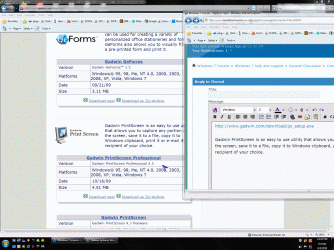
http://www.gadwin.com/download/ps_setup.exe

Gadwin PrintScreen is an easy to use utility that allows you to capture any portion of the screen, save it to a file, copy it to Windows clipboard, print it or e-mail it to a recipient of your choice.
 

Attachments

  • Win 7 RTM001.gif
    Win 7 RTM001.gif
    200.4 KB · Views: 25

My Computer My Computer

Computer Manufacturer/Model Number
ME!
OS
Windows 7 SP1 Ultimate 64bit
CPU
AMD Phenom II X4 940
Motherboard
ASUS M4A79 Deluxe (BIOS 3603)
Memory
OCZ PC8500 Platinum 4GB
Graphics Card(s)
Sapphire HD4870 1GB 256-bit GDDR5
Sound Card
HT Omega Claro
Monitor(s) Displays
ViewSonic G220fb still rocks
Screen Resolution
1600x1200@85hz
Hard Drives
160GB Seagate 7200.10 Sata
150GB WD Raptor 10,000rpm Sata
PSU
Corsair TX950W
Cooling
Zalman 9700NT
Keyboard
Logitech Standard
Mouse
Microsoft SideWinder
Internet Speed
5.26MB down 0.86MB up
Other Info
APC BackUps 900VA

My Computers My Computers

System One System Two

  • Computer type
    PC/Desktop
    Computer Manufacturer/Model Number
    PowerSpec G164
    OS
    WIN10
    CPU
    AMD Ryzen 5 3600 6-Core Processor 3.59 GHz
    Memory
    16.0 GB
    Internet Speed
    VERY FAST>>>!!!
  • Antivirus
    ESET Security Premium
Thank you all. Finally fixed the problem as requested by gregrocker.

Also learnt how to upload a screenshot!

Capture.JPG
 

My Computer My Computer

Computer Manufacturer/Model Number
Fujitsu Siemens
OS
Windows 7 Professional
Memory
2gb
Graphics Card(s)
1gb
Sound Card
265
Monitor(s) Displays
1080p
Hard Drives
1 external 1tb
Cooling
fan
Gadwin PrintScreen is an easy to use utility that allows you to capture any portion of the screen, save it to a file, copy it to Windows clipboard, print it or e-mail it to a recipient of your choice.
I'm asking out of curiosity, but given that Windows 7 includes a screenshot utility that works perfectly for posting images on this forum, why would any 3rd party app be needed? What features does it have that aren't present in the Snipping Tool?
 

My Computer My Computer

OS
Windows 7 Ultimate x64 SP1
CPU
Intel Core i7-2600
Motherboard
Gigabyte GA-P67A-UD3P-B3
Memory
12 GB Patriot Extreme DDR3-1333
Graphics Card(s)
Nvidia GTX 470
Monitor(s) Displays
Dell UltraSharp 2209WA
Hard Drives
OCZ Agility3 240 GB, WD5001AALS, WD7501AALS
PSU
OCZ ModStream 700W
Case
CoolerMaster HAF 912 Advanced
Cooling
CoolerMaster Hyper 212 Plus
Thank you all. Finally fixed the problem as requested by gregrocker.
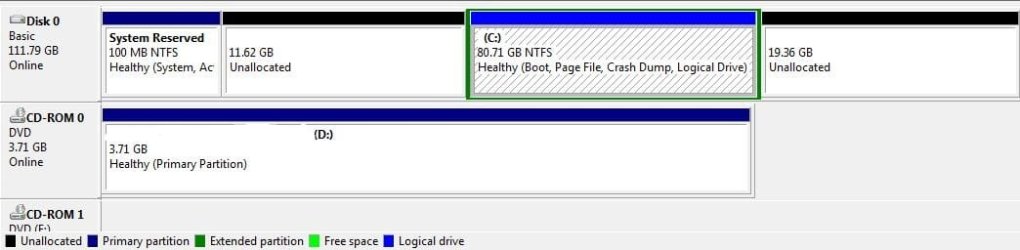
You're drive formatting make me scratch me head in confusion. Why waste 12 GB of space?
 

My Computer My Computer

OS
Windows 7 Ultimate x64 SP1
CPU
Intel Core i7-2600
Motherboard
Gigabyte GA-P67A-UD3P-B3
Memory
12 GB Patriot Extreme DDR3-1333
Graphics Card(s)
Nvidia GTX 470
Monitor(s) Displays
Dell UltraSharp 2209WA
Hard Drives
OCZ Agility3 240 GB, WD5001AALS, WD7501AALS
PSU
OCZ ModStream 700W
Case
CoolerMaster HAF 912 Advanced
Cooling
CoolerMaster Hyper 212 Plus
Thank you all. Finally fixed the problem as requested by gregrocker.
You're drive formatting make me scratch me head in confusion. Why waste 12 GB of space?


Oh yeah i was getting that ready for my downloads from Bittorrent. Ill do it just now...
 

My Computer My Computer

Computer Manufacturer/Model Number
Fujitsu Siemens
OS
Windows 7 Professional
Memory
2gb
Graphics Card(s)
1gb
Sound Card
265
Monitor(s) Displays
1080p
Hard Drives
1 external 1tb
Cooling
fan
You don't need a separate partition for that, especially one located before your system volume. I'm a big fan of not over-partitioning a drive.
 

My Computer My Computer

OS
Windows 7 Ultimate x64 SP1
CPU
Intel Core i7-2600
Motherboard
Gigabyte GA-P67A-UD3P-B3
Memory
12 GB Patriot Extreme DDR3-1333
Graphics Card(s)
Nvidia GTX 470
Monitor(s) Displays
Dell UltraSharp 2209WA
Hard Drives
OCZ Agility3 240 GB, WD5001AALS, WD7501AALS
PSU
OCZ ModStream 700W
Case
CoolerMaster HAF 912 Advanced
Cooling
CoolerMaster Hyper 212 Plus
Alright sorry boss
 

My Computer My Computer

Computer Manufacturer/Model Number
Fujitsu Siemens
OS
Windows 7 Professional
Memory
2gb
Graphics Card(s)
1gb
Sound Card
265
Monitor(s) Displays
1080p
Hard Drives
1 external 1tb
Cooling
fan
Alright sorry boss
Too many people forget the age-old motto: K.I.S.S. Keep It Simple Stupid. No, that's not meant as an insult. That's just the saying.

In other words, FAR too many people ignore this concept, and set their systems up with crazy configs...simple because it lets them. Always remember that just because you can do something, doesn't mean it is the best way. Simplify your setup, and you'll have less issues down the road...which is what we are all after.

There's no need to be condescending....just simplify and follow good, known practices.
 

My Computer My Computer

OS
Windows 7 Ultimate x64 SP1
CPU
Intel Core i7-2600
Motherboard
Gigabyte GA-P67A-UD3P-B3
Memory
12 GB Patriot Extreme DDR3-1333
Graphics Card(s)
Nvidia GTX 470
Monitor(s) Displays
Dell UltraSharp 2209WA
Hard Drives
OCZ Agility3 240 GB, WD5001AALS, WD7501AALS
PSU
OCZ ModStream 700W
Case
CoolerMaster HAF 912 Advanced
Cooling
CoolerMaster Hyper 212 Plus
Hello mw2, welcome to Seven Forums!


If you wanted to recover the space ahead of the system volume you could use the info in Option Two in the tutorial at the link below, it refers to the "System Reserved" partition but the steps are exactly the same and you could even make the system volume as a "Primary Partition" while you're at it with the same Partition Wizard program.


Partition Wizard : Use the Bootable CD
 

My Computer My Computer

Computer Manufacturer/Model Number
* BFK Customs *
OS
W 7 64-bit Ultimate
CPU
Intel Q9550 Yorkfield
Motherboard
ASUS P5Q Pro
Memory
8GB Dominator 8500C5D
Graphics Card(s)
ATI : XFX 5870
Sound Card
Realtek HD Audio 7-1
Monitor(s) Displays
1x 47" LCD HDMI & 3x 26" LCD HDMI
Screen Resolution
1920x1080P & 1920x1200
Hard Drives
1x 80GB Intel X25-M G2 SSD : 1x 500GB & 1x 640GB WD Caviar Black(s)
PSU
Corsair 620HX
Case
Cooler Master RC-690
Cooling
Tuniq Tower 120, 2x 140mm and 3x 120mm case fans
Keyboard
Microsoft 500
Mouse
Razer Diamondback 3G
Internet Speed
14 Mb/s
Other Info
1x Koutech 3Gb/s SATA HDD Hot Swap Rack
In order to recover the 12gb Unallocated space into the C:Win7 partition, C must be converted from an Extended Logical to a Primary partition. It is always best to have Win7 on a Primary partition anyway, since Logical can never be marked Active to recover the System MBR into it should that become necessary.

You also get slightly better performance by having Win7 on the preferred lower left-hand address of the HD closer to where the disk reader parks.

Read over the Partiion Wizard tutorial which BarefootKid wrote/linked above, boot PW CD, rightclick Win7 partition, select Modify>Convert to Primary, OK. Then rightclick again to Resize, drag left grey border to the left to take up 12gb Unallocated space, OK. Apply all Steps.
 
Thank you all for such a warm welcome. Im having a look at the partition wizard now and will try to follow the steps! Thanks again

Oh and one other thing, how do i get the picture thing working? I uploaded one but it dont work. You know the user picture?
 

My Computer My Computer

Computer Manufacturer/Model Number
Fujitsu Siemens
OS
Windows 7 Professional
Memory
2gb
Graphics Card(s)
1gb
Sound Card
265
Monitor(s) Displays
1080p
Hard Drives
1 external 1tb
Cooling
fan

My Computers My Computers

System One System Two

  • Computer type
    PC/Desktop
    Computer Manufacturer/Model Number
    PowerSpec G164
    OS
    WIN10
    CPU
    AMD Ryzen 5 3600 6-Core Processor 3.59 GHz
    Memory
    16.0 GB
    Internet Speed
    VERY FAST>>>!!!
  • Antivirus
    ESET Security Premium
Thank you all for such a warm welcome. Im having a look at the partition wizard now and will try to follow the steps! Thanks again

Oh and one other thing, how do i get the picture thing working? I uploaded one but it dont work. You know the user picture?


Do remember to post back with an update.
 

My Computer My Computer

Computer Manufacturer/Model Number
* BFK Customs *
OS
W 7 64-bit Ultimate
CPU
Intel Q9550 Yorkfield
Motherboard
ASUS P5Q Pro
Memory
8GB Dominator 8500C5D
Graphics Card(s)
ATI : XFX 5870
Sound Card
Realtek HD Audio 7-1
Monitor(s) Displays
1x 47" LCD HDMI & 3x 26" LCD HDMI
Screen Resolution
1920x1080P & 1920x1200
Hard Drives
1x 80GB Intel X25-M G2 SSD : 1x 500GB & 1x 640GB WD Caviar Black(s)
PSU
Corsair 620HX
Case
Cooler Master RC-690
Cooling
Tuniq Tower 120, 2x 140mm and 3x 120mm case fans
Keyboard
Microsoft 500
Mouse
Razer Diamondback 3G
Internet Speed
14 Mb/s
Other Info
1x Koutech 3Gb/s SATA HDD Hot Swap Rack
Back
Top