Can't Receive Emails Automatically?

RayPaula

New member
Local time
12:52 AM
Messages
35
:huh: Hi, Does anyone know how I can receive my emails automatically in Office 2007 Outlook? When I open Outlook, I have to go to Send/Receive then click on Send/Receive All in order to receive my email. I would like to receive it automatically upon opening Outlook. My OS is Windows 7 Ultimate 64bit. Thanks in advance, Ray
PS: I miss Outlook Express......:rolleyes:
 

My Computer

Computer type
PC/Desktop
OS
Windows 7 Ultimate x64
Hi
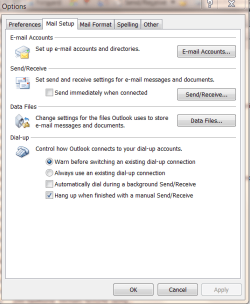
enc shot.

You can also enable automatic send and receive say every 30 mins if you like.

go to tools==>options

I prefer to have mine set to manually as I never am sure what might be in the outbox and I don't want to send stuff I haven't finished or am not sure about.

Cheers
jimbo
 

Attachments

  • email.png
    email.png
    23.3 KB · Views: 31

My Computer

Computer type
PC/Desktop
Computer Manufacturer/Model Number
Custom built, several laptops HP/ASUS
OS
Linux CENTOS 7 / various Windows OS'es and servers
CPU
Intel i7 Intel i5
Memory
8GB, 16GB
Graphics Card(s)
On Motherboard
Sound Card
Realtek HD audio
Monitor(s) Displays
Apple Cinema display, Samsung LCD
Screen Resolution
1920 X 1080
Hard Drives
4 X 1TB SATA
Mouse
Toshiba wireless laser
Internet Speed
> 20MB up
Hi Ray,

Congrats on your move to Outlook 2007 Email, it'll be worth it once you get used to it.

To answer your question and in addition to Jimbo's great post above:
From the TOOLS menu, click the following
Send / Receive
Send / Receive Settings
Define Send / Receive Groups
You can set how often it checks here. Just ensure that the box is ticked to schedule this automatically.

GOOD LUCK

Tim

PS: You can also use the shortcut key F9 for a quick on the spot send/receive.
 

My Computer

Computer Manufacturer/Model Number
Custom Hack job
OS
Windows 7 Ultimate 64 bit
CPU
Intel(R) Core(TM)2 Quad CPU Q8200 @ 2.33GHz
Motherboard
GigaByte EP45-UD3
Memory
8 GB Kingston
Graphics Card(s)
Nvidia GeForce 9600GT
Sound Card
Soundblaster Audigy
Monitor(s) Displays
AOC x2 22"
Hard Drives
2 x Samsung 500GB (RAID)
2 x Samsung 2TB
1 x WD Green 2TB
1 x Seagate 1TB
1 x Samsung 500GB
PSU
Thermaltake QFan 750W
Case
CM Scout Gaming
Cooling
Coolermaster V10
Keyboard
Microsoft Wireless Keyboard 1000
Mouse
Microsoft Wireless Optical 2000
Internet Speed
320
Other Info
Winfast PVR2000CP
LG DVD-RAM DVD/RW/DL Super Multi
Linksys WMP300Nx2 Wireless Adapter
Tim

Nice Post
 

My Computer

Computer Manufacturer/Model Number
HP Pavillion dv-7 1005 Tx
OS
Win 8 Release candidate 8400
CPU
[email protected]
Memory
4 gigs
Graphics Card(s)
Nvidia 9600M
Sound Card
HD built-in
Monitor(s) Displays
17" Wxga
Screen Resolution
1440x900
Cooling
none
Internet Speed
45Mb down 5Mb up
:D Hi, Thanks for the replies! I found the option that you're speaking of. In the past with Outlook Express, as soon as I opened up Outlook I would start receiving my emails automatically. I didn't have to set a time frame. It appears that I will need to set a time frame to receive them with Outlook. There are times that I may be online and would like to check my emails periodically every couple minutes or so. With this being said, I'll set the time frame to every 1 minute. I would prefer it to be automatic when I open Outlook insted of Outlook running every 1 minute checking for emails. Thanks for the help, Ray
 

My Computer

Computer type
PC/Desktop
OS
Windows 7 Ultimate x64
You're welcome Ray!
 

My Computer

Computer Manufacturer/Model Number
Custom Hack job
OS
Windows 7 Ultimate 64 bit
CPU
Intel(R) Core(TM)2 Quad CPU Q8200 @ 2.33GHz
Motherboard
GigaByte EP45-UD3
Memory
8 GB Kingston
Graphics Card(s)
Nvidia GeForce 9600GT
Sound Card
Soundblaster Audigy
Monitor(s) Displays
AOC x2 22"
Hard Drives
2 x Samsung 500GB (RAID)
2 x Samsung 2TB
1 x WD Green 2TB
1 x Seagate 1TB
1 x Samsung 500GB
PSU
Thermaltake QFan 750W
Case
CM Scout Gaming
Cooling
Coolermaster V10
Keyboard
Microsoft Wireless Keyboard 1000
Mouse
Microsoft Wireless Optical 2000
Internet Speed
320
Other Info
Winfast PVR2000CP
LG DVD-RAM DVD/RW/DL Super Multi
Linksys WMP300Nx2 Wireless Adapter
Back
Top