cant record & no sound with audacity

cherpe

New member
Local time
10:49 PM
Messages
2
I have a Dell GX755 Desktop . I tried to enable stereo mix but it still shows not available. Do I need a new sound card? I have my turntable connected to my reciever's phono inputs & tape outputs to computer. When I try Audacity it shows no sound wave and has no sound. I am trying to convert vinyl records to mp3. Help appreciated
 

My Computer My Computer

Computer type
PC/Desktop
Computer Manufacturer/Model Number
dell GX755
OS
windows 7 home premium 32 bit
You may have Audacity misconfigured, but it's certainly possible you need a new sound card.

Some sound cards support stereo mix in Win 7 and some don't. It isn't as easy as it was under Windows XP and I think deliberately so.

If you have Realtek sound (I do), you should be able to get stereo mix to work on Win 7.

You can get an external card for $30 or $40 that will work if nothing else. I haven't followed which internal sound cards will work, but there are some.

You can try older drivers and as many tricks as you can find on the Internet and they may eventually work. You have to decide how many hours you want to devote to that rather than just buying another card.
 

My Computer My Computer

Computer type
PC/Desktop
Computer Manufacturer/Model Number
Ignatz Special; 4 speed manual gearbox; factory air conditioning; one of one
OS
Windows 7 Home Premium SP1, 64-bit
CPU
Intel Skylake i5-6600K, not overclocked
Motherboard
AsRock Z170M Extreme 4, micro ATX
Memory
8 GB HyperX DDR4-2666 (2 x 4 GB)
Graphics Card(s)
none; graphics are integrated on CPU
Sound Card
onboard: Realtek ALC1150; external: USB Behringer UF0-202
Monitor(s) Displays
Dell S2340M 23 inch IPS
Screen Resolution
1600 x 900
Hard Drives
System: Crucial MX100 series SSD, 128 GB;
Data: Samsung Spinpoint 103SJ, 1 TB;
Backup: WD Caviar Green WD30EZRX-00D8PB0, 3 TB
PSU
Rosewill SilentNight 500 watt fanless, semi-modular
Case
Antec Solo II
Cooling
Noctua NH-U12S; Noctua F12 intake, Noctua S12A exhaust
Keyboard
Microsoft 200 6JH-00001 USB
Mouse
Dell or Microsoft optical wired; USB
Antivirus
Microsoft Security Essentials and Malwarebytes Premium
Browser
Pale Moon
Other Info
All fans PWM; speeds at idle: CPU circa 500 rpm; intake circa 600 rpm; exhaust circa 600 rpm; CPU temps 27 idle and 47 C load in a warm room (27 C/81 F) when running Intel Extreme Tuning Utility stress test.
Actually, you could just use an auxiliary cable and plug each end into both your headphone jack and your microphone jack. Then, simply use the input from the "external microphone" (which is just the audio from the computer) to record the audio.
 

My Computer My Computer

Computer type
Laptop
Computer Manufacturer/Model Number
Toshiba
OS
Windows 7 Home Premium 64 bit
CPU
AMD E-450 40nm Technology
Motherboard
TOSHIBA Portable PC (Socket FT1)
Memory
3.00GB DDR3 @ 675MHz (9-9-9-24)
Graphics Card(s)
Generic PnP Monitor (1366x768@60Hz) 384MB ATI AMD Radeon HD
Hard Drives
Hard Drives:
298GB TOSHIBA MK3275GSX SATA Disk Device (SATA)
2TB Toshiba External Drive
Optical Drives:
DTSOFT Virtual CdRom Device
TSSTcorp CDDVDW TS-L633F SATA CdRom Device
Antivirus
Microsoft Security Essentials
Browser
Google Chrome
I tried using the headphone jack still nothing.Also tried downloading realtek drivers as well stilla no go. So I 'll try a new sound card. thanks for the replies .
 

My Computer My Computer

Computer type
PC/Desktop
Computer Manufacturer/Model Number
dell GX755
OS
windows 7 home premium 32 bit
Glenzo's method should work. You'd run a set of cables from the headphone output to the microphone input. Clunky, but it usually works.

If you have Realtek sound, I wouldn't give up easily. I have Realtek sound built into the motherboard and I got it working with stereo mix. Try old and new Realtek drivers. Try drivers from Realtek direct and from Dell as well.

But it can be pain to get it right, so I can understand wanting to go with another card. I have a cheap external USB sound card that works fine for stereo mix, but I rarely use it since my on-board sound works OK.
 

My Computer My Computer

Computer type
PC/Desktop
Computer Manufacturer/Model Number
Ignatz Special; 4 speed manual gearbox; factory air conditioning; one of one
OS
Windows 7 Home Premium SP1, 64-bit
CPU
Intel Skylake i5-6600K, not overclocked
Motherboard
AsRock Z170M Extreme 4, micro ATX
Memory
8 GB HyperX DDR4-2666 (2 x 4 GB)
Graphics Card(s)
none; graphics are integrated on CPU
Sound Card
onboard: Realtek ALC1150; external: USB Behringer UF0-202
Monitor(s) Displays
Dell S2340M 23 inch IPS
Screen Resolution
1600 x 900
Hard Drives
System: Crucial MX100 series SSD, 128 GB;
Data: Samsung Spinpoint 103SJ, 1 TB;
Backup: WD Caviar Green WD30EZRX-00D8PB0, 3 TB
PSU
Rosewill SilentNight 500 watt fanless, semi-modular
Case
Antec Solo II
Cooling
Noctua NH-U12S; Noctua F12 intake, Noctua S12A exhaust
Keyboard
Microsoft 200 6JH-00001 USB
Mouse
Dell or Microsoft optical wired; USB
Antivirus
Microsoft Security Essentials and Malwarebytes Premium
Browser
Pale Moon
Other Info
All fans PWM; speeds at idle: CPU circa 500 rpm; intake circa 600 rpm; exhaust circa 600 rpm; CPU temps 27 idle and 47 C load in a warm room (27 C/81 F) when running Intel Extreme Tuning Utility stress test.
The user is trying to record from an external source to Audacity. The external source needs to be connected to the Line In connection, for stereo as the mic in is only mono. The Dell support site is down right now so I can't find out what a stock OptiPlex GX755 has. The OptiPlex line is sold as commercial workstations and many of these do not have full audio I/O connections like a consumer model with full multimedia support. I would suspect it will require adding a separate sound card to get full audio functions.

I have Audacity installed, but don't really use it since my recording studio software is used when I want to record from an external source such as a tape or vinyl from my stereo system. But, the only source that Audacity will record from (at least in my system) is the "Stereo Mix". I've tried, doing some testing for a friend, to use Audacity with my USB connected recording interface devices and even with the recording device set as default recording device Audacity will still not use it.
 

My Computer My Computer

Computer type
PC/Desktop
Computer Manufacturer/Model Number
My Own Build
OS
Windows 10 64 bit
CPU
Intel i7 6700K
Motherboard
ASUS ROG Maximus VIII Hero
Memory
16GB Corsair Dominator
Graphics Card(s)
Intel CPU Graphics
Sound Card
RealTek
Monitor(s) Displays
27" Dell S2719dgf
Screen Resolution
2560X1440
Hard Drives
1 TB Samsung 850 EVO SSD for Win 10 Pro
500GB Samsung 850 EVO SSD for Win 10 Insider
2 TB drive for backup
PSU
EVGA Supernova 750G2
Case
BeQuiet Silent Base 600
Cooling
Deepcool Captain 120EX
Keyboard
Microsoft Wireless 2000
Mouse
Microsoft wireless
Internet Speed
100 MB/sec (Cable)
Antivirus
Microsoft Defender and Malwarebytes
Browser
Edge/Firefox
Other Info
Cakewalk (Sonar) by BandLab and Studio One 4.1 Pro recording studio software. MOTU 896Mk3 Hybrid recording interface, Frontier Tranzport wireless control unit, Behringer X-Touch Control Surface.
Five USB connected optical drives for CD Audio production using Nero BurningROM
I'll pop in with my question here, since it's similar/related.

I upgraded my PC recently, including an upgrade to Windows 7 64-bit. When I want to use Audacity, I see I have input volume, so I should be able to record. There is, however, no sound output. I tried every source available, but I just can't get any sound from my speakers, which is a necessity to record and especially edit the recordings.

I did some Google searches, and it looked like the ASIO drivers might not be good. But installing new drivers won't work.

Does anyone kave any clue what I could/should do to solve this?
 

My Computer My Computer

Computer type
PC/Desktop
Computer Manufacturer/Model Number
custom build
OS
Windows 7 Home Premium 64bit
CPU
i5-4440
Motherboard
ASUS H81M-K
Silent Audacity

Similar symptoms on EliteBook under W7 Pro 64 bits. Audacity doesn't work. Version 2.06

Loaded music or generated sounds show flat wave.
Recording shows the amplitude, I hear the echo, but upon stop everything disappears.
All drivers seem OK, all other sound software work.

Apparently this is a recurrent problem seen by people before 2009...
Once, somebody mentioned short sound buffers (_temp), but I have no idea how to do anything with, besides, on my previous computer, under XP, everything worked...

Thanks.

Jerzy K.
 

My Computer My Computer

Computer type
Laptop
Computer Manufacturer/Model Number
HP EliteBook
OS
Windows 7 pro 64 bits
Memory
8G
Browser
Firefox
I have a recording studio using Sonar X3, however I have Audacity for testing.

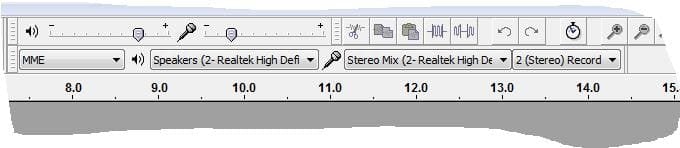
Here is my configuration and it works for recording and playback.
 

Attachments

  • Capture.JPG
    Capture.JPG
    22.2 KB · Views: 9

My Computer My Computer

Computer type
PC/Desktop
Computer Manufacturer/Model Number
My Own Build
OS
Windows 10 64 bit
CPU
Intel i7 6700K
Motherboard
ASUS ROG Maximus VIII Hero
Memory
16GB Corsair Dominator
Graphics Card(s)
Intel CPU Graphics
Sound Card
RealTek
Monitor(s) Displays
27" Dell S2719dgf
Screen Resolution
2560X1440
Hard Drives
1 TB Samsung 850 EVO SSD for Win 10 Pro
500GB Samsung 850 EVO SSD for Win 10 Insider
2 TB drive for backup
PSU
EVGA Supernova 750G2
Case
BeQuiet Silent Base 600
Cooling
Deepcool Captain 120EX
Keyboard
Microsoft Wireless 2000
Mouse
Microsoft wireless
Internet Speed
100 MB/sec (Cable)
Antivirus
Microsoft Defender and Malwarebytes
Browser
Edge/Firefox
Other Info
Cakewalk (Sonar) by BandLab and Studio One 4.1 Pro recording studio software. MOTU 896Mk3 Hybrid recording interface, Frontier Tranzport wireless control unit, Behringer X-Touch Control Surface.
Five USB connected optical drives for CD Audio production using Nero BurningROM
I came to find out (with help from a friend) that the settings were wrong. Because I had to reinstall Audacity, there was some setting (can't reproduce since my friend solved it for me, sorry) that did not send the audio to my speakers. Apparently, Audacity thinks you should not hear what you are recording during the recording. I do prefer to hear what I'm recording though and I'm glad I can hear it again :-)
 

My Computer My Computer

Computer type
PC/Desktop
Computer Manufacturer/Model Number
custom build
OS
Windows 7 Home Premium 64bit
CPU
i5-4440
Motherboard
ASUS H81M-K
Thank you, People. But...
This is NOT a settings issue. The recording sound which is recognized, starts, and vanishes. The sound which is loaded from an external file (mp3 or ogg or whatever) disappears. The internal generators produce flat waves, zero. This is an internal problem, independent of the drivers (I had no problems with WaveShop or other programs).
The best. Jerzy K.
 

My Computer My Computer

Computer type
Laptop
Computer Manufacturer/Model Number
HP EliteBook
OS
Windows 7 pro 64 bits
Memory
8G
Browser
Firefox
Back
Top