Can't remember how to unlock Start Menu

hdmi

New member
Member
Local time
5:19 AM
Messages
70
Sometimes although very rarely, when I'm a little sleepy I accidentally drag instead of left-clicking and a couple times so far, I've accidentally dropped items into folders as a result from this. On most occasions I was still able to figure out how to undo my clumsiness, however.

Anyway, I found a way to completely lock the Start Menu and now I can't remember exactly how I did it — but I remember deleting a few registry entries that had only a GUID and no reference to a file, using Trend Micro HijackThis. I'd love to know if there's a way to easily lock / unlock the Start Menu, similar to the Taskbar's locking feature. I'm also missing the ability to right-click items in the Start Menu (no popup menu appears), so that I cannot unpin anything by accident either.
 
Last edited:

My Computer My Computer

Computer type
Laptop
Computer Manufacturer/Model Number
Asus R510L
OS
8.1 x64
CPU
i7 4510U
Memory
8GB DDR3
Graphics Card(s)
GeForce 820M
Sound Card
Eastern Electric Supreme; Emotiva UMC-200; Astell&Kern AK240
Monitor(s) Displays
LG 42LH5000
Screen Resolution
1920x1080
Hard Drives
1TB internal; 45TB external
PSU
Li-ion
Keyboard
Logitech K800
Mouse
Logitech G400
Internet Speed
20Mbit/s up, 200Mbit/s down
Browser
IE 11
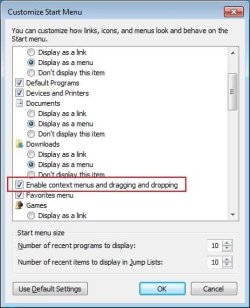
I'm not sure I understand what you mean by "locking", but if you want to enable drag/drop and right-click menus:
1) right-click on the taskbar and select Properties
2) go to the Start Menu tab
3) click on Customize
4) look for "Enable context menus and dragging and dropping"
 

My Computer My Computer

Computer Manufacturer/Model Number
Me :) I build all my PCs
OS
Windows 7 Home 64, Vista Ultimate 64
I'm not sure I understand what you mean by "locking", but if you want to enable drag/drop and right-click menus:
1) right-click on the taskbar and select Properties
2) go to the Start Menu tab
3) click on Customize
4) look for "Enable context menus and dragging and dropping"
Thanks Ivo, but there are no such options in the Customize panel. I remember again how I did it though. It's a feature in Yamicsoft Windows 7 Manager that disables drag and drop in the Start Menu. The feature really helps to prevent accidental dragdropping of Start Menu pinned programs or Start Menu pinned shortcuts onto Start Menu folders (folders pinned to Start Menu using Brink's tutorial, to which I replied my above post only seconds before Brink moved my post into this new topic right here).

What I don't like about the feature is the fact it disables right-click capability in Start Menu at the same time as well, so there's no option to keep that capability enabled while drag and drop capability is disabled. Consider this my feature request for your Classic Shell, please. Going to test your new version of it now, so I can give you my feedback. Your previous version was already saving me from getting another heart attack. +1. :)
 

My Computer My Computer

Computer type
Laptop
Computer Manufacturer/Model Number
Asus R510L
OS
8.1 x64
CPU
i7 4510U
Memory
8GB DDR3
Graphics Card(s)
GeForce 820M
Sound Card
Eastern Electric Supreme; Emotiva UMC-200; Astell&Kern AK240
Monitor(s) Displays
LG 42LH5000
Screen Resolution
1920x1080
Hard Drives
1TB internal; 45TB external
PSU
Li-ion
Keyboard
Logitech K800
Mouse
Logitech G400
Internet Speed
20Mbit/s up, 200Mbit/s down
Browser
IE 11

Attachments

  • startmenu.jpg
    startmenu.jpg
    29.3 KB · Views: 47

My Computer My Computer

Computer Manufacturer/Model Number
Me :) I build all my PCs
OS
Windows 7 Home 64, Vista Ultimate 64
  • Like
Reactions: JMH
Thanks again, found it now... in order to bring it back on the list shown by your screenshot, the drag and drop capability has to be re-enabled first in Yamicsoft Windows 7 Manager | Customization | Customize System | Start Menu.
 

My Computer My Computer

Computer type
Laptop
Computer Manufacturer/Model Number
Asus R510L
OS
8.1 x64
CPU
i7 4510U
Memory
8GB DDR3
Graphics Card(s)
GeForce 820M
Sound Card
Eastern Electric Supreme; Emotiva UMC-200; Astell&Kern AK240
Monitor(s) Displays
LG 42LH5000
Screen Resolution
1920x1080
Hard Drives
1TB internal; 45TB external
PSU
Li-ion
Keyboard
Logitech K800
Mouse
Logitech G400
Internet Speed
20Mbit/s up, 200Mbit/s down
Browser
IE 11
Back
Top