Can't remove # filter from music directory

Hinginator

New member
Local time
4:15 AM
Messages
3
Can't edit # attribute in View->Choose Details

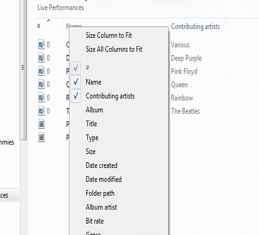
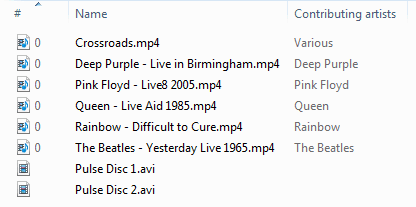
I can't remove the track number (#) filter from my music directory. I've been using MP3Tag to sort out my files. I think the problem might me because the files are MP4's. I'll attach some photos to explain.
 

Attachments
  • Capture.PNG
    Capture.PNG
    5.1 KB · Views: 14
  • Capture1.PNG
    Capture1.PNG
    9.4 KB · Views: 14
Last edited:

My Computer My Computer

At a glance

Windows 7 Professional
Computer type
PC/Desktop
OS
Windows 7 Professional
I can't even open a file with an mp4 extension in mp3Tag. You're asked to "select a directory that contains audio files", so mp4s aren't even shown. At least on my PC.
 

My Computer My Computer

At a glance

Windows 7 Home Premium SP1, 64-bitIntel Skylake i5-6600K, not overclocked8 GB HyperX DDR4-2666 (2 x 4 GB)none; graphics are integrated on CPU
Computer type
PC/Desktop
Computer Manufacturer/Model Number
Ignatz Special; 4 speed manual gearbox; factory air conditioning; one of one
OS
Windows 7 Home Premium SP1, 64-bit
CPU
Intel Skylake i5-6600K, not overclocked
Motherboard
AsRock Z170M Extreme 4, micro ATX
Memory
8 GB HyperX DDR4-2666 (2 x 4 GB)
Graphics Card(s)
none; graphics are integrated on CPU
Sound Card
onboard: Realtek ALC1150; external: USB Behringer UF0-202
Monitor(s) Displays
Dell S2340M 23 inch IPS
Screen Resolution
1600 x 900
Hard Drives
System: Crucial MX100 series SSD, 128 GB;
Data: Samsung Spinpoint 103SJ, 1 TB;
Backup: WD Caviar Green WD30EZRX-00D8PB0, 3 TB
PSU
Rosewill SilentNight 500 watt fanless, semi-modular
Case
Antec Solo II
Cooling
Noctua NH-U12S; Noctua F12 intake, Noctua S12A exhaust
Keyboard
Microsoft 200 6JH-00001 USB
Mouse
Dell or Microsoft optical wired; USB
Antivirus
Microsoft Security Essentials and Malwarebytes Premium
Browser
Pale Moon
Other Info
All fans PWM; speeds at idle: CPU circa 500 rpm; intake circa 600 rpm; exhaust circa 600 rpm; CPU temps 27 idle and 47 C load in a warm room (27 C/81 F) when running Intel Extreme Tuning Utility stress test.
There should be "more" option at the bottom part of the drop-down-list.
On the next pop-up window. Move down the # , make the Name/Title to be on top. uncheck the #. it will disappear surely.

Regards
 

My Computer My Computer

At a glance

Windows 7 Pro 32bitDual Core
Computer type
PC/Desktop
Computer Manufacturer/Model Number
HP
OS
Windows 7 Pro 32bit
CPU
Dual Core
Antivirus
Trend Micro
Back
Top