Can't remove motherboard

bishop101

New member
Member
VIP
Local time
3:32 AM
Messages
110
Location
North
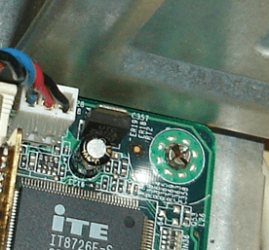
Hi, I bought a new case and wanted to gut out my stock HP m8400f case. But when I tried to remove the Motherboard I couldn't because 1 screw at the top right hand corner was sort of welded to the cage. It looked like one of those really tiny screws but using a small screwdriver I couldn't remove it. Any ideas? Please help.
 

My Computer

OS
Windows 7 Professional x64
CPU
AMD Phenom™ 9500 Quad-Core Processor
Motherboard
MCP61PM-HM (Nettle3)
Memory
8 GB DDR2 OCZ
Graphics Card(s)
Power Color 5750
Monitor(s) Displays
HP w2207h
Hard Drives
2x Seagate ST336032 0AS SCSI 326 GB,
WD Caviar Black 600 GB,
WD Caviar Black 1 TB
PSU
Corsair TX 650w
Case
Cooler Master 690 Advanced
WD40 works miracles .... ;)
 

My Computer

Computer type
PC/Desktop
Computer Manufacturer/Model Number
LENOVO K450 @3.0GHZ
OS
64-bit Windows 8.1 Pro
CPU
Core(TM) i5 CPU 4330 Haswell @ 3.20GHz
Motherboard
LENOVO
Memory
12.00 GB
Graphics Card(s)
Intel(R) HD Graphics
Sound Card
Intel HD integtrated
Monitor(s) Displays
HP 25' ISP Monitor
Screen Resolution
1900/1020
Hard Drives
(1) ST1000DM003-1CH162 (2) Generic STORAGE DEVICE USB Device (3) Generic STORAGE DEVICE USB Device
Internet Speed
100mb down/10mb up
Almost sounds like it could be a rivet. Any chance of getting a picture of it?
 

My Computer

Computer type
PC/Desktop
Computer Manufacturer/Model Number
Me
OS
Win 7 Ultimate x64
CPU
FX-8350 @ 4.6 GHz so far
Motherboard
Asus M5A97 EVO
Memory
ADATA XPG V1 Series Black 8GB DDR3 1600
Graphics Card(s)
Sapphire R9 270x Dual-X
Sound Card
Xonar DGX w/ Corsair Vengence 1300
Monitor(s) Displays
Acer S232HL Abid
Screen Resolution
1920x1080
Hard Drives
120 GB OCZ Vertex 3
500 GB Seagate 7200.12
PSU
Antec Earthwatts 650W Green
Case
Antec Three Hundred
Cooling
Cooler Master 212 EVO
Keyboard
Logitech G510
Mouse
Logitech G500s
Internet Speed
35000/3000
Can't that damage the mother board? I also look on the back all the other screws once removed left clean screw holes this one particular screw had a back plate filling the void, leading me to believe it's welded or something. thanks.
 

My Computer

OS
Windows 7 Professional x64
CPU
AMD Phenom™ 9500 Quad-Core Processor
Motherboard
MCP61PM-HM (Nettle3)
Memory
8 GB DDR2 OCZ
Graphics Card(s)
Power Color 5750
Monitor(s) Displays
HP w2207h
Hard Drives
2x Seagate ST336032 0AS SCSI 326 GB,
WD Caviar Black 600 GB,
WD Caviar Black 1 TB
PSU
Corsair TX 650w
Case
Cooler Master 690 Advanced
I will post pic a few moments
 

My Computer

OS
Windows 7 Professional x64
CPU
AMD Phenom™ 9500 Quad-Core Processor
Motherboard
MCP61PM-HM (Nettle3)
Memory
8 GB DDR2 OCZ
Graphics Card(s)
Power Color 5750
Monitor(s) Displays
HP w2207h
Hard Drives
2x Seagate ST336032 0AS SCSI 326 GB,
WD Caviar Black 600 GB,
WD Caviar Black 1 TB
PSU
Corsair TX 650w
Case
Cooler Master 690 Advanced
that is a rivet.. you will need to drill that out if you want to remove the mobo...
 

My Computer

Computer type
PC/Desktop
Computer Manufacturer/Model Number
LENOVO K450 @3.0GHZ
OS
64-bit Windows 8.1 Pro
CPU
Core(TM) i5 CPU 4330 Haswell @ 3.20GHz
Motherboard
LENOVO
Memory
12.00 GB
Graphics Card(s)
Intel(R) HD Graphics
Sound Card
Intel HD integtrated
Monitor(s) Displays
HP 25' ISP Monitor
Screen Resolution
1900/1020
Hard Drives
(1) ST1000DM003-1CH162 (2) Generic STORAGE DEVICE USB Device (3) Generic STORAGE DEVICE USB Device
Internet Speed
100mb down/10mb up
ImageShack Album - 3 images

The first two pictures show the rivet front and back, the last picture just shows what little space I have to maneuver to fit in a drill. How would I got about drilling? This is my first build and I was not anticipating this.
 

My Computer

OS
Windows 7 Professional x64
CPU
AMD Phenom™ 9500 Quad-Core Processor
Motherboard
MCP61PM-HM (Nettle3)
Memory
8 GB DDR2 OCZ
Graphics Card(s)
Power Color 5750
Monitor(s) Displays
HP w2207h
Hard Drives
2x Seagate ST336032 0AS SCSI 326 GB,
WD Caviar Black 600 GB,
WD Caviar Black 1 TB
PSU
Corsair TX 650w
Case
Cooler Master 690 Advanced
Doesn't look like a rivet to me. Rivets are used in the construction of many cases, but never in the mounting of a motherboard. The stresses incurred with inserting and fastening a rivet are far more than a motherboard can withstand. It looks more like a self-locking motherboard mounting post. With a pair of pliers, carefully squeeze the top of the post together. Be extremely careful here. Your motherboard should then lift out of the case.

Capture.PNG
 

My Computer

Computer type
PC/Desktop
Computer Manufacturer/Model Number
Dwarf Dwf/11/2012 r09/2013
OS
Windows 8.1 Pro RTM x64
CPU
Intel Core-i5-3570K 4-core @ 3.4GHz (Ivy Bridge) (OC 4.4GHz)
Motherboard
ASRock Z77 Extreme4-M
Memory
4 x 4GB DDR3-1600 Corsair Vengeance CMZ8GX3M2A1600C9B (16GB)
Graphics Card(s)
MSI GeForce GTX770 Gaming OC 2GB
Sound Card
Realtek High Definition on board solution (ALC 898)
Monitor(s) Displays
ViewSonic VA1912w Widescreen (VGA)
Screen Resolution
1440x900
Hard Drives
OCZ Agility 3 SSD 120GB SATA III x2 (RAID 0)
Samsung HD501LJ 500GB SATA II x2
Hitachi HDS721010CLA332 1TB SATA II
Iomega 1.5TB Ext USB 2.0
WD 2.0TB Ext USB 3.0
PSU
XFX Pro Series 850W Semi-Modular
Case
Gigabyte IF233
Cooling
1 x 120mm Front Inlet 1 x 120mm Rear Exhaust
Keyboard
Microsoft Comfort Curve Keyboard 3000 (USB)
Mouse
Microsoft Comfort Mouse 3000 for Business (USB)
Internet Speed
NetGear DG834Gv3 ADSL Modem/Router (Ethernet) ~4.0 Mb/s (O2)
Antivirus
Avast! 8.0.1497
Browser
IE 11
Other Info
Optical Drive: HL-DT-ST BD-RE BH10LS30 SATA Bluray
Lexmark S305 Printer/Scanner/Copier (USB)
WEI Score: 8.1/8.1/8.5/8.5/8.25
Asus Eee PC 1011PX Netbook (Windows 7 x86 Starter)
Gives a whole new meaning to the term "no user serviceable parts".

Not a whole lot of room to work with, but I would start with a pair of pliers and see about squeezing those 4 nibs (or whatever you want to call them) together and see if it will come off that way.

If that doesn't work or you don't have pliers small enough to get to it, looks like it may be time to break out the drill. Not sure if going from the back would work just from the size of it. If you do have to go at it from the front I would make good and sure that any and all components are removed from the board, and then tape down newspaper or something to cover all the everything but where you are going to drill; won't do any good to manage to free the motherboard and have it end up dead due to a small metal filing getting stuck someplace it shouldn't have.
 

My Computer

Computer type
PC/Desktop
Computer Manufacturer/Model Number
Me
OS
Win 7 Ultimate x64
CPU
FX-8350 @ 4.6 GHz so far
Motherboard
Asus M5A97 EVO
Memory
ADATA XPG V1 Series Black 8GB DDR3 1600
Graphics Card(s)
Sapphire R9 270x Dual-X
Sound Card
Xonar DGX w/ Corsair Vengence 1300
Monitor(s) Displays
Acer S232HL Abid
Screen Resolution
1920x1080
Hard Drives
120 GB OCZ Vertex 3
500 GB Seagate 7200.12
PSU
Antec Earthwatts 650W Green
Case
Antec Three Hundred
Cooling
Cooler Master 212 EVO
Keyboard
Logitech G510
Mouse
Logitech G500s
Internet Speed
35000/3000
Looking at the pictures I would personally work from the reverse side of the rivet (the flat head Pic 2), as there appears to be more room for access and you would not be working against the actual circuit board.

Rather that drill the rivet out, which is an option but would ideally require a drill rig to align with the centre of the rivet, but would grind the rivet head off using something suitable (I have a Mini-Dremel that can fit various cutting disks and grindstones but any suitable tool with speed control would do)
 

My Computers

System One System Two

  • Computer type
    PC/Desktop
    Computer Manufacturer/Model Number
    ChillBlast - Custom to my design
    OS
    Windows 11 Pro x64 [Latest Release and Release Preview]
    CPU
    Ryzen 9 5950X, 3.8 - 5.2 MHz
    Motherboard
    Asus Prime X570-Pro
    Memory
    64GB [2 x 32GB] DDR4 3200MHz
    Graphics Card(s)
    4GB NVIDIA GEFORCE GTX 1650 Ti
    Sound Card
    On-board SPDIF to 5.1 System + HDMI [5.1 system]
    Monitor(s) Displays
    32" UHD 32 Bit HDR Monitor + 43" UHD 4K 32Bit HDR TV
    Screen Resolution
    2 x 3840 x 2160 @60Hz
    Hard Drives
    1TB M2 SSD OS, 500GB Fast Access SSD, 2 x 8TB Data + Various Externals from 1TB to 4TB, 10TB NAS
    PSU
    NZXT C750 80 PLUS Gold 750W Modular PSU
    Case
    Workstation Case [Matt Black]
    Cooling
    NZXT Kraken X63 280mm CPU Cooler +2x Quiet Case fans
    Keyboard
    Logitech Wireless MX Keys & K400 + others
    Mouse
    Logitech Wireless MX Master 3S
    Internet Speed
    920 MB Down 50 MB Up
    Antivirus
    BitDefender Total Security Pro
    Browser
    Chrome (always run latest Non-Beta)
    Other Info
    Also run ...
    Laptop - Quad 8GB - Windows 10 Pro x64
    Nexus 7 Android tablet x2
    Samsung 10.2" tablet
    Blackview TAB 8 4G Android Tablet c/w Keyboard
    Wacom Intuos Pro Medium Pen Pad
    Wacom Intuos Pro Small Pen Pad
    Wacom Expresskeys Remote
    Loopdeck+ Graphics Controller
    Shuttle Pro v2 Control
  • Computer type
    Laptop
    System Manufacturer/Model Number
    Dell XPS 17 10750H
    OS
    Windows 11 Pro x64 Latest RP
    CPU
    Intel I7 10750H 5.0GHz
    Motherboard
    Dell XPS
    Memory
    32GB [2x16GB] DDR4 2933 MHz
    Graphics Card(s)
    nVidia GTX1650Ti 4 GB GDDR6
    Sound Card
    Stock [Realtek] 4 Speaker
    Monitor(s) Displays
    17" IPS UHD+ Infinity Edge Touchscreen
    Screen Resolution
    3840 x 2400
    Hard Drives
    2TB M2 NVMe, 4TB External + various 500GB & 1TB External NVMe (also have access to spinner HDD from
    PSU
    Stock
    Case
    Stock XPS Aluminium & Carbon Fibre
    Cooling
    Stock - Active Fan Control
    Keyboard
    Backlit + Various Logitech
    Mouse
    Stock Track Pad + Logitech MX Trackball
    Internet Speed
    72 MB Down 18MB Up
    Browser
    Chrome
    Other Info
    Also run ...
    Laptop - Quad 8GB - Windows 10 Pro x64
    Nexus 7 Android tablet x2
    10.2" tablet
    Sony Z3 Android Smartphone
    Wacom Intuos Pro Medium Pen Pad
    Wacom Intuos Pro Small Pen Pad
    Wacom Expresskeys Remote
    Loopdeck+ Graphics Controller
    Shuttle Pro v2 Control Pad
    10TB NAS
I did the bit with the pliers and was able to free the motherboard. Thanks to all.
 

My Computer

OS
Windows 7 Professional x64
CPU
AMD Phenom™ 9500 Quad-Core Processor
Motherboard
MCP61PM-HM (Nettle3)
Memory
8 GB DDR2 OCZ
Graphics Card(s)
Power Color 5750
Monitor(s) Displays
HP w2207h
Hard Drives
2x Seagate ST336032 0AS SCSI 326 GB,
WD Caviar Black 600 GB,
WD Caviar Black 1 TB
PSU
Corsair TX 650w
Case
Cooler Master 690 Advanced
You're welcome. I hope you were careful when doing so.
 

My Computer

Computer type
PC/Desktop
Computer Manufacturer/Model Number
Dwarf Dwf/11/2012 r09/2013
OS
Windows 8.1 Pro RTM x64
CPU
Intel Core-i5-3570K 4-core @ 3.4GHz (Ivy Bridge) (OC 4.4GHz)
Motherboard
ASRock Z77 Extreme4-M
Memory
4 x 4GB DDR3-1600 Corsair Vengeance CMZ8GX3M2A1600C9B (16GB)
Graphics Card(s)
MSI GeForce GTX770 Gaming OC 2GB
Sound Card
Realtek High Definition on board solution (ALC 898)
Monitor(s) Displays
ViewSonic VA1912w Widescreen (VGA)
Screen Resolution
1440x900
Hard Drives
OCZ Agility 3 SSD 120GB SATA III x2 (RAID 0)
Samsung HD501LJ 500GB SATA II x2
Hitachi HDS721010CLA332 1TB SATA II
Iomega 1.5TB Ext USB 2.0
WD 2.0TB Ext USB 3.0
PSU
XFX Pro Series 850W Semi-Modular
Case
Gigabyte IF233
Cooling
1 x 120mm Front Inlet 1 x 120mm Rear Exhaust
Keyboard
Microsoft Comfort Curve Keyboard 3000 (USB)
Mouse
Microsoft Comfort Mouse 3000 for Business (USB)
Internet Speed
NetGear DG834Gv3 ADSL Modem/Router (Ethernet) ~4.0 Mb/s (O2)
Antivirus
Avast! 8.0.1497
Browser
IE 11
Other Info
Optical Drive: HL-DT-ST BD-RE BH10LS30 SATA Bluray
Lexmark S305 Printer/Scanner/Copier (USB)
WEI Score: 8.1/8.1/8.5/8.5/8.25
Asus Eee PC 1011PX Netbook (Windows 7 x86 Starter)
Back
Top