Solved Can't remove NVIDIA update

Deasteroid

New member
Local time
1:53 PM
Messages
18
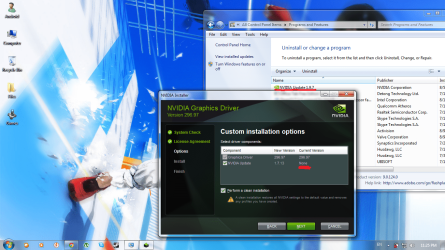
Trying to install new NVIDIA driver. The thing is, when driver tries to install NVIDIA update, it fails. It says that no update is installed at the moment, but the driver update remains in my laptop. I couldn't remove it from Programs And Features. Clicking on it to delete it, but nothing happens.

Tried to delete it in a safe mode, also used ''NVIDIA clean installation'' option, which removes previous NVIDIA features. Fail again, removed the driver and PhysX, but not the update. It's just stuck there.

How can I fix this?
 

My Computer

OS
Windows 7 Ultimate x64
If I understand you correctly and I'm not sure I do.
Go to Windows Explorer and then Downloads. Find it there and right click and remove it. Then empty the Recycle Bin.
 

My Computer

Computer type
PC/Desktop
Computer Manufacturer/Model Number
Home made Desktop
OS
Windows 10 Pro. 64/ version 1709 Windows 7 Pro/64
CPU
Intel i7-6800K @ 4.3
Motherboard
ASUS X-99 Deluxe II
Memory
Corsair Platinum 16 gig @2400
Graphics Card(s)
EVGA GTX 1070 OC
Monitor(s) Displays
Asus 27" LED LCD/VE278Q
Screen Resolution
1920-1080 or 1280-720 HDMI
Hard Drives
INTEL SSD 730-240 Gb Sata 3.0/
PSU
EVGA Platium 1200W
Case
Phanteks Luxe Tempered Glass 8 fans/ one radiator
Cooling
XSPC/ Water Cooled CPU
Keyboard
Das 4 Professional
Mouse
Logitech M705/MX Anywhere 2-S
Internet Speed
100 mbits
Antivirus
Microsoft Security Essentials/ Malwarebytes Premium 3.0/ SAS
Browser
I.E. 11 default/Firefox/ ISP Time Warner Cable/Spectrum
Other Info
LG BluRay Burner/
Sound system-KLipsch-THX/
Icy Dock ssd Hot Swap bays.

My Computer

Computer Manufacturer/Model Number
HP Pavilion Phoenix H9-1060sc
OS
Windows 8 Pro 64-Bit
CPU
Intel Core i7 (2nd Gen) 2600 / 3.4 GHz
Motherboard
IPISB-CH2 (Chicago)
Memory
16 GB
Graphics Card(s)
Nvidia GeForce GTX 580
Sound Card
Integrated IDT 92HD89E Audio
Monitor(s) Displays
Samsung 23" SyncMaster SA750D
Screen Resolution
1920 x 1080
Hard Drives
120 GB Solid State & 2 TB 7200 RPM 3.0 Gb/sec
PSU
Internal 600 Watt (100V-240V)
Case
HP Tower: Height: 41.3 cm Width: 17.3 cm
Keyboard
HP Wireless, Shipped with Computer
Mouse
Came with Keyboard as bundle
Internet Speed
Never Enough aka 8 mb/s
Tried rolling driver back as well, didn't help. Okay, I'll just upload a picture...

See? just stuck there, can't delete it. As I said, even a "clean installation" doesn't help...
 

Attachments

  • Untitled.png
    Untitled.png
    315.6 KB · Views: 115

My Computer

OS
Windows 7 Ultimate x64
First it's time to fill out your system specs completely. ((My System Specs))
If I got what you are trying to do is un-install Nvidia driver 296.97 and replace it with the same driver, 296.97 is that correct? When you tick (Next) what happens?
 

My Computer

Computer type
PC/Desktop
Computer Manufacturer/Model Number
Home made Desktop
OS
Windows 10 Pro. 64/ version 1709 Windows 7 Pro/64
CPU
Intel i7-6800K @ 4.3
Motherboard
ASUS X-99 Deluxe II
Memory
Corsair Platinum 16 gig @2400
Graphics Card(s)
EVGA GTX 1070 OC
Monitor(s) Displays
Asus 27" LED LCD/VE278Q
Screen Resolution
1920-1080 or 1280-720 HDMI
Hard Drives
INTEL SSD 730-240 Gb Sata 3.0/
PSU
EVGA Platium 1200W
Case
Phanteks Luxe Tempered Glass 8 fans/ one radiator
Cooling
XSPC/ Water Cooled CPU
Keyboard
Das 4 Professional
Mouse
Logitech M705/MX Anywhere 2-S
Internet Speed
100 mbits
Antivirus
Microsoft Security Essentials/ Malwarebytes Premium 3.0/ SAS
Browser
I.E. 11 default/Firefox/ ISP Time Warner Cable/Spectrum
Other Info
LG BluRay Burner/
Sound system-KLipsch-THX/
Icy Dock ssd Hot Swap bays.
I think I've said enough. I'm not trying to replace the driver with the same one. Here I go for one more time: I had other version of NVIDIA driver and tried to replace it with 296.97. It INSTALLED the driver and PhysX, but couldn't replace NVIDIA update 1.9.7 with 1.7.13 one. Update version 1.9.7 is just stuck there, when I'm trying to delete it nothing happens, and driver says that I have none istalled. But, when I tick next, it installs everything except NVIDIA update, and at the end says that driver failed at complete installation.
 

My Computer

OS
Windows 7 Ultimate x64
You could try to uninstall the other nvidia products again, then try to manually delete the nvidia update folder from the program files folders. Also remove any nvidia files from programdata folder and appdata folders in your user account. Also manually removing the entries in the registry and using a tool like ccleaner. Then install the nvidia products again.
I would recommend backing up your system before you make the changes though. Preferably making an image of your c: drive.
 

My Computer

Computer type
PC/Desktop
Computer Manufacturer/Model Number
Custom Build
OS
Win 7 Ultimate, Win 8.1 Pro, Linux Mint 19 Cinnamon (All 64-Bit)
CPU
Intel i5 4690K
Motherboard
Gigabyte Z97X-UD3H
Memory
Corsair Vengeance LP 32GB DDR3
Graphics Card(s)
MSI GTX 1060 GAMING X 6GB
Sound Card
Onboard
Hard Drives
Samsung 850 EVO 250GB SSD (x2)
Samsung 860 EVO 1TB SSD (x2)
Crucial MX300 525GB SSD
WD Blue 2TB 5400rpm Intellipark Disabled (x2)
PSU
Corsair HX750i
Case
Phanteks Enthoo Pro
Cooling
CM Hyper 212 EVO on CPU, Noctua Redux NF-P14S 1500rpm (x6)
Keyboard
Corsair K70 RGB LUX
Mouse
Corsair Sabre RGB
Antivirus
Avast Free, MalwareBytes, SAS & CryptoPrevent
Browser
Chrome
Other Info
StarTech PEXESAT322I 2 Port PCI-E SATA Card
ASUS PCE-AC56 Dual-band AC1300 Wireless Card
Akasa FC.Six Manual Fan Controller
And a Partridge in a Pear Tree!
Try the "Revo uninstaller". It works wonders sometimes.
 

My Computer

Computer Manufacturer/Model Number
eMachines ET1831-7
OS
Windows 7 Ultimate
CPU
Pentium Dual-Core CPU E5400 @ 2.70GHz
Motherboard
EMCP73VT-PM
Memory
4096M
Graphics Card(s)
nVidia 8400GS
Sound Card
built-in Realtek
Monitor(s) Displays
Acer 20"
Screen Resolution
1680x1050
Hard Drives
Seagate ST3750528AS ATA 500G
Other Info
Dual-boot with Linux.
I agree revo uninstaller is a great tool. I think you have to buy the pro version for 64bit support though.
 

My Computer

Computer type
PC/Desktop
Computer Manufacturer/Model Number
Custom Build
OS
Win 7 Ultimate, Win 8.1 Pro, Linux Mint 19 Cinnamon (All 64-Bit)
CPU
Intel i5 4690K
Motherboard
Gigabyte Z97X-UD3H
Memory
Corsair Vengeance LP 32GB DDR3
Graphics Card(s)
MSI GTX 1060 GAMING X 6GB
Sound Card
Onboard
Hard Drives
Samsung 850 EVO 250GB SSD (x2)
Samsung 860 EVO 1TB SSD (x2)
Crucial MX300 525GB SSD
WD Blue 2TB 5400rpm Intellipark Disabled (x2)
PSU
Corsair HX750i
Case
Phanteks Enthoo Pro
Cooling
CM Hyper 212 EVO on CPU, Noctua Redux NF-P14S 1500rpm (x6)
Keyboard
Corsair K70 RGB LUX
Mouse
Corsair Sabre RGB
Antivirus
Avast Free, MalwareBytes, SAS & CryptoPrevent
Browser
Chrome
Other Info
StarTech PEXESAT322I 2 Port PCI-E SATA Card
ASUS PCE-AC56 Dual-band AC1300 Wireless Card
Akasa FC.Six Manual Fan Controller
And a Partridge in a Pear Tree!
Downloaded Revo Unistaller trial, it indeed helped. I'm really thankful for your help guys. I'll mark this as solved. Thank you once again!
 

My Computer

OS
Windows 7 Ultimate x64
Back
Top