Can't save as - program stops responding

NYaccent

New member
Local time
5:12 AM
Messages
35
I see my original thread was marked as solved.
The issue was solved for a couple of hours.
Now it seems I can save images to my external hard drive
BUT
The program stops responding
Then it responds
then it saves it
It takes 2 minutes before anything can be saved
Right now I am waiting on two things to be saved
One is graphics from my email
and the 2nd is saving a tagged tag I made in Animation Shop
It will save but it is giving me enough time now to write this message here until I can get back to my email or Animation Shop Program

What else can I check?
I think the problem lies with the external hard drive

I need more help please
Thanks, Ilene​
 
Last edited:

My Computer

OS
I am not sure
Oh dear, that is very disappointing. Can you check your drive again for errors. Tell us what it says. If you have errors again then it might be that the drive is failing.

What else do you have running on the machine?

Just in case the drive is failing, make a backup copy of your stuff to wherever you can before you do anything else.

Regards....Mike Connor
 

My Computer

OS
Several, including Windows 7 x64 Ultimate
I have been making a back up of the important things from one external hard drive to my other external hard drive BUT the back up I have been doing to the 2nd external hard drive has been failing for the past 3 days so I can't back it all up -

I will run the scan again and let you know what it says. Thanks, Ilene
 

My Computer

OS
I am not sure
OK. I was about to go to bed, but I'll wait now..............

Regards....Mike Connor
 

My Computer

OS
Several, including Windows 7 x64 Ultimate
Go to sleep as the disc check is taking a long time to run.
I will have the answer for you so you can look for it tomorrow.

What do you mean what else I have running on the computer?

I use Incredimail
I have Paint Shop Pro and Animation Shop
Skype I use once a week
IE, Google Chrome and FF
My Book external hard drive and Seagate Free Agent back up

I think that is all I have

I'll post my results once i get them Hugs Ilene
 

My Computer

OS
I am not sure
I meant hardware, what other discs etc, But it is not really important now. I will look in first thing for an update on your situation.

Regards....Mike Connor
 

My Computer

OS
Several, including Windows 7 x64 Ultimate
The only hardware i have is a printer, and two external hard drives - and sometimes I plug in Magic Jack

The disc check still has not responded
The program says running - but it isn't doing anything
Hopefully in the morning I'll have something to report.
Thanks, Ilene

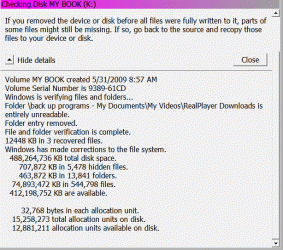
Edit: I ran the disc check in safe mode and it went faster
Hopefully I attached the report correctly.
If not i'll save it to m Fotki account and then embed the image
Thanks again, Ilene
 

Attachments

  • Animation1.gif
    Animation1.gif
    23.8 KB · Views: 10
Last edited:

My Computer

OS
I am not sure
Well, obviously you are having problems with that drive. All I can suggest right now is that you replace it.

If you run a drive that is extremely fragmented for any length of time it can cause problems like this, usually the drive becomes unserviceable. If you have unreadable sections of drive then it is obviously unreliable.

To be sure, and once you have backed up what you could. I would run the check again and see what it says. If you get more unreadable sections then the drive is definitely damaged and unreliable.

Regards....Mike Connor
 

My Computer

OS
Several, including Windows 7 x64 Ultimate
Okay thanks - I will see what I can save and back up and run the check again - and let you look at the report. Thanks Ilene
 

My Computer

OS
I am not sure
At one time we went to some lengths to try and "save" such drives, as they were very expensive. One possible way is to save what you can, and then reformat the drive. Using the Windows "Format" program, this will flag and ignore damaged sectors. However, such a drive can be very unreliable indeed, it depends on the damage. If a head has actually crashed, ( A "head crash" is when a head actually touches the surface of a disc. Normally it should never do so, but float above it ).

Formatting it may help, or it may not. If you still get read and write errors after formatting, and running a few tests, by moving a few files back and forth, then the disk is basically junk.

Regards....Mike Connor
 

My Computer

OS
Several, including Windows 7 x64 Ultimate
I am copying what I can to my other external hard drive - It has been running all night since the External "K" drive had many many many files on it. Once that is done I will reformat it like you said I should do and then see what happens when I start saving on it again. Maybe transfer some files like you said and do a check - I'll report back here what I find.

It wasn't that much money - it it is no good it's no good - I just have 5 years worth of graphics - personalized siggy tags etc on it - most can be replaced - some cannot so I am hoping I am able to save those files elsewhere. The transfer to my other external hard drive should take some time but when it is done I may need directions on how to reformat the other one. Thanks for your help. Hugs Ilene
 

My Computer

OS
I am not sure
I am copying what I can to my other external hard drive - It has been running all night since the External "K" drive had many many many files on it. Once that is done I will reformat it like you said I should do and then see what happens when I start saving on it again. Maybe transfer some files like you said and do a check - I'll report back here what I find.

It wasn't that much money - it it is no good it's no good - I just have 5 years worth of graphics - personalized siggy tags etc on it - most can be replaced - some cannot so I am hoping I am able to save those files elsewhere. The transfer to my other external hard drive should take some time but when it is done I may need directions on how to reformat the other one. Thanks for your help. Hugs Ilene

OK Ilene, get back to us when you are ready.

There are also a few technical tricks to recover data even from damaged drives, and if you have lost something important we can try to get it back using some of them. This is a little involved but not really difficult.

!!!! Don' t use the drive at all if you want to try and recover data from it. !!!!

After we have recovered what we can, then reformatting MIGHT!!! get it working again, but it might not. All depends on what the problem is. Nowadays it is usually better to get a new drive rather than try to repair a faulty one.

Regards....Mike Connor
 

My Computer

OS
Several, including Windows 7 x64 Ultimate
Before I do anything - I will see what was backed up by my other external hard drive. If I was able to save my personal pictures and personalized tags I would be very happy. If I couldn't, then those would be the 2 folders that I'd need to try to recover. I won't use the drive at all or do anything to it until I report back here to let you know that I was able to save the important items or not. Thanks again, Ilene
 

My Computer

OS
I am not sure
Before I do anything - I will see what was backed up by my other external hard drive. If I was able to save my personal pictures and personalized tags I would be very happy. If I couldn't, then those would be the 2 folders that I'd need to try to recover. I won't use the drive at all or do anything to it until I report back here to let you know that I was able to save the important items or not. Thanks again, Ilene


OK. If you are happy with what you have recovered then fine. Otherwise I will try to walk you through some special recovery techniques.

Regards....Mike Connor
 

My Computer

OS
Several, including Windows 7 x64 Ultimate
Thanks - I'll be back once the back up is done. It may take a while yet.
 

My Computer

OS
I am not sure
OK Ilene,

I considered various methods you could try, but many are quite complex, and so I chose a fairly simple but very powerful one. It has the major advantage that it runs entirely in memory ( RAM Random Access Memory ) and does not write to the drive being recovered, which would overwrite data you are trying to recover!

First, you need to download this program;

Download DiskDigger | DiskDigger

It is free for personal use.

It does not need to be installed, just extract the files to a directory of your choice on your system or other drive but NOT to the drive you are trying to recover!

Once you have extracted the files, run the DiskDigger.exe, and you will get a screen like this;


Choose your language in the title bar, and then look at the drives listed.

Choose the drive you want to recover files from and then click "next";


Now use the "Dig Deep" (scan file system for deleted files), and click on the box which shows NTFS Partition ( and possibly a label from your drive).

Click "Next"

(Just for info; The other option, "Dig Deeper", will be no use to you as it will only recover fragments that you wont be able to do anything with, especially on heavily fragmented files).

The program will scan the drive and list the results in a screen like this;


Choose the files you want to recover and then click "next"
 

My Computer

OS
Several, including Windows 7 x64 Ultimate
You will get this box;


Save the files to the folder of your choice. That was it! Depending on the state of the files on the disc, and how well the program worked, you should now have recovered most of your files.

There are many more techniques and methods for recovering data, but if this one doesn't work for you, most of the others wont either, and most are considerably more complex.

If you have not recovered what you wanted by now, then forget it and just discard the damaged disc.

As I already wrote, you CAN try to reformat it and see if it works, but that is likely to prove very unreliable.

Regards....Mike Connor
 

My Computer

OS
Several, including Windows 7 x64 Ultimate
Thanks - the files are still backing up so I don't know yet what was salvaged. Hugs Ilene
 

My Computer

OS
I am not sure
OK. Let me know how you get on.

Regards....Mike Connor
 

My Computer

OS
Several, including Windows 7 x64 Ultimate
Touching Base - the files are still backing up LOL there are hundreds of thousands of them.
 

My Computer

OS
I am not sure
Back
Top