Cant Save-As to Second Harddrive

Double D

New member
Local time
9:09 AM
Messages
3
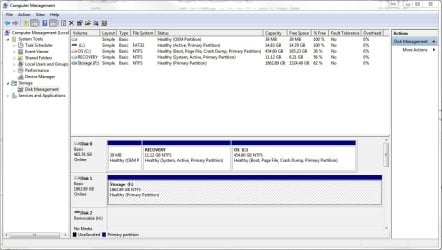
I recently added a 2 TB drive as a secondary media storage drive. I am able to move, copy and delete files too and from it, but the problem is when I open a file from that drive into a program, edit it, and try to save back over it OR try to do a save as; I get a "Disk Full" error. The disk is setup as NTFS and has 82% free space.

Here is a picture of the Disk Management Page and one of the Disk Full errors.

Thanks for any ideas...
 

Attachments
  • Drive Details.JPG
    Drive Details.JPG
    110.8 KB · Views: 5
  • Disk Full Error.JPG
    Disk Full Error.JPG
    14.1 KB · Views: 16

My Computer My Computer

Computer type
PC/Desktop
Computer Manufacturer/Model Number
Dell
OS
Windows 7 64 Bit
CPU
Intel Core2 Quad
Memory
4 Gig
Hard Drives
C: 450 Gig
F: 2 Terabyte
Antivirus
Microsoft Security Essentials
Browser
Chrome
Peculiar.

A couple of questions:

If you look at the drive in Windows Explorer with all hidden files shown, does it make sense to you that the files you see add up to only about 340 GB? No surprises seen in Explorer?

How long has this been going on---when was everything last OK?

There are programs like WinDirStat that will give you a graphic representation of everything on the drive by file type, folder, etc.

Are you using this drive for any type of formal backup through imaging or Windows Backup and Restore? What is supposed to be on it?

Have you considered running the drive manufacturer's diagnostic tools on the drive? Or chkdsk?
 

My Computer My Computer

Computer type
PC/Desktop
Computer Manufacturer/Model Number
Ignatz Special; 4 speed manual gearbox; factory air conditioning; one of one
OS
Windows 7 Home Premium SP1, 64-bit
CPU
Intel Skylake i5-6600K, not overclocked
Motherboard
AsRock Z170M Extreme 4, micro ATX
Memory
8 GB HyperX DDR4-2666 (2 x 4 GB)
Graphics Card(s)
none; graphics are integrated on CPU
Sound Card
onboard: Realtek ALC1150; external: USB Behringer UF0-202
Monitor(s) Displays
Dell S2340M 23 inch IPS
Screen Resolution
1600 x 900
Hard Drives
System: Crucial MX100 series SSD, 128 GB;
Data: Samsung Spinpoint 103SJ, 1 TB;
Backup: WD Caviar Green WD30EZRX-00D8PB0, 3 TB
PSU
Rosewill SilentNight 500 watt fanless, semi-modular
Case
Antec Solo II
Cooling
Noctua NH-U12S; Noctua F12 intake, Noctua S12A exhaust
Keyboard
Microsoft 200 6JH-00001 USB
Mouse
Dell or Microsoft optical wired; USB
Antivirus
Microsoft Security Essentials and Malwarebytes Premium
Browser
Pale Moon
Other Info
All fans PWM; speeds at idle: CPU circa 500 rpm; intake circa 600 rpm; exhaust circa 600 rpm; CPU temps 27 idle and 47 C load in a warm room (27 C/81 F) when running Intel Extreme Tuning Utility stress test.
I viewed ALL the files in Win Explorer and the files/folders shown make sense and add up to 340 gig.

To my knowledge, its been going on since it was installed. About 6 months ago. Most of the time I am just dumping large pictures and videos but when I do edit, I have to save to the C-Drive and move back.

Not familiar with WinDirStat. I tried running it. Is this something I need to download?

I am only using it as a second storage location for large files, pictures, videos and music. I use carbonite to back up BOTH my drives.

Thanks!!


Peculiar.

A couple of questions:

If you look at the drive in Windows Explorer with all hidden files shown, does it make sense to you that the files you see add up to only about 340 GB? No surprises seen in Explorer?

How long has this been going on---when was everything last OK?

There are programs like WinDirStat that will give you a graphic representation of everything on the drive by file type, folder, etc.

Are you using this drive for any type of formal backup through imaging or Windows Backup and Restore? What is supposed to be on it?

Have you considered running the drive manufacturer's diagnostic tools on the drive? Or chkdsk?
 

My Computer My Computer

Computer type
PC/Desktop
Computer Manufacturer/Model Number
Dell
OS
Windows 7 64 Bit
CPU
Intel Core2 Quad
Memory
4 Gig
Hard Drives
C: 450 Gig
F: 2 Terabyte
Antivirus
Microsoft Security Essentials
Browser
Chrome
I would say, try to backup or move the files to another local and rewrite the HD that is effected. It could be a problem with that HD's file system. Just a thought.
 

My Computer My Computer

OS
windows 7 professional x32
In Windows Explorer right-cllck the HDD letter and click Properties, Quota tab and assure nothing is checked in the Settings.
 

My Computer My Computer

Computer type
PC/Desktop
Computer Manufacturer/Model Number
Customs, Dell, Gateway, HP, Toshiba, Acer, ASUS
OS
Windows 7 Ultimate 64-bit, Windows 8.1 64-bit, Mac OS X 10.10, Linux Mint 17, Windows 10 Pro TP
Keyboard
Microsoft
Mouse
Microsoft
In Windows Explorer right-cllck the HDD letter and click Properties, Quota tab and assure nothing is checked in the Settings.

Nothing is checked under quota. :(
 

My Computer My Computer

Computer type
PC/Desktop
Computer Manufacturer/Model Number
Dell
OS
Windows 7 64 Bit
CPU
Intel Core2 Quad
Memory
4 Gig
Hard Drives
C: 450 Gig
F: 2 Terabyte
Antivirus
Microsoft Security Essentials
Browser
Chrome
TreeSize Free - Quickly Scan Directory Sizes and Find Space Hogs

Above link is to the free version of Treesize, a program that analyzes space used on a hard drive. Similar to Windirstat, but maybe more intuitive.

I'd run that and then maybe run chkdsk and at least download the drive manufacturer's diagnostic tools.
 

My Computer My Computer

Computer type
PC/Desktop
Computer Manufacturer/Model Number
Ignatz Special; 4 speed manual gearbox; factory air conditioning; one of one
OS
Windows 7 Home Premium SP1, 64-bit
CPU
Intel Skylake i5-6600K, not overclocked
Motherboard
AsRock Z170M Extreme 4, micro ATX
Memory
8 GB HyperX DDR4-2666 (2 x 4 GB)
Graphics Card(s)
none; graphics are integrated on CPU
Sound Card
onboard: Realtek ALC1150; external: USB Behringer UF0-202
Monitor(s) Displays
Dell S2340M 23 inch IPS
Screen Resolution
1600 x 900
Hard Drives
System: Crucial MX100 series SSD, 128 GB;
Data: Samsung Spinpoint 103SJ, 1 TB;
Backup: WD Caviar Green WD30EZRX-00D8PB0, 3 TB
PSU
Rosewill SilentNight 500 watt fanless, semi-modular
Case
Antec Solo II
Cooling
Noctua NH-U12S; Noctua F12 intake, Noctua S12A exhaust
Keyboard
Microsoft 200 6JH-00001 USB
Mouse
Dell or Microsoft optical wired; USB
Antivirus
Microsoft Security Essentials and Malwarebytes Premium
Browser
Pale Moon
Other Info
All fans PWM; speeds at idle: CPU circa 500 rpm; intake circa 600 rpm; exhaust circa 600 rpm; CPU temps 27 idle and 47 C load in a warm room (27 C/81 F) when running Intel Extreme Tuning Utility stress test.
Back
Top