Solved Can't save file in desktop folder

wislndixie

New member
Local time
11:03 PM
Messages
5
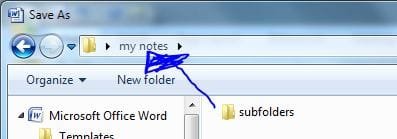
I have a folder on my desktop "my notes", it has several subfolders. When I have a file I want to save, I click on "save file as" name my file and then click on the "my notes" folder which opens up with my subfolders listed. My problem is, when I open the "my notes" folder, windows 7 defaults to the first subfolder listed. I want to save my file in the main folder of "my notes" not any of the subfolders. Can someone tell me how to save the file in the main folder of "my notes" not the subfolder?
Thanks,
Wisln
 

My Computer

OS
Windows 7 Home Premium
Hello and welcome to SevenForums

SA.JPG

Does it look like that, If so Just Lick save,

If not and your in the Subfolder click on the text where it has "My Notes!"
SA2.JPG
 

My Computer

Computer Manufacturer/Model Number
Home Build.
OS
Windows 7 Home Pre
CPU
Q8200 Intell 2.333
Motherboard
Asus P5Q3 Delux
Memory
DDR3 1333 4gig
Graphics Card(s)
Ati HD4870
Sound Card
Onboard Soundmax. 7.1
Monitor(s) Displays
1, 20" Samsung
Screen Resolution
1600/900
PSU
Good enough
Case
Le Shark
Cooling
FAN FAN FAN FAN, Thermaltake Minitype 90 with speed fan 4.
Keyboard
Standard, Gaming Wolfking
Mouse
Cm-storm-inferno-wired-gaming-mouse
Internet Speed
Sky Crappy upto 20meg I get a whapping 5.8mbs.
Hey Mr. Demon, thanks for the quick reply. I narrowed it down somewhat. This only happens when I''m trying to save a pdf file. If I save an word or xcel file then when I open "save as" I see the first picture you showed and it's easy to save in the "my notes" folder. However, if its a pdf file, when I click "save as" it opens a window that doesn't have all my folders in the left pane, but a window that has "recent place" "desktop" etc. When I click desktop which is where "my notes" folder is stored, it opens the main folder with all the subs listed and defaulted to the first folder.
Wisln
 

My Computer

OS
Windows 7 Home Premium
Got it, you second pic did it. When I click on the text it brings up a drop down menu that I select "my notes" again and it saves the file. Thanks
 

My Computer

OS
Windows 7 Home Premium
Your very welcome, Have some REP for saything thanks.
 

My Computer

Computer Manufacturer/Model Number
Home Build.
OS
Windows 7 Home Pre
CPU
Q8200 Intell 2.333
Motherboard
Asus P5Q3 Delux
Memory
DDR3 1333 4gig
Graphics Card(s)
Ati HD4870
Sound Card
Onboard Soundmax. 7.1
Monitor(s) Displays
1, 20" Samsung
Screen Resolution
1600/900
PSU
Good enough
Case
Le Shark
Cooling
FAN FAN FAN FAN, Thermaltake Minitype 90 with speed fan 4.
Keyboard
Standard, Gaming Wolfking
Mouse
Cm-storm-inferno-wired-gaming-mouse
Internet Speed
Sky Crappy upto 20meg I get a whapping 5.8mbs.
In the little Text box your writing this in there is a Paperclip, this will open another window for you too upload.SA3.JPG
 

My Computer

Computer Manufacturer/Model Number
Home Build.
OS
Windows 7 Home Pre
CPU
Q8200 Intell 2.333
Motherboard
Asus P5Q3 Delux
Memory
DDR3 1333 4gig
Graphics Card(s)
Ati HD4870
Sound Card
Onboard Soundmax. 7.1
Monitor(s) Displays
1, 20" Samsung
Screen Resolution
1600/900
PSU
Good enough
Case
Le Shark
Cooling
FAN FAN FAN FAN, Thermaltake Minitype 90 with speed fan 4.
Keyboard
Standard, Gaming Wolfking
Mouse
Cm-storm-inferno-wired-gaming-mouse
Internet Speed
Sky Crappy upto 20meg I get a whapping 5.8mbs.
Back
Top