
Can't Save or Export msinfo32

Bithawk

New member
Local time
12:53 AM
Messages
5
I can run msinfo32 OK but when I try to save or export, it hangs at a page that says "refreshing system info...printing". I let it run over an hour before I stopped it. I have saved msinfo32 in the past about 3 months ago with no problems. I have attached a snapshot of the hung spot. I need to create this file to help with solving a problem with Nero. I use AVG and have run it several times with no threats found. Other than the Nero installs the only other changes that I have made are Microsoft Security updates and Java 7-11 update.
 

Attachments
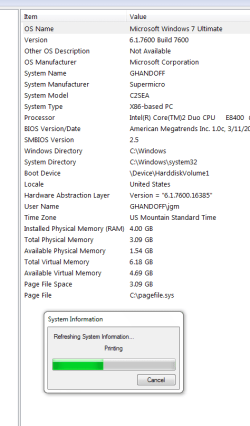
  • msinfo32 save hungup.PNG
    msinfo32 save hungup.PNG
    14.8 KB · Views: 13

My Computer

Computer Manufacturer/Model Number
Clone
OS
windows 7,32bit
CPU
Intel P4
Motherboard
Supermicro/C2SEA
Memory
4GB
Graphics Card(s)
EVGA 9400GT
Sound Card
Asus Essex
Monitor(s) Displays
Samsung SuncMaster SA350
Hard Drives
2 - WD 1GB Sata
PSU
Antec 400w
Case
In-Win
Cooling
Intel
Anything strange in Start / Devices and Printers?
 

My Computer

Computer type
PC/Desktop
Computer Manufacturer/Model Number
Lenovo IdeaCenter 450
OS
Windows 10 Pro X64
CPU
Intel Quad Core i7-4770 @ 3.4Ghz
Memory
16.0GB PC3-12800 DDR3 SDRAM 1600 MHz
Graphics Card(s)
Intel Integrated HD Graphics
Sound Card
Realtek HD Audio
Monitor(s) Displays
HP 22" LCD
Screen Resolution
1680 x 1050
Hard Drives
250GB Samsung EVO SATA-3 SSD
2TB Seagate ST2000DM001 SATA-2
1.5TB Seagate ST3150041AS SATA
Keyboard
Dell USB
Mouse
Lenovo USB
Internet Speed
Cable via Road Runner 3MB Upload, 30MB Download
Antivirus
Windows Defender, MBAM Pro, MBAE
Browser
Seamonkey
Other Info
UEFI/GPT
PLDS DVD-RW DH16AERSH
No devices or printers

Hi Ztruker, strange indeed. It opens a search window for "Control Panel > All control Panel items > Devices and Printers" and just searches forever not finding anything apparently. I tried devices and printers from the control panel with the same results. I don't have a printer connected to this PC but I do use a shared printer on another PC on the network, so there is a printer driver installed and I usually can see the printer. Could this be some type of network problem? I don't understand what changed. Any ideas?
 

My Computer

Computer Manufacturer/Model Number
Clone
OS
windows 7,32bit
CPU
Intel P4
Motherboard
Supermicro/C2SEA
Memory
4GB
Graphics Card(s)
EVGA 9400GT
Sound Card
Asus Essex
Monitor(s) Displays
Samsung SuncMaster SA350
Hard Drives
2 - WD 1GB Sata
PSU
Antec 400w
Case
In-Win
Cooling
Intel
Found the fix on hardware forum. Changed Blutooth services to automatic(was manual) and now devices & printers runs OK and I am able to save & export my msinfo32 data to file. It's all good here!!:)
 

My Computer

Computer Manufacturer/Model Number
Clone
OS
windows 7,32bit
CPU
Intel P4
Motherboard
Supermicro/C2SEA
Memory
4GB
Graphics Card(s)
EVGA 9400GT
Sound Card
Asus Essex
Monitor(s) Displays
Samsung SuncMaster SA350
Hard Drives
2 - WD 1GB Sata
PSU
Antec 400w
Case
In-Win
Cooling
Intel
Great, glad you figured that one out, and thanks for letting me know.
 

My Computer

Computer type
PC/Desktop
Computer Manufacturer/Model Number
Lenovo IdeaCenter 450
OS
Windows 10 Pro X64
CPU
Intel Quad Core i7-4770 @ 3.4Ghz
Memory
16.0GB PC3-12800 DDR3 SDRAM 1600 MHz
Graphics Card(s)
Intel Integrated HD Graphics
Sound Card
Realtek HD Audio
Monitor(s) Displays
HP 22" LCD
Screen Resolution
1680 x 1050
Hard Drives
250GB Samsung EVO SATA-3 SSD
2TB Seagate ST2000DM001 SATA-2
1.5TB Seagate ST3150041AS SATA
Keyboard
Dell USB
Mouse
Lenovo USB
Internet Speed
Cable via Road Runner 3MB Upload, 30MB Download
Antivirus
Windows Defender, MBAM Pro, MBAE
Browser
Seamonkey
Other Info
UEFI/GPT
PLDS DVD-RW DH16AERSH
Hello, I have the same problem, however I am not stuck at "Printing information" :

File.jpg


I find nothing unusual at Devices and Printers.
Please help.
 

My Computer

Computer type
PC/Desktop
OS
Windows 7 Ultimate 32bit
CPU
Intel E5200 Dual-Core 2.5 Ghz
Motherboard
Intel Express Chipset G31
Graphics Card(s)
Nvidia GeForce 9500 GT DDR2 512mb vRAM
Antivirus
ESET NOD32 Antivirus 5.0.95
Browser
Google Chrome
If you can't print it, I would make a snip.
 

My Computer

Computer Manufacturer/Model Number
HP, Dell, Gateway, Toshiba - 4 laptops and 2 desktops
OS
Vista, Windows7, Mint Mate, Zorin, Windows 8
CPU
from 1.6GHz Duo to i7
Monitor(s) Displays
2x HP w2207
Hard Drives
5x HDD, 7x SSD, 12x Externals
Keyboard
with trackball - no mices
Mouse
Trackball mice
Internet Speed
DSL 6000
Already fixed it - just had to restard the PC and it runned flawlessly.
 

My Computer

Computer type
PC/Desktop
OS
Windows 7 Ultimate 32bit
CPU
Intel E5200 Dual-Core 2.5 Ghz
Motherboard
Intel Express Chipset G31
Graphics Card(s)
Nvidia GeForce 9500 GT DDR2 512mb vRAM
Antivirus
ESET NOD32 Antivirus 5.0.95
Browser
Google Chrome
Back
Top