Can't see 2nd drive

hazard0us

New member
Local time
2:10 AM
Messages
7
Location
Austin, Texas USA
I had Windows 7 RC temporarily installed on a 120GB Ultra ATA drive while I was waiting for my warranty replacement Raptor to come back. Works fine... albeit a bit slow of course. My data drive is a 750GB SATA drive.

So my Raptor replacement drive came back from Western Digital (5-year warranty... nice). I installed the same Windows 7 RC on it, and it won't recognize my 750GB drive!

I put the 120GB drive back in the driver's seat. It can see the 750GB drive and all its contents again just fine... so the data isn't gone.

Anyone got any ideas how to make the 750GB drive visible to the new 74GB Raptor?
 

My Computer

Computer Manufacturer/Model Number
Hazard0us Home-Built XXX-2
OS
Windows 7 RC
CPU
E2160
Motherboard
Gigabyte P35
Memory
2GB Patriot
Graphics Card(s)
GeForce 8800GTS 256MB
Sound Card
onboard HD Audio, M-Audio Delta Audiophile 2496
Monitor(s) Displays
Dell E248WFP
Hard Drives
WDC WD1200BB-00CAA1 (120GB)
Seagate ST3750640AS (750GB)
WDC WD740ADFS-00SLR5 (74GB Raptor)
PSU
OCZ 640W
Case
Lian-Li
Cooling
Intel stock
Do the jumper settings match on the drives? If the existing drives are CS, is the Raptor CS? Or, are the existing drives Master/Slave, and if so, is the Raptor Master?

Never mind. Moments - We all have 'em.
 
Sorry, I should have mentioned... when I'm experiencing the problem, the 120GB ATA drive is removed, and I only have SATA drives in there. (plus a DVDRW on IDE)

So none of the drives are set to cable select. CS shouldn't be an issue now, right?
 

My Computer

Computer Manufacturer/Model Number
Hazard0us Home-Built XXX-2
OS
Windows 7 RC
CPU
E2160
Motherboard
Gigabyte P35
Memory
2GB Patriot
Graphics Card(s)
GeForce 8800GTS 256MB
Sound Card
onboard HD Audio, M-Audio Delta Audiophile 2496
Monitor(s) Displays
Dell E248WFP
Hard Drives
WDC WD1200BB-00CAA1 (120GB)
Seagate ST3750640AS (750GB)
WDC WD740ADFS-00SLR5 (74GB Raptor)
PSU
OCZ 640W
Case
Lian-Li
Cooling
Intel stock
That was my stupid attack. SATA does not have CS/Master/Slave.

Thinking...
 
You could clarify one thing.

Drives do not see each other. The BIOS sees a drive and Windows sees a drive. Can you describe where you are when you can't see the 750?
 
Windows 7. In the BIOS the drive is as visible as it always was.
 

My Computer

Computer Manufacturer/Model Number
Hazard0us Home-Built XXX-2
OS
Windows 7 RC
CPU
E2160
Motherboard
Gigabyte P35
Memory
2GB Patriot
Graphics Card(s)
GeForce 8800GTS 256MB
Sound Card
onboard HD Audio, M-Audio Delta Audiophile 2496
Monitor(s) Displays
Dell E248WFP
Hard Drives
WDC WD1200BB-00CAA1 (120GB)
Seagate ST3750640AS (750GB)
WDC WD740ADFS-00SLR5 (74GB Raptor)
PSU
OCZ 640W
Case
Lian-Li
Cooling
Intel stock
Start
Search
diskmgmt.msc

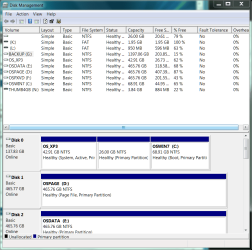
Is it in the top pane? Without a drive letter?

.
 

Attachments

  • Capture.PNG
    Capture.PNG
    37.1 KB · Views: 73
I figured it out.

I looked in the Disk Management program, same thing you just suggested.

The missing drive was not in the top pane, but was listed there in the bottom pane as a "Foreign" drive - this was true earlier and I probably should have mentioned it.

I right-clicked on it and there is an option called Import Foreign Drive. Ha! All is well now, I can see the files.

Must be something to do with SSID's, GUID's or what-not...
 

My Computer

Computer Manufacturer/Model Number
Hazard0us Home-Built XXX-2
OS
Windows 7 RC
CPU
E2160
Motherboard
Gigabyte P35
Memory
2GB Patriot
Graphics Card(s)
GeForce 8800GTS 256MB
Sound Card
onboard HD Audio, M-Audio Delta Audiophile 2496
Monitor(s) Displays
Dell E248WFP
Hard Drives
WDC WD1200BB-00CAA1 (120GB)
Seagate ST3750640AS (750GB)
WDC WD740ADFS-00SLR5 (74GB Raptor)
PSU
OCZ 640W
Case
Lian-Li
Cooling
Intel stock
Back
Top