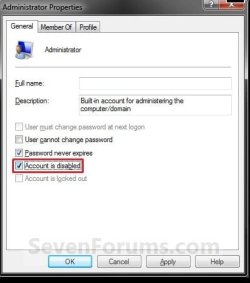
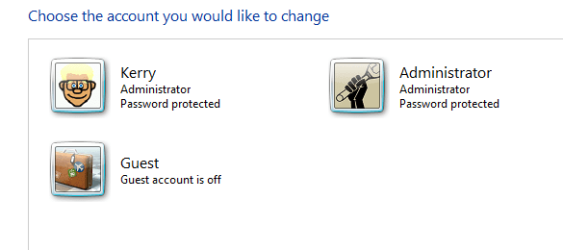
I'm trying to help Glennc with his user acounts and wanted to replicate his problem. This meant enabling the Default Admin user account.I have never had occasion to use this before but ran cmd as administrator and typed "net user administrator /active:yes"
The process finished OK and I rebooted but no Admin account. I have just one account with my name (John). No password so normally boot straight in with no login. Can't get Admin to show.
Must have done something wrong but for the life of me i can't see where>
Any help please!
The process finished OK and I rebooted but no Admin account. I have just one account with my name (John). No password so normally boot straight in with no login. Can't get Admin to show.
Must have done something wrong but for the life of me i can't see where>
Any help please!
My Computer
- Computer type
- PC/Desktop
- OS
- Microsoft Windows 7 Home Premium 64-bit 7601 Multiprocessor Free Service Pack 1
- CPU
- Intel(R) Core(TM) i7-3770 CPU @ 3.40GHz
- Motherboard
- ASUSTeK COMPUTER INC. P8H77-M
- Memory
- 8.00 GB
- Graphics Card(s)
- Intel(R) HD Graphics 4000
- Sound Card
- On Board
- Monitor(s) Displays
- Dell 24"
- Screen Resolution
- 1920 x 1080
- Hard Drives
- (1) INTEL SSDSC2CT180A3 ATA Device (2) ST500DM002-1BD142 ATA Device (3) WDC WD3200AAKS-75L9A0 ATA Device (4) Generic- Compact Flash USB Device (5) Generic- MS/MS-Pro USB Device (6) Generic- SD/MMC USB Device (7) Generic- SM/xD-Picture USB
- PSU
- 500w Corsair
- Case
- Cooler Master
- Cooling
- 3 Fans
- Keyboard
- Logitech MK300
- Mouse
- Logitech WOM
- Internet Speed
- 75Mb
- Antivirus
- Norton 360
- Browser
- Firefox, Opera, IE