Can't see HD

MichaelNewmann

New member
Local time
11:24 AM
Messages
10
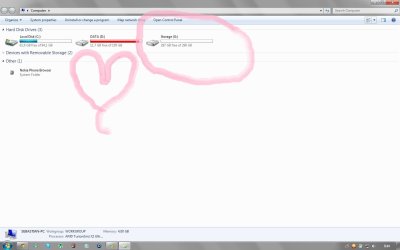
I did a fresh install of Windows 7 ultimate x64 today. Everything seems fine but looks like one partition or hard drive is missing. Where can I make the third partition or hd visible? I'll attach screenshots so you'll get a better idea what I'm talking about.
 

Attachments

  • my-computer.jpg
    my-computer.jpg
    79.7 KB · Views: 22
  • Computer-management.jpg
    Computer-management.jpg
    111.1 KB · Views: 30

My Computer

OS
Windows Ultimate x64
Thank you for your reply. I'm not so familiar with disk management. I followed the tutorial and for some reason I can't add a disk or change the letter. Check out my screenshot.

Sorry if I seem stupid but I'm very dumb when it comes to hard disks.
 

Attachments

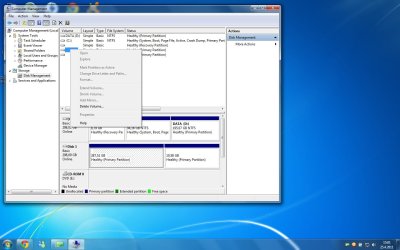
  • rightclick-computermanagement.jpg
    rightclick-computermanagement.jpg
    108.2 KB · Views: 20

My Computer

OS
Windows Ultimate x64
Try "rescan disks" from the action menu of disk management.
 

My Computer

Computer type
PC/Desktop
Computer Manufacturer/Model Number
Ignatz Special; 4 speed manual gearbox; factory air conditioning; one of one
OS
Windows 7 Home Premium SP1, 64-bit
CPU
Intel Skylake i5-6600K, not overclocked
Motherboard
AsRock Z170M Extreme 4, micro ATX
Memory
8 GB HyperX DDR4-2666 (2 x 4 GB)
Graphics Card(s)
none; graphics are integrated on CPU
Sound Card
onboard: Realtek ALC1150; external: USB Behringer UF0-202
Monitor(s) Displays
Dell S2340M 23 inch IPS
Screen Resolution
1600 x 900
Hard Drives
System: Crucial MX100 series SSD, 128 GB;
Data: Samsung Spinpoint 103SJ, 1 TB;
Backup: WD Caviar Green WD30EZRX-00D8PB0, 3 TB
PSU
Rosewill SilentNight 500 watt fanless, semi-modular
Case
Antec Solo II
Cooling
Noctua NH-U12S; Noctua F12 intake, Noctua S12A exhaust
Keyboard
Microsoft 200 6JH-00001 USB
Mouse
Dell or Microsoft optical wired; USB
Antivirus
Microsoft Security Essentials and Malwarebytes Premium
Browser
Pale Moon
Other Info
All fans PWM; speeds at idle: CPU circa 500 rpm; intake circa 600 rpm; exhaust circa 600 rpm; CPU temps 27 idle and 47 C load in a warm room (27 C/81 F) when running Intel Extreme Tuning Utility stress test.
Click on the Drive 1 area, not on the partitions on Disk 1 and select initialize disk. then you should be able to assign drive letters to those partitions.
 

My Computer

Computer Manufacturer/Model Number
Built be Me
OS
Windows 7 Pro x64
CPU
i5 760
Motherboard
Asus P7P55D-E Pro
Memory
16GB
Graphics Card(s)
Nvidia GTS450
Sound Card
On board
Monitor(s) Displays
Dell 2007WFP Dell 1800FP
Screen Resolution
1680x1050 1280x1024
Hard Drives
Seagate 250GB & 750GB
WD 1TB
PSU
Antec 750
Case
In Win
Cooling
Cooler Master Hyper 212+
Keyboard
IBM
Mouse
MS
Try "rescan disks" from the action menu of disk management.

I tried "rescan disks" with no change in the situation.

Click on the Drive 1 area, not on the partitions on Disk 1 and select initialize disk. then you should be able to assign drive letters to those partitions.

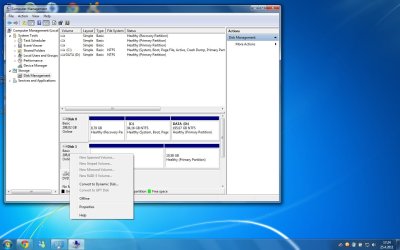
Am I missing something, I can't find initialize disk anywhere. When I right clicked disk 1, the following list is showed.
 

Attachments

  • rightclick.jpg
    rightclick.jpg
    103.4 KB · Views: 20

My Computer

OS
Windows Ultimate x64
Can't see my second hard drive

Computer see my second hard drive after I installed Windows 7 Pro 64. Device manager sees it. What's up with this? Looking at Mike's problem, I wonder where computer management is and how I might fix this situation. Help!
 

My Computer

Computer Manufacturer/Model Number
Velocity Micro Vector
OS
Windows 7 Professional 64 bit
CPU
Intel E6400
Motherboard
Unknown
Memory
4 gb
Graphics Card(s)
EVGA Nvidia 9800GT
Sound Card
SB Xtreme Gamer
Monitor(s) Displays
Acer 23"/ LG LED 23"
Hard Drives
WD 300 GB 7200 rpm SATA
Samsung Spinpoint 1 TB 7200 rpm SATA
Computer see my second hard drive after I installed Windows 7 Pro 64. Device manager sees it. What's up with this? Looking at Mike's problem, I wonder where computer management is and how I might fix this situation. Help!


Start :ar: Computer Management :ar: Disk Management
 

My Computer

Computer type
PC/Desktop
Computer Manufacturer/Model Number
Built them myself, Science Experiments !
OS
Win7 Enterprise, Win7 x86 (Ult 7600), Win7 x64 Ult 7600, TechNet RTM on AMD x64 (2.8Ghz)
CPU
AMD fx8350 4ghz, AMD-32 2400mhz, AMD-64 3200mhz, AMDx64 2.8G
Motherboard
SIS 755, ECS-K8M890M-M (Ult 7600), GigaByte & others
Memory
2gb, 4gb on the Ult 7600, 4gb on Technet RTM, 32gb on FX8350
Graphics Card(s)
Draw my own Graphics, several nVidia cards
Sound Card
on motherboard
Monitor(s) Displays
19" flat scr, 28" I-Inc widescr,22" Emprex Widescr, 23" Acer
Screen Resolution
1280 x 1024, 1440 x 900, 1920 x 1080
Hard Drives
6 pata Ide HD's & 2 Sata HD's
added 80gb external on Ult 7600 computer,
numerous extra 1tb, 2TB, 3Tb SATA HD's
A collection of ext HD Docks w/ HDs
PSU
430w, 550w, 600w, 700, 800, etc
Case
All Generic Full Towers
Cooling
Open Air & a few fans, some w/ colored LEDs
Keyboard
Compaq & Dell recycled from GoodWill
Mouse
Made in China Optical Wired Mouse
Internet Speed
Fast Cable InterNet
Antivirus
AVG Free on 24 different Desktops, NO Problems!
Browser
IE 8 is preferred, but use FireFox sometimes
Other Info
Linksys Routers, switches, & Hubs
Too Many USB Flash Drives to count, Biggest is 64GB !
Eight computers in my home network.
Sixteen computers at my business network.
Linked via TeamViewer !
Lots of old used spare computer parts everywhere!
You can easily get to Diskmgmt by Start -> Run -> DISKMGMT.MSC

Also, maximize the window to be able to see everything. Then, spread the columns in the upper part of the display, so that you see all the text and numerical values in each column. The default column widths do not show everything and posting screenshots with non-visible data is not as helpful as having everything that's there appear in the posted screenshot.

Anyway, it looks like the two partitions on your first hard drive are properly lettered, C and D.

The second drive's large 287GB primary partition is your current problem, and you want to give it a drive letter. Since you already have two CD/DVD drives and they are E and F, do you want to give this 287GB drive a letter of G? That's one way to go, of course.

Or, you can reassign drive letters for your two CD/DVD drives (making them F and G, for example) and then assigning E to the 287GB partition on the second hard drive.

Up to you. Any of this is possible, and under your complete control.

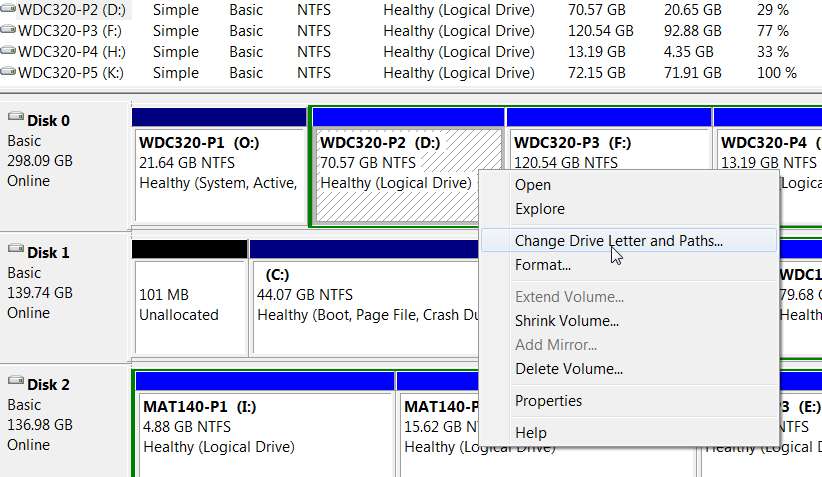
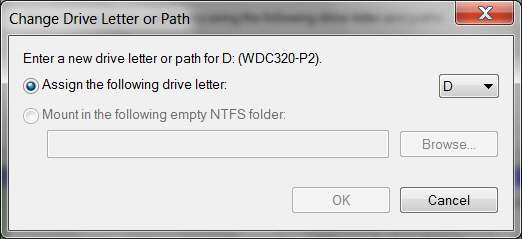
To change/assign a drive letter to a given CD/DVD drive, or to a hard drive partition, click on it. In the case of the hard drive partition, click on that partition (making it cross-hatched, thus selected). Then right-click on it to get the popup menu, and select "change drive letter and paths...".

driveletter.jpg


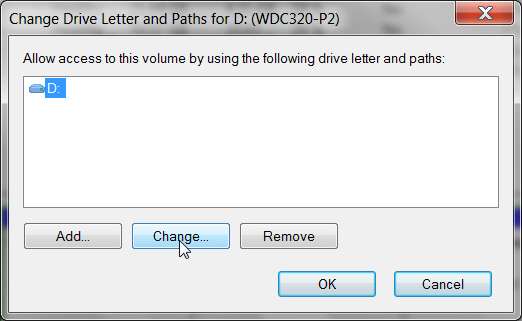
You'll then get a new window allowing you to push the "change" button to change or assign an available drive letter. If you don't like the presented default letter, just click on the down-arrow and pick another letter from what's available.

driveletter2.jpg


If you push the CHANGE button, you can then do what you want... to assign the suggested letter or pick another one.

driveletter3.jpg


Again, if you want to make this 287GB partition E, then you'll first have to reassign your two CD/DVD drives E and F... or at least just the one which is currently E, giving it another letter (say G) and then giving the new 287GB hard drive partition E.

It's all up to you. Left-click on the 287GB partition, right-click and select "change drive letter and paths..." and follow the wizard.

 

My Computer

Computer type
PC/Desktop
Computer Manufacturer/Model Number
Home-built, two systems (1) and (2)
OS
Windows 7 Pro x64 (1), Win7 Pro X64 (2)
CPU
i5-3350p 3.1Ghz/6MB-cache (1); E8400 3.0Ghz/6MB-cache (2)
Motherboard
ASUS P8Z77-V Pro (1); ASUS P5Q3 (2)
Memory
8GB PC3-12800 DDR3 (1); 4GB PC3-10600 DDR3 (2)
Graphics Card(s)
ATI HD7750 (1), (see TV cards); ATI R7 250 (2)
Sound Card
Realtek ALC892 HD Audio (1); Realtek ALC1200 HD Audio (2)
Monitor(s) Displays
Eizo HD2441W LCD, Eizo S2433W (1); Eizo 24" S2433W (2)
Screen Resolution
1920x1200, 1920x1200 (1); 1920x1200 (2)
Hard Drives
(1) 1TB SATA-II (7200RPM), 2x2TB SATA-III (7200RPM), 250GB SATA-III (10000RPM) for OS; 2x2TB external USB 3.0

(2) 320GB SATA-II (7200RPM), 750GB SATA-II (7200RPM), 150GB SATA-II (10000RPM) for OS; 2TB external USB 3.0
PSU
Nesteq ECS-6001 600W (1); Nesteq ECS-5001 500W (2)
Case
Acousti-Case 360 (1) and (2)
Cooling
Noctua NH-U12P SE2 for CPU, 2x120mm case fans (1) and (2)
Keyboard
IBM PS/2 (1) and (2)
Mouse
Logitech MX Revolution wireless (1); Microsoft wired (2)
Internet Speed
100mbps down / 10mbps up
Antivirus
Microsoft Security Essentials; Malwarebyte Anti-Malware Pro
Browser
Firefox
Other Info
Ceton InfiniTV 4-tuner cablecard-enabled TV card as well as Hauppauge HVR-2250 OTA/ATSC 2-tuner TV card in (1), running under Win7 WMC
Have you used a 3rd Party Partitioning app on the drive?
 

My Computer

OS
ME/XP/Vista/Win7
To change/assign a drive letter to a given CD/DVD drive, or to a hard drive partition, click on it. In the case of the hard drive partition, click on that partition (making it cross-hatched, thus selected). Then right-click on it to get the popup menu, and select "change drive letter and paths...".

Please explain what I am doing wrong in the video below, because "change drive letter and paths..." is still not available for the big unassigned partition. To make things more clear I right clicked on all the necessary partitions to show what is available and what is not.

ImageShack® - Online Photo and Video Hosting
 

My Computer

OS
Windows Ultimate x64
Please explain what I am doing wrong in the video below, because "change drive letter and paths..." is still not available for the big unassigned partition.
I don't know how you got that second drive to look like that. Has that drive ever been used before? Did you get it from an old system?

Since it's not accessible right now, I'm sure you wouldn't be against just starting over on the drive, right? If you could get the 300GB back, and then partition it any way you want (one or more partitions that were usable, with drive letters of your own choosing) that would be good, right?

My suggestion is that you "start over" on that drive.

Download [free] Partition Wizard Home Edition 5.2 from this page, and also download the ISO for the standalone boot CD for Partition Wizard.

The program installs and runs under WinXP and Win7, and some of its more complex functions (i.e. when involving the OS boot C partition) need to run outside of Windows itself... most conveniently when booted from the standalone boot CD.

But manipulation of the second drive can be done while using the under-Windows installed version of the program.

Install and run the program, and use it to "delete partition". As with the Win7 DISKMGMT you will be able to select a partition from the second drive, and then on the left side of the PW window you select the "delete partition". Click OK.

Do the same for the second 10GB partition on the second drive.

Or, you can simply select "DISK 2" from the PW interface, and then on the left side click on "DELETE ALL PARTITIONS".

Then click on the "APPLY" button in the lower-left of the window, and your entire second drive should now be empty and unallocated.

Now, start creating new partitions. Select the unallocated space (all 300GB) and then "create partition" on the left side, and pick your size. I would suggest "logical" partition type as opposed to "primary" partition type, for maximum future flexibility. There is no limit to size or number of logical partitions, unlike primary partitions of which there can only be a max of four on a drive. Otherwise, the difference is transparent and invisible to you.

So you can allocate one large logical partition to use all of the second drive, or you can partition it into several smaller logical partitions. Each one can then be given a letter (also using Partition Wizard).

As I said previously, if you want to change the drive letters for your CD/DVD drives you'll have to use Win7's DISKMGMT.MSC. Partition Wizard can only be used to manipulate drive letters on hard drive partitions.
 

My Computer

Computer type
PC/Desktop
Computer Manufacturer/Model Number
Home-built, two systems (1) and (2)
OS
Windows 7 Pro x64 (1), Win7 Pro X64 (2)
CPU
i5-3350p 3.1Ghz/6MB-cache (1); E8400 3.0Ghz/6MB-cache (2)
Motherboard
ASUS P8Z77-V Pro (1); ASUS P5Q3 (2)
Memory
8GB PC3-12800 DDR3 (1); 4GB PC3-10600 DDR3 (2)
Graphics Card(s)
ATI HD7750 (1), (see TV cards); ATI R7 250 (2)
Sound Card
Realtek ALC892 HD Audio (1); Realtek ALC1200 HD Audio (2)
Monitor(s) Displays
Eizo HD2441W LCD, Eizo S2433W (1); Eizo 24" S2433W (2)
Screen Resolution
1920x1200, 1920x1200 (1); 1920x1200 (2)
Hard Drives
(1) 1TB SATA-II (7200RPM), 2x2TB SATA-III (7200RPM), 250GB SATA-III (10000RPM) for OS; 2x2TB external USB 3.0

(2) 320GB SATA-II (7200RPM), 750GB SATA-II (7200RPM), 150GB SATA-II (10000RPM) for OS; 2TB external USB 3.0
PSU
Nesteq ECS-6001 600W (1); Nesteq ECS-5001 500W (2)
Case
Acousti-Case 360 (1) and (2)
Cooling
Noctua NH-U12P SE2 for CPU, 2x120mm case fans (1) and (2)
Keyboard
IBM PS/2 (1) and (2)
Mouse
Logitech MX Revolution wireless (1); Microsoft wired (2)
Internet Speed
100mbps down / 10mbps up
Antivirus
Microsoft Security Essentials; Malwarebyte Anti-Malware Pro
Browser
Firefox
Other Info
Ceton InfiniTV 4-tuner cablecard-enabled TV card as well as Hauppauge HVR-2250 OTA/ATSC 2-tuner TV card in (1), running under Win7 WMC
First of all, I have nothing against starting all over again so the more easier you make it, the better! - anyway I have to ask a few things since I'm not familiar at all with disk management or any softwares whatsoever.

Can I simply go to to Windows Disk Management and simply right click on the partitions and select delete or do I need the program you mentioned, Partition Wizard?

Because all I want is, that disk back in use and accessible through My Computer.


And thank you for your help, I was getting quite desperate. :)
 

My Computer

OS
Windows Ultimate x64
First of all, I have nothing against starting all over again so the more easier you make it, the better!
Excellent.

But you still didn't say where you got this drive from, nor how it ended up in the partitioned state that it's in.

I suspect this disk is currently in a "dynamic disk" state, rather than in a "basic disk" state. Perhaps it was part of a RAID setup in its previous lifetime.

Personally, I've never played with anything of the "dynamic disk" variety, so I don't even know how/why you would ever do this.

Anyway, when we get it back to "ground zero factory" state it will be a standard normal "basic disk" with partitions that have letters, and be usable by Windows.


Can I simply go to to Windows Disk Management and simply right click on the partitions and select delete or do I need the program you mentioned, Partition Wizard?
The video you made showed that when you right-clicked on the two partitions of the second drive, the only option from the popup menu which was not grayed-out was "delete volume". Nothing else was even possible. Again, this strongly suggests "dynamic disk".

If anything, we want to convert this "dynamic disk" to a "basic disk". I've never done that before (never had to), but perhaps using DISKMGMT.MSC (i.e. Windows' Disk Management) and selecting "delete volume" will do the trick... and just return all the space on the drive to "basic" and "unallocated".

However whatever you can do with Windows Disk Management (DISKMGMT.MSC) you can do with Partition Wizard and LOTS AND LOTS MORE with Partition Wizard. Furthermore, the user interface and inherent functional capability of Partition Wizard is far more user-friendly and intuitive and colorful and powerful and flexible and capable than that of Windows Disk Management.

Believe me, if you use Partition Wizard to do the current tasks, you will probably never go back to Windows Disk Management.


Because all I want is, that disk back in use and accessible through My Computer.
No problem. That's what you shall achieve.

But you need to provide some closure here, and tell us where you got that second drive from. It certainly didn't arrive in the mail from Amazon looking like that.

Anyway, my recommendation is to use Partition Wizard and do everything with it. I suspect it can also convert a "dynamic disk" to a "basic disk", which really is step one for your project. From there, partitioning is trivial.
 

My Computer

Computer type
PC/Desktop
Computer Manufacturer/Model Number
Home-built, two systems (1) and (2)
OS
Windows 7 Pro x64 (1), Win7 Pro X64 (2)
CPU
i5-3350p 3.1Ghz/6MB-cache (1); E8400 3.0Ghz/6MB-cache (2)
Motherboard
ASUS P8Z77-V Pro (1); ASUS P5Q3 (2)
Memory
8GB PC3-12800 DDR3 (1); 4GB PC3-10600 DDR3 (2)
Graphics Card(s)
ATI HD7750 (1), (see TV cards); ATI R7 250 (2)
Sound Card
Realtek ALC892 HD Audio (1); Realtek ALC1200 HD Audio (2)
Monitor(s) Displays
Eizo HD2441W LCD, Eizo S2433W (1); Eizo 24" S2433W (2)
Screen Resolution
1920x1200, 1920x1200 (1); 1920x1200 (2)
Hard Drives
(1) 1TB SATA-II (7200RPM), 2x2TB SATA-III (7200RPM), 250GB SATA-III (10000RPM) for OS; 2x2TB external USB 3.0

(2) 320GB SATA-II (7200RPM), 750GB SATA-II (7200RPM), 150GB SATA-II (10000RPM) for OS; 2TB external USB 3.0
PSU
Nesteq ECS-6001 600W (1); Nesteq ECS-5001 500W (2)
Case
Acousti-Case 360 (1) and (2)
Cooling
Noctua NH-U12P SE2 for CPU, 2x120mm case fans (1) and (2)
Keyboard
IBM PS/2 (1) and (2)
Mouse
Logitech MX Revolution wireless (1); Microsoft wired (2)
Internet Speed
100mbps down / 10mbps up
Antivirus
Microsoft Security Essentials; Malwarebyte Anti-Malware Pro
Browser
Firefox
Other Info
Ceton InfiniTV 4-tuner cablecard-enabled TV card as well as Hauppauge HVR-2250 OTA/ATSC 2-tuner TV card in (1), running under Win7 WMC
OK will try this!

And what comes to how the disk got messed up like this. I re-installed Windows 7. I formatted C: aka the system partition and did a fresh install of windows 7, after that the big partition was gone. The partitions were originally made up by the manufacturer.
 

My Computer

OS
Windows Ultimate x64
Glory hallelujah! Took me 3 minutes to do, and now its again visible in My Computer.


Can I kiss you now?
 

Attachments

  • jesus-is-alive.jpg
    jesus-is-alive.jpg
    49.2 KB · Views: 8

My Computer

OS
Windows Ultimate x64
Glory hallelujah! Took me 3 minutes to do, and now its again visible in My Computer.

Can I kiss you now?
No thanks...

But I'm very glad Partition Wizard did the trick for you. It truly is a superb product, and everybody should really use it and be familiar with it. Of course having knowledge of partitions is also basic computer knowledge that I feel anybody who's reasonably computer-savvy should also possess. In particular, the notion of and difference between "logical" and "primary" partitions, and the consequences of using each type in a multi-drive environment... this is all very important to know if you do have multiple drives.

Just for closure, did you use the individual "delete partition" approach twice, or did you click on DISK 2 and then use the "delete all partitions" method?

Did you have to convert from "dynamic disk" to "basic disk", or did Partition Wizard simply do the job straightaway? Was it even a "dynamic disk" at all, or did the current drive configuration simply present no problem at all to Partition Wizard?

Did you allocate one large "logical" partition as I recommended? Or is that new G partition allocated as "primary"?

Are you saying that your machine always had two hard drives, and that the partitioning of both drives was pre-fab? Came that way? And all you did was reinstall Win7... onto hard disk #1? It's still not clear how that second drive's partition became unusable.


Finally, if you want to provide one final screenshot (using DISKMGMT.MSC or Partition Wizard), showing both drives as you now have closed things out, that would be informative.

Don't forget to first spread the columns wider from their default width, so that we can see the full detail text in each column, as everything that is presented is of interest.


Glad you had a "happy ending".
 

My Computer

Computer type
PC/Desktop
Computer Manufacturer/Model Number
Home-built, two systems (1) and (2)
OS
Windows 7 Pro x64 (1), Win7 Pro X64 (2)
CPU
i5-3350p 3.1Ghz/6MB-cache (1); E8400 3.0Ghz/6MB-cache (2)
Motherboard
ASUS P8Z77-V Pro (1); ASUS P5Q3 (2)
Memory
8GB PC3-12800 DDR3 (1); 4GB PC3-10600 DDR3 (2)
Graphics Card(s)
ATI HD7750 (1), (see TV cards); ATI R7 250 (2)
Sound Card
Realtek ALC892 HD Audio (1); Realtek ALC1200 HD Audio (2)
Monitor(s) Displays
Eizo HD2441W LCD, Eizo S2433W (1); Eizo 24" S2433W (2)
Screen Resolution
1920x1200, 1920x1200 (1); 1920x1200 (2)
Hard Drives
(1) 1TB SATA-II (7200RPM), 2x2TB SATA-III (7200RPM), 250GB SATA-III (10000RPM) for OS; 2x2TB external USB 3.0

(2) 320GB SATA-II (7200RPM), 750GB SATA-II (7200RPM), 150GB SATA-II (10000RPM) for OS; 2TB external USB 3.0
PSU
Nesteq ECS-6001 600W (1); Nesteq ECS-5001 500W (2)
Case
Acousti-Case 360 (1) and (2)
Cooling
Noctua NH-U12P SE2 for CPU, 2x120mm case fans (1) and (2)
Keyboard
IBM PS/2 (1) and (2)
Mouse
Logitech MX Revolution wireless (1); Microsoft wired (2)
Internet Speed
100mbps down / 10mbps up
Antivirus
Microsoft Security Essentials; Malwarebyte Anti-Malware Pro
Browser
Firefox
Other Info
Ceton InfiniTV 4-tuner cablecard-enabled TV card as well as Hauppauge HVR-2250 OTA/ATSC 2-tuner TV card in (1), running under Win7 WMC
First of all, I have nothing against starting all over again so the more easier you make it, the better! - anyway I have to ask a few things since I'm not familiar at all with disk management or any softwares whatsoever.

Can I simply go to to Windows Disk Management and simply right click on the partitions and select delete or do I need the program you mentioned, Partition Wizard?

Because all I want is, that disk back in use and accessible through My Computer.


And thank you for your help, I was getting quite desperate. :)

Yes, you can use Disk Management.
http://www.sevenforums.com/tutorials/2668-partition-volume-delete.html?ltr=P
http://www.sevenforums.com/tutorials/2674-partition-volume-create-new.html?ltr=P
No need for 3rd party app.
 

My Computer

OS
ME/XP/Vista/Win7
Back
Top