
shwinkotian
New member
- Local time
- 8:33 PM
- Messages
- 2
Hello all,
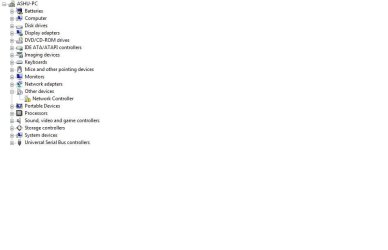
I recenlty got my DELL Inspiron 1545 formatted,after which i am not able to use my wireless network.I have installed all the drivers provided in the CD's by DELL.But somehow not able to bring up the wireless adapter up.How do i check if the hardware by itself has problems or perhaps i have not got the driver installed at all !
Windows IP Configuration
Host Name . . . . . . . . . . . . : Ashu-PC
Primary Dns Suffix . . . . . . . :
Node Type . . . . . . . . . . . . : Hybrid
IP Routing Enabled. . . . . . . . : No
WINS Proxy Enabled. . . . . . . . : No
Ethernet adapter Local Area Connection:
Connection-specific DNS Suffix . :
Description . . . . . . . . . . . : Marvell Yukon 88E8040 PCI-E Fast Ethernet Controller
Physical Address. . . . . . . . . : 00-23-AE-1D-94-FC
DHCP Enabled. . . . . . . . . . . : Yes
Autoconfiguration Enabled . . . . : Yes
Link-local IPv6 Address . . . . . : fe80::586d:81d2:76de:df94%10(Preferred)
IPv4 Address. . . . . . . . . . . : 192.168.1.3(Preferred)
Subnet Mask . . . . . . . . . . . : 255.255.255.0
Lease Obtained. . . . . . . . . . : Saturday, February 25, 2012 11:06:36 AM
Lease Expires . . . . . . . . . . : Tuesday, February 28, 2012 11:30:00 AM
Default Gateway . . . . . . . . . : 192.168.1.1
DHCP Server . . . . . . . . . . . : 192.168.1.1
DNS Servers . . . . . . . . . . . : 192.168.1.1
NetBIOS over Tcpip. . . . . . . . : Enabled
Tunnel adapter Local Area Connection* 6:
Media State . . . . . . . . . . . : Media disconnected
Connection-specific DNS Suffix . :
Description . . . . . . . . . . . : isatap.{78DB558F-6393-4642-BEAC-40945C405657}
Physical Address. . . . . . . . . : 00-00-00-00-00-00-00-E0
DHCP Enabled. . . . . . . . . . . : No
Autoconfiguration Enabled . . . . : Yes
Thanks for your help
AK
I recenlty got my DELL Inspiron 1545 formatted,after which i am not able to use my wireless network.I have installed all the drivers provided in the CD's by DELL.But somehow not able to bring up the wireless adapter up.How do i check if the hardware by itself has problems or perhaps i have not got the driver installed at all !
Windows IP Configuration
Host Name . . . . . . . . . . . . : Ashu-PC
Primary Dns Suffix . . . . . . . :
Node Type . . . . . . . . . . . . : Hybrid
IP Routing Enabled. . . . . . . . : No
WINS Proxy Enabled. . . . . . . . : No
Ethernet adapter Local Area Connection:
Connection-specific DNS Suffix . :
Description . . . . . . . . . . . : Marvell Yukon 88E8040 PCI-E Fast Ethernet Controller
Physical Address. . . . . . . . . : 00-23-AE-1D-94-FC
DHCP Enabled. . . . . . . . . . . : Yes
Autoconfiguration Enabled . . . . : Yes
Link-local IPv6 Address . . . . . : fe80::586d:81d2:76de:df94%10(Preferred)
IPv4 Address. . . . . . . . . . . : 192.168.1.3(Preferred)
Subnet Mask . . . . . . . . . . . : 255.255.255.0
Lease Obtained. . . . . . . . . . : Saturday, February 25, 2012 11:06:36 AM
Lease Expires . . . . . . . . . . : Tuesday, February 28, 2012 11:30:00 AM
Default Gateway . . . . . . . . . : 192.168.1.1
DHCP Server . . . . . . . . . . . : 192.168.1.1
DNS Servers . . . . . . . . . . . : 192.168.1.1
NetBIOS over Tcpip. . . . . . . . : Enabled
Tunnel adapter Local Area Connection* 6:
Media State . . . . . . . . . . . : Media disconnected
Connection-specific DNS Suffix . :
Description . . . . . . . . . . . : isatap.{78DB558F-6393-4642-BEAC-40945C405657}
Physical Address. . . . . . . . . : 00-00-00-00-00-00-00-E0
DHCP Enabled. . . . . . . . . . . : No
Autoconfiguration Enabled . . . . : Yes
Thanks for your help
AK
Attachments
My Computer
At a glance
Windows vista -SP1-32 bit
- OS
- Windows vista -SP1-32 bit


