Cant see second HDD

pryskna

New member
Local time
2:14 PM
Messages
30
Hello all
I have reinstal my PC today. I have system SSD HDD 60GB kingston,and normal Western Digital 320GB.
I just reinstall win and cant see the WD HDD ??? can u pls help me?
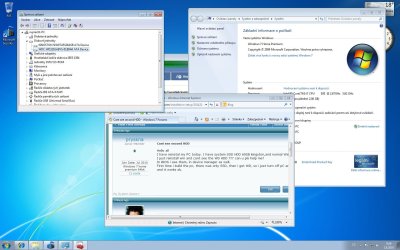
In BIOS i see them, in device manager as well.
First time i build the pc, there was only SSD, then i get WD, so i just turn off pC and connect ,turn on, and it works ok.
 

My Computer

OS
Windows 7 home premium 64bit
CPU
i7 920 @ 4GHz @ 1.296v D0
Motherboard
gigabyte X58A-UD3R rev2.
Memory
zeppelin 3x2GB DDR3 1600MHz
Graphics Card(s)
ASUS GTX470
Sound Card
Realtek
Monitor(s) Displays
LG 22"
Screen Resolution
1680x1050
Hard Drives
Kingston 64GB SSD/
WD 320GB
PSU
Seasonic 750W
Case
Antec Three hundred
Cooling
Noctuas
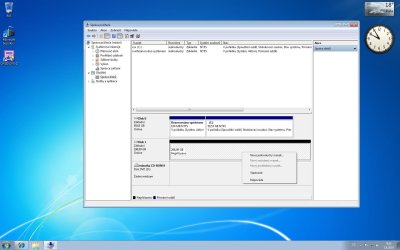
Look in Disk Management to see if WD HD shows up, which it should if it registers in BIOS.

You may need to assign it a drive letter for it to show up in Explorer. Rightclick to assign it available drive letter.
 
This one?.
 

Attachments

  • ss.jpg
    ss.jpg
    174.8 KB · Views: 34

My Computer

OS
Windows 7 home premium 64bit
CPU
i7 920 @ 4GHz @ 1.296v D0
Motherboard
gigabyte X58A-UD3R rev2.
Memory
zeppelin 3x2GB DDR3 1600MHz
Graphics Card(s)
ASUS GTX470
Sound Card
Realtek
Monitor(s) Displays
LG 22"
Screen Resolution
1680x1050
Hard Drives
Kingston 64GB SSD/
WD 320GB
PSU
Seasonic 750W
Case
Antec Three hundred
Cooling
Noctuas
Go to Start Menu, rightclick Computer, select Manage, then Disk Management.

Find the WD HD, rightclick, Assign a Drive Letter.
 
Last edited:
ty :) but i can find this window :(
 

My Computer

OS
Windows 7 home premium 64bit
CPU
i7 920 @ 4GHz @ 1.296v D0
Motherboard
gigabyte X58A-UD3R rev2.
Memory
zeppelin 3x2GB DDR3 1600MHz
Graphics Card(s)
ASUS GTX470
Sound Card
Realtek
Monitor(s) Displays
LG 22"
Screen Resolution
1680x1050
Hard Drives
Kingston 64GB SSD/
WD 320GB
PSU
Seasonic 750W
Case
Antec Three hundred
Cooling
Noctuas
got it, but i cant change :(
 

Attachments

  • ddd.jpg
    ddd.jpg
    124.2 KB · Views: 18

My Computer

OS
Windows 7 home premium 64bit
CPU
i7 920 @ 4GHz @ 1.296v D0
Motherboard
gigabyte X58A-UD3R rev2.
Memory
zeppelin 3x2GB DDR3 1600MHz
Graphics Card(s)
ASUS GTX470
Sound Card
Realtek
Monitor(s) Displays
LG 22"
Screen Resolution
1680x1050
Hard Drives
Kingston 64GB SSD/
WD 320GB
PSU
Seasonic 750W
Case
Antec Three hundred
Cooling
Noctuas
Google translate says the drive is unassigned so you'll need to create a new partition or two, format NTFS and assign drive letter.
 
mby i got it, there was a format, so now im formating...)
sry man, im new with windows 7, i know it all, just dont have all the icons in Manage.
 

My Computer

OS
Windows 7 home premium 64bit
CPU
i7 920 @ 4GHz @ 1.296v D0
Motherboard
gigabyte X58A-UD3R rev2.
Memory
zeppelin 3x2GB DDR3 1600MHz
Graphics Card(s)
ASUS GTX470
Sound Card
Realtek
Monitor(s) Displays
LG 22"
Screen Resolution
1680x1050
Hard Drives
Kingston 64GB SSD/
WD 320GB
PSU
Seasonic 750W
Case
Antec Three hundred
Cooling
Noctuas
Google translate says that the first choice on the right click menu is New Simple Volume.

Select that to Create a New partition, format NTFS, assign a Drive Letter.

If you want a second partition, divide the space you allow for first partition in half, format it.

Then rightclick in the empty space remaining on the right side to make another partition the same way, assign a different letter.
 
You will want to install your Programs to the SSD, but you can move your User folders to the Western Digital HD to save space on the SSD.

You can watch this video to see how to move User Folders to Western Digital HD: http://www.sevenforums.com/tutorials/72427-data-partition.html

And here is the SevenForums tutorial: http://www.sevenforums.com/tutorials/18629-user-folders-change-default-location.html

You can also save a Win7 backup image to the WD HD so you never have to reinstall again, just reimage the HD or a replacement in 15 minutes using DVD and stored image: http://www.sevenforums.com/tutorials/663-backup-complete-computer-create-image-backup.html
 
Last edited:
ty so much mate, very helpfull :)
 

My Computer

OS
Windows 7 home premium 64bit
CPU
i7 920 @ 4GHz @ 1.296v D0
Motherboard
gigabyte X58A-UD3R rev2.
Memory
zeppelin 3x2GB DDR3 1600MHz
Graphics Card(s)
ASUS GTX470
Sound Card
Realtek
Monitor(s) Displays
LG 22"
Screen Resolution
1680x1050
Hard Drives
Kingston 64GB SSD/
WD 320GB
PSU
Seasonic 750W
Case
Antec Three hundred
Cooling
Noctuas
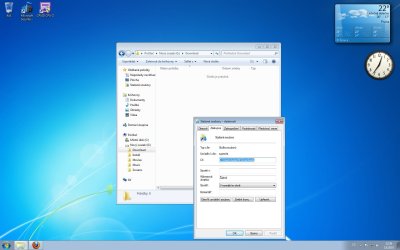
One more question, can i make a change of downloading files.? I want to download to WD to Download folder.
But if i right clik on folder, there is no Location. :(
As i use firefox, and it automaticly start download without no possibilites to change the location of dwnld.
 

Attachments

  • no loc.jpg
    no loc.jpg
    106.2 KB · Views: 3

My Computer

OS
Windows 7 home premium 64bit
CPU
i7 920 @ 4GHz @ 1.296v D0
Motherboard
gigabyte X58A-UD3R rev2.
Memory
zeppelin 3x2GB DDR3 1600MHz
Graphics Card(s)
ASUS GTX470
Sound Card
Realtek
Monitor(s) Displays
LG 22"
Screen Resolution
1680x1050
Hard Drives
Kingston 64GB SSD/
WD 320GB
PSU
Seasonic 750W
Case
Antec Three hundred
Cooling
Noctuas
Move your Downloads and any other User folders (Documents, Pictures, Videos, etc) to the WD HD using the video and tutorial I linked earlier.

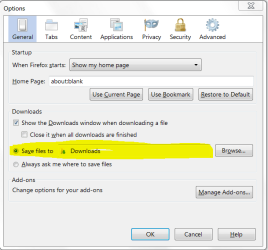
In Firefox, go to Tools>Options to set your Downloads folder as downloads location.
 

Attachments

  • Capture.PNG
    Capture.PNG
    17.8 KB · Views: 0
Back
Top