Can't see secondary drive anymore

tic tok

New member
Local time
11:11 PM
Messages
15
Hello,

My secondary drive started disappearing last month.
I could see it in Safe Mode or when I scanned for hardware with the rapid storage technology, it would pop up.

But after awhile, the Computer would freeze.
But wouldn't if the secondary drive wasn't visible.


But today, I couldn't do those two things anymore, as I couldn't see the drive anymore.


So I flashed my BIOS to a later version for better SATA compatibility. I read somewhere that that fixed the problem for someone experiencing the same thing.

That didn't do anything. In fact in rapid storage technology it would only list 1 empty port instead of 4 empty ports as it did before. You see I partitioned the secondary drive into 4 parts.

So i tried hooking up the secondary drive to a SATA to USB adapter.
I can see one partition, but the other partitions are empty ?

I'm ready to buy an external hard drive to back it up, I wish I would've done it sooner.
 
Last edited:

My Computer My Computer

At a glance

Windows 7 ProfessionalIntel i5 3570
Computer type
PC/Desktop
Computer Manufacturer/Model Number
CYBERPOWERPC
OS
Windows 7 Professional
CPU
Intel i5 3570
Motherboard
b75m-d3h
Hard Drives
Sandisk 60 GB
Seagate 2 TB
Antivirus
Bitdefender
Browser
Firefox
Is this disappearing secondary drive an internal?

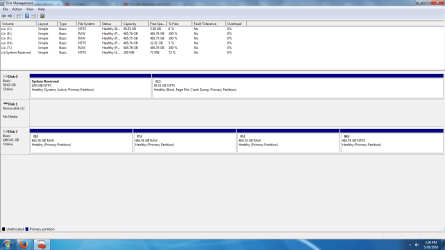
What do you see in Windows Disk Management?

Post a screen shot of that.

If the drive had 4 partitions and 3 of the 4 are now empty, I assume you lost a bunch of personal data?
 

My Computer My Computer

At a glance

Windows 7 Home Premium SP1, 64-bitIntel Skylake i5-6600K, not overclocked8 GB HyperX DDR4-2666 (2 x 4 GB)none; graphics are integrated on CPU
Computer type
PC/Desktop
Computer Manufacturer/Model Number
Ignatz Special; 4 speed manual gearbox; factory air conditioning; one of one
OS
Windows 7 Home Premium SP1, 64-bit
CPU
Intel Skylake i5-6600K, not overclocked
Motherboard
AsRock Z170M Extreme 4, micro ATX
Memory
8 GB HyperX DDR4-2666 (2 x 4 GB)
Graphics Card(s)
none; graphics are integrated on CPU
Sound Card
onboard: Realtek ALC1150; external: USB Behringer UF0-202
Monitor(s) Displays
Dell S2340M 23 inch IPS
Screen Resolution
1600 x 900
Hard Drives
System: Crucial MX100 series SSD, 128 GB;
Data: Samsung Spinpoint 103SJ, 1 TB;
Backup: WD Caviar Green WD30EZRX-00D8PB0, 3 TB
PSU
Rosewill SilentNight 500 watt fanless, semi-modular
Case
Antec Solo II
Cooling
Noctua NH-U12S; Noctua F12 intake, Noctua S12A exhaust
Keyboard
Microsoft 200 6JH-00001 USB
Mouse
Dell or Microsoft optical wired; USB
Antivirus
Microsoft Security Essentials and Malwarebytes Premium
Browser
Pale Moon
Other Info
All fans PWM; speeds at idle: CPU circa 500 rpm; intake circa 600 rpm; exhaust circa 600 rpm; CPU temps 27 idle and 47 C load in a warm room (27 C/81 F) when running Intel Extreme Tuning Utility stress test.
Yes, it's an internal.

I couldn't see it via internal anymore so I tried hooking it up via USB.
And that's when I found out that only 1 partition had my files and the rest were empty.

It was all there last night.
It's not like I did anything out of the ordinary since then.
 

Attachments

  • Disk Management 1.png
    Disk Management 1.png
    40.1 KB · Views: 11

My Computer My Computer

At a glance

Windows 7 ProfessionalIntel i5 3570
Computer type
PC/Desktop
Computer Manufacturer/Model Number
CYBERPOWERPC
OS
Windows 7 Professional
CPU
Intel i5 3570
Motherboard
b75m-d3h
Hard Drives
Sandisk 60 GB
Seagate 2 TB
Antivirus
Bitdefender
Browser
Firefox
I'm not a drive recovery authority. Jumanji is the best member for that.

Partitions going to RAW status is definitely not a good sign.

I see that your H partition is nearly full. At a minimum, I would copy everything on that to some other drive immediately if I cared about whatever is on it.

Generally, I think the recommendation with lost partitions is to first try to recover the partitions rather than the data on them. The data is likely still there, but you can't get at it when the partition is lost.

The best outcome for you is that the other 3 partitions never had anything on them and were always empty. If that's the case, just copy what's on H to some other drive and then wipe out all partitions and start over.

But you may have more than a partition problem. The drive itself may be sick.

I'd first concentrate on trying to recover those 3 RAW partitions. I think Partition Wizard and testdisk (?) are 2 commonly used tools, but I'm not skilled enough to tell you what you need to do with them.
 

My Computer My Computer

At a glance

Windows 7 Home Premium SP1, 64-bitIntel Skylake i5-6600K, not overclocked8 GB HyperX DDR4-2666 (2 x 4 GB)none; graphics are integrated on CPU
Computer type
PC/Desktop
Computer Manufacturer/Model Number
Ignatz Special; 4 speed manual gearbox; factory air conditioning; one of one
OS
Windows 7 Home Premium SP1, 64-bit
CPU
Intel Skylake i5-6600K, not overclocked
Motherboard
AsRock Z170M Extreme 4, micro ATX
Memory
8 GB HyperX DDR4-2666 (2 x 4 GB)
Graphics Card(s)
none; graphics are integrated on CPU
Sound Card
onboard: Realtek ALC1150; external: USB Behringer UF0-202
Monitor(s) Displays
Dell S2340M 23 inch IPS
Screen Resolution
1600 x 900
Hard Drives
System: Crucial MX100 series SSD, 128 GB;
Data: Samsung Spinpoint 103SJ, 1 TB;
Backup: WD Caviar Green WD30EZRX-00D8PB0, 3 TB
PSU
Rosewill SilentNight 500 watt fanless, semi-modular
Case
Antec Solo II
Cooling
Noctua NH-U12S; Noctua F12 intake, Noctua S12A exhaust
Keyboard
Microsoft 200 6JH-00001 USB
Mouse
Dell or Microsoft optical wired; USB
Antivirus
Microsoft Security Essentials and Malwarebytes Premium
Browser
Pale Moon
Other Info
All fans PWM; speeds at idle: CPU circa 500 rpm; intake circa 600 rpm; exhaust circa 600 rpm; CPU temps 27 idle and 47 C load in a warm room (27 C/81 F) when running Intel Extreme Tuning Utility stress test.
Yikes, thanks for the help thus far.

I definitely had data on all 4 partitions and each partition was almost full like the H drive.


How would I go about enlisting Jumanji's help?
 
Last edited:

My Computer My Computer

At a glance

Windows 7 ProfessionalIntel i5 3570
Computer type
PC/Desktop
Computer Manufacturer/Model Number
CYBERPOWERPC
OS
Windows 7 Professional
CPU
Intel i5 3570
Motherboard
b75m-d3h
Hard Drives
Sandisk 60 GB
Seagate 2 TB
Antivirus
Bitdefender
Browser
Firefox
I just found a recent post of his that said he is going to be in Spain on vacation till June 12.

You might have better luck by opening a new thread in the "backup and recovery" section with a title something like:

3 of 4 partitions gone to RAW status. How do I recover partitions or data?

You will probably be asked to do a preliminary scan with a tool, most likely Partition Wizard, a free download.

But anything is possible. Wait to hear what they say.

In the meantime, assume your drive is dying within 24 hours and get the data now on H copied elsewhere.

You should do that as a matter of course anyway---as drives and partitions can go bye-bye without notice.

As you have just found out.
 

My Computer My Computer

At a glance

Windows 7 Home Premium SP1, 64-bitIntel Skylake i5-6600K, not overclocked8 GB HyperX DDR4-2666 (2 x 4 GB)none; graphics are integrated on CPU
Computer type
PC/Desktop
Computer Manufacturer/Model Number
Ignatz Special; 4 speed manual gearbox; factory air conditioning; one of one
OS
Windows 7 Home Premium SP1, 64-bit
CPU
Intel Skylake i5-6600K, not overclocked
Motherboard
AsRock Z170M Extreme 4, micro ATX
Memory
8 GB HyperX DDR4-2666 (2 x 4 GB)
Graphics Card(s)
none; graphics are integrated on CPU
Sound Card
onboard: Realtek ALC1150; external: USB Behringer UF0-202
Monitor(s) Displays
Dell S2340M 23 inch IPS
Screen Resolution
1600 x 900
Hard Drives
System: Crucial MX100 series SSD, 128 GB;
Data: Samsung Spinpoint 103SJ, 1 TB;
Backup: WD Caviar Green WD30EZRX-00D8PB0, 3 TB
PSU
Rosewill SilentNight 500 watt fanless, semi-modular
Case
Antec Solo II
Cooling
Noctua NH-U12S; Noctua F12 intake, Noctua S12A exhaust
Keyboard
Microsoft 200 6JH-00001 USB
Mouse
Dell or Microsoft optical wired; USB
Antivirus
Microsoft Security Essentials and Malwarebytes Premium
Browser
Pale Moon
Other Info
All fans PWM; speeds at idle: CPU circa 500 rpm; intake circa 600 rpm; exhaust circa 600 rpm; CPU temps 27 idle and 47 C load in a warm room (27 C/81 F) when running Intel Extreme Tuning Utility stress test.
Alright thanks a lot ignatzatsonic,

Will do.


:::EDIT:::
You mean backup and restore, right?
 

My Computer My Computer

At a glance

Windows 7 ProfessionalIntel i5 3570
Computer type
PC/Desktop
Computer Manufacturer/Model Number
CYBERPOWERPC
OS
Windows 7 Professional
CPU
Intel i5 3570
Motherboard
b75m-d3h
Hard Drives
Sandisk 60 GB
Seagate 2 TB
Antivirus
Bitdefender
Browser
Firefox
right
 

My Computer My Computer

At a glance

Windows 7 Home Premium SP1, 64-bitIntel Skylake i5-6600K, not overclocked8 GB HyperX DDR4-2666 (2 x 4 GB)none; graphics are integrated on CPU
Computer type
PC/Desktop
Computer Manufacturer/Model Number
Ignatz Special; 4 speed manual gearbox; factory air conditioning; one of one
OS
Windows 7 Home Premium SP1, 64-bit
CPU
Intel Skylake i5-6600K, not overclocked
Motherboard
AsRock Z170M Extreme 4, micro ATX
Memory
8 GB HyperX DDR4-2666 (2 x 4 GB)
Graphics Card(s)
none; graphics are integrated on CPU
Sound Card
onboard: Realtek ALC1150; external: USB Behringer UF0-202
Monitor(s) Displays
Dell S2340M 23 inch IPS
Screen Resolution
1600 x 900
Hard Drives
System: Crucial MX100 series SSD, 128 GB;
Data: Samsung Spinpoint 103SJ, 1 TB;
Backup: WD Caviar Green WD30EZRX-00D8PB0, 3 TB
PSU
Rosewill SilentNight 500 watt fanless, semi-modular
Case
Antec Solo II
Cooling
Noctua NH-U12S; Noctua F12 intake, Noctua S12A exhaust
Keyboard
Microsoft 200 6JH-00001 USB
Mouse
Dell or Microsoft optical wired; USB
Antivirus
Microsoft Security Essentials and Malwarebytes Premium
Browser
Pale Moon
Other Info
All fans PWM; speeds at idle: CPU circa 500 rpm; intake circa 600 rpm; exhaust circa 600 rpm; CPU temps 27 idle and 47 C load in a warm room (27 C/81 F) when running Intel Extreme Tuning Utility stress test.
MiniTool Power Data Recovery [which includes a partition recovery of sorts] may be a great bet! Immediately after copying off the data in partition H, then attempt recovery of the three RAW partitions. There are several free and pay-for utilities like MiniTool. :)
 
Last edited:

My Computer My Computer

At a glance

Windows 7 Professional 64-bitDesktop i5; Acers i5 & i7desktop 16GB; 1 Acer 8GB & 1 Acer 16GB
Computer type
PC/Desktop
Computer Manufacturer/Model Number
Antec desktop; Acer Aspire laptops
OS
Windows 7 Professional 64-bit
CPU
Desktop i5; Acers i5 & i7
Memory
desktop 16GB; 1 Acer 8GB & 1 Acer 16GB
Hard Drives
1TB split into 2 equal partitions [OS and data] usable by RJS
Internet Speed
AT&T DSL
Browser
FF, GChrome, msIE
Other Info
Windows 7 Firewall, Emsisoft AM/AV, MSE [scan-only], SpywareBlaster, Ruiware/BillP combine
Download and install Minitool Partition Recovery Wizard Free Edition https://www.partitionwizard.com/

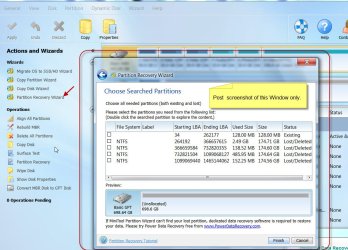
Launch PartitionWizard:On the left Pane click on Partition Recovery Wizard > Next > Select your now external drive> Next > Full Disk > Next > QuickScan > Next. Allow the quickscan to complete. At the end of the quickscan you will get a window showing all the found partitions ( like the one below) . Post a screenshot of it ASAP..

29-05-2016 10-26-53.jpg

After posting the screenshot click on Cancel and quit Partition Wizard. I shall see it before I leave for Spain ( I have another 36 hours countdown) and let you know what further to do before I vanish.
 

My Computer My Computer

At a glance

Windows 7 Home Premium 32 bit
OS
Windows 7 Home Premium 32 bit
Wow, coming in for the clutch.


I got a problem...before anyone posted any further assistance since my last post, I downloaded partition wizard.

It wasn't seeing the disk.

But I could view it in windows explorer.
So I unplugged the usb connection and dialed it up via SATA again, thinking maybe partition wizard would be able to see it.

To no avail, that didn't work.

So I went back and plugged it with the USB adapter.
It's not being recognized by explorer.
But I can see it in device manager as a general ATA ATAPI Device USB Device.


I've been trying to troubleshoot the problem for an hour, I don't know how to get partition wizard to see the drive.


Thanks for appearing out of nowhere. I appreciate it.
 

My Computer My Computer

At a glance

Windows 7 ProfessionalIntel i5 3570
Computer type
PC/Desktop
Computer Manufacturer/Model Number
CYBERPOWERPC
OS
Windows 7 Professional
CPU
Intel i5 3570
Motherboard
b75m-d3h
Hard Drives
Sandisk 60 GB
Seagate 2 TB
Antivirus
Bitdefender
Browser
Firefox
I was very confident since Windows Disk Management showed your drive with all four Partitions - the three RAW partitions even had drive letters - Partition Wizard will definitely run. That has been belied.

As ignatzatsonic said earlier, your HDD seems to have raced to its end faster than we could catch it, if what you describe is true.

Now what?

With the USB adapter try the HDD on another working PC. Can you see it in Windows Disk Management as before?

If not, connect it back as an internal Drive. No need to use the Sata to USB adapter which is an additional interface. Run the manufacturer's diagnostic/Repair utility . ( We do not know the HDD brand) and check the health of the drive.

If the manufacturer does not have a diagnostic/ repair Utility, then check your drive with Crystal Disk Info(or any other Utility mentioned here, How To Test The Health Of Your HDD Drive ) and report the results.

( One more thing I would like to add is before running Partition Wizard, reboot your PC, plug-in your HDD with SATA to USB adapter. Do not open My Computer, Device Manager, Windows Explorer, Windows Disk Management or any other program that will access the Disk. After booting straightaway run Partition Wizard and check whether it catches the drive. Sometimes other programs that you run may lock the drive and not release it for any other program.)
 

My Computer My Computer

At a glance

Windows 7 Home Premium 32 bit
OS
Windows 7 Home Premium 32 bit
I tried hooking it up to a laptop,
it installed the drivers but in disk management, it came up as a "removable" drive (No Media).

I also tried partition wizard on that computer and got 0 results.

I tried Sea Tools for Windows for my Seagate drive in safe and normal mode.
It didn't see the drive.

But with Crystal Disk Info, it saw it. I'll let the picture do the explaining.
After that I opened up disk management and it was asking to initialize the drive, i pressed cancel.

I tried rebooting, and only running partition wizard. It couldn't see the drive.
I did hear the USB dongle sound when I plugged it in.
 

Attachments

  • right now.png
    right now.png
    154.4 KB · Views: 4

My Computer My Computer

At a glance

Windows 7 ProfessionalIntel i5 3570
Computer type
PC/Desktop
Computer Manufacturer/Model Number
CYBERPOWERPC
OS
Windows 7 Professional
CPU
Intel i5 3570
Motherboard
b75m-d3h
Hard Drives
Sandisk 60 GB
Seagate 2 TB
Antivirus
Bitdefender
Browser
Firefox
As I said earlier, your HDD seems to have raced to its end faster than we could catch it.

If Seatools for Windows for does not see the drive and if no other program also does not see the the drive, there is absolutely nothing we can do to recover the data. You have to seek Professional Data Recovery.( Whatever data you see about the drive nomenclature, the drive capacity etc., is gotten from the firmware/electronics from the PCB on the drive. Beyond that the physical HDD itself has gone dead - may be due to a deluge of bad sectors..)

As a last ditch attempt to see whether lady luck smiles on you, try to initialise the disk as an MBR when it asks you to initialise it. If initialisation goes through, stop with it. Do not create a simple volume. ( Don't worry. Just initialising only writes the MBR code into Sector 0 and doesn't do anything beyond that sector.So your data is safe.)

If initialisation does not go through and you only get an error message >>>>Professional data recovery.

( Remove your drive and do not do anything with it further if you intend to seek Professional Data recovery service.)

Try to report within the next ten hours, before I leave to the Airport.

Good luck.
 

My Computer My Computer

At a glance

Windows 7 Home Premium 32 bit
OS
Windows 7 Home Premium 32 bit
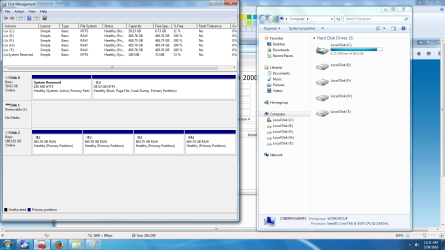
it's visible by windows explorer again

it's hooked up via USB


i can see the 4 partitions on disk management

in crystal disk info, the health is still unknown
it still can't be detected by Sea Tools also

this is what it looks like in explorer
 

Attachments

  • explorer.png
    explorer.png
    112.4 KB · Views: 4

My Computer My Computer

At a glance

Windows 7 ProfessionalIntel i5 3570
Computer type
PC/Desktop
Computer Manufacturer/Model Number
CYBERPOWERPC
OS
Windows 7 Professional
CPU
Intel i5 3570
Motherboard
b75m-d3h
Hard Drives
Sandisk 60 GB
Seagate 2 TB
Antivirus
Bitdefender
Browser
Firefox
thanks a lot for doing this,
i know how it is the day before and of a flight
 

My Computer My Computer

At a glance

Windows 7 ProfessionalIntel i5 3570
Computer type
PC/Desktop
Computer Manufacturer/Model Number
CYBERPOWERPC
OS
Windows 7 Professional
CPU
Intel i5 3570
Motherboard
b75m-d3h
Hard Drives
Sandisk 60 GB
Seagate 2 TB
Antivirus
Bitdefender
Browser
Firefox
If your drive is visible in Windows Explorer and you can access H: , first backup all data in it to elsewhere.

Is your SATA to USB adapter OK? That is why I do not want any additional interface between the drive and the PC that introduces another point of uncertainity and would prefer a direct SATA connection in the PC and do everything in it. In case Windows refuses to see it with the direct connection, we can try to access it with any DOS based utility or Linux ( putting Windows to rest) and check what can be done.

With the present SATA to USB adapter check whether Partition Wizard sees it.

If it sees post a screenshot.
,
At this stage I shall take a break and return on 12th June to continue.

You have also started a thread in the Backup and Restore sub-forum but much of the info here is missing in it. So I don't think you are going to get a meaningful response there from other members because unless one understands the problem no meaningful solution can come in spite of any best brain/s..

We shall start afresh again with the direct SATA connection after 12th June. Till then keep the drive away safely..
 
Last edited:

My Computer My Computer

At a glance

Windows 7 Home Premium 32 bit
OS
Windows 7 Home Premium 32 bit
I contacted MiniTools and one of the customer service people told me to disconnect my multi card reader.

It seems to have given better compatibility to the drive as I can see my E: drive now but have a hard time accessing the files to copy over to a backup folder.

I tried minitools data recovery software out out of curiousity.

I clicked the damaged partitions option and the scanning for hardware kept getting stuck on 64%

i won't mess around anymore,

partition wizard wouldn't even start up.


I'll just disconnect the drive's power and sata cable and leave it in the computer for now.
 

My Computer My Computer

At a glance

Windows 7 ProfessionalIntel i5 3570
Computer type
PC/Desktop
Computer Manufacturer/Model Number
CYBERPOWERPC
OS
Windows 7 Professional
CPU
Intel i5 3570
Motherboard
b75m-d3h
Hard Drives
Sandisk 60 GB
Seagate 2 TB
Antivirus
Bitdefender
Browser
Firefox
My last post before I leave to the airport.

Now I want to check your Partition Wizard installation. You downloaded it even before we asked you to download it.

1..Please keep aside your SATA to USB adapter and the faulty HDD plugged into the adapter. Keep aside, Keep aside.

2. Plug out all devices connected to USB ports of your machine.You are allowed to keep only your USB Keyboard and USB mouse plugged in. All other USB ports on your machine should be empty. Check and double check that nothing other than your Keyboard and Mouse is plugged into the USB ports.

3. Run Partition Wizard.

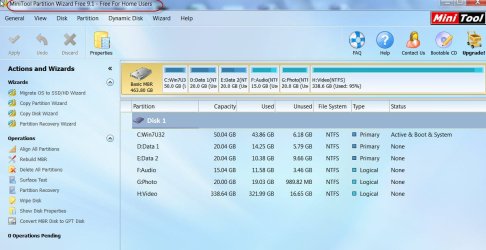
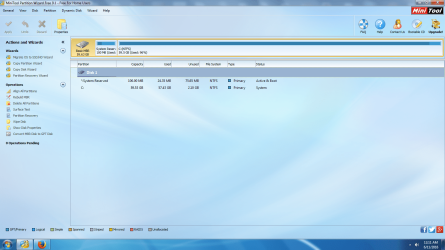
Does it show your system drive as it shows my System drive below?

30-05-2016 18-18-38.jpg

Post a screenshot. I also want to check the version you had downloaded.

If Partition Wizard does not show your system drive, then something is wrong with your Partition Wizard installation.

Let us check this first.
 

My Computer My Computer

At a glance

Windows 7 Home Premium 32 bit
OS
Windows 7 Home Premium 32 bit
Okie dokes
 

Attachments

  • partition wizard.png
    partition wizard.png
    339.3 KB · Views: 7

My Computer My Computer

At a glance

Windows 7 ProfessionalIntel i5 3570
Computer type
PC/Desktop
Computer Manufacturer/Model Number
CYBERPOWERPC
OS
Windows 7 Professional
CPU
Intel i5 3570
Motherboard
b75m-d3h
Hard Drives
Sandisk 60 GB
Seagate 2 TB
Antivirus
Bitdefender
Browser
Firefox
Back
Top