Cant see Vista entry on bootloader After Win 7

gungaabayar

New member
Local time
8:07 AM
Messages
4
Hi all,
Ive been using a hard disk with XP Pro installed first partition and Vista Ult installed second partition. Yesterday I installed Win 7 Home premium on first partition where XP was installed. During installation I deleted the first partition and created new one for the win 7 installition. Obviously XP is gone, dont care.

Win 7 is booting fine. Problem is I cant boot from Vista which is in second partition D. No vista entry on bootloader. PC boots from Win 7 straight away. I used easyBCD to add vista entry but no luck.

QUESTION: How to get my Vista back?

Thanks in advance,
DG
 

My Computer My Computer

OS
win 7
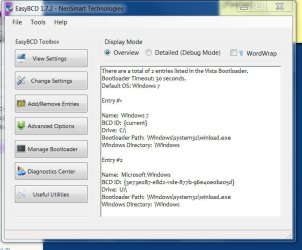
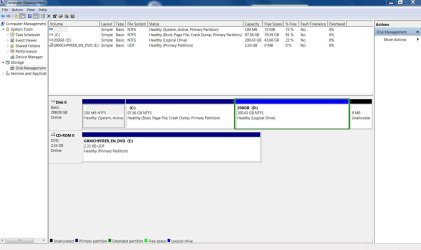
Can you post back a screenshot of your EasyBCD listings page and full Disk Management drive map?
Use Snipping tool in Start menu, attach files using paper clip in reply box.

Can you see Vista in explorer?

Were other HD's plugged during install?
 
Hi

No other HDD plugged during installation.
I can see Vista folders in explorer

entry"2 is added by me but not working. I chosen D letter drive but it shows U letter. dnt know why.

Thanks
DG
 

Attachments

  • Capture1.JPG
    Capture1.JPG
    62.7 KB · Views: 20
  • Capture2.JPG
    Capture2.JPG
    119.2 KB · Views: 22

My Computer My Computer

OS
win 7
Hi again,

I have just used EasyBCD 2.0 beta to add vista entry and I have an options to choose Win 7 and Vista. Chosen Vista but it says no winload.exe found. I search the file from entire D disk, couldnt find. I dnt know why this file gone missing. Tried to repair the vista startup using Vista Installation DVD but it said cant fix it automatically.

Vista was working fine before Win 7. quite strange.

Question. Can I copy the missing file winload.exe to the system32 folder manually? Does it cure the problem? Where can I get the the file from?

Thanks again
DG
 

My Computer My Computer

OS
win 7
This is the best research I can find but no solutions arise that apply clearly to your dual boot with Win7. But take a look at the bcdedits suggested: winload.exe is missing or corrupt (no it's not!)

If you bought Win7 retail, you can try MS Tech Support which is included as this is a known issue to them.

I asked our top expert on these things SIW2 to take a look.

Hopefully others may recognize the problem and offer a fix.
 
Last edited:
Hi,


You should find winload.exe here:

D:\Windows\System32\winload.exe


Try removing both entries to the Vista partition, using Easy 2.0 Add/Remove Entries.

In Disk Management rt click the 100mb partition and give it Drive letter S.

Then add a new entry for the Vista partition using Easy 2.0

Hope it helps
 

My Computers My Computers

System One System Two

  • Computer type
    PC/Desktop
    OS
    7 X64
    CPU
    i5 8400
    Motherboard
    gigabyte b365m ds3h
    Memory
    2x8gb 3200mhz
    Hard Drives
    various
    PSU
    pure power 11 400w cm
    Case
    Coolermaster
    Cooling
    cryorig m9i
  • Computer type
    PC/Desktop
    OS
    7x64
    CPU
    g5400
    Motherboard
    ga b365m ds3h
    Memory
    8gb ddr4 2400
    PSU
    xfx pro 450w
Thanks mate

Hi
Thanks for your quick and clear explanations,
Im trying to fix the problem and let u know what happen...
DG

This is the best research I can find but no solutions arise that apply clearly to your dual boot with Win7. But take a look at the bcdedits suggested: winload.exe is missing or corrupt (no it's not!)

If you bought Win7 retail, you can try MS Tech Support which is included as this is a known issue to them.

I asked our top expert on these things SIW2 to take a look.

Hopefully others may recognize the problem and offer a fix.
 

My Computer My Computer

OS
win 7
i have the same problem
if i go to diskmgmt.msc and set the partition with vista on it active, it becomes the only active boot dr cant get it to see both
 

My Computer My Computer

OS
xp pro
i have the same problem
if i go to diskmgmt.msc and set the partition with vista on it active, it becomes the only active boot dr cant get it to see both

Please post back a screenshot of your full Disk Mgmt drive map, as well as the EasyBCD 2.0 beta boot listings. Use snipping tool in start menu, attach files using paper clip in reply box.
 
Back
Top