Solved Can't seem to install 7 from my usb on my Vaio.

paul456

New member
Local time
4:40 PM
Messages
10
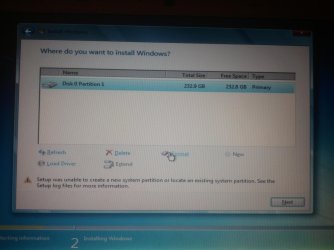
I've got a Sony Vaio VGN-NS30E that was running 7 32-bit HP. The other day I upgraded my RAM from 3gb to 4gb. Everything was running perfectly, I noticed then that i wasn't using all the ram only 2.84gb after some research I found out that I needed to be running 64bit to use most of the RAM. So anyways earlier I went and bought a disk. I had upgrade using a pendrive, would use my disk drive but the laser is burnt out. I formatted my drive and went to proceed only to be halted by an error saying that setup cannot install on the partition (or something along those lines).

Anyone got any suggestions for me please on how to proceed and is this a Vaio problem?

Thanks Paul
 

My Computer My Computer

At a glance

none currently
OS
none currently
Welcome to SevenForums paul456, Show us a screenshot of your disk management screen and we can prob get u up and running....
 

My Computer My Computer

At a glance

Win7 Home Premium x64 W10Pro&HomeA12 9720p 4+8 TurionII M5206GB 8GBR7
Computer type
Laptop
Computer Manufacturer/Model Number
HP 17-ak0xx, dv7 3173nr
OS
Win7 Home Premium x64 W10Pro&Home
CPU
A12 9720p 4+8 TurionII M520
Motherboard
HP 3839
Memory
6GB 8GB
Graphics Card(s)
R7
Monitor(s) Displays
24" sa550
Screen Resolution
1600x900 1920x1080
Mouse
Logitechx2
Internet Speed
120Mb/s down 12up
Ok give me 5 minutes I'm just installing Zorin OS so I have something on it to use.
 

My Computer My Computer

At a glance

none currently
OS
none currently

My Computer My Computer

At a glance

Windows 7 Ultimate SP1 64-BitIntel Core i7 870 @ 2.93GHz8Gb Dual-Channel DDR3 @ 664MHznVidia GeForce GTX 460 1024MB dedicated RAM
Computer Manufacturer/Model Number
HP Pavilion Elite 495UK
OS
Windows 7 Ultimate SP1 64-Bit
CPU
Intel Core i7 870 @ 2.93GHz
Motherboard
MSI 2A9C (CPU1)
Memory
8Gb Dual-Channel DDR3 @ 664MHz
Graphics Card(s)
nVidia GeForce GTX 460 1024MB dedicated RAM
Sound Card
Realtek HD Audio
Monitor(s) Displays
HP2310i
Screen Resolution
1920 x 1080
Hard Drives
1x1954GB Hitachi HDS22020ALA 330 (RAID), 1x1954GB Hitachi External for backup and storage
PSU
460W
Case
HP Elite
Cooling
Air cooled
Keyboard
Logitech K750 solar-powered keyboard
Mouse
Logitech Wireless M180 mouse
Internet Speed
2Mb
Other Info
Pure Avanti Flow Internet Radio with iPod Dock, 64Gb iPod, HP USB Speakers, Sony MDR-V500 Headphones, Sony Vaio F-Series Laptop
 

My Computer My Computer

At a glance

none currently
OS
none currently
All Linux code must be deleted using the CLEAN ALL command.As you have had linux on the HD you need do a Clean all & full format.

Try a full clean & full format in command prompt.
1) Boot DVD & Press Shift+F10 (for command prompt)
http://www.sevenforums.com/tutorials/119713-diskpart-pc-startup.html
2) Boot DVD, & http://www.sevenforums.com/tutorials/682-command-prompt-startup.html
(for command prompt)

Type in command line
DISKPART
LIST DISK
SELECT DISK # (win HD)
CLEAN ALL
CREATE PARTITION PRIMARY
SELECT PARTITION 1
ACTIVE
FORMAT fs=NTFS
ASSIGN
EXIT
EXIT
http://www.sevenforums.com/tutorials/91339-ssd-hdd-optimize-windows-reinstallation.html
 

My Computer My Computer

At a glance

ME/XP/Vista/Win7
OS
ME/XP/Vista/Win7
When I get to the installer, I get to this point of formatting to which after I press next, the error message pops up.
 

Attachments

  • 2011-12-04 21.19.34.jpg
    2011-12-04 21.19.34.jpg
    228.7 KB · Views: 10

My Computer My Computer

At a glance

none currently
OS
none currently
How long should the Clean all stage take my I ask?
 

My Computer My Computer

At a glance

none currently
OS
none currently
Depending on the size of the drive it can take several hours.
 

My Computer My Computer

At a glance

Windows 7 Ultimate SP1 64-BitIntel Core i7 870 @ 2.93GHz8Gb Dual-Channel DDR3 @ 664MHznVidia GeForce GTX 460 1024MB dedicated RAM
Computer Manufacturer/Model Number
HP Pavilion Elite 495UK
OS
Windows 7 Ultimate SP1 64-Bit
CPU
Intel Core i7 870 @ 2.93GHz
Motherboard
MSI 2A9C (CPU1)
Memory
8Gb Dual-Channel DDR3 @ 664MHz
Graphics Card(s)
nVidia GeForce GTX 460 1024MB dedicated RAM
Sound Card
Realtek HD Audio
Monitor(s) Displays
HP2310i
Screen Resolution
1920 x 1080
Hard Drives
1x1954GB Hitachi HDS22020ALA 330 (RAID), 1x1954GB Hitachi External for backup and storage
PSU
460W
Case
HP Elite
Cooling
Air cooled
Keyboard
Logitech K750 solar-powered keyboard
Mouse
Logitech Wireless M180 mouse
Internet Speed
2Mb
Other Info
Pure Avanti Flow Internet Radio with iPod Dock, 64Gb iPod, HP USB Speakers, Sony MDR-V500 Headphones, Sony Vaio F-Series Laptop
Ohh I see, I'm more used to a little 4gb usb taking two minutes. Cheers for all the help everyone too.
 

My Computer My Computer

At a glance

none currently
OS
none currently
You're very welcome. :)
 

My Computer My Computer

At a glance

Windows 7 Ultimate SP1 64-BitIntel Core i7 870 @ 2.93GHz8Gb Dual-Channel DDR3 @ 664MHznVidia GeForce GTX 460 1024MB dedicated RAM
Computer Manufacturer/Model Number
HP Pavilion Elite 495UK
OS
Windows 7 Ultimate SP1 64-Bit
CPU
Intel Core i7 870 @ 2.93GHz
Motherboard
MSI 2A9C (CPU1)
Memory
8Gb Dual-Channel DDR3 @ 664MHz
Graphics Card(s)
nVidia GeForce GTX 460 1024MB dedicated RAM
Sound Card
Realtek HD Audio
Monitor(s) Displays
HP2310i
Screen Resolution
1920 x 1080
Hard Drives
1x1954GB Hitachi HDS22020ALA 330 (RAID), 1x1954GB Hitachi External for backup and storage
PSU
460W
Case
HP Elite
Cooling
Air cooled
Keyboard
Logitech K750 solar-powered keyboard
Mouse
Logitech Wireless M180 mouse
Internet Speed
2Mb
Other Info
Pure Avanti Flow Internet Radio with iPod Dock, 64Gb iPod, HP USB Speakers, Sony MDR-V500 Headphones, Sony Vaio F-Series Laptop
i didn't use a USB, but did a clean install on my system today from a DVD and it took a little over 2 hours. usb should be at least a little faster than that ;)
 

My Computer My Computer

At a glance

Windows 7 Professional x64AMD Phenom II X4 980 Black Edition @ 4.1Ghz8GB Crucial DDR2 PC5300Asus Radeon HD 5450
Computer Manufacturer/Model Number
Custom Box
OS
Windows 7 Professional x64
CPU
AMD Phenom II X4 980 Black Edition @ 4.1Ghz
Motherboard
ECS Elite Group IC780M-A V2.0
Memory
8GB Crucial DDR2 PC5300
Graphics Card(s)
Asus Radeon HD 5450
Sound Card
On Board
Monitor(s) Displays
Dual Monitor Setup
Hard Drives
60GB OCZ Vertex 3 SSD,
320GB, 250GB, & Dual 160GB HDD's
PSU
Cooler Master eXtreme Power Plus 500w
Case
Cooler Master Elite 310
Cooling
Dual 120mm Cooler Master Case Fans
Keyboard
Logitech...
Mouse
Microsoft Mouse 4000
Internet Speed
Super Fast
Paul - I hope you didn't buy a whole new Win7 OS just to reinstall 64 bit since you're entitled to use 32- or 64-bit with each license. If so, save the Product Key to use elsewhere and use the one on the Vaio COA sticker.

Try writing the DVD ISO to stick using UltraISO trial version: On file tab select Open DVD, on Bootable tab select Write Disk Image, Format, Write. Boot under USB, Removable or HD's. This method always works for me.
 
After finishing the clean process via diskpart and going onto the install I still end up arty the same point as I've shown above in the picture.

Any suggestions anyone please?
 

My Computer My Computer

At a glance

none currently
OS
none currently
Yes, rewrite the DVD ISO to flash stick using the method I gave you just above.

Try writing the DVD ISO to stick using UltraISO trial version: On file tab select Open DVD, on Bootable tab select Write Disk Image, Format, Write. Boot under USB, Removable or HD's. This method always works for me.


If you have the ISO extracted already, write it using Universal USB Installer
with Win7 in dropdown menu.

The installer must be ruled out and these methods never fail.

Reset the BIOS to defaults, then Disable the DVD drive in BIOS setup, set HD first to boot, set SATA controller to AHCI to try install. Then boot USB by tapping Sony one-time BIOS boot menu key at bootup, which I believe is F2.
 
I believe I may have got it. I think resetting the bios was the way to go as well as reflashing the usb stick with the file. I'm currently expanding windows and I hope all goes well. Thanks for the help everyone.
 

My Computer My Computer

At a glance

none currently
OS
none currently
Back
Top