Can't send email via Outlook while in WinXP Virtual Mode

C32C3

New member
Local time
12:20 PM
Messages
228
Greetings,

My understanding of Windows Virtual PC is very limited. So, if anyone can help me understand why I am having difficulty sending an email via Outlook in WinXP Virtual Mode I would appreciate it.

I have even tried using Windows Express but even that doesn't work.

I have tested the internet connection. I can watch online news, YouTube, whatever I want. No problem.

Thanks for your help.
 

My Computer My Computer

At a glance

Win7 Ultimate x64Intel Core i7 950 (4x 3066 MHz with HT) Quad ...6GB DDR3 1333MhzNvidia GTS 450 (1024MB GDDR5 | DX 11)
Computer Manufacturer/Model Number
Deviantsystems
OS
Win7 Ultimate x64
CPU
Intel Core i7 950 (4x 3066 MHz with HT) Quad Core
Motherboard
Asus P6X58D-E
Memory
6GB DDR3 1333Mhz
Graphics Card(s)
Nvidia GTS 450 (1024MB GDDR5 | DX 11)
Sound Card
Intel HD Audio via Realtek ALC889 with 8-channel support
Monitor(s) Displays
Sony Bravia 32"
Screen Resolution
1080i, x1768x992
Hard Drives
2x WD 1TB 7200 RPM Sata
PSU
OCZ ModXStream Pro 600W 80+
Case
Lian Li PC-7FN
Cooling
Processor cooling: Scythe Big Shuriken SCBSK-1000
Keyboard
Microsoft Ergonomic
Mouse
Logitec Trackball
Greetings,

My understanding of Windows Virtual PC is very limited. So, if anyone can help me understand why I am having difficulty sending an email via Outlook in WinXP Virtual Mode I would appreciate it.

I have even tried using Windows Express but even that doesn't work.

I have tested the internet connection. I can watch online news, YouTube, whatever I want. No problem.

Thanks for your help.

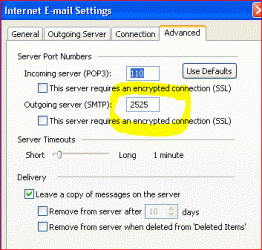
When you say that you can't send via outlook that is installed in windows xp mode, can we assume that you have set the properties of the smtp server correctly?
Is it only the Send or is it receiving problems?
Could it be your firewall in xp?
I just ran outlook in xp mode and sent and received email on one of my accounts.

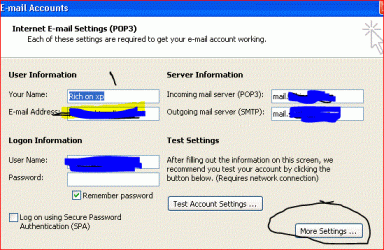
these two screens could be your solution.

Rich
 

Attachments

  • email-outlook-xpmode.GIF
    email-outlook-xpmode.GIF
    28.4 KB · Views: 5
  • email-outlook-xpmode-1.GIF
    email-outlook-xpmode-1.GIF
    27.1 KB · Views: 2

My Computer My Computer

At a glance

Windows 7 Pro x64 SP1Intel Core I716 GigsNVIDIA GeForce GTX 670M
Computer type
Laptop
Computer Manufacturer/Model Number
Toshiba Laptop Qosimo X870
OS
Windows 7 Pro x64 SP1
CPU
Intel Core I7
Motherboard
Toshiba Qosmio
Memory
16 Gigs
Graphics Card(s)
NVIDIA GeForce GTX 670M
Monitor(s) Displays
17.7" laptop
Screen Resolution
1600 x 900
Hard Drives
256 Gig SanDisk SSD for C
256 Gig Intel SSD for D
Internet Speed
50/25 FIOS
Antivirus
Vipre (all you can eat for 10 machines)
Browser
IE and FF
Other Info
I have dos 6.22, wfwg 3.11, win98, 2000 and xp VHD's available for testing. MS's Virtual PC works great.
I tried to find the menu's that you are showing in Outlook but have not succeeded. Where are they?

The message that I am getting has this code 0x800cc0D. It says that Outlook can't find the server. I googled the code and am now trying to fix the problem but so far no good.
 

My Computer My Computer

At a glance

Win7 Ultimate x64Intel Core i7 950 (4x 3066 MHz with HT) Quad ...6GB DDR3 1333MhzNvidia GTS 450 (1024MB GDDR5 | DX 11)
Computer Manufacturer/Model Number
Deviantsystems
OS
Win7 Ultimate x64
CPU
Intel Core i7 950 (4x 3066 MHz with HT) Quad Core
Motherboard
Asus P6X58D-E
Memory
6GB DDR3 1333Mhz
Graphics Card(s)
Nvidia GTS 450 (1024MB GDDR5 | DX 11)
Sound Card
Intel HD Audio via Realtek ALC889 with 8-channel support
Monitor(s) Displays
Sony Bravia 32"
Screen Resolution
1080i, x1768x992
Hard Drives
2x WD 1TB 7200 RPM Sata
PSU
OCZ ModXStream Pro 600W 80+
Case
Lian Li PC-7FN
Cooling
Processor cooling: Scythe Big Shuriken SCBSK-1000
Keyboard
Microsoft Ergonomic
Mouse
Logitec Trackball
I have downloaded the Microsoft Outlook Connector hoping that would solve the problem but .............

When filling out the required info for establishing an email account in Outlook I have made certain that all is correct. When choosing Hotmail the server info is automatically filled in. So at least that's not the problem.

At the moment I can neither send nor receive.

Thanks for helping.
 

My Computer My Computer

At a glance

Win7 Ultimate x64Intel Core i7 950 (4x 3066 MHz with HT) Quad ...6GB DDR3 1333MhzNvidia GTS 450 (1024MB GDDR5 | DX 11)
Computer Manufacturer/Model Number
Deviantsystems
OS
Win7 Ultimate x64
CPU
Intel Core i7 950 (4x 3066 MHz with HT) Quad Core
Motherboard
Asus P6X58D-E
Memory
6GB DDR3 1333Mhz
Graphics Card(s)
Nvidia GTS 450 (1024MB GDDR5 | DX 11)
Sound Card
Intel HD Audio via Realtek ALC889 with 8-channel support
Monitor(s) Displays
Sony Bravia 32"
Screen Resolution
1080i, x1768x992
Hard Drives
2x WD 1TB 7200 RPM Sata
PSU
OCZ ModXStream Pro 600W 80+
Case
Lian Li PC-7FN
Cooling
Processor cooling: Scythe Big Shuriken SCBSK-1000
Keyboard
Microsoft Ergonomic
Mouse
Logitec Trackball
I have downloaded the Microsoft Outlook Connector hoping that would solve the problem but .............

When filling out the required info for establishing an email account in Outlook I have made certain that all is correct. When choosing Hotmail the server info is automatically filled in. So at least that's not the problem.

At the moment I can neither send nor receive.

Thanks for helping.

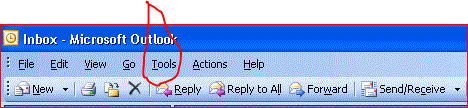
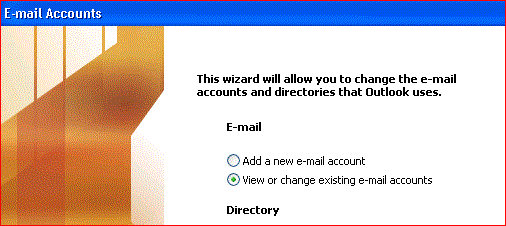
I have captured the screens that you will see when you run outlook and then get you thru the configuring your email accounts.

First at the top you have to select tools
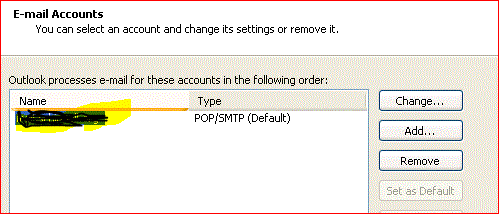
then email accounts and then the correct (you probably only have one)

then after you have put the information into the squares, there is a third
area that you need to make some changes to. As I had shown in my prior messages.

Rich
I did not ask you what version of Outlook you have installed on your windows xp?

The last screen on the right is where you select the more settings..
 

Attachments

  • outlook2003-1.GIF
    outlook2003-1.GIF
    12.4 KB · Views: 1
  • outlook2003-2.GIF
    outlook2003-2.GIF
    17.7 KB · Views: 2
  • outlook2003-3.GIF
    outlook2003-3.GIF
    15.6 KB · Views: 2
  • outlook2003-4.GIF
    outlook2003-4.GIF
    43.1 KB · Views: 6

My Computer My Computer

At a glance

Windows 7 Pro x64 SP1Intel Core I716 GigsNVIDIA GeForce GTX 670M
Computer type
Laptop
Computer Manufacturer/Model Number
Toshiba Laptop Qosimo X870
OS
Windows 7 Pro x64 SP1
CPU
Intel Core I7
Motherboard
Toshiba Qosmio
Memory
16 Gigs
Graphics Card(s)
NVIDIA GeForce GTX 670M
Monitor(s) Displays
17.7" laptop
Screen Resolution
1600 x 900
Hard Drives
256 Gig SanDisk SSD for C
256 Gig Intel SSD for D
Internet Speed
50/25 FIOS
Antivirus
Vipre (all you can eat for 10 machines)
Browser
IE and FF
Other Info
I have dos 6.22, wfwg 3.11, win98, 2000 and xp VHD's available for testing. MS's Virtual PC works great.
Thanks for the explanation of the menu's.

I have Outlook 2003.

I will have a go at your suggestion tomorrow and let you know how it goes.

Thanks for everything.
 

My Computer My Computer

At a glance

Win7 Ultimate x64Intel Core i7 950 (4x 3066 MHz with HT) Quad ...6GB DDR3 1333MhzNvidia GTS 450 (1024MB GDDR5 | DX 11)
Computer Manufacturer/Model Number
Deviantsystems
OS
Win7 Ultimate x64
CPU
Intel Core i7 950 (4x 3066 MHz with HT) Quad Core
Motherboard
Asus P6X58D-E
Memory
6GB DDR3 1333Mhz
Graphics Card(s)
Nvidia GTS 450 (1024MB GDDR5 | DX 11)
Sound Card
Intel HD Audio via Realtek ALC889 with 8-channel support
Monitor(s) Displays
Sony Bravia 32"
Screen Resolution
1080i, x1768x992
Hard Drives
2x WD 1TB 7200 RPM Sata
PSU
OCZ ModXStream Pro 600W 80+
Case
Lian Li PC-7FN
Cooling
Processor cooling: Scythe Big Shuriken SCBSK-1000
Keyboard
Microsoft Ergonomic
Mouse
Logitec Trackball
Thanks for taking the time to post the attachments but after trying your suggestion I am still unable to send or receive in Outlook 2003. I haven't given up yet. If it works for you then it should work for me.

In the meantime I am using Messenger which is working just fine. Outlook has more features than Messenger naturally I prefer using it.
 

My Computer My Computer

At a glance

Win7 Ultimate x64Intel Core i7 950 (4x 3066 MHz with HT) Quad ...6GB DDR3 1333MhzNvidia GTS 450 (1024MB GDDR5 | DX 11)
Computer Manufacturer/Model Number
Deviantsystems
OS
Win7 Ultimate x64
CPU
Intel Core i7 950 (4x 3066 MHz with HT) Quad Core
Motherboard
Asus P6X58D-E
Memory
6GB DDR3 1333Mhz
Graphics Card(s)
Nvidia GTS 450 (1024MB GDDR5 | DX 11)
Sound Card
Intel HD Audio via Realtek ALC889 with 8-channel support
Monitor(s) Displays
Sony Bravia 32"
Screen Resolution
1080i, x1768x992
Hard Drives
2x WD 1TB 7200 RPM Sata
PSU
OCZ ModXStream Pro 600W 80+
Case
Lian Li PC-7FN
Cooling
Processor cooling: Scythe Big Shuriken SCBSK-1000
Keyboard
Microsoft Ergonomic
Mouse
Logitec Trackball
C3, what error are you getting? Some email programs require the full login name including domain to log on.

Rich
 

My Computer My Computer

At a glance

Windows 7 Pro x64 SP1Intel Core I716 GigsNVIDIA GeForce GTX 670M
Computer type
Laptop
Computer Manufacturer/Model Number
Toshiba Laptop Qosimo X870
OS
Windows 7 Pro x64 SP1
CPU
Intel Core I7
Motherboard
Toshiba Qosmio
Memory
16 Gigs
Graphics Card(s)
NVIDIA GeForce GTX 670M
Monitor(s) Displays
17.7" laptop
Screen Resolution
1600 x 900
Hard Drives
256 Gig SanDisk SSD for C
256 Gig Intel SSD for D
Internet Speed
50/25 FIOS
Antivirus
Vipre (all you can eat for 10 machines)
Browser
IE and FF
Other Info
I have dos 6.22, wfwg 3.11, win98, 2000 and xp VHD's available for testing. MS's Virtual PC works great.
richnrockville,

The error that I am getting says, "can't find the server, code Ox800ccOD. I have googled it and tried the suggested solutions but still without success.

I am thinking of deleting Outlook 2003 from the XP Mode because I have Outlook 2010 on my host machine. Still, I would like to know why I'm experiencing this problem. Solving problems is a way of learning, IMO.
 

My Computer My Computer

At a glance

Win7 Ultimate x64Intel Core i7 950 (4x 3066 MHz with HT) Quad ...6GB DDR3 1333MhzNvidia GTS 450 (1024MB GDDR5 | DX 11)
Computer Manufacturer/Model Number
Deviantsystems
OS
Win7 Ultimate x64
CPU
Intel Core i7 950 (4x 3066 MHz with HT) Quad Core
Motherboard
Asus P6X58D-E
Memory
6GB DDR3 1333Mhz
Graphics Card(s)
Nvidia GTS 450 (1024MB GDDR5 | DX 11)
Sound Card
Intel HD Audio via Realtek ALC889 with 8-channel support
Monitor(s) Displays
Sony Bravia 32"
Screen Resolution
1080i, x1768x992
Hard Drives
2x WD 1TB 7200 RPM Sata
PSU
OCZ ModXStream Pro 600W 80+
Case
Lian Li PC-7FN
Cooling
Processor cooling: Scythe Big Shuriken SCBSK-1000
Keyboard
Microsoft Ergonomic
Mouse
Logitec Trackball
richnrockville,

The error that I am getting says, "can't find the server, code Ox800ccOD. I have googled it and tried the suggested solutions but still without success.

I am thinking of deleting Outlook 2003 from the XP Mode because I have Outlook 2010 on my host machine. Still, I would like to know why I'm experiencing this problem. Solving problems is a way of learning, IMO.

Normally, this error can mean a couple of things, Either your smtp and pop server names are not proper in the configuration or your firewall/av is preventing your xp session from going to the internet.

one way to check is to go to the dos (cmd.exe) prompt in xp and
pinging your smtp and pop servers Mine is mail.xxx.com and see if you
get an answer.


Rich
 

My Computer My Computer

At a glance

Windows 7 Pro x64 SP1Intel Core I716 GigsNVIDIA GeForce GTX 670M
Computer type
Laptop
Computer Manufacturer/Model Number
Toshiba Laptop Qosimo X870
OS
Windows 7 Pro x64 SP1
CPU
Intel Core I7
Motherboard
Toshiba Qosmio
Memory
16 Gigs
Graphics Card(s)
NVIDIA GeForce GTX 670M
Monitor(s) Displays
17.7" laptop
Screen Resolution
1600 x 900
Hard Drives
256 Gig SanDisk SSD for C
256 Gig Intel SSD for D
Internet Speed
50/25 FIOS
Antivirus
Vipre (all you can eat for 10 machines)
Browser
IE and FF
Other Info
I have dos 6.22, wfwg 3.11, win98, 2000 and xp VHD's available for testing. MS's Virtual PC works great.
richnville,

Thanks for hanging in there with me in an effort to resolve the problem of not being able to send or receive mail in Outlook 2003 in XP Mode.

When I come to the screen that you picture above, namely the second one on the right where "More Settings" is encircled, the Server Information is already filled in, its reads "Hotmail" because I am using my hotmail account and not a pop 3 account. When I click More Settings, and come into another screen where the first tab is General; there Hotmail is again already filled in. There is nothing to change.

Sorry that I cannot yet attach thumbnails. I haven't installed a program for that in XP Mode. I will do that.
 

My Computer My Computer

At a glance

Win7 Ultimate x64Intel Core i7 950 (4x 3066 MHz with HT) Quad ...6GB DDR3 1333MhzNvidia GTS 450 (1024MB GDDR5 | DX 11)
Computer Manufacturer/Model Number
Deviantsystems
OS
Win7 Ultimate x64
CPU
Intel Core i7 950 (4x 3066 MHz with HT) Quad Core
Motherboard
Asus P6X58D-E
Memory
6GB DDR3 1333Mhz
Graphics Card(s)
Nvidia GTS 450 (1024MB GDDR5 | DX 11)
Sound Card
Intel HD Audio via Realtek ALC889 with 8-channel support
Monitor(s) Displays
Sony Bravia 32"
Screen Resolution
1080i, x1768x992
Hard Drives
2x WD 1TB 7200 RPM Sata
PSU
OCZ ModXStream Pro 600W 80+
Case
Lian Li PC-7FN
Cooling
Processor cooling: Scythe Big Shuriken SCBSK-1000
Keyboard
Microsoft Ergonomic
Mouse
Logitec Trackball
Re: Your problem is most likely hotmail, I don't use hotmail but something tells me that there is a configure option when you log onto hotmail to allow remote access. I know in gmail there is to allow pop. Sorry can't be more help there.
BTW: the snipping tool in windows 7, if you put it on the task bar, will allow you to mark and capture parts of your xp screen. that's how I captured the screens for my prior posts.. I love the snipping tool.

rich
 

My Computer My Computer

At a glance

Windows 7 Pro x64 SP1Intel Core I716 GigsNVIDIA GeForce GTX 670M
Computer type
Laptop
Computer Manufacturer/Model Number
Toshiba Laptop Qosimo X870
OS
Windows 7 Pro x64 SP1
CPU
Intel Core I7
Motherboard
Toshiba Qosmio
Memory
16 Gigs
Graphics Card(s)
NVIDIA GeForce GTX 670M
Monitor(s) Displays
17.7" laptop
Screen Resolution
1600 x 900
Hard Drives
256 Gig SanDisk SSD for C
256 Gig Intel SSD for D
Internet Speed
50/25 FIOS
Antivirus
Vipre (all you can eat for 10 machines)
Browser
IE and FF
Other Info
I have dos 6.22, wfwg 3.11, win98, 2000 and xp VHD's available for testing. MS's Virtual PC works great.
richnrockville,

I think you are right. The problem is probably Hotmail. I prefer using Outlook to access my hotmail account but if its not possible in the XP Mode its not terribly disappointing. I have Outlook 2010 in Win7 on my host machine.

I didn't know that there is a snipping tool in Win7. How do I access it?
 

My Computer My Computer

At a glance

Win7 Ultimate x64Intel Core i7 950 (4x 3066 MHz with HT) Quad ...6GB DDR3 1333MhzNvidia GTS 450 (1024MB GDDR5 | DX 11)
Computer Manufacturer/Model Number
Deviantsystems
OS
Win7 Ultimate x64
CPU
Intel Core i7 950 (4x 3066 MHz with HT) Quad Core
Motherboard
Asus P6X58D-E
Memory
6GB DDR3 1333Mhz
Graphics Card(s)
Nvidia GTS 450 (1024MB GDDR5 | DX 11)
Sound Card
Intel HD Audio via Realtek ALC889 with 8-channel support
Monitor(s) Displays
Sony Bravia 32"
Screen Resolution
1080i, x1768x992
Hard Drives
2x WD 1TB 7200 RPM Sata
PSU
OCZ ModXStream Pro 600W 80+
Case
Lian Li PC-7FN
Cooling
Processor cooling: Scythe Big Shuriken SCBSK-1000
Keyboard
Microsoft Ergonomic
Mouse
Logitec Trackball
Windows snipping tool is in all programs accessories. I copied it to the task bar and then it is easily run..

Rich
 

My Computer My Computer

At a glance

Windows 7 Pro x64 SP1Intel Core I716 GigsNVIDIA GeForce GTX 670M
Computer type
Laptop
Computer Manufacturer/Model Number
Toshiba Laptop Qosimo X870
OS
Windows 7 Pro x64 SP1
CPU
Intel Core I7
Motherboard
Toshiba Qosmio
Memory
16 Gigs
Graphics Card(s)
NVIDIA GeForce GTX 670M
Monitor(s) Displays
17.7" laptop
Screen Resolution
1600 x 900
Hard Drives
256 Gig SanDisk SSD for C
256 Gig Intel SSD for D
Internet Speed
50/25 FIOS
Antivirus
Vipre (all you can eat for 10 machines)
Browser
IE and FF
Other Info
I have dos 6.22, wfwg 3.11, win98, 2000 and xp VHD's available for testing. MS's Virtual PC works great.
Thanks for the tip.
 

My Computer My Computer

At a glance

Win7 Ultimate x64Intel Core i7 950 (4x 3066 MHz with HT) Quad ...6GB DDR3 1333MhzNvidia GTS 450 (1024MB GDDR5 | DX 11)
Computer Manufacturer/Model Number
Deviantsystems
OS
Win7 Ultimate x64
CPU
Intel Core i7 950 (4x 3066 MHz with HT) Quad Core
Motherboard
Asus P6X58D-E
Memory
6GB DDR3 1333Mhz
Graphics Card(s)
Nvidia GTS 450 (1024MB GDDR5 | DX 11)
Sound Card
Intel HD Audio via Realtek ALC889 with 8-channel support
Monitor(s) Displays
Sony Bravia 32"
Screen Resolution
1080i, x1768x992
Hard Drives
2x WD 1TB 7200 RPM Sata
PSU
OCZ ModXStream Pro 600W 80+
Case
Lian Li PC-7FN
Cooling
Processor cooling: Scythe Big Shuriken SCBSK-1000
Keyboard
Microsoft Ergonomic
Mouse
Logitec Trackball
Back
Top