I cannot receive or send email in my Windows Live Mail account. I receive error ID: 0x300CCC92 and am asked to enter my username and password which are remembered and pop up on the screen. Even if I retype them, I still receive an error. My email will work sometimes so I am able to receive my email, but the majority of the time it does not work even though I change no settings. This is a pattern...I can receive email, and then I cannot. I have spoken with numerous people at AT&T, had someone change some settings via remote access, and the problem was finally fixed, but the next morning, I could no longer receive email again. This has been happening for four days. I even deleted Windows Live Essentials 2011 and then installed Windows Live Essentials 2012, but all of my email is remembered, and I have the same problem...error ID: 0x300CCC92.
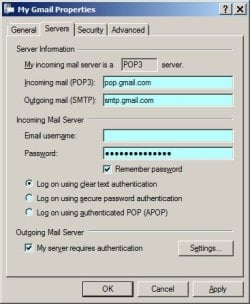
I have Windows 7 and have these settings:
Incoming mail (POP 3): inbound.att.net
Outgoing mail (SMTP): outbound.att.net
Under Servers my email username and password are entered, and "Remember password" is checked.
Under Settings in the Servers tab I have checked "Use same settings as my incoming server"
"My server requires authentication" is checked under Servers
Under Advanced both boxes are checked for outgoing mail and incoming mail that read, "This server requires a secure connection (SSL)"
I have had this email account for years, I can receive email on my ipad and phone. Until the technician fixed some settings via remote access, my phone was having the same issue even though my cell phone is through Verizon and my internet is through AT&T UVerse.
My husband has an email account with a different beginning but the same ending (sbcglobal.net) as mine, and he has no problems with his email.
I tried to access my email from Windows Live email from another laptop, and I had the same problem...same error code.
I can access my email well by going directly online, but I like the format of Windows Live Mail much better.
I am also trying to transfer my email from Windows Live Mail to Outlook, but I am running into problems with that as well as Outlook is displaying a message regarding default programs and the control panel. I am hoping you can help me keep Windows Live Mail. It is a mystery why I can receive mail only during a certain window of time during the day, and I haven't yet pinpointed when those times are...very frustrating when trying to access and send mail.
I have Windows 7 and have these settings:
Incoming mail (POP 3): inbound.att.net
Outgoing mail (SMTP): outbound.att.net
Under Servers my email username and password are entered, and "Remember password" is checked.
Under Settings in the Servers tab I have checked "Use same settings as my incoming server"
"My server requires authentication" is checked under Servers
Under Advanced both boxes are checked for outgoing mail and incoming mail that read, "This server requires a secure connection (SSL)"
I have had this email account for years, I can receive email on my ipad and phone. Until the technician fixed some settings via remote access, my phone was having the same issue even though my cell phone is through Verizon and my internet is through AT&T UVerse.
My husband has an email account with a different beginning but the same ending (sbcglobal.net) as mine, and he has no problems with his email.
I tried to access my email from Windows Live email from another laptop, and I had the same problem...same error code.
I can access my email well by going directly online, but I like the format of Windows Live Mail much better.
I am also trying to transfer my email from Windows Live Mail to Outlook, but I am running into problems with that as well as Outlook is displaying a message regarding default programs and the control panel. I am hoping you can help me keep Windows Live Mail. It is a mystery why I can receive mail only during a certain window of time during the day, and I haven't yet pinpointed when those times are...very frustrating when trying to access and send mail.
My Computer
- Computer type
- Laptop
- Computer Manufacturer/Model Number
- HP
- OS
- Windows 7 Home Premium 64 bit
- CPU
- AMD Phenom(tm) II P650 Dual-Core Processor 2.60 GHz
- Memory
- 4.00 GB
- Antivirus
- Microsoft Security Essentials
- Browser
- Explorer