Can't set default program to open .hlp files

foozlesprite

New member
Local time
3:19 PM
Messages
5
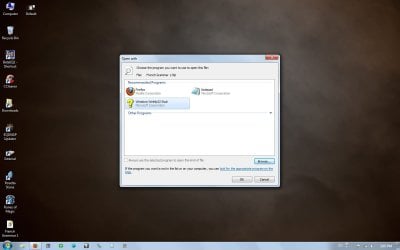
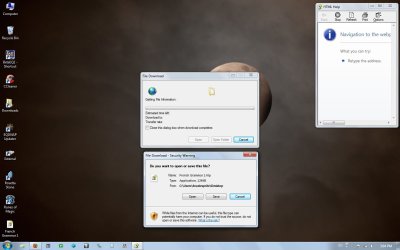
Hey guys. I've got a .hlp file that I want to open, but I guess it was made with an older version of Windows in mind. If I double click to open it I get what you see in my first attachment. I can open it with a version I downloaded from Microsoft's site (C:\Windows\winhlp32.exe). However, the "Always Open With" box is greyed out. I've tried going in through the Control Panel but it does the same thing. I don't mind messing with the registry if that's the only fix, but I really would like to get this working right every time without having to manually select it. Thanks for any help you can give!
 

Attachments
  • Default.jpg
    Default.jpg
    78.2 KB · Views: 132
  • Disabled.jpg
    Disabled.jpg
    59.6 KB · Views: 124

My Computer

OS
Windows 7 64bit
Screen Resolution
1440x900
I would think if you were able to change it, then other help files would not open. Maybe it is greyed out for that reason.
 

My Computer

Computer Manufacturer/Model Number
Homebuilt
OS
Windows 7 x64
CPU
i7-2600K
Motherboard
Asus P8Z77-v Pro
Memory
8 G
Graphics Card(s)
GTX 480
Sound Card
Onboard
Monitor(s) Displays
LG W2753V
Screen Resolution
1920x1080
Hard Drives
Crucial M4 128 G SSD
Hello Foozlesprite, and welcome to Seven Forums.

If it is a older help file version, then you might see is doing only OPTION ONE in the tutorial below may be able to allow you to in Windows 7 like it did in Vista.

Help and Support in Vista - Vista Forums

Hope this helps,
Shawn
 

My Computer

Computer type
PC/Desktop
Computer Manufacturer/Model Number
Self built custom
OS
64-bit Windows 11 Pro for Workstations
CPU
Intel i7-8700K OC'd to 5 GHz
Motherboard
ASUS ROG Maximus XI Formula Z390
Memory
64 GB (4x16GB) G.SKILL TridentZ RGB DDR4 3600 MHz
Graphics Card(s)
ASUS ROG-STRIX-GTX1080TI-O11G-GAMING
Sound Card
Integrated
Monitor(s) Displays
2 x Samsung Odyssey G7 27"
Screen Resolution
2560x1440
Hard Drives
1TB Samsung 990 PRO M.2,
4TB Samsung 990 PRO PRO M.2,
TerraMaster F8 SSD Plus NAS
PSU
Seasonic Prime Titanium 850W
Case
Thermaltake Core P3
Cooling
Corsair Hydro H115i
Keyboard
Logitech wireless K800
Mouse
Logitech MX Master 4
Internet Speed
2 Gb/s Download and 100 Mb/s Upload
Antivirus
Malwarebyte Anti-Malware Premium
Browser
Google Chrome
Other Info
Logitech Z625 speaker system,
Logitech BRIO 4K Pro webcam,
HP Color LaserJet Pro MFP M477fdn,
APC SMART-UPS RT 1000 XL - SURT1000XLI,
Galaxy S23 Plus phone
The download that that Vista link points me to is the same one I already had installed. It does open the document, but I can't set it as default. Perhaps Saltgrass is right and it can't be done because that wouldn't allow newer documents to open.
 

My Computer

OS
Windows 7 64bit
Screen Resolution
1440x900
This may not be the right answer,, but you can try the following,,,

HTML Help Workshop - Microsoft HTML Help Downloads

Download and install HTMLHelp.exe

Install that and see if that helps?

I have seen a lot of problems with HTML Help files and CHM files lately across all flavors of Windows
 

My Computer

Computer Manufacturer/Model Number
Self Built
OS
Win 7 Ultimate 32bit
CPU
C2D E6600 2.4Ghz
Motherboard
Intel D965WH
Memory
4G Kingston KHX5400D2
Graphics Card(s)
EVGA GTX 570 HD SC (012-P3-1573-KR)
Sound Card
On-Board
Monitor(s) Displays
Samsung 226BW
Screen Resolution
1680 x 1050
Hard Drives
2 x 250 Seagate Barracuda
2 x 500 Seagate Barracuda (Raid1)
PSU
Corsair TX750W
Case
In-Win C589
Cooling
Stock Intel Cooling

My Computers

System One System Two

  • Computer type
    PC/Desktop
    OS
    7 X64
    CPU
    i5 8400
    Motherboard
    gigabyte b365m ds3h
    Memory
    2x8gb 3200mhz
    Hard Drives
    various
    PSU
    pure power 11 400w cm
    Case
    Coolermaster
    Cooling
    cryorig m9i
  • Computer type
    PC/Desktop
    OS
    7x64
    CPU
    g5400
    Motherboard
    ga b365m ds3h
    Memory
    8gb ddr4 2400
    PSU
    xfx pro 450w
Yes, when I click the Windows 7 install link, it begins to install then tells me I already have that update installed on my computer. (And I tried Tepid's link but it tells me I already have a newer version on my computer.)
 

My Computer

OS
Windows 7 64bit
Screen Resolution
1440x900
What about changing the extension from .hlp to something else, maybe .hpl then setting the app you want as default for only that extension? I've not tried this and the app may reject it if it's not .hlp. Worth a try though.
 

My Computer

Computer type
PC/Desktop
Computer Manufacturer/Model Number
Lenovo IdeaCenter 450
OS
Windows 10 Pro X64
CPU
Intel Quad Core i7-4770 @ 3.4Ghz
Memory
16.0GB PC3-12800 DDR3 SDRAM 1600 MHz
Graphics Card(s)
Intel Integrated HD Graphics
Sound Card
Realtek HD Audio
Monitor(s) Displays
HP 22" LCD
Screen Resolution
1680 x 1050
Hard Drives
250GB Samsung EVO SATA-3 SSD
2TB Seagate ST2000DM001 SATA-2
1.5TB Seagate ST3150041AS SATA
Keyboard
Dell USB
Mouse
Lenovo USB
Internet Speed
Cable via Road Runner 3MB Upload, 30MB Download
Antivirus
Windows Defender, MBAM Pro, MBAE
Browser
Seamonkey
Other Info
UEFI/GPT
PLDS DVD-RW DH16AERSH
What about changing the extension from .hlp to something else, maybe .hpl then setting the app you want as default for only that extension? I've not tried this and the app may reject it if it's not .hlp. Worth a try though.

This worked for me :) I had to use a renamer program to rename all the extensions but overall it was MUCH faster than having to select the program every time. Thanks for the help, everybody!
 

My Computer

OS
Windows 7 64bit
Screen Resolution
1440x900
What about changing the extension from .hlp to something else, maybe .hpl then setting the app you want as default for only that extension? I've not tried this and the app may reject it if it's not .hlp. Worth a try though.

Interesting,, hadn't thought of that.
 

My Computer

Computer Manufacturer/Model Number
Self Built
OS
Win 7 Ultimate 32bit
CPU
C2D E6600 2.4Ghz
Motherboard
Intel D965WH
Memory
4G Kingston KHX5400D2
Graphics Card(s)
EVGA GTX 570 HD SC (012-P3-1573-KR)
Sound Card
On-Board
Monitor(s) Displays
Samsung 226BW
Screen Resolution
1680 x 1050
Hard Drives
2 x 250 Seagate Barracuda
2 x 500 Seagate Barracuda (Raid1)
PSU
Corsair TX750W
Case
In-Win C589
Cooling
Stock Intel Cooling
Back
Top