Solved Can't set desktop background

johnivanovich

New member
Local time
4:34 PM
Messages
42
Hi!

I have a problem with setting a desktop background.

When I right click on a picture (every picture, no matter where it's located) I get following error message:
"The file D:\John\AppData\Roaming\Microsoft\Windows Photo Viewer\Windows Photo Viewer Wallpaper.jpg could not be written. Please check permission on this file and try again."

I've changed background today before this and it was all right. Didn't install any new program after that.
I've tried with system restore but it didn't help.

Account has administrator status.

Any help would be appreciated!
 

My Computer

OS
Windows 7 Ultimate x64
Can you make files in folder D:\John\AppData\Roaming\Microsoft\Windows Photo Viewer ?
Can you open files in that folder?
Can you delete files in that folder?
 

My Computer

Computer type
Laptop
Computer Manufacturer/Model Number
ACER ASPIRE 5742G
OS
Microsoft Windows 7 Home Premium 64-bits 7601 Multiprocessor Free Service Pack 1
CPU
Intel(R) Core(TM) i3 CPU M 370 @ 2.40GHz
Motherboard
Acer Aspire 5742G
Memory
4,00 GB
Graphics Card(s)
ATI Mobility Radeon HD 5400 Series
Sound Card
(1) AMD High Definition Audio Device (2) Realtek High Defi
Screen Resolution
1366 x 768 x 32 bits (4294967296 colors) @ 60 Hz
Hard Drives
WDC WD5000BEVT-22ZAT0
Thank you very much!

I've opened that folder and delete the photo that was in it (last desktop background) and now everything is working fine :)
 

My Computer

OS
Windows 7 Ultimate x64
It seems I was too fast...

When I deleted the picture, it worked fine, but when tried to set a new background again, same problem.

Is there anything I can do to solve the problem permanently?
 

My Computer

OS
Windows 7 Ultimate x64
It seems I was too fast...

When I deleted the picture, it worked fine, but when tried to set a new background again, same problem.

Is there anything I can do to solve the problem permanently?
Can you create files in that folder? Can you delete files in that folder?
it doesn't ask you for administrator rights?
 

My Computer

Computer type
Laptop
Computer Manufacturer/Model Number
ACER ASPIRE 5742G
OS
Microsoft Windows 7 Home Premium 64-bits 7601 Multiprocessor Free Service Pack 1
CPU
Intel(R) Core(TM) i3 CPU M 370 @ 2.40GHz
Motherboard
Acer Aspire 5742G
Memory
4,00 GB
Graphics Card(s)
ATI Mobility Radeon HD 5400 Series
Sound Card
(1) AMD High Definition Audio Device (2) Realtek High Defi
Screen Resolution
1366 x 768 x 32 bits (4294967296 colors) @ 60 Hz
Hard Drives
WDC WD5000BEVT-22ZAT0
Hi!

I have a problem with setting a desktop background.

When I right click on a picture (every picture, no matter where it's located) I get following error message:
"The file D:\John\AppData\Roaming\Microsoft\Windows Photo Viewer\Windows Photo Viewer Wallpaper.jpg could not be written. Please check permission on this file and try again."

I've changed background today before this and it was all right. Didn't install any new program after that.
I've tried with system restore but it didn't help.

Account has administrator status.

Any help would be appreciated!
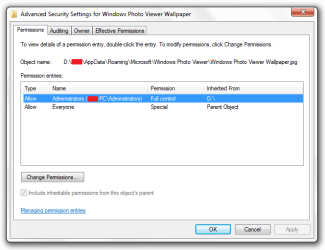
Right click D:\John\AppData\Roaming\Microsoft\Windows Photo Viewer\Windows Photo Viewer Wallpaper.jpg on click properties=>security tab->advanced. Post screenshot
 

My Computer

Computer type
Laptop
Computer Manufacturer/Model Number
ACER ASPIRE 5742G
OS
Microsoft Windows 7 Home Premium 64-bits 7601 Multiprocessor Free Service Pack 1
CPU
Intel(R) Core(TM) i3 CPU M 370 @ 2.40GHz
Motherboard
Acer Aspire 5742G
Memory
4,00 GB
Graphics Card(s)
ATI Mobility Radeon HD 5400 Series
Sound Card
(1) AMD High Definition Audio Device (2) Realtek High Defi
Screen Resolution
1366 x 768 x 32 bits (4294967296 colors) @ 60 Hz
Hard Drives
WDC WD5000BEVT-22ZAT0
[/QUOTE]
Can you create files in that folder? Can you delete files in that folder?
it doesn't ask you for administrator rights?[/QUOTE]

I can create and delete files in the folder.
When I'm creating files, it doesn't ask me for administrator rights and when im deleting files, it asks.
 

My Computer

OS
Windows 7 Ultimate x64
Try going to C:\Users\YOUR USER NAME\AppData\Roaming\Microsoft\Windows\Themes folder and rename the TranscodedWallpaper.jpg to TranscodedWallpaper.bak.jpg and reboot and see if you can change it. If it works then you can delete the TranscodedWallpaper.bak.jpg.
AppData is hidden use step 3 of this tutorial to unhide it http://www.sevenforums.com/tutorials/56005-file-folder-hide-unhide.html
Jerry
 

My Computer

Computer type
Laptop
Computer Manufacturer/Model Number
Sager NP9170
OS
Win 7 Pro x64 / Win 10 Pro
CPU
Intel(R) Core(TM) i7-3630QM CPU @ 2.40GHz
Motherboard
CLEVO P170EM
Memory
12 GB
Graphics Card(s)
(1) Intel(R) HD Graphics 4000 (2) NVIDIA GeForce GTX 675M
Sound Card
(1) Realtek High Definition Audio (2) Intel(R) Display Aud
Monitor(s) Displays
17.3
Screen Resolution
1920x1080
Hard Drives
(1) Samsung 860 EVO 500GB(OS) (1) Samsung 860 EVO 500GB(Data)
Keyboard
Backlite
Antivirus
MSE, Malwarebytes Pro
Browser
Firefox
Other Info
DESKTOP: Custom-built.
OS: Win 10 Pro x64.
CASE: Rosewill R5.
CPU: Intel I5 4670K CPU @ 3.40GHz.
CPU COOLER: Cool Master Hyper 212 EVO.
MOTHERBOARD: Asus Z87-A.
MEMORY: Kingston HyperX 2x4 GB.
GPU: Nvidia Geforce 650 TI.
PSU: Corsair TX750.
DRIVES: (1) Samsung 840 120 GB SSD (2) Western Digital blue 500 GB 7200 RPM.
Can you create files in that folder? Can you delete files in that folder?
it doesn't ask you for administrator rights?

I can create and delete files in the folder.
When I'm creating files, it doesn't ask me for administrator rights and when im deleting files, it asks.
answer #6
 

My Computer

Computer type
Laptop
Computer Manufacturer/Model Number
ACER ASPIRE 5742G
OS
Microsoft Windows 7 Home Premium 64-bits 7601 Multiprocessor Free Service Pack 1
CPU
Intel(R) Core(TM) i3 CPU M 370 @ 2.40GHz
Motherboard
Acer Aspire 5742G
Memory
4,00 GB
Graphics Card(s)
ATI Mobility Radeon HD 5400 Series
Sound Card
(1) AMD High Definition Audio Device (2) Realtek High Defi
Screen Resolution
1366 x 768 x 32 bits (4294967296 colors) @ 60 Hz
Hard Drives
WDC WD5000BEVT-22ZAT0
[/QUOTE]Right click D:\John\AppData\Roaming\Microsoft\Windows Photo Viewer\Windows Photo Viewer Wallpaper.jpg on click properties=>security tab->advanced. Post screenshot[/QUOTE]

Here it is:
 

Attachments

  • 1.png
    1.png
    34.1 KB · Views: 7

My Computer

OS
Windows 7 Ultimate x64
Try going to C:\Users\YOUR USER NAME\AppData\Roaming\Microsoft\Windows\Themes folder and rename the TranscodedWallpaper.jpg to TranscodedWallpaper.bak.jpg and reboot and see if you can change it. If it works then you can delete the TranscodedWallpaper.bak.jpg.
AppData is hidden use step 3 of this tutorial to unhide it http://www.sevenforums.com/tutorials/56005-file-folder-hide-unhide.html
Jerry

I don't have that folder. It goes C:\Users\John\AppData\Roaming\Microsoft and then the only folder I have is MSDN and inside that folder there is a folder named 8.0 and it's empty.
 

My Computer

OS
Windows 7 Ultimate x64
Try going to C:\Users\YOUR USER NAME\AppData\Roaming\Microsoft\Windows\Themes folder and rename the TranscodedWallpaper.jpg to TranscodedWallpaper.bak.jpg and reboot and see if you can change it. If it works then you can delete the TranscodedWallpaper.bak.jpg.
AppData is hidden use step 3 of this tutorial to unhide it http://www.sevenforums.com/tutorials/56005-file-folder-hide-unhide.html
Jerry

I don't have that folder. It goes C:\Users\John\AppData\Roaming\Microsoft and then the only folder I have is MSDN and inside that folder there is a folder named 8.0 and it's empty.

That strange you should have that folder, it was just a thought on my part anyway follow through with Kaktussoft suggestions.

Jerry
 

My Computer

Computer type
Laptop
Computer Manufacturer/Model Number
Sager NP9170
OS
Win 7 Pro x64 / Win 10 Pro
CPU
Intel(R) Core(TM) i7-3630QM CPU @ 2.40GHz
Motherboard
CLEVO P170EM
Memory
12 GB
Graphics Card(s)
(1) Intel(R) HD Graphics 4000 (2) NVIDIA GeForce GTX 675M
Sound Card
(1) Realtek High Definition Audio (2) Intel(R) Display Aud
Monitor(s) Displays
17.3
Screen Resolution
1920x1080
Hard Drives
(1) Samsung 860 EVO 500GB(OS) (1) Samsung 860 EVO 500GB(Data)
Keyboard
Backlite
Antivirus
MSE, Malwarebytes Pro
Browser
Firefox
Other Info
DESKTOP: Custom-built.
OS: Win 10 Pro x64.
CASE: Rosewill R5.
CPU: Intel I5 4670K CPU @ 3.40GHz.
CPU COOLER: Cool Master Hyper 212 EVO.
MOTHERBOARD: Asus Z87-A.
MEMORY: Kingston HyperX 2x4 GB.
GPU: Nvidia Geforce 650 TI.
PSU: Corsair TX750.
DRIVES: (1) Samsung 840 120 GB SSD (2) Western Digital blue 500 GB 7200 RPM.
Right click D:\John\AppData\Roaming\Microsoft\Windows Photo Viewer\Windows Photo Viewer Wallpaper.jpg on click properties=>security tab->advanced. Post screenshot[/QUOTE]

Here it is:[/QUOTE]
Right click D:\John\AppData\Roaming\Microsoft\Windows Photo Viewer\Windows Photo Viewer Wallpaper.jpg on click properties=>security tab->advanced. Post screenshot

Tell me the owner of that file as well
 

My Computer

Computer type
Laptop
Computer Manufacturer/Model Number
ACER ASPIRE 5742G
OS
Microsoft Windows 7 Home Premium 64-bits 7601 Multiprocessor Free Service Pack 1
CPU
Intel(R) Core(TM) i3 CPU M 370 @ 2.40GHz
Motherboard
Acer Aspire 5742G
Memory
4,00 GB
Graphics Card(s)
ATI Mobility Radeon HD 5400 Series
Sound Card
(1) AMD High Definition Audio Device (2) Realtek High Defi
Screen Resolution
1366 x 768 x 32 bits (4294967296 colors) @ 60 Hz
Hard Drives
WDC WD5000BEVT-22ZAT0
Try going to C:\Users\YOUR USER NAME\AppData\Roaming\Microsoft\Windows\Themes folder and rename the TranscodedWallpaper.jpg to TranscodedWallpaper.bak.jpg and reboot and see if you can change it. If it works then you can delete the TranscodedWallpaper.bak.jpg.
AppData is hidden use step 3 of this tutorial to unhide it http://www.sevenforums.com/tutorials/56005-file-folder-hide-unhide.html
Jerry
D:\John\AppData\Roaming\Microsoft\Windows\Themes is what he means! You relocated the profile folder as it seems(?)
 

My Computer

Computer type
Laptop
Computer Manufacturer/Model Number
ACER ASPIRE 5742G
OS
Microsoft Windows 7 Home Premium 64-bits 7601 Multiprocessor Free Service Pack 1
CPU
Intel(R) Core(TM) i3 CPU M 370 @ 2.40GHz
Motherboard
Acer Aspire 5742G
Memory
4,00 GB
Graphics Card(s)
ATI Mobility Radeon HD 5400 Series
Sound Card
(1) AMD High Definition Audio Device (2) Realtek High Defi
Screen Resolution
1366 x 768 x 32 bits (4294967296 colors) @ 60 Hz
Hard Drives
WDC WD5000BEVT-22ZAT0
[/QUOTE]
Right click D:\John\AppData\Roaming\Microsoft\Windows Photo Viewer\Windows Photo Viewer Wallpaper.jpg on click properties=>security tab->advanced. Post screenshot

Tell me the owner of that file as well[/QUOTE]
 

Attachments

  • 2.png
    2.png
    30.4 KB · Views: 6
Last edited:

My Computer

OS
Windows 7 Ultimate x64
Right click D:\John\AppData\Roaming\Microsoft\Windows Photo Viewer\Windows Photo Viewer Wallpaper.jpg on click properties=>security tab->advanced. Post screenshot

Tell me the owner of that file as well[/QUOTE][/QUOTE]
who's the owner??
 

My Computer

Computer type
Laptop
Computer Manufacturer/Model Number
ACER ASPIRE 5742G
OS
Microsoft Windows 7 Home Premium 64-bits 7601 Multiprocessor Free Service Pack 1
CPU
Intel(R) Core(TM) i3 CPU M 370 @ 2.40GHz
Motherboard
Acer Aspire 5742G
Memory
4,00 GB
Graphics Card(s)
ATI Mobility Radeon HD 5400 Series
Sound Card
(1) AMD High Definition Audio Device (2) Realtek High Defi
Screen Resolution
1366 x 768 x 32 bits (4294967296 colors) @ 60 Hz
Hard Drives
WDC WD5000BEVT-22ZAT0
How many files are in folder "D:\John\AppData\Roaming\Microsoft\Windows Photo Viewer" you want to keep? Drag them to another empty folder, so you can move them back later
 

My Computer

Computer type
Laptop
Computer Manufacturer/Model Number
ACER ASPIRE 5742G
OS
Microsoft Windows 7 Home Premium 64-bits 7601 Multiprocessor Free Service Pack 1
CPU
Intel(R) Core(TM) i3 CPU M 370 @ 2.40GHz
Motherboard
Acer Aspire 5742G
Memory
4,00 GB
Graphics Card(s)
ATI Mobility Radeon HD 5400 Series
Sound Card
(1) AMD High Definition Audio Device (2) Realtek High Defi
Screen Resolution
1366 x 768 x 32 bits (4294967296 colors) @ 60 Hz
Hard Drives
WDC WD5000BEVT-22ZAT0
[/QUOTE]who's the owner??[/QUOTE]

Sorry for being a complete noob, but how can I see the owner of the file?
 

My Computer

OS
Windows 7 Ultimate x64
You better do this in http://www.sevenforums.com/tutorials/783-elevated-command-prompt.html

Code:
takeown  /f  D:\John\AppData  /r  /d  Y
icacls  D:\John\AppData\*  /reset  /t  /c  /l  /q
icacls  D:\John\AppData\*  /inheritance:e  /t  /c  /l  /q
This does:
become own of all files under D:\john\appdata
reset the permissions. includes subfolders
set permission to inherete. includes subfolders

When done make a new file in that "problem" folder. Try to delete that file. Still administrator prompt?
 

My Computer

Computer type
Laptop
Computer Manufacturer/Model Number
ACER ASPIRE 5742G
OS
Microsoft Windows 7 Home Premium 64-bits 7601 Multiprocessor Free Service Pack 1
CPU
Intel(R) Core(TM) i3 CPU M 370 @ 2.40GHz
Motherboard
Acer Aspire 5742G
Memory
4,00 GB
Graphics Card(s)
ATI Mobility Radeon HD 5400 Series
Sound Card
(1) AMD High Definition Audio Device (2) Realtek High Defi
Screen Resolution
1366 x 768 x 32 bits (4294967296 colors) @ 60 Hz
Hard Drives
WDC WD5000BEVT-22ZAT0
How many files are in folder "D:\John\AppData\Roaming\Microsoft\Windows Photo Viewer" you want to keep? Drag them to another empty folder, so you can move them back later

There is only one file - my current desktop background.
 

My Computer

OS
Windows 7 Ultimate x64
Back
Top