Solved Can't set Internet Time

bug67

Hazard Avoidance
Pro User
VIP
Local time
8:20 PM
Messages
262
Location
Eagle River, AK
I have my system clock set to automatically synchronize with an internet time server. However, it never keeps accurate time. Every time I go to set it it says, "The Windows Time service is not running." OK. I click "Change settings" and "Update now" and all is well.

This time when I click "Change settings," however, I get a pop-up that says:

Unable to continue

You do not have permissions to perform this task. Please contact your computer administrator for help.
I'm thinking this is because of something I did while trying to fix the time service not running issue. I don't remember what I did exactly. Probably some copy/paste stupidity I found on line that had to do with running a terminal as admin and stopping/re-starting the time server. :o

Now it's borked. If I could just get some help being able to change Internet time settings like it was, I'd be happy.
 

My Computer

Computer Manufacturer/Model Number
Dell XPS 400
OS
Windows 7 X64 Professional
CPU
Intel® Pentium D Dual Core 3.6GHZ
Motherboard
DELL Dimension 9150 MotherBoard DXP051 XPS400 FJ030
Memory
4GB DDR2 PC2-5300
Graphics Card(s)
GeForce GT 440 (Fermi) 2GB 128-bit DDR3 PCI Express 2.0 x16
Sound Card
ASUS XONAR DG 5.1 Channels PCI Interface Xonar DG
Monitor(s) Displays
2 X 23" Apple Cinema Display
Screen Resolution
1920 X 1200p
Hard Drives
250GB Intel® 510 Series SSD SATA 6G (w/TRIM) [500MB/s Reads]
1.0TB Western Digital Caviar Black SATA 6G 7200rpm 64MB Cache
PSU
375 Watt Dell
Case
Dell XPS 400 BTX Case
Cooling
Dell XPS 400 Air Cooling
Keyboard
Logitech Illuminated Keyboard
Mouse
Logitech M705 Marathon
Internet Speed
+/- 9929 Kbps
Other Info
This machine was given to me when my dad bought a new computer. I keep throwing upgrades at it and it keeps on ticking. Think I've done everything to it that can be done outside a PSU upgrade so I can run an even BETTER GPU.
System restore may not help you because the change probably happened too far back.

You could try creating a new standard account and trying from there.

If that does the trick, just set up the account with the same settings as your old one, and then delete the old account.
 

My Computer

Computer Manufacturer/Model Number
HP Pavilion Elite 495UK
OS
Windows 7 Ultimate SP1 64-Bit
CPU
Intel Core i7 870 @ 2.93GHz
Motherboard
MSI 2A9C (CPU1)
Memory
8Gb Dual-Channel DDR3 @ 664MHz
Graphics Card(s)
nVidia GeForce GTX 460 1024MB dedicated RAM
Sound Card
Realtek HD Audio
Monitor(s) Displays
HP2310i
Screen Resolution
1920 x 1080
Hard Drives
1x1954GB Hitachi HDS22020ALA 330 (RAID), 1x1954GB Hitachi External for backup and storage
PSU
460W
Case
HP Elite
Cooling
Air cooled
Keyboard
Logitech K750 solar-powered keyboard
Mouse
Logitech Wireless M180 mouse
Internet Speed
2Mb
Other Info
Pure Avanti Flow Internet Radio with iPod Dock, 64Gb iPod, HP USB Speakers, Sony MDR-V500 Headphones, Sony Vaio F-Series Laptop
  • Like
Reactions: JMH

My Computer

Computer Manufacturer/Model Number
Hewlett packard/p6512uk
OS
Microsoft Windows 7 Home Premium 64-bit 7600
CPU
IIx4 amd athelon 635 processor
Motherboard
FOXCONN 2AA9
Memory
2x2gb
Graphics Card(s)
ati radeon HD 5450
Sound Card
(1) Realtek High Definition Audio (2) AMD High Definition
Monitor(s) Displays
samsung lcd tv 32"
Screen Resolution
1360x 768
Hard Drives
(1) WDC WD10 01FAES-60Z2A0 SATA Disk Device (2) Maxtor OneTouch USB Device (3) ST310003 33AS USB Device (4) WD My Book 1111 USB Device
PSU
?
Cooling
air!
Keyboard
wireless hp
Mouse
wireless Hp,optical
Internet Speed
1.10mb/s
Antivirus
MSE
Browser
Firefox
  • Like
Reactions: JMH
Probably because I'm a pea brain I always start with sfc /scannow. If it passes I know I have a starting point. Then I right click on the time (lower right corner) and set to internet time and sync it. If for what ever reason the time doesn't stay correct I replace the cmos battery. I don't care how old it is because I have had bad new batteries. Most of every thing using the internet, updates ect. won't work correctly unless the time on your computer is correct. I have never had to go any farther because those steps have always solved my problem. In XP I had to go into the bios and set the time but with Windows 7 I have never had to do that. I don't know why.
 

My Computer

Computer type
PC/Desktop
Computer Manufacturer/Model Number
Home made Desktop
OS
Windows 10 Pro. 64/ version 1709 Windows 7 Pro/64
CPU
Intel i7-6800K @ 4.3
Motherboard
ASUS X-99 Deluxe II
Memory
Corsair Platinum 16 gig @2400
Graphics Card(s)
EVGA GTX 1070 OC
Monitor(s) Displays
Asus 27" LED LCD/VE278Q
Screen Resolution
1920-1080 or 1280-720 HDMI
Hard Drives
INTEL SSD 730-240 Gb Sata 3.0/
PSU
EVGA Platium 1200W
Case
Phanteks Luxe Tempered Glass 8 fans/ one radiator
Cooling
XSPC/ Water Cooled CPU
Keyboard
Das 4 Professional
Mouse
Logitech M705/MX Anywhere 2-S
Internet Speed
100 mbits
Antivirus
Microsoft Security Essentials/ Malwarebytes Premium 3.0/ SAS
Browser
I.E. 11 default/Firefox/ ISP Time Warner Cable/Spectrum
Other Info
LG BluRay Burner/
Sound system-KLipsch-THX/
Icy Dock ssd Hot Swap bays.
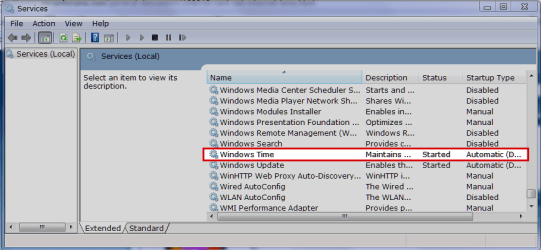
Go to Start>All Programs>Admin Tools>Services, scroll to Windows Time. Make sure start up is set to Automatic or Automatic (Delayed start). Double click the entry if not set properly.
Capture.PNG
 

My Computer

Computer type
PC/Desktop
Computer Manufacturer/Model Number
Home Built Desktop By DataTech
OS
Windows 7 Ultimate X64 SP1
CPU
Intel i5-2550K, Differing ~4.4-4.8GHz No built in GPU
Motherboard
ASUS P8Z68-V PRO/GEN3
Memory
16GB G.Skill Sniper 1866MHz @ 2133MHz 2x8GB
Graphics Card(s)
ASUS GTX650TIB-DC2OC-2GD5, (650TI Boost)
Sound Card
Onboard Realtek 5-1
Monitor(s) Displays
Samsung P2570HD
Screen Resolution
1920x1080
Hard Drives
Samsung 840 Pro 256GB SSD for OS, 500GB Seagate Constellation (Enterprise drive) for Data
PSU
Corsair HX650W
Case
Inwin Dragon Rider
Cooling
Hyper 212 EVO w/two Noctua fans, push-pull, @1300 RPM
Keyboard
E-Z Eyes, bright yellow keys with large characters
Mouse
steelseries SENSEI Laser Pro Gaming
Internet Speed
48-51Mbs Mbs down, 11 Mbs up Xfinity Cable
Antivirus
Norton Internet Security 2013
Browser
IE 10, Opera, Pale Moon if needed
Other Info
4 case fans, LG BluRay-RE, ASUS DVD-RW, Mr. Fusion power supply, 1.21 gigawatts.
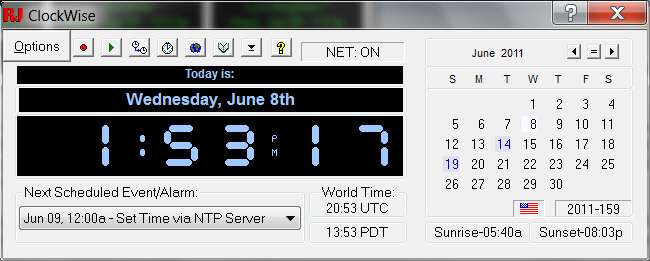
Just in passing, my own Windows Time service is set to "manual" and is currently NOT running. To keep my clock in sync via "atomic time" (every night at midnight, from tick.usno.navy.mil), I instead use an old 3rd-party product I've been using seemingly forever, named Clockwise.

I know, it's not free (but I paid for it once, many years ago with Win98, and I've been using it ever since) and it's been in this form and working perfectly for many years, and it doesn't need any change really. It does exactly what I need from it... which is a very nice clock/calendar display, a world time display showing a user-defined set of cities and their times, event/alarm mechanism, etc.

Here's the "expanded" presentation (which I don't normally use, because it's larger than I want), which allows for a "second time zone" value to also be displayed simultaneously, along with "primary time zone" and UTC:

clockwiseexpanded.jpg


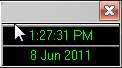
and here's the "miniature" presentation (which is what I use, placed in a corner of my screen):

clockwiseminiature.jpg


Note that with "miniature" there is a minor cosmetic problem using Aero desktop on Win7 along with "125% medium" font size. The title bar is supposed to display the day of the week, which it DOES do for WinXP and for Win7/Aero as long as you use "100% normal" font size. I miss it, but it's going to be fixed by the author in a new updated version that is planned.

There's also a "hidden" presentation version, where it is simply not onscreen at all but nevertheless is running all the time (for alarms and events, and also to update the system clock at midnight... or whatever time you set it to do that).

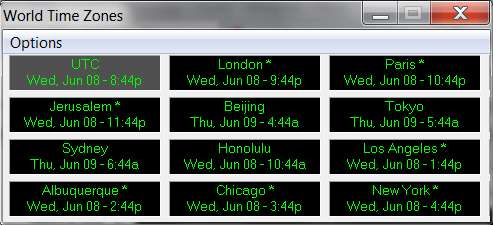
World time presentation (4x3 by default, but you can change the matrix size and can set the cities in each cell to your liking):

clockwiseworldtime.jpg
 

My Computer

Computer type
PC/Desktop
Computer Manufacturer/Model Number
Home-built, two systems (1) and (2)
OS
Windows 7 Pro x64 (1), Win7 Pro X64 (2)
CPU
i5-3350p 3.1Ghz/6MB-cache (1); E8400 3.0Ghz/6MB-cache (2)
Motherboard
ASUS P8Z77-V Pro (1); ASUS P5Q3 (2)
Memory
8GB PC3-12800 DDR3 (1); 4GB PC3-10600 DDR3 (2)
Graphics Card(s)
ATI HD7750 (1), (see TV cards); ATI R7 250 (2)
Sound Card
Realtek ALC892 HD Audio (1); Realtek ALC1200 HD Audio (2)
Monitor(s) Displays
Eizo HD2441W LCD, Eizo S2433W (1); Eizo 24" S2433W (2)
Screen Resolution
1920x1200, 1920x1200 (1); 1920x1200 (2)
Hard Drives
(1) 1TB SATA-II (7200RPM), 2x2TB SATA-III (7200RPM), 250GB SATA-III (10000RPM) for OS; 2x2TB external USB 3.0

(2) 320GB SATA-II (7200RPM), 750GB SATA-II (7200RPM), 150GB SATA-II (10000RPM) for OS; 2TB external USB 3.0
PSU
Nesteq ECS-6001 600W (1); Nesteq ECS-5001 500W (2)
Case
Acousti-Case 360 (1) and (2)
Cooling
Noctua NH-U12P SE2 for CPU, 2x120mm case fans (1) and (2)
Keyboard
IBM PS/2 (1) and (2)
Mouse
Logitech MX Revolution wireless (1); Microsoft wired (2)
Internet Speed
100mbps down / 10mbps up
Antivirus
Microsoft Security Essentials; Malwarebyte Anti-Malware Pro
Browser
Firefox
Other Info
Ceton InfiniTV 4-tuner cablecard-enabled TV card as well as Hauppauge HVR-2250 OTA/ATSC 2-tuner TV card in (1), running under Win7 WMC
Thanks dsperber, I just set my default time server to tick.usno.navy.mil.:D
:focus:
 

My Computer

Computer type
PC/Desktop
Computer Manufacturer/Model Number
Home Built Desktop By DataTech
OS
Windows 7 Ultimate X64 SP1
CPU
Intel i5-2550K, Differing ~4.4-4.8GHz No built in GPU
Motherboard
ASUS P8Z68-V PRO/GEN3
Memory
16GB G.Skill Sniper 1866MHz @ 2133MHz 2x8GB
Graphics Card(s)
ASUS GTX650TIB-DC2OC-2GD5, (650TI Boost)
Sound Card
Onboard Realtek 5-1
Monitor(s) Displays
Samsung P2570HD
Screen Resolution
1920x1080
Hard Drives
Samsung 840 Pro 256GB SSD for OS, 500GB Seagate Constellation (Enterprise drive) for Data
PSU
Corsair HX650W
Case
Inwin Dragon Rider
Cooling
Hyper 212 EVO w/two Noctua fans, push-pull, @1300 RPM
Keyboard
E-Z Eyes, bright yellow keys with large characters
Mouse
steelseries SENSEI Laser Pro Gaming
Internet Speed
48-51Mbs Mbs down, 11 Mbs up Xfinity Cable
Antivirus
Norton Internet Security 2013
Browser
IE 10, Opera, Pale Moon if needed
Other Info
4 case fans, LG BluRay-RE, ASUS DVD-RW, Mr. Fusion power supply, 1.21 gigawatts.
Go to Start>All Programs>Admin Tools>Services, scroll to Windows Time. Make sure start up is set to Automatic or Automatic (Delayed start). Double click the entry if not set properly.
View attachment 158717

When I look in services, I see no such thing listed as "Windows Time." I bet I axed it when I was futzing around in Command Prompt. How do I get it back?
 

My Computer

Computer Manufacturer/Model Number
Dell XPS 400
OS
Windows 7 X64 Professional
CPU
Intel® Pentium D Dual Core 3.6GHZ
Motherboard
DELL Dimension 9150 MotherBoard DXP051 XPS400 FJ030
Memory
4GB DDR2 PC2-5300
Graphics Card(s)
GeForce GT 440 (Fermi) 2GB 128-bit DDR3 PCI Express 2.0 x16
Sound Card
ASUS XONAR DG 5.1 Channels PCI Interface Xonar DG
Monitor(s) Displays
2 X 23" Apple Cinema Display
Screen Resolution
1920 X 1200p
Hard Drives
250GB Intel® 510 Series SSD SATA 6G (w/TRIM) [500MB/s Reads]
1.0TB Western Digital Caviar Black SATA 6G 7200rpm 64MB Cache
PSU
375 Watt Dell
Case
Dell XPS 400 BTX Case
Cooling
Dell XPS 400 Air Cooling
Keyboard
Logitech Illuminated Keyboard
Mouse
Logitech M705 Marathon
Internet Speed
+/- 9929 Kbps
Other Info
This machine was given to me when my dad bought a new computer. I keep throwing upgrades at it and it keeps on ticking. Think I've done everything to it that can be done outside a PSU upgrade so I can run an even BETTER GPU.
You can TRY system file checker SFC /scannow, but I'm not sure it will fix a missing sevice.
 

My Computer

Computer type
PC/Desktop
Computer Manufacturer/Model Number
Home Built Desktop By DataTech
OS
Windows 7 Ultimate X64 SP1
CPU
Intel i5-2550K, Differing ~4.4-4.8GHz No built in GPU
Motherboard
ASUS P8Z68-V PRO/GEN3
Memory
16GB G.Skill Sniper 1866MHz @ 2133MHz 2x8GB
Graphics Card(s)
ASUS GTX650TIB-DC2OC-2GD5, (650TI Boost)
Sound Card
Onboard Realtek 5-1
Monitor(s) Displays
Samsung P2570HD
Screen Resolution
1920x1080
Hard Drives
Samsung 840 Pro 256GB SSD for OS, 500GB Seagate Constellation (Enterprise drive) for Data
PSU
Corsair HX650W
Case
Inwin Dragon Rider
Cooling
Hyper 212 EVO w/two Noctua fans, push-pull, @1300 RPM
Keyboard
E-Z Eyes, bright yellow keys with large characters
Mouse
steelseries SENSEI Laser Pro Gaming
Internet Speed
48-51Mbs Mbs down, 11 Mbs up Xfinity Cable
Antivirus
Norton Internet Security 2013
Browser
IE 10, Opera, Pale Moon if needed
Other Info
4 case fans, LG BluRay-RE, ASUS DVD-RW, Mr. Fusion power supply, 1.21 gigawatts.
Hello Dave,

If you deleted the Windows Time sevice, then you could do a system restore using a restore point dated before you believe you deleted it. If that's not an available option to you, then I'm afraid that you may be looking at a repair install or clean reinstall of Windows 7.

Services.jpg

Hope this helps,
Shawn
 

My Computer

Computer type
PC/Desktop
Computer Manufacturer/Model Number
Self built custom
OS
64-bit Windows 11 Pro for Workstations
CPU
Intel i7-8700K OC'd to 5 GHz
Motherboard
ASUS ROG Maximus XI Formula Z390
Memory
64 GB (4x16GB) G.SKILL TridentZ RGB DDR4 3600 MHz
Graphics Card(s)
ASUS ROG-STRIX-GTX1080TI-O11G-GAMING
Sound Card
Integrated
Monitor(s) Displays
2 x Samsung Odyssey G7 27"
Screen Resolution
2560x1440
Hard Drives
1TB Samsung 990 PRO M.2,
4TB Samsung 990 PRO PRO M.2,
TerraMaster F8 SSD Plus NAS
PSU
Seasonic Prime Titanium 850W
Case
Thermaltake Core P3
Cooling
Corsair Hydro H115i
Keyboard
Logitech wireless K800
Mouse
Logitech MX Master 4
Internet Speed
2 Gb/s Download and 100 Mb/s Upload
Antivirus
Malwarebyte Anti-Malware Premium
Browser
Google Chrome
Other Info
Logitech Z625 speaker system,
Logitech BRIO 4K Pro webcam,
HP Color LaserJet Pro MFP M477fdn,
APC SMART-UPS RT 1000 XL - SURT1000XLI,
Galaxy S23 Plus phone
Time is not set by the usual method as we used to do with XP in the Control Panel or Services. Now to sync time or to set a time interval you have to modify "Time Synchronization" in the Task Scheduler > Time Synchronization (or create a new schedule as I did) (I disabled the built-in time schedule and created my own). Also using the registry to modify time synch does not work in Windows 7.

The only method that Windows 7 uses to synch time is through "Time Synchronization". You can use the Control Panel > Date and Time > Internet Time to set the server you use, but Windows 7 uses Time Synchronization in the Task Scheduler and not the Windows Time found in Services.msc to sync time. I have my Windows Time set to manual. Task Scheduler runs my task every 2 hours to synch time.
 

My Computers

System One System Two

  • Computer type
    Laptop
    Computer Manufacturer/Model Number
    Dell Precision 7510
    OS
    W7PRO
    CPU
    Intel i7-6820HQ @ 2.7GHz
    Memory
    16GB
  • Computer type
    Laptop
    OS
    W7Pro
Time is not set by the usual method as we used to do with XP in the Control Panel or Services. Now to sync time or to set a time interval you have to modify "Time Synchronization" in the Task Scheduler > Time Synchronization (or create a new schedule as I did) (I disabled the built-in time schedule and created my own). Also using the registry to modify time synch does not work in Windows 7.

The only method that Windows 7 uses to synch time is through "Time Synchronization". You can use the Control Panel > Date and Time > Internet Time to set the server you use, but Windows 7 uses Time Synchronization in the Task Scheduler and not the Windows Time found in Services.msc to sync time. I have my Windows Time set to manual. Task Scheduler runs my task every 2 hours to synch time.
Very interesting.

Do you get any UAC interactions at all with your approach?

When I first used Clockwise with Win7, I had to set the properties of "Clockwise.exe" to "run as administrator" in order to avoid UAC error popups when it wanted to "update the system clock", and also to "update system registry key" at program close or Win7 shutdown. The program still has WinXP design, and obviously needs to be revised to conform to new Win7 expectations.

There is still a UAC message when the program is launched concerning "requires authorization to update the system", however, and "run as administrator" does not prevent that.

These are all planned for correction in an upcoming Win7-compatible version.
 

My Computer

Computer type
PC/Desktop
Computer Manufacturer/Model Number
Home-built, two systems (1) and (2)
OS
Windows 7 Pro x64 (1), Win7 Pro X64 (2)
CPU
i5-3350p 3.1Ghz/6MB-cache (1); E8400 3.0Ghz/6MB-cache (2)
Motherboard
ASUS P8Z77-V Pro (1); ASUS P5Q3 (2)
Memory
8GB PC3-12800 DDR3 (1); 4GB PC3-10600 DDR3 (2)
Graphics Card(s)
ATI HD7750 (1), (see TV cards); ATI R7 250 (2)
Sound Card
Realtek ALC892 HD Audio (1); Realtek ALC1200 HD Audio (2)
Monitor(s) Displays
Eizo HD2441W LCD, Eizo S2433W (1); Eizo 24" S2433W (2)
Screen Resolution
1920x1200, 1920x1200 (1); 1920x1200 (2)
Hard Drives
(1) 1TB SATA-II (7200RPM), 2x2TB SATA-III (7200RPM), 250GB SATA-III (10000RPM) for OS; 2x2TB external USB 3.0

(2) 320GB SATA-II (7200RPM), 750GB SATA-II (7200RPM), 150GB SATA-II (10000RPM) for OS; 2TB external USB 3.0
PSU
Nesteq ECS-6001 600W (1); Nesteq ECS-5001 500W (2)
Case
Acousti-Case 360 (1) and (2)
Cooling
Noctua NH-U12P SE2 for CPU, 2x120mm case fans (1) and (2)
Keyboard
IBM PS/2 (1) and (2)
Mouse
Logitech MX Revolution wireless (1); Microsoft wired (2)
Internet Speed
100mbps down / 10mbps up
Antivirus
Microsoft Security Essentials; Malwarebyte Anti-Malware Pro
Browser
Firefox
Other Info
Ceton InfiniTV 4-tuner cablecard-enabled TV card as well as Hauppauge HVR-2250 OTA/ATSC 2-tuner TV card in (1), running under Win7 WMC
In the task scheduler is does say that the Windows Time service is used for this.
 

My Computer

Computer type
PC/Desktop
Computer Manufacturer/Model Number
Home Built Desktop By DataTech
OS
Windows 7 Ultimate X64 SP1
CPU
Intel i5-2550K, Differing ~4.4-4.8GHz No built in GPU
Motherboard
ASUS P8Z68-V PRO/GEN3
Memory
16GB G.Skill Sniper 1866MHz @ 2133MHz 2x8GB
Graphics Card(s)
ASUS GTX650TIB-DC2OC-2GD5, (650TI Boost)
Sound Card
Onboard Realtek 5-1
Monitor(s) Displays
Samsung P2570HD
Screen Resolution
1920x1080
Hard Drives
Samsung 840 Pro 256GB SSD for OS, 500GB Seagate Constellation (Enterprise drive) for Data
PSU
Corsair HX650W
Case
Inwin Dragon Rider
Cooling
Hyper 212 EVO w/two Noctua fans, push-pull, @1300 RPM
Keyboard
E-Z Eyes, bright yellow keys with large characters
Mouse
steelseries SENSEI Laser Pro Gaming
Internet Speed
48-51Mbs Mbs down, 11 Mbs up Xfinity Cable
Antivirus
Norton Internet Security 2013
Browser
IE 10, Opera, Pale Moon if needed
Other Info
4 case fans, LG BluRay-RE, ASUS DVD-RW, Mr. Fusion power supply, 1.21 gigawatts.
Do you get any UAC interactions at all with your approach?

I have UAC turned off.

I haven't seen a need for UAC, but I suspect there would not be a problem if UAC was on since Task Scheduler is being used.


In the task scheduler is does say that the Windows Time service is used for this.

Windows Time service is used but not the way it was used in XP. Task Scheduler > Time Synchronization uses Windows Time, but Windows Time does not have to be set to Auto. (Task Scheduler) Time Sychronization turns Windows Time on/off as needed. In XP, we used to adjust time via the registry, but not so in W7. The time servers are used in the Date and Time applet in W7, but that's all.
 

My Computers

System One System Two

  • Computer type
    Laptop
    Computer Manufacturer/Model Number
    Dell Precision 7510
    OS
    W7PRO
    CPU
    Intel i7-6820HQ @ 2.7GHz
    Memory
    16GB
  • Computer type
    Laptop
    OS
    W7Pro
The time servers are used in the Date and Time applet in Windows 7, but that's all.
So the time that is displayed is not windows time as read by apps and schedulers?
 

My Computer

Computer type
PC/Desktop
Computer Manufacturer/Model Number
Home Built Desktop By DataTech
OS
Windows 7 Ultimate X64 SP1
CPU
Intel i5-2550K, Differing ~4.4-4.8GHz No built in GPU
Motherboard
ASUS P8Z68-V PRO/GEN3
Memory
16GB G.Skill Sniper 1866MHz @ 2133MHz 2x8GB
Graphics Card(s)
ASUS GTX650TIB-DC2OC-2GD5, (650TI Boost)
Sound Card
Onboard Realtek 5-1
Monitor(s) Displays
Samsung P2570HD
Screen Resolution
1920x1080
Hard Drives
Samsung 840 Pro 256GB SSD for OS, 500GB Seagate Constellation (Enterprise drive) for Data
PSU
Corsair HX650W
Case
Inwin Dragon Rider
Cooling
Hyper 212 EVO w/two Noctua fans, push-pull, @1300 RPM
Keyboard
E-Z Eyes, bright yellow keys with large characters
Mouse
steelseries SENSEI Laser Pro Gaming
Internet Speed
48-51Mbs Mbs down, 11 Mbs up Xfinity Cable
Antivirus
Norton Internet Security 2013
Browser
IE 10, Opera, Pale Moon if needed
Other Info
4 case fans, LG BluRay-RE, ASUS DVD-RW, Mr. Fusion power supply, 1.21 gigawatts.
Do you get any UAC interactions at all with your approach?

I have UAC turned off.

I haven't seen a need for UAC, but I suspect there would not be a problem if UAC was on since Task Scheduler is being used.
I, too, have UAC turned off on my own machines. So I never even realized that there was a UAC-related issue with the WinXP-designed Clockwise from my own inhouse experience.

It was only when I went to install Clockwise on other family/friend Win7 machines (e.g. new laptops, new replacement home desktops, etc.) who DID have UAC active that I even discovered the set of problems.

So now I'm curious as to what your experience would be (if only for a brief experiment) if you elevated UAC to be on at say the default level, as to whether whatever you're running every two hours runs silently even with UAC enabled.
 

My Computer

Computer type
PC/Desktop
Computer Manufacturer/Model Number
Home-built, two systems (1) and (2)
OS
Windows 7 Pro x64 (1), Win7 Pro X64 (2)
CPU
i5-3350p 3.1Ghz/6MB-cache (1); E8400 3.0Ghz/6MB-cache (2)
Motherboard
ASUS P8Z77-V Pro (1); ASUS P5Q3 (2)
Memory
8GB PC3-12800 DDR3 (1); 4GB PC3-10600 DDR3 (2)
Graphics Card(s)
ATI HD7750 (1), (see TV cards); ATI R7 250 (2)
Sound Card
Realtek ALC892 HD Audio (1); Realtek ALC1200 HD Audio (2)
Monitor(s) Displays
Eizo HD2441W LCD, Eizo S2433W (1); Eizo 24" S2433W (2)
Screen Resolution
1920x1200, 1920x1200 (1); 1920x1200 (2)
Hard Drives
(1) 1TB SATA-II (7200RPM), 2x2TB SATA-III (7200RPM), 250GB SATA-III (10000RPM) for OS; 2x2TB external USB 3.0

(2) 320GB SATA-II (7200RPM), 750GB SATA-II (7200RPM), 150GB SATA-II (10000RPM) for OS; 2TB external USB 3.0
PSU
Nesteq ECS-6001 600W (1); Nesteq ECS-5001 500W (2)
Case
Acousti-Case 360 (1) and (2)
Cooling
Noctua NH-U12P SE2 for CPU, 2x120mm case fans (1) and (2)
Keyboard
IBM PS/2 (1) and (2)
Mouse
Logitech MX Revolution wireless (1); Microsoft wired (2)
Internet Speed
100mbps down / 10mbps up
Antivirus
Microsoft Security Essentials; Malwarebyte Anti-Malware Pro
Browser
Firefox
Other Info
Ceton InfiniTV 4-tuner cablecard-enabled TV card as well as Hauppauge HVR-2250 OTA/ATSC 2-tuner TV card in (1), running under Win7 WMC
So now I'm curious as to what your experience would be (if only for a brief experiment) if you elevated UAC to be on at say the default level, as to whether whatever you're running every two hours runs silently even with UAC enabled.

I'll turn it on and get back to you.
 

My Computers

System One System Two

  • Computer type
    Laptop
    Computer Manufacturer/Model Number
    Dell Precision 7510
    OS
    W7PRO
    CPU
    Intel i7-6820HQ @ 2.7GHz
    Memory
    16GB
  • Computer type
    Laptop
    OS
    W7Pro
Windows Time service is used but not the way it was used in XP. Task Scheduler > Time Synchronization uses Windows Time, but Windows Time does not have to be set to Auto. (Task Scheduler) Time Sychronization turns Windows Time on/off as needed. In XP, we used to adjust time via the registry, but not so in W7. The time servers are used in the Date and Time applet in W7, but that's all.
I'm sure this is the underlying explanation for why the WinXP-based Clockwise produces the UAC conflict it currently does when running on a Win7 system with UAC not disabled, when it goes to update both the Win7 "system clock" as well as the registry.

So it runs perfectly, silently, and quietly, when UAC is set off. And with "run as administrator" also runs silently once you launch it (and respond to the initial UAC message). And, if you will respond to the additional UAC message at program close or Windows shutdown, the program will close normally.

But obviously, it is in need or re-engineering to work its function differently in a Win7 environment. And this task scheduler technique you've devised may be the obvious solution... if it turns out to be UAC-immune.
 

My Computer

Computer type
PC/Desktop
Computer Manufacturer/Model Number
Home-built, two systems (1) and (2)
OS
Windows 7 Pro x64 (1), Win7 Pro X64 (2)
CPU
i5-3350p 3.1Ghz/6MB-cache (1); E8400 3.0Ghz/6MB-cache (2)
Motherboard
ASUS P8Z77-V Pro (1); ASUS P5Q3 (2)
Memory
8GB PC3-12800 DDR3 (1); 4GB PC3-10600 DDR3 (2)
Graphics Card(s)
ATI HD7750 (1), (see TV cards); ATI R7 250 (2)
Sound Card
Realtek ALC892 HD Audio (1); Realtek ALC1200 HD Audio (2)
Monitor(s) Displays
Eizo HD2441W LCD, Eizo S2433W (1); Eizo 24" S2433W (2)
Screen Resolution
1920x1200, 1920x1200 (1); 1920x1200 (2)
Hard Drives
(1) 1TB SATA-II (7200RPM), 2x2TB SATA-III (7200RPM), 250GB SATA-III (10000RPM) for OS; 2x2TB external USB 3.0

(2) 320GB SATA-II (7200RPM), 750GB SATA-II (7200RPM), 150GB SATA-II (10000RPM) for OS; 2TB external USB 3.0
PSU
Nesteq ECS-6001 600W (1); Nesteq ECS-5001 500W (2)
Case
Acousti-Case 360 (1) and (2)
Cooling
Noctua NH-U12P SE2 for CPU, 2x120mm case fans (1) and (2)
Keyboard
IBM PS/2 (1) and (2)
Mouse
Logitech MX Revolution wireless (1); Microsoft wired (2)
Internet Speed
100mbps down / 10mbps up
Antivirus
Microsoft Security Essentials; Malwarebyte Anti-Malware Pro
Browser
Firefox
Other Info
Ceton InfiniTV 4-tuner cablecard-enabled TV card as well as Hauppauge HVR-2250 OTA/ATSC 2-tuner TV card in (1), running under Win7 WMC
The Windows Time Service is a network orientated service, and not needed on a stand alone systems. If you are running a major network of hundreds or thousands of systems in a client-server environment it is vastly more important that all the system's times are in sync, than if the time is actually correct.
The servers send out a regular synch pulse which is used by the windows time service on the client machines to set the clocks to match the server time. This assists in backup and other system tasks.

of course it is also normal procedure to keep the servers synced to the atomic clocks via the internet

The win7 time synchronisation with the internet is, as stated above, controlled from the Task Scheduler, and may be adjusted by editing the Task.

The option of running a task with the "Highest Possible privileges" prevents any UAC issues, and may also be used for running any 3rd party program at start-up, without UAC prompts as long as the program itself requires no interaction - there is a full tutorial in the tutorial section

http://www.sevenforums.com/tutorials/67503-task-create-run-program-startup-log.html
 

My Computers

System One System Two

  • Computer type
    PC/Desktop
    Computer Manufacturer/Model Number
    ChillBlast - Custom to my design
    OS
    Windows 11 Pro x64 [Latest Release and Release Preview]
    CPU
    Ryzen 9 5950X, 3.8 - 5.2 MHz
    Motherboard
    Asus Prime X570-Pro
    Memory
    64GB [2 x 32GB] DDR4 3200MHz
    Graphics Card(s)
    4GB NVIDIA GEFORCE GTX 1650 Ti
    Sound Card
    On-board SPDIF to 5.1 System + HDMI [5.1 system]
    Monitor(s) Displays
    32" UHD 32 Bit HDR Monitor + 43" UHD 4K 32Bit HDR TV
    Screen Resolution
    2 x 3840 x 2160 @60Hz
    Hard Drives
    1TB M2 SSD OS, 500GB Fast Access SSD, 2 x 8TB Data + Various Externals from 1TB to 4TB, 10TB NAS
    PSU
    NZXT C750 80 PLUS Gold 750W Modular PSU
    Case
    Workstation Case [Matt Black]
    Cooling
    NZXT Kraken X63 280mm CPU Cooler +2x Quiet Case fans
    Keyboard
    Logitech Wireless MX Keys & K400 + others
    Mouse
    Logitech Wireless MX Master 3S
    Internet Speed
    920 MB Down 50 MB Up
    Antivirus
    BitDefender Total Security Pro
    Browser
    Chrome (always run latest Non-Beta)
    Other Info
    Also run ...
    Laptop - Quad 8GB - Windows 10 Pro x64
    Nexus 7 Android tablet x2
    Samsung 10.2" tablet
    Blackview TAB 8 4G Android Tablet c/w Keyboard
    Wacom Intuos Pro Medium Pen Pad
    Wacom Intuos Pro Small Pen Pad
    Wacom Expresskeys Remote
    Loopdeck+ Graphics Controller
    Shuttle Pro v2 Control
  • Computer type
    Laptop
    System Manufacturer/Model Number
    Dell XPS 17 10750H
    OS
    Windows 11 Pro x64 Latest RP
    CPU
    Intel I7 10750H 5.0GHz
    Motherboard
    Dell XPS
    Memory
    32GB [2x16GB] DDR4 2933 MHz
    Graphics Card(s)
    nVidia GTX1650Ti 4 GB GDDR6
    Sound Card
    Stock [Realtek] 4 Speaker
    Monitor(s) Displays
    17" IPS UHD+ Infinity Edge Touchscreen
    Screen Resolution
    3840 x 2400
    Hard Drives
    2TB M2 NVMe, 4TB External + various 500GB & 1TB External NVMe (also have access to spinner HDD from
    PSU
    Stock
    Case
    Stock XPS Aluminium & Carbon Fibre
    Cooling
    Stock - Active Fan Control
    Keyboard
    Backlit + Various Logitech
    Mouse
    Stock Track Pad + Logitech MX Trackball
    Internet Speed
    72 MB Down 18MB Up
    Browser
    Chrome
    Other Info
    Also run ...
    Laptop - Quad 8GB - Windows 10 Pro x64
    Nexus 7 Android tablet x2
    10.2" tablet
    Sony Z3 Android Smartphone
    Wacom Intuos Pro Medium Pen Pad
    Wacom Intuos Pro Small Pen Pad
    Wacom Expresskeys Remote
    Loopdeck+ Graphics Controller
    Shuttle Pro v2 Control Pad
    10TB NAS
So now I'm curious as to what your experience would be (if only for a brief experiment) if you elevated UAC to be on at say the default level, as to whether whatever you're running every two hours runs silently even with UAC enabled.

I'll turn it on and get back to you.


Well, I set the clock to a different time, turned on UAC, and rebooted. At the scheduled interval that Time Synchronization was to occur, Task Scheduler > Time Synchronization ran likes it's supposed to and reset the clock to the correct time.

UAC did not interfer with my schedule in Time Synchronization. There is no conflict.
 

My Computers

System One System Two

  • Computer type
    Laptop
    Computer Manufacturer/Model Number
    Dell Precision 7510
    OS
    W7PRO
    CPU
    Intel i7-6820HQ @ 2.7GHz
    Memory
    16GB
  • Computer type
    Laptop
    OS
    W7Pro
Back
Top