
I have 2 USB 802.11b/g wireless adapters. I finally got Windows 7 64-bit drivers installed on both computers.
On one computer device manager says the device is working properly, on the other there is a Code 10 error.
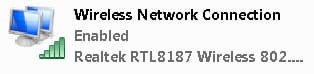
When I try Windows' "manually connect to a wireless network" or "manually create a network profile" on the "device is working" computer, I get the message "an unexpected error occurred." I have Linksys Network Magic running and try to get it to add a wireless adapter. It reports that wireless is not enabled. The attached jpg shows what Windows thinks. The connection is enabled but no app will use it.
No matter what I do on the other computer, the code 10 remains.
I've seen a number of code 10 threads, but none seems to apply to my problem.
I consider that I'm fairly knowledgeable about wireless, having setup several wireless computers and other devices on my network, but this one has me tearing my hair out -- I don't have a lot to spare!
On one computer device manager says the device is working properly, on the other there is a Code 10 error.
When I try Windows' "manually connect to a wireless network" or "manually create a network profile" on the "device is working" computer, I get the message "an unexpected error occurred." I have Linksys Network Magic running and try to get it to add a wireless adapter. It reports that wireless is not enabled. The attached jpg shows what Windows thinks. The connection is enabled but no app will use it.
No matter what I do on the other computer, the code 10 remains.
I've seen a number of code 10 threads, but none seems to apply to my problem.
I consider that I'm fairly knowledgeable about wireless, having setup several wireless computers and other devices on my network, but this one has me tearing my hair out -- I don't have a lot to spare!
Attachments
My Computer
- OS
- Windows 7 Pro 64

