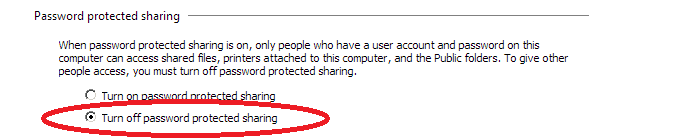
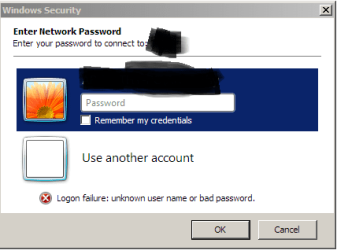
I'm trying to network a desktop computer with a new laptop. Both are Windows 7 Home Premium computers. The desktop lists the laptop in the network, but when I try to access folders I'm sharing, I am prompted for a password. The laptop has no password since I log on without it. I've also tried the homegroup password, but it's still not accepted. I've tried other passwords I've used here and there for things, but none of them works.
Furthermore, the laptop doesn't see the desktop. Only the desktop lists both itself and the laptop in the network. The laptop lists only itself.
The laptop has options for creating a homegroup, but the desktop does not, which seems odd to me since they're both Windows 7 Home Premium, and I thought W7 HP could not create a homegroup. In any case, I just want to share several folders with both computers over my home network.
Could this be a firewall issue with the laptop? I see plenty of resources for allowing new programs through the firewall, but how, then, do I allow the other computer through?
If I could solve the password mystery, it might work. Help, please. Puh-leez!
Thanks.
Furthermore, the laptop doesn't see the desktop. Only the desktop lists both itself and the laptop in the network. The laptop lists only itself.
The laptop has options for creating a homegroup, but the desktop does not, which seems odd to me since they're both Windows 7 Home Premium, and I thought W7 HP could not create a homegroup. In any case, I just want to share several folders with both computers over my home network.
Could this be a firewall issue with the laptop? I see plenty of resources for allowing new programs through the firewall, but how, then, do I allow the other computer through?
If I could solve the password mystery, it might work. Help, please. Puh-leez!
Thanks.
Attachments
My Computer
- Computer type
- PC/Desktop
- Computer Manufacturer/Model Number
- Dell Studio XPS 8100, Dell XPS 15 laptop
- OS
- Windows 10 Home, 64 bit
- CPU
- Intel Core i7 860 @ 2.8 GHz
- Motherboard
- Dell 0T568R (CPU1)
- Memory
- 8.0 GB Dual Channel DDR3 @ 664 MHz (9-9-9-24)
- Graphics Card(s)
- nVidia GeForce GTS 240
- Sound Card
- M-Audio Delta Audiophile 2496
- Monitor(s) Displays
- Dell 2407WFP
- Screen Resolution
- 1920x1200
- Hard Drives
- 977 GB Western Digital WDC WD1001FAES-75W7A0 (SCSI)
- Antivirus
- Windows Defender, MalwareBytes Anti-Malware, AdwCleaner
- Browser
- Firefox, occasionally IE and Edge
- Other Info
- Mozilla Firefox, Mozilla Thunderbird. Western Digital Passport 250 GB external HD, two Mushkin Enhanced Mulholland 32GB USB flash drives, AKG K240 Studio headphones, Asus AC-1900 dual band wireless router.