I have used 7 (64 bit) long enough to be confident in using it as my main Windows machine.
Part of that is being a print server. I am staying with Workgroups to allow connecting to Linux boxes using Samba.
I installed the printer just fine.
But I can't see how to share it.
Google searches helped me verify some things.
Under Network and Sharing Center > Change Adapter Settings I do have File and Printer Sharing enabled.
Under Advanced sharing settings I have set the radio button to Turn on file and printer sharing.
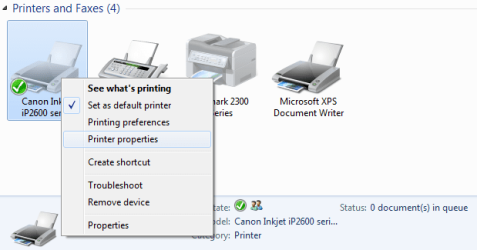
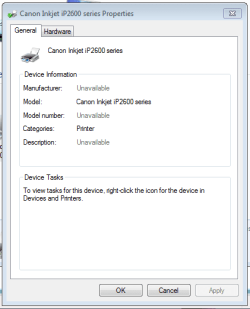
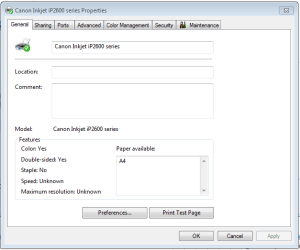
But when I go to Devices and Printers in Control Panel, and go to properties of the printer, I do not have a sharing tab. Or anything share related on the context menu.
I can access folders on other machines, and I can share folders, but I get prompted for a password on other machines even though I have disabled passwords. That is a lower priority.
How can I share the printer?
Thank you!
Part of that is being a print server. I am staying with Workgroups to allow connecting to Linux boxes using Samba.
I installed the printer just fine.
But I can't see how to share it.
Google searches helped me verify some things.
Under Network and Sharing Center > Change Adapter Settings I do have File and Printer Sharing enabled.
Under Advanced sharing settings I have set the radio button to Turn on file and printer sharing.
But when I go to Devices and Printers in Control Panel, and go to properties of the printer, I do not have a sharing tab. Or anything share related on the context menu.
I can access folders on other machines, and I can share folders, but I get prompted for a password on other machines even though I have disabled passwords. That is a lower priority.
How can I share the printer?
Thank you!
My Computer
- OS
- 7