Can't shrink windows 7 partition anymore

jeremyleroy96

New member
Local time
5:23 PM
Messages
41
i am only able to shrink it 10gb! but i need more for what i want i have disabled and deleted page file, disabled hibernate and did every single trick! what can i do? I am pretty sure i cant use gparted on linux because it will make it unbootable correct?
 

My Computer My Computer

Computer Manufacturer/Model Number
HP
OS
Windows 7 64 Bit
Memory
4GB
Graphics Card(s)
NVidia Geforce 130m 1gb w/ Cuda
Screen Resolution
1366 x 768
Hard Drives
500gb

My Computer My Computer

Computer Manufacturer/Model Number
* BFK Customs *
OS
W 7 64-bit Ultimate
CPU
Intel Q9550 Yorkfield
Motherboard
ASUS P5Q Pro
Memory
8GB Dominator 8500C5D
Graphics Card(s)
ATI : XFX 5870
Sound Card
Realtek HD Audio 7-1
Monitor(s) Displays
1x 47" LCD HDMI & 3x 26" LCD HDMI
Screen Resolution
1920x1080P & 1920x1200
Hard Drives
1x 80GB Intel X25-M G2 SSD : 1x 500GB & 1x 640GB WD Caviar Black(s)
PSU
Corsair 620HX
Case
Cooler Master RC-690
Cooling
Tuniq Tower 120, 2x 140mm and 3x 120mm case fans
Keyboard
Microsoft 500
Mouse
Razer Diamondback 3G
Internet Speed
14 Mb/s
Other Info
1x Koutech 3Gb/s SATA HDD Hot Swap Rack
You are not going to get much smaller then 10 GB.
 

My Computer My Computer

Computer type
PC/Desktop
Computer Manufacturer/Model Number
Alienware Aurora ALX R4
OS
Windows 10 Pro (x64)
CPU
Intel Core i7-3930K (3.2GHz - 4.5GHz)
Motherboard
Alienware Aurora-R4 x79
Memory
4x Samsung 4GB PC3-12800 DDR3 (16GB 1600MHz)
Graphics Card(s)
Nvidia Geforce GTX 690
Sound Card
SteelSeries Siberia Elite
Monitor(s) Displays
Dell UltraSharp U3011
Screen Resolution
2560x1600
Hard Drives
Samsung 850 Pro 256 GB, Seagate 1TB Desktop Hybrid HDD, 2x Western Digital 4TB Green HDD
PSU
875W Some Dell PSU <.<
Case
Alienware Aurora ALX
Cooling
Custom Liquid Cooling (EK CPU & GPU blocks) dual EK 480RAD
Keyboard
Logitech G710+ Mechanical
Mouse
Logitech G700s
Internet Speed
Verizon Fios (50 mbps average)
Other Info
Server: Intel NUC D54250WYK: i5-4250U, 16GB, 256 GB mSATA, Windows Server 2012 R2
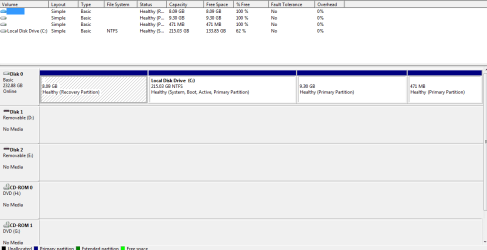
There you go my largest partition in windows 7. One is recovery (8gb) one is ubuntu (10gb) and the other is something called swap for ubuntu. I can now shrink nothing because i used the 10gb on ubuntu.
h.png
 

My Computer My Computer

Computer Manufacturer/Model Number
HP
OS
Windows 7 64 Bit
Memory
4GB
Graphics Card(s)
NVidia Geforce 130m 1gb w/ Cuda
Screen Resolution
1366 x 768
Hard Drives
500gb
Just because I'm curious; why do you want so many small partitions?
 

My Computer My Computer

Computer Manufacturer/Model Number
* BFK Customs *
OS
W 7 64-bit Ultimate
CPU
Intel Q9550 Yorkfield
Motherboard
ASUS P5Q Pro
Memory
8GB Dominator 8500C5D
Graphics Card(s)
ATI : XFX 5870
Sound Card
Realtek HD Audio 7-1
Monitor(s) Displays
1x 47" LCD HDMI & 3x 26" LCD HDMI
Screen Resolution
1920x1080P & 1920x1200
Hard Drives
1x 80GB Intel X25-M G2 SSD : 1x 500GB & 1x 640GB WD Caviar Black(s)
PSU
Corsair 620HX
Case
Cooler Master RC-690
Cooling
Tuniq Tower 120, 2x 140mm and 3x 120mm case fans
Keyboard
Microsoft 500
Mouse
Razer Diamondback 3G
Internet Speed
14 Mb/s
Other Info
1x Koutech 3Gb/s SATA HDD Hot Swap Rack
You likely have a system file way out in right field that is blocking shrinkage. You can actually see it on the defrag map using Auslogics free Disk Defragger.

The tool which will move this file is PerfectDisk 10 trial version Offline Defragger. First run defragger in Compact Files mode, then rightclick on drive to run Offline Defragger to move System files.

Post back if you need any help. This is how I have solved this problems dozens of times.
 
Just because I'm curious; why do you want so many small partitions?

I listed the partitions!!! The smallest 100mb or something is something for ubuntu to use as temporary files. I want to dual boot ubuntu so i need to shrink windows and give ubuntu the unallocated space. I have a looked at the defrag map in what you told me yes there are a lot of files not at the end of the volume but probably at the 10gb mark. I defragmented and it didn't move them!

EDIT: sorry didn't see your post. Will the trial version so what i need it to or will i need to purchase it?
 

My Computer My Computer

Computer Manufacturer/Model Number
HP
OS
Windows 7 64 Bit
Memory
4GB
Graphics Card(s)
NVidia Geforce 130m 1gb w/ Cuda
Screen Resolution
1366 x 768
Hard Drives
500gb
The trial will allow you to use the features mentioned to move the system file out of the way.

Ask back if you need any help 1)defragging to compact files, then 2) offline defragging to move System Files.
 
Last edited:
I use gParted in the Ubuntu live install cd (written to a 1GB flash drive with unetbootin) to create free space at the end a HDD before installing Ubuntu.. It only needs about 10GB to work and can save files to NTFS partitions. Usually the files windows puts at the end of the system partition are temporary files and pieces of restore points, which are not critical system files anyway, even though they're protected. I would also recommend making a system backup image first. If you like ubuntu and want to use it permanently on a system with only one HDD, I found the best way to do it is to erase the HDD, use gparted to create 2 NTFS partitions (1 for windows and programs and one for media). Leave 30-40 GB of free space, reinstall windows first, then install ubuntu in the free space. Let ubuntu configure the partitions or you'll get hopelessly messed up trying to get it working, especially if you've never done it before
 
Back
Top