Hi Guys,
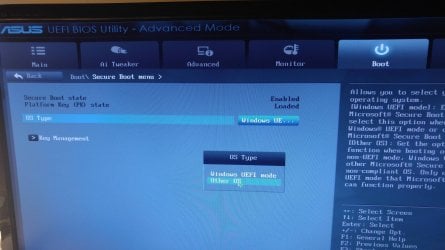
I have multiple OS installed and after a standard BIOS update all my OS except Win 7 Pro 64 will boot. I get the error similar to Solved system32\winload.efi Status 0xC0000428 error
i.e
\windows.~bt\windows\system32\winload.efi
Status 0xC0000428
The digital signature for this file could not be verified
Here is my BCDEdit /enum
...but I dont see a set up section like the other user so I cant delete same. When I try and use my Win 7 discs I get an incompatibility pop up?
Any idea of a fix? I also tried
bootrec /fixmbr
bootrec /fixboot
bootrec /rebuildBCD
...last command didnt execute. I have Win 7,10,server 2008, server 2012 on the PC and all worked pre BIOS update.
Thanks
Error screenshot
https://imgur.com/a/UpAoT
I have multiple OS installed and after a standard BIOS update all my OS except Win 7 Pro 64 will boot. I get the error similar to Solved system32\winload.efi Status 0xC0000428 error
i.e
\windows.~bt\windows\system32\winload.efi
Status 0xC0000428
The digital signature for this file could not be verified
Here is my BCDEdit /enum
Code:
D:\WINDOWS\system32>BCDEdit /enum

Windows Boot Manager
--------------------
identifier              {bootmgr}
device                  partition=\Device\HarddiskVolume6
path                    \EFI\Microsoft\Boot\bootmgfw.efi
description             Windows Boot Manager
locale                  en-US
inherit                 {globalsettings}
default                 {default}
resumeobject            {f70bf587-5970-11e5-a45c-ff4a625ade9b}
displayorder            {current}
                        {5e8aa277-7437-11e4-be50-c944a73f9204}
                        {5e8aa273-7437-11e4-be50-c944a73f9204}
                        {5e8aa26f-7437-11e4-be50-c944a73f9204}
                        {default}
toolsdisplayorder       {memdiag}
timeout                 10

Windows Boot Loader
-------------------
identifier              {current}
device                  partition=D:
path                    \WINDOWS\system32\winload.efi
description             Windows 10
locale                  en-US
inherit                 {bootloadersettings}
recoverysequence        {f70bf589-5970-11e5-a45c-ff4a625ade9b}
recoveryenabled         Yes
isolatedcontext         Yes
allowedinmemorysettings 0x15000075
osdevice                partition=D:
systemroot              \WINDOWS
resumeobject            {f70bf587-5970-11e5-a45c-ff4a625ade9b}
nx                      OptIn
bootmenupolicy          Standard

Windows Boot Loader
-------------------
identifier              {5e8aa277-7437-11e4-be50-c944a73f9204}
device                  partition=M:
path                    \Windows\system32\winload.efi
description             Windows Server 2012 R2
locale                  en-US
inherit                 {bootloadersettings}
recoverysequence        {5e8aa278-7437-11e4-be50-c944a73f9204}
recoveryenabled         Yes
isolatedcontext         Yes
allowedinmemorysettings 0x15000075
osdevice                partition=M:
systemroot              \Windows
resumeobject            {5e8aa276-7437-11e4-be50-c944a73f9204}
nx                      OptOut

Windows Boot Loader
-------------------
identifier              {5e8aa273-7437-11e4-be50-c944a73f9204}
device                  partition=L:
path                    \Windows\system32\winload.efi
description             Windows Server 2008 R2
locale                  en-US
inherit                 {bootloadersettings}
recoverysequence        {5e8aa274-7437-11e4-be50-c944a73f9204}
recoveryenabled         Yes
osdevice                partition=L:
systemroot              \Windows
resumeobject            {5e8aa272-7437-11e4-be50-c944a73f9204}
nx                      OptOut

Windows Boot Loader
-------------------
identifier              {5e8aa26f-7437-11e4-be50-c944a73f9204}
device                  partition=K:
path                    \Windows\system32\winload.efi
description             Windows 8.1
locale                  en-US
inherit                 {bootloadersettings}
recoverysequence        {5e8aa270-7437-11e4-be50-c944a73f9204}
recoveryenabled         Yes
isolatedcontext         Yes
allowedinmemorysettings 0x15000075
osdevice                partition=K:
systemroot              \Windows
resumeobject            {5e8aa26e-7437-11e4-be50-c944a73f9204}
nx                      OptIn
bootmenupolicy          Standard

Windows Boot Loader
-------------------
identifier              {default}
device                  partition=C:
path                    \Windows\system32\winload.efi
description             Windows 7
locale                  en-US
inherit                 {bootloadersettings}
recoverysequence        {5e8aa26c-7437-11e4-be50-c944a73f9204}
recoveryenabled         Yes
osdevice                partition=C:
systemroot              \Windows
resumeobject            {5e8aa26a-7437-11e4-be50-c944a73f9204}
nx                      OptIn
...but I dont see a set up section like the other user so I cant delete same. When I try and use my Win 7 discs I get an incompatibility pop up?
Any idea of a fix? I also tried
bootrec /fixmbr
bootrec /fixboot
bootrec /rebuildBCD
...last command didnt execute. I have Win 7,10,server 2008, server 2012 on the PC and all worked pre BIOS update.
Thanks
Error screenshot
https://imgur.com/a/UpAoT
My Computer
At a glance
Win 7 Pro 64bitProcessor a 4.70 gigahertz AMD FX -9590 Eight...G.SKILL Sniper Gaming Series 16GB (2 x 8GB) 2...GIGABYTE GV-R929XOC-4GD Radeon R9 290X 4GB 51...
- Computer type
- PC/Desktop
- Computer Manufacturer/Model Number
- Custom
- OS
- Win 7 Pro 64bit
- CPU
- Processor a 4.70 gigahertz AMD FX -9590 Eight-Core
- Motherboard
- ASUSTeK COMPUTER INC. SABERTOOTH 990FX R2.0 Rev 1.xx
- Memory
- G.SKILL Sniper Gaming Series 16GB (2 x 8GB) 240-Pi
- Graphics Card(s)
- GIGABYTE GV-R929XOC-4GD Radeon R9 290X 4GB 512-Bit
- Hard Drives
- Samsung SSD 840 EVO 500GB
ST1000DM003-1CH162 [Hard drive] (1000.20 GB)
WDC WD10EZEX-08M2NA0 [Hard drive] (1000.20 GB)
- Antivirus
- Vipre
- Browser
- Chrome