
Can't start Windows DVD Maker - video card does not meet system req

Sigh, we are not in phase. I answer the post before after another of your posts... oh well..

So I paste the hardware Id that ive copied from device manager over the first bold line above.

And then I change this line 'NVIDIA_G86.DEV_0428.3 = "NVIDIA GeForce 8400M G'

to say 'Sony Vaio' instead? Or do I just put a T next to the G?

This part is confusing for me! Sorry
Heh I'm sorry.
It's my fault as I am the one that knows better in this field.

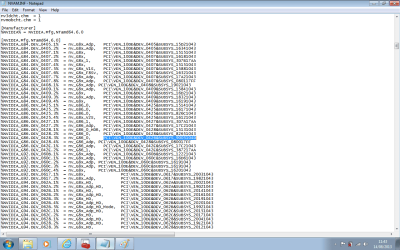
Replace only PCI\VEN_10DE&DEV_0428&SUBSYS_16161043.

The line will have to become:

%NVIDIA_G86.DEV_0428.3% = nv_G86_0, PASTE YOUR HARDWARE ID HERE

The part before the comma is what driver has to be loaded, the hardware ID after the comma and the space identifies the device that will use it.

Then down in the second line the guy said to change "NVIDIA GeForce 8400M G" to "Sony Vaio", I say that imho it's irrelevant.

That line says what you will see in the place of Standard VGA Graphics adapter if you manage to install this driver. Whatever is written there should not have any other effect as it's just text to be used in the user interface (what the humans see, the computer when it is doing its stuff sees only the hardware IDs which is the first line I told you to modify), at least in theory.

So I said you could try correcting it first to "NVIDIA GeForce 8400M GT" and if it does not load, you can edit it to "Sony Vaio" later.
 

My Computer My Computer

At a glance

Win 7 Pro 64-bit 7601AMD Phenom 9650 QuadCore, revision DR-B35 GB yes I run 2x 2GB and 1x 1GB, different b...NVIDIA GeForce 9800 GT 512 Mb, unknown manufa...
Computer type
PC/Desktop
Computer Manufacturer/Model Number
custom built
OS
Win 7 Pro 64-bit 7601
CPU
AMD Phenom 9650 QuadCore, revision DR-B3
Motherboard
ASUS M4A78
Memory
5 GB yes I run 2x 2GB and 1x 1GB, different brand, spank me.
Graphics Card(s)
NVIDIA GeForce 9800 GT 512 Mb, unknown manufacturer.
Sound Card
Crappy Realtek Integrated Audio
Monitor(s) Displays
Fujitsu Siemens P19-3P
Screen Resolution
1280 x 1024 x 32 bits @ 60 Hz Oh yeah, 4:3 rocks!
Hard Drives
(1) MAXTOR S TM3320613AS SATA Disk Device (2) STM35004 18AS SATA Disk Device (3) TOSHIBA USB 2.5"-HDD
PSU
whatever, around 450w
Case
Scavenged from old company PC, 10+ years old
Cooling
CPU fan, GPU fan, case fan, nothing fancy
Keyboard
Microsoft, PS/2, white.
Mouse
Optical, logitec.
Internet Speed
effective max speeds: 70-ish kB/s down 30-ish kB/s up
Antivirus
Avira, free edition.
Browser
Firefox with FXChrome to make it look like Google Chrome :P
Other Info
Was discarded by previous owner due to "horrible performance".
Was running Win Xp from a IDE drive. Yeah. Was a pain.
SATA II drive and Win7 and it zips away! Yay!
Sigh, we are not in phase. I answer the post before after another of your posts... oh well..

So I paste the hardware Id that ive copied from device manager over the first bold line above.

And then I change this line 'NVIDIA_G86.DEV_0428.3 = "NVIDIA GeForce 8400M G'

to say 'Sony Vaio' instead? Or do I just put a T next to the G?

This part is confusing for me! Sorry
Heh I'm sorry.
It's my fault as I am the one that knows better in this field.

Replace only PCI\VEN_10DE&DEV_0428&SUBSYS_16161043.

The line will have to become:

%NVIDIA_G86.DEV_0428.3% = nv_G86_0, PASTE YOUR HARDWARE ID HERE

The part before the comma is what driver has to be loaded, the hardware ID after the comma and the space identifies the device that will use it.

Then down in the second line the guy said to change "NVIDIA GeForce 8400M G" to "Sony Vaio", I say that imho it's irrelevant.

That line says what you will see in the place of Standard VGA Graphics adapter if you manage to install this driver. Whatever is written there should not have any other effect as it's just text to be used in the user interface (what the humans see, the computer when it is doing its stuff sees only the hardware IDs which is the first line I told you to modify), at least in theory.

So I said you could try correcting it first to "NVIDIA GeForce 8400M GT" and if it does not load, you can edit it to "Sony Vaio" later.

Tried the method you suggest mate and unfortunately it doesn't work :(
 

Attachments

  • Untitled.png
    Untitled.png
    23.7 KB · Views: 4
  • Untitled1.png
    Untitled1.png
    30.7 KB · Views: 4

My Computer My Computer

At a glance

Windows 7 Ultimate x64
Computer type
Laptop
Computer Manufacturer/Model Number
Sony Vaio FZ38M
OS
Windows 7 Ultimate x64
The second line had to become

NVIDIA_G86.DEV_0428.3 = "Sony Vaio "

not just "Sony Vaio"

I said to replace only the "NVIDIA GeForce 8400M G", not the whole line.

-----------------

If it still doesn't work you can try with the others with a revision number close enough.

That is, delete both lines you modified, don't leave empty spaces.

Do the same as you did above with

%NVIDIA_G86.DEV_0428.1% = nv_G86_0_HDR, PCI\VEN_10DE&DEV_0428&SUBSYS_15131043

And the other line with the same name below

NVIDIA_G86.DEV_0428.1 = "NVIDIA GeForce 8400M G"


If does not work delete the two lines, and do the same to

%NVIDIA_G86.DEV_0428.2% = nv_G86_0, PCI\VEN_10DE&DEV_0428&SUBSYS_82651043

and

NVIDIA_G86.DEV_0428.2 = "NVIDIA GeForce 8400M G "


if it still does not work delete again and do the same to these lines:

%NVIDIA_G86.DEV_0428.4% = nv_G86_Adp, PCI\VEN_10DE&DEV_0428&SUBSYS_080017FF

and

NVIDIA_G86.DEV_0428.4 = "NVIDIA GeForce 8400M G "
 

My Computer My Computer

At a glance

Win 7 Pro 64-bit 7601AMD Phenom 9650 QuadCore, revision DR-B35 GB yes I run 2x 2GB and 1x 1GB, different b...NVIDIA GeForce 9800 GT 512 Mb, unknown manufa...
Computer type
PC/Desktop
Computer Manufacturer/Model Number
custom built
OS
Win 7 Pro 64-bit 7601
CPU
AMD Phenom 9650 QuadCore, revision DR-B3
Motherboard
ASUS M4A78
Memory
5 GB yes I run 2x 2GB and 1x 1GB, different brand, spank me.
Graphics Card(s)
NVIDIA GeForce 9800 GT 512 Mb, unknown manufacturer.
Sound Card
Crappy Realtek Integrated Audio
Monitor(s) Displays
Fujitsu Siemens P19-3P
Screen Resolution
1280 x 1024 x 32 bits @ 60 Hz Oh yeah, 4:3 rocks!
Hard Drives
(1) MAXTOR S TM3320613AS SATA Disk Device (2) STM35004 18AS SATA Disk Device (3) TOSHIBA USB 2.5"-HDD
PSU
whatever, around 450w
Case
Scavenged from old company PC, 10+ years old
Cooling
CPU fan, GPU fan, case fan, nothing fancy
Keyboard
Microsoft, PS/2, white.
Mouse
Optical, logitec.
Internet Speed
effective max speeds: 70-ish kB/s down 30-ish kB/s up
Antivirus
Avira, free edition.
Browser
Firefox with FXChrome to make it look like Google Chrome :P
Other Info
Was discarded by previous owner due to "horrible performance".
Was running Win Xp from a IDE drive. Yeah. Was a pain.
SATA II drive and Win7 and it zips away! Yay!
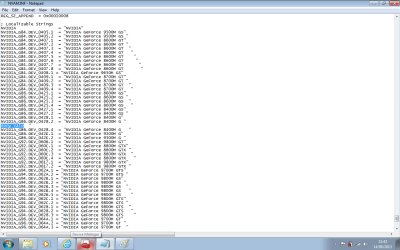
Thanks for the help fella, but no luck.
 

My Computer My Computer

At a glance

Windows 7 Ultimate x64
Computer type
Laptop
Computer Manufacturer/Model Number
Sony Vaio FZ38M
OS
Windows 7 Ultimate x64
Heh. I'm out of ideas to load that driver in Windows. Seems like your card isn't the same as the one of that guy (while having the same name).

We now check if you really need that driver anyway. Is the screen resolution the screen's native (in the laptop specs says 1280 x 800)?

If you just want to burn a DVD, you can use plenty of very good free programs, like say ImgBurn. (its installer contains toolbars and other crap, please read what you are installing and decline any offer for registry cleaners and toolbars and whatever isn't ImgBurn)

Can you try playing your blu-rays with a free player or a trial? Do they play smoothly? Is the processor load from task manager above 90%?

If it does fine, and you can live with a horribly unsafe and crappy user interface, you can live without that driver. If it isn't like I suspected and you didn't crack it anyway.

The other option is triggering the recovery (if you have it) as said in post 20. To get back Vista and the blu-ray player. Or just reinstalling Vista.

Otherwise it's the linux option as said above in post 16.
 

My Computer My Computer

At a glance

Win 7 Pro 64-bit 7601AMD Phenom 9650 QuadCore, revision DR-B35 GB yes I run 2x 2GB and 1x 1GB, different b...NVIDIA GeForce 9800 GT 512 Mb, unknown manufa...
Computer type
PC/Desktop
Computer Manufacturer/Model Number
custom built
OS
Win 7 Pro 64-bit 7601
CPU
AMD Phenom 9650 QuadCore, revision DR-B3
Motherboard
ASUS M4A78
Memory
5 GB yes I run 2x 2GB and 1x 1GB, different brand, spank me.
Graphics Card(s)
NVIDIA GeForce 9800 GT 512 Mb, unknown manufacturer.
Sound Card
Crappy Realtek Integrated Audio
Monitor(s) Displays
Fujitsu Siemens P19-3P
Screen Resolution
1280 x 1024 x 32 bits @ 60 Hz Oh yeah, 4:3 rocks!
Hard Drives
(1) MAXTOR S TM3320613AS SATA Disk Device (2) STM35004 18AS SATA Disk Device (3) TOSHIBA USB 2.5"-HDD
PSU
whatever, around 450w
Case
Scavenged from old company PC, 10+ years old
Cooling
CPU fan, GPU fan, case fan, nothing fancy
Keyboard
Microsoft, PS/2, white.
Mouse
Optical, logitec.
Internet Speed
effective max speeds: 70-ish kB/s down 30-ish kB/s up
Antivirus
Avira, free edition.
Browser
Firefox with FXChrome to make it look like Google Chrome :P
Other Info
Was discarded by previous owner due to "horrible performance".
Was running Win Xp from a IDE drive. Yeah. Was a pain.
SATA II drive and Win7 and it zips away! Yay!
After all that fiddling about with the driver, I used a nvidia beta driver on their website! I did go on the exact page where the successful driver is, but I was hesitant to use a beta driver.

Anyway, the display is now showing the correct GPU.

All the best!
 

My Computer My Computer

At a glance

Windows 7 Ultimate x64
Computer type
Laptop
Computer Manufacturer/Model Number
Sony Vaio FZ38M
OS
Windows 7 Ultimate x64
Can you please post what name/number/version that driver is?

So we know how to help better other people.
 

My Computer My Computer

At a glance

Win 7 Pro 64-bit 7601AMD Phenom 9650 QuadCore, revision DR-B35 GB yes I run 2x 2GB and 1x 1GB, different b...NVIDIA GeForce 9800 GT 512 Mb, unknown manufa...
Computer type
PC/Desktop
Computer Manufacturer/Model Number
custom built
OS
Win 7 Pro 64-bit 7601
CPU
AMD Phenom 9650 QuadCore, revision DR-B3
Motherboard
ASUS M4A78
Memory
5 GB yes I run 2x 2GB and 1x 1GB, different brand, spank me.
Graphics Card(s)
NVIDIA GeForce 9800 GT 512 Mb, unknown manufacturer.
Sound Card
Crappy Realtek Integrated Audio
Monitor(s) Displays
Fujitsu Siemens P19-3P
Screen Resolution
1280 x 1024 x 32 bits @ 60 Hz Oh yeah, 4:3 rocks!
Hard Drives
(1) MAXTOR S TM3320613AS SATA Disk Device (2) STM35004 18AS SATA Disk Device (3) TOSHIBA USB 2.5"-HDD
PSU
whatever, around 450w
Case
Scavenged from old company PC, 10+ years old
Cooling
CPU fan, GPU fan, case fan, nothing fancy
Keyboard
Microsoft, PS/2, white.
Mouse
Optical, logitec.
Internet Speed
effective max speeds: 70-ish kB/s down 30-ish kB/s up
Antivirus
Avira, free edition.
Browser
Firefox with FXChrome to make it look like Google Chrome :P
Other Info
Was discarded by previous owner due to "horrible performance".
Was running Win Xp from a IDE drive. Yeah. Was a pain.
SATA II drive and Win7 and it zips away! Yay!
cool. thanks. :D
 

My Computer My Computer

At a glance

Win 7 Pro 64-bit 7601AMD Phenom 9650 QuadCore, revision DR-B35 GB yes I run 2x 2GB and 1x 1GB, different b...NVIDIA GeForce 9800 GT 512 Mb, unknown manufa...
Computer type
PC/Desktop
Computer Manufacturer/Model Number
custom built
OS
Win 7 Pro 64-bit 7601
CPU
AMD Phenom 9650 QuadCore, revision DR-B3
Motherboard
ASUS M4A78
Memory
5 GB yes I run 2x 2GB and 1x 1GB, different brand, spank me.
Graphics Card(s)
NVIDIA GeForce 9800 GT 512 Mb, unknown manufacturer.
Sound Card
Crappy Realtek Integrated Audio
Monitor(s) Displays
Fujitsu Siemens P19-3P
Screen Resolution
1280 x 1024 x 32 bits @ 60 Hz Oh yeah, 4:3 rocks!
Hard Drives
(1) MAXTOR S TM3320613AS SATA Disk Device (2) STM35004 18AS SATA Disk Device (3) TOSHIBA USB 2.5"-HDD
PSU
whatever, around 450w
Case
Scavenged from old company PC, 10+ years old
Cooling
CPU fan, GPU fan, case fan, nothing fancy
Keyboard
Microsoft, PS/2, white.
Mouse
Optical, logitec.
Internet Speed
effective max speeds: 70-ish kB/s down 30-ish kB/s up
Antivirus
Avira, free edition.
Browser
Firefox with FXChrome to make it look like Google Chrome :P
Other Info
Was discarded by previous owner due to "horrible performance".
Was running Win Xp from a IDE drive. Yeah. Was a pain.
SATA II drive and Win7 and it zips away! Yay!
Back
Top