Can't start Windows DVD Maker - video card does not meet system req

tnm

New member
Member
VIP
Local time
9:34 PM
Messages
110
Hi,

Just done a clean install of windows 7 using http://www.sevenforums.com/tutorials/219487-clean-reinstall-factory-oem-windows-7-a.html

and when trying to use Windows DVD Maker I get the message that my video card does not meet the min system req. I unchecked and checked the dvd maker as suggested by one thread but to no avail. The display adaptor appears to be working properly. I cannot download any of my computers NVIDIA drivers (8400m gt card) on sony support page. I also went to NVIDIA website and searched for my video card and found that this is meant to be compatible but it didn't work http://www.nvidia.co.uk/download/find.aspx

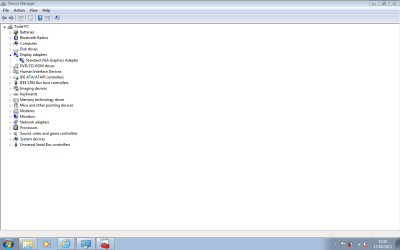
Here is a pic of device manager
 

Attachments

  • Untitled.png
    Untitled.png
    21.5 KB · Views: 8

My Computer My Computer

At a glance

Windows 7 Ultimate x64
Computer type
Laptop
Computer Manufacturer/Model Number
Sony Vaio FZ38M
OS
Windows 7 Ultimate x64
8400m GT is known for these issues about not working with newer drivers if at all on windows 7.

From device manager, you can see your card is using the generic windows display driver. (otherwise you would have seen the card's name instead of "VGA adapter")

Anyway, this is the sony page about support for your laptop model, yes it's in italian but drivers don't care of language. Click on Windows Vista, and scroll down, click on the driver with NVIDIA in the name, then download it from the page that opens from it. Or click here to go directly to the download page.
The text there explains why the driver is important and how to run it.
In your case is basically download and run the executable.

You might need to run it in compatibility mode (if it fails saying that you are not using Vista), this tutorial explains how.

Report back if it works.
 

My Computer My Computer

At a glance

Win 7 Pro 64-bit 7601AMD Phenom 9650 QuadCore, revision DR-B35 GB yes I run 2x 2GB and 1x 1GB, different b...NVIDIA GeForce 9800 GT 512 Mb, unknown manufa...
Computer type
PC/Desktop
Computer Manufacturer/Model Number
custom built
OS
Win 7 Pro 64-bit 7601
CPU
AMD Phenom 9650 QuadCore, revision DR-B3
Motherboard
ASUS M4A78
Memory
5 GB yes I run 2x 2GB and 1x 1GB, different brand, spank me.
Graphics Card(s)
NVIDIA GeForce 9800 GT 512 Mb, unknown manufacturer.
Sound Card
Crappy Realtek Integrated Audio
Monitor(s) Displays
Fujitsu Siemens P19-3P
Screen Resolution
1280 x 1024 x 32 bits @ 60 Hz Oh yeah, 4:3 rocks!
Hard Drives
(1) MAXTOR S TM3320613AS SATA Disk Device (2) STM35004 18AS SATA Disk Device (3) TOSHIBA USB 2.5"-HDD
PSU
whatever, around 450w
Case
Scavenged from old company PC, 10+ years old
Cooling
CPU fan, GPU fan, case fan, nothing fancy
Keyboard
Microsoft, PS/2, white.
Mouse
Optical, logitec.
Internet Speed
effective max speeds: 70-ish kB/s down 30-ish kB/s up
Antivirus
Avira, free edition.
Browser
Firefox with FXChrome to make it look like Google Chrome :P
Other Info
Was discarded by previous owner due to "horrible performance".
Was running Win Xp from a IDE drive. Yeah. Was a pain.
SATA II drive and Win7 and it zips away! Yay!
  • Like
Reactions: tnm
Hi there .. Just curious why cant you Install the Drivers from the Sony website ? Maybe if you had Windows activated and run Updates it may help
 

My Computer My Computer

At a glance

windows 7 home 64bitINTEL-CORE I716GB
Computer Manufacturer/Model Number
W530-3630QM1
OS
windows 7 home 64bit
CPU
INTEL-CORE I7
Memory
16GB
Hard Drives
750GB
Browser
Chrome
So your'e saying that once it's activated more updates may come?
I've tried many drivers - from the my specific model page on the sony website as well as the nvidia website to no avail.
 

My Computer My Computer

At a glance

Windows 7 Ultimate x64
Computer type
Laptop
Computer Manufacturer/Model Number
Sony Vaio FZ38M
OS
Windows 7 Ultimate x64
I am saying that it is some thing which needs to be done .. I mean what is the point in getting your System working perfectly .. When you know it wont last for long
 

My Computer My Computer

At a glance

windows 7 home 64bitINTEL-CORE I716GB
Computer Manufacturer/Model Number
W530-3630QM1
OS
windows 7 home 64bit
CPU
INTEL-CORE I7
Memory
16GB
Hard Drives
750GB
Browser
Chrome
  • Like
Reactions: tnm
Currently dealing with activation issue as sony upgraded my OS to win7 without giving me a product key. Only just clean installed again to find this an issue as prior to this it was activated.
 

My Computer My Computer

At a glance

Windows 7 Ultimate x64
Computer type
Laptop
Computer Manufacturer/Model Number
Sony Vaio FZ38M
OS
Windows 7 Ultimate x64
So, are you saying that Sony upgraded a Vista home premium into a windows 7 ultimate?

I can't really believe this without some proof. :rolleyes:
 

My Computer My Computer

At a glance

Win 7 Pro 64-bit 7601AMD Phenom 9650 QuadCore, revision DR-B35 GB yes I run 2x 2GB and 1x 1GB, different b...NVIDIA GeForce 9800 GT 512 Mb, unknown manufa...
Computer type
PC/Desktop
Computer Manufacturer/Model Number
custom built
OS
Win 7 Pro 64-bit 7601
CPU
AMD Phenom 9650 QuadCore, revision DR-B3
Motherboard
ASUS M4A78
Memory
5 GB yes I run 2x 2GB and 1x 1GB, different brand, spank me.
Graphics Card(s)
NVIDIA GeForce 9800 GT 512 Mb, unknown manufacturer.
Sound Card
Crappy Realtek Integrated Audio
Monitor(s) Displays
Fujitsu Siemens P19-3P
Screen Resolution
1280 x 1024 x 32 bits @ 60 Hz Oh yeah, 4:3 rocks!
Hard Drives
(1) MAXTOR S TM3320613AS SATA Disk Device (2) STM35004 18AS SATA Disk Device (3) TOSHIBA USB 2.5"-HDD
PSU
whatever, around 450w
Case
Scavenged from old company PC, 10+ years old
Cooling
CPU fan, GPU fan, case fan, nothing fancy
Keyboard
Microsoft, PS/2, white.
Mouse
Optical, logitec.
Internet Speed
effective max speeds: 70-ish kB/s down 30-ish kB/s up
Antivirus
Avira, free edition.
Browser
Firefox with FXChrome to make it look like Google Chrome :P
Other Info
Was discarded by previous owner due to "horrible performance".
Was running Win Xp from a IDE drive. Yeah. Was a pain.
SATA II drive and Win7 and it zips away! Yay!
Sent it off to sony 3 years ago for repairs to find a new OS on it. I thought it was a good will gesture at the time, so I continued to use it. Just this week I've come to do a clean install and need the product key to activate.
 

My Computer My Computer

At a glance

Windows 7 Ultimate x64
Computer type
Laptop
Computer Manufacturer/Model Number
Sony Vaio FZ38M
OS
Windows 7 Ultimate x64
I will try the compatibility method you suggested and will report back. What other options do I have?
 

My Computer My Computer

At a glance

Windows 7 Ultimate x64
Computer type
Laptop
Computer Manufacturer/Model Number
Sony Vaio FZ38M
OS
Windows 7 Ultimate x64
8400m GT is known for these issues about not working with newer drivers if at all on windows 7.

From device manager, you can see your card is using the generic windows display driver. (otherwise you would have seen the card's name instead of "VGA adapter")

Anyway, this is the sony page about support for your laptop model, yes it's in italian but drivers don't care of language. Click on Windows Vista, and scroll down, click on the driver with NVIDIA in the name, then download it from the page that opens from it. Or click here to go directly to the download page.
The text there explains why the driver is important and how to run it.
In your case is basically download and run the executable.

You might need to run it in compatibility mode (if it fails saying that you are not using Vista), this tutorial explains how.

Report back if it works.

Hi mate, the method above did not work. Ran in compatibility mode and as an administrator (windows vista was selected in the compatibility box).

Any other ways I can get my card recognised?
 

My Computer My Computer

At a glance

Windows 7 Ultimate x64
Computer type
Laptop
Computer Manufacturer/Model Number
Sony Vaio FZ38M
OS
Windows 7 Ultimate x64
What about reinstalling Vista? Would also remove the risk of getting banned for piracy. Sony does not give windows 7 licenses without seeing cash. And I doubt certified technicians are so careless to pirate the OS on devices they are fixing.

Anyway, this post in an old thread could work, or at least worked for him and a few others.

Since he is basically teaching how to hack the driver installer into believing that your card is in the compatibility list, you can do that with any driver supposed to support the 8400m GT and it should theoretically work.

At most you screw up and install an incompatible driver and have to remove it from Safe mode.
 

My Computer My Computer

At a glance

Win 7 Pro 64-bit 7601AMD Phenom 9650 QuadCore, revision DR-B35 GB yes I run 2x 2GB and 1x 1GB, different b...NVIDIA GeForce 9800 GT 512 Mb, unknown manufa...
Computer type
PC/Desktop
Computer Manufacturer/Model Number
custom built
OS
Win 7 Pro 64-bit 7601
CPU
AMD Phenom 9650 QuadCore, revision DR-B3
Motherboard
ASUS M4A78
Memory
5 GB yes I run 2x 2GB and 1x 1GB, different brand, spank me.
Graphics Card(s)
NVIDIA GeForce 9800 GT 512 Mb, unknown manufacturer.
Sound Card
Crappy Realtek Integrated Audio
Monitor(s) Displays
Fujitsu Siemens P19-3P
Screen Resolution
1280 x 1024 x 32 bits @ 60 Hz Oh yeah, 4:3 rocks!
Hard Drives
(1) MAXTOR S TM3320613AS SATA Disk Device (2) STM35004 18AS SATA Disk Device (3) TOSHIBA USB 2.5"-HDD
PSU
whatever, around 450w
Case
Scavenged from old company PC, 10+ years old
Cooling
CPU fan, GPU fan, case fan, nothing fancy
Keyboard
Microsoft, PS/2, white.
Mouse
Optical, logitec.
Internet Speed
effective max speeds: 70-ish kB/s down 30-ish kB/s up
Antivirus
Avira, free edition.
Browser
Firefox with FXChrome to make it look like Google Chrome :P
Other Info
Was discarded by previous owner due to "horrible performance".
Was running Win Xp from a IDE drive. Yeah. Was a pain.
SATA II drive and Win7 and it zips away! Yay!
What about reinstalling Vista? Would also remove the risk of getting banned for piracy. Sony does not give windows 7 licenses without seeing cash. And I doubt certified technicians are so careless to pirate the OS on devices they are fixing.

Anyway, this post in an old thread could work, or at least worked for him and a few others.

Since he is basically hacking the driver installer into believing that your card is in the compatibility list, you can do that with any driver supposed to support the 8400m GT and it should theoretically work.

At most you screw up and install an incompatible driver and have to remove it from Safe mode.

You have your opinion as you are entitled to it, but I do not engage in illegal activities.
 

My Computer My Computer

At a glance

Windows 7 Ultimate x64
Computer type
Laptop
Computer Manufacturer/Model Number
Sony Vaio FZ38M
OS
Windows 7 Ultimate x64
Which is why I talked about risk and still posted something that could help you.
The admins might or might not share my view.

Still, when you tried the stuff linked in the post report back.
 

My Computer My Computer

At a glance

Win 7 Pro 64-bit 7601AMD Phenom 9650 QuadCore, revision DR-B35 GB yes I run 2x 2GB and 1x 1GB, different b...NVIDIA GeForce 9800 GT 512 Mb, unknown manufa...
Computer type
PC/Desktop
Computer Manufacturer/Model Number
custom built
OS
Win 7 Pro 64-bit 7601
CPU
AMD Phenom 9650 QuadCore, revision DR-B3
Motherboard
ASUS M4A78
Memory
5 GB yes I run 2x 2GB and 1x 1GB, different brand, spank me.
Graphics Card(s)
NVIDIA GeForce 9800 GT 512 Mb, unknown manufacturer.
Sound Card
Crappy Realtek Integrated Audio
Monitor(s) Displays
Fujitsu Siemens P19-3P
Screen Resolution
1280 x 1024 x 32 bits @ 60 Hz Oh yeah, 4:3 rocks!
Hard Drives
(1) MAXTOR S TM3320613AS SATA Disk Device (2) STM35004 18AS SATA Disk Device (3) TOSHIBA USB 2.5"-HDD
PSU
whatever, around 450w
Case
Scavenged from old company PC, 10+ years old
Cooling
CPU fan, GPU fan, case fan, nothing fancy
Keyboard
Microsoft, PS/2, white.
Mouse
Optical, logitec.
Internet Speed
effective max speeds: 70-ish kB/s down 30-ish kB/s up
Antivirus
Avira, free edition.
Browser
Firefox with FXChrome to make it look like Google Chrome :P
Other Info
Was discarded by previous owner due to "horrible performance".
Was running Win Xp from a IDE drive. Yeah. Was a pain.
SATA II drive and Win7 and it zips away! Yay!
Which is why I talked about risk and still posted something that could help you.
The admins might or might not share my view.

Still, when you tried the stuff linked in the post report back.

I'm taking about my issue with it being upgraded. Anyway, I'm no computer tech, but you're basically saying that there is no windows 7 driver for the 8400m gt, only vista?

For me, it's whether I want to revert back or stay with win7 and not have my graphics card recognised. Does this mean I can't watch blue rays on it anymore. It used to have windvd preinstalled. Can I not get this back as its not on my sony's support page.
 
Last edited:

My Computer My Computer

At a glance

Windows 7 Ultimate x64
Computer type
Laptop
Computer Manufacturer/Model Number
Sony Vaio FZ38M
OS
Windows 7 Ultimate x64
go to the end of the txt file and choose the closest match and note the DEV_0428.3 number.. "append the description to say "Sony Vaio" for your info
then go to the [Manufacturer]
%NVIDIA% = NVIDIA.Mfg,NTamd64.6.0 section and edit the DEV_0428.3 number.. to show the following
%NVIDIA_G86.DEV_0428.3% = nv_G86_0, PCI\VEN_10DE&DEV_0426&SUBSYS_9005104D

save and use device manager to update the driverer
Worked for me, hope this helps...

Dic


Above is part of the thread you provided. Could you make this sound easier for me, if you know what it mean? Ive done the manufacturer section but don't know what the sony vaio add on is
 

My Computer My Computer

At a glance

Windows 7 Ultimate x64
Computer type
Laptop
Computer Manufacturer/Model Number
Sony Vaio FZ38M
OS
Windows 7 Ultimate x64
Anyway, I'm no computer tech, but you're basically saying that there is no windows 7 driver for the 8400m gt, only vista?
Kinda. It seems like NVIDIA is trying to pull the plug for that card to force users to upgrade, and the driver installers won't recognize it (this happens all the time for other oldish cards that are still theoretically supported). Or is somehow modded by Sony and the device ID does not match with the ones in the driver settings.

What I know is that there are a lot of others with a laptop with that card (especially VAIO) that had similar issues when upgrading to 7, and not all managed to solve them.

From a purely technical standpoint, a Vista driver should work fine in 7 too and let you access the card's video decoding co-processors. Which I assume is why the DVD maker is making such a fuss.

Since the above is a hack of the device ID list in the driver configuration file, it should theoretically work with all devices that the driver itself claims to support.
Or at least it was like that back in the day when they dropped support of AGP cards. Edit the config file and the driver will load and work fine.

Does this mean I can't watch blue rays on it anymore.
As said above, the card was helping in decoding videos. I have no way to know if the processor alone can do it. Try playing blu-rays with VLC or a trial of whatever player can do it, and look at the processor's load in Task manager. If the video is fine and the processor load isn't huge, you could be ok even without driver.

It used to have windvd preinstalled.
It's usually recommended to find the activation key of your OEM-installed programs before a reinstall. Although it's not always possible as it relies on gray-area programs that look around the registry or inside encrypted files in the program itself.

Unless you can convince the Sony support guys that you had it preinstalled when you bought the laptop, it's gone.

There are free alternatives like Potplayer (fourth from the top) or VLC, but it's not a given that they will work on your disks.

The other alternative is ripping the disks. That is copying the video on your hard drive in a format that most serious players like VLC will play without issues, without harming the disks. Which is going to fill any HDD very fast unless you tone down the quality a bit, as it's 12+ GB of movie file per blu-ray.
People into these things usually buy a multi-TB external storage drive.

For me, it's whether I want to revert back or stay with win7 and not have my graphics card recognised.
There is also the Linux option. You can try out Linux Mint Cinnamon 15 or Ubuntu 13.04 (the former having windows-XP-like interface, the latter is a bit weirder ala windows 8 but you might like it more) from a USB drive (download the Iso file and then you can use rufus to make it, when booting from the USB drive, choose "try it" or something like that, not "install") and see if they work fine (they usually do and everything works out of the box) and you can play your disks with VLC as explained here.

They also come preloaded with Firefox and LibreOffice and various other useful programs (and you can download more from the store, ala Android). All free of charge (only a select few apps require a payment, the bulk is free), and most stuff is kept updated.

The only weak point of linux is that it can't run most Windows games. Although Steam did open up shop in Ubuntu/Mint too with a cadre of indie and less-known ported games (don't expect any major title), more might come in the future.

Above is part of the thread you provided. Could you make this sound easier for me, if you know what it mean?
Ok, downloading the thing now (can't give better directions without looking at the file). When I have it in my hands I'll try to explain better if I can.

 
Last edited:

My Computer My Computer

At a glance

Win 7 Pro 64-bit 7601AMD Phenom 9650 QuadCore, revision DR-B35 GB yes I run 2x 2GB and 1x 1GB, different b...NVIDIA GeForce 9800 GT 512 Mb, unknown manufa...
Computer type
PC/Desktop
Computer Manufacturer/Model Number
custom built
OS
Win 7 Pro 64-bit 7601
CPU
AMD Phenom 9650 QuadCore, revision DR-B3
Motherboard
ASUS M4A78
Memory
5 GB yes I run 2x 2GB and 1x 1GB, different brand, spank me.
Graphics Card(s)
NVIDIA GeForce 9800 GT 512 Mb, unknown manufacturer.
Sound Card
Crappy Realtek Integrated Audio
Monitor(s) Displays
Fujitsu Siemens P19-3P
Screen Resolution
1280 x 1024 x 32 bits @ 60 Hz Oh yeah, 4:3 rocks!
Hard Drives
(1) MAXTOR S TM3320613AS SATA Disk Device (2) STM35004 18AS SATA Disk Device (3) TOSHIBA USB 2.5"-HDD
PSU
whatever, around 450w
Case
Scavenged from old company PC, 10+ years old
Cooling
CPU fan, GPU fan, case fan, nothing fancy
Keyboard
Microsoft, PS/2, white.
Mouse
Optical, logitec.
Internet Speed
effective max speeds: 70-ish kB/s down 30-ish kB/s up
Antivirus
Avira, free edition.
Browser
Firefox with FXChrome to make it look like Google Chrome :P
Other Info
Was discarded by previous owner due to "horrible performance".
Was running Win Xp from a IDE drive. Yeah. Was a pain.
SATA II drive and Win7 and it zips away! Yay!
Thanks a bunch for the detailed reply mate, much appreciated.

So are you basically saying that the only way to get back the preinstalled blue ray player is by reverting back to its preinstalled OS?

Thanks for willing to look at the file. Not sure how to modify it.
 

My Computer My Computer

At a glance

Windows 7 Ultimate x64
Computer type
Laptop
Computer Manufacturer/Model Number
Sony Vaio FZ38M
OS
Windows 7 Ultimate x64
Ok, decoded his ramblings. :D

Reposting full instructions for the sake of clarity.

Go in device manager (write "device manager" in the Start searchbox and press Enter), select video adapters, double click on your video card, go to Details tab. Above the white box there is a pull down menu, click on it and select Hardware IDs. Rightclick on the first line and select Copy. Paste it in a notepad document and make sure it's the same code you see from that panel.

Then run the dumb installer, that will extract the stuff and will then error out saying it has not found drivers.

Go in the C:\NVIDIA\WinVista64\179.28\IS\Display folder it just created, where you find a file called NVAM.inf

Open it in notepad.

Find this line:
%NVIDIA_G86.DEV_0428.3% = nv_G86_0, PCI\VEN_10DE&DEV_0428&SUBSYS_16161043

Modify the PCI\VEN_10DE&DEV_0428&SUBSYS_16161043 into the hardware ID you copied before.

Save and close Notepad.

The guy said to go to the end of the file and alter the description for the card into Sony Vaio

This line:
NVIDIA_G86.DEV_0428.3 = "NVIDIA GeForce 8400M G "

But frankly this is just the fluff text that it's displayed in the Device Manager and in other applications for us normal humans that cannot identify the device by hardware ID like the computer does.

I personally think it's irrelevant, as in the past I did call a card "Pink Elephants on Parade" for lulz and it did work fine.
But being this a weird situation, it's up to you. I would first try correcting it in GT and go on. If it does not load you can always alter it later.

Install the driver by following this tutorial. As this method bypasses the dumb installer and allows the hack you just made to work.

FYI, NVIDIA_G86.DEV_0428.3 should be what the card actually is, as G86 is the codename for the graphic chip of the 8400m GT, and the 428.3 should be the chip architecture revision number, or one close enough to install a driver that works fine anyway.

Seems like a jerk changed the card's ID from the standard one you see in the configuration file (and had to alter), and here the prime suspect is Sony, in one of their usual efforts to force people to buy a new device instead of refitting the old device.

As said above, you can try this trick on newer drivers from NVIDIA with the same procedure, as long as they contain the strings you should be able to get it working. In theory at least.

At most you install a bad driver that will turn the screen black when windows is loading.
If that happens, boot in Safe Mode by rebooting and pressing F8 a few times as soon as the logo or the BIOS white text disappears, then uninstall it from Drive Manager.
(Safe mode does not load non-microsoft generic drivers)
 

My Computer My Computer

At a glance

Win 7 Pro 64-bit 7601AMD Phenom 9650 QuadCore, revision DR-B35 GB yes I run 2x 2GB and 1x 1GB, different b...NVIDIA GeForce 9800 GT 512 Mb, unknown manufa...
Computer type
PC/Desktop
Computer Manufacturer/Model Number
custom built
OS
Win 7 Pro 64-bit 7601
CPU
AMD Phenom 9650 QuadCore, revision DR-B3
Motherboard
ASUS M4A78
Memory
5 GB yes I run 2x 2GB and 1x 1GB, different brand, spank me.
Graphics Card(s)
NVIDIA GeForce 9800 GT 512 Mb, unknown manufacturer.
Sound Card
Crappy Realtek Integrated Audio
Monitor(s) Displays
Fujitsu Siemens P19-3P
Screen Resolution
1280 x 1024 x 32 bits @ 60 Hz Oh yeah, 4:3 rocks!
Hard Drives
(1) MAXTOR S TM3320613AS SATA Disk Device (2) STM35004 18AS SATA Disk Device (3) TOSHIBA USB 2.5"-HDD
PSU
whatever, around 450w
Case
Scavenged from old company PC, 10+ years old
Cooling
CPU fan, GPU fan, case fan, nothing fancy
Keyboard
Microsoft, PS/2, white.
Mouse
Optical, logitec.
Internet Speed
effective max speeds: 70-ish kB/s down 30-ish kB/s up
Antivirus
Avira, free edition.
Browser
Firefox with FXChrome to make it look like Google Chrome :P
Other Info
Was discarded by previous owner due to "horrible performance".
Was running Win Xp from a IDE drive. Yeah. Was a pain.
SATA II drive and Win7 and it zips away! Yay!
Go in the C:\NVIDIA\WinVista64\179.28\IS\Display folder it just created, where you find a file called NVAM.inf

Open it in notepad.

Find this line:
%NVIDIA_G86.DEV_0428.3% = nv_G86_0, PCI\VEN_10DE&DEV_0428&SUBSYS_16161043

Modify the PCI\VEN_10DE&DEV_0428&SUBSYS_16161043 into the hardware ID you copied before.

Save and close Notepad.

The guy said to go to the end of the file and alter the description for the card into Sony Vaio

This line:
NVIDIA_G86.DEV_0428.3 = "NVIDIA GeForce 8400M G "

I personally think it's irrelevant, as in the past I did call a card "Pink Elephants on Parade" for lulz and it did work fine.
But being this a weird situation, it's up to you. I would first try correcting it in GT and go on. If it does not load you can always alter it later.

So I paste the hardware Id that ive copied from device manager over the first bold line above.

And then I change this line 'NVIDIA_G86.DEV_0428.3 = "NVIDIA GeForce 8400M G'

to say 'Sony Vaio' instead? Or do I just put a T next to the G?

This part is confusing for me! Sorry
 

My Computer My Computer

At a glance

Windows 7 Ultimate x64
Computer type
Laptop
Computer Manufacturer/Model Number
Sony Vaio FZ38M
OS
Windows 7 Ultimate x64
So are you basically saying that the only way to get back the preinstalled blue ray player is by reverting back to its preinstalled OS?
No. I said that unless you convince someone in the customer support of Sony to give you another OEM activation code for that program, it's lost forever. But on second thought...

If you still have the recovery partition and can trigger a full recovery from that you should get it back (along with Vista and all the other stuff the VAIO came with when you bought it)
Backup your data first as what is on the disk is probably going to be erased.

There should be a key to press stated during boot to trigger this thing, if not, get in BIOS options or Setup by pressing a key it says during boot, (for that laptop should be F2), and disable the "quiet boot" or the "logo" or whatever says it makes boot faster by disabling some checks so you can see the text saying what key to press and not a dumb Sony logo.

If that works, try to find a way to burn recovery DVDs, most laptops come with software that allows you to save that recovery partition in another drive or on a bunch of DVDs.

If that isn't possible make a disk image (whole disk, not just partitions or system image) with EASEUS todo backup free and guard it closely as it's the only way to have that player in case your OS gets corrupted and you have to reinstall.
 
Last edited:

My Computer My Computer

At a glance

Win 7 Pro 64-bit 7601AMD Phenom 9650 QuadCore, revision DR-B35 GB yes I run 2x 2GB and 1x 1GB, different b...NVIDIA GeForce 9800 GT 512 Mb, unknown manufa...
Computer type
PC/Desktop
Computer Manufacturer/Model Number
custom built
OS
Win 7 Pro 64-bit 7601
CPU
AMD Phenom 9650 QuadCore, revision DR-B3
Motherboard
ASUS M4A78
Memory
5 GB yes I run 2x 2GB and 1x 1GB, different brand, spank me.
Graphics Card(s)
NVIDIA GeForce 9800 GT 512 Mb, unknown manufacturer.
Sound Card
Crappy Realtek Integrated Audio
Monitor(s) Displays
Fujitsu Siemens P19-3P
Screen Resolution
1280 x 1024 x 32 bits @ 60 Hz Oh yeah, 4:3 rocks!
Hard Drives
(1) MAXTOR S TM3320613AS SATA Disk Device (2) STM35004 18AS SATA Disk Device (3) TOSHIBA USB 2.5"-HDD
PSU
whatever, around 450w
Case
Scavenged from old company PC, 10+ years old
Cooling
CPU fan, GPU fan, case fan, nothing fancy
Keyboard
Microsoft, PS/2, white.
Mouse
Optical, logitec.
Internet Speed
effective max speeds: 70-ish kB/s down 30-ish kB/s up
Antivirus
Avira, free edition.
Browser
Firefox with FXChrome to make it look like Google Chrome :P
Other Info
Was discarded by previous owner due to "horrible performance".
Was running Win Xp from a IDE drive. Yeah. Was a pain.
SATA II drive and Win7 and it zips away! Yay!
Back
Top