Can't Start Windows Update. Says File Missing.

realtekwin7

New member
Local time
5:13 PM
Messages
10
How can I post my log here?
I don't know much about computers and something is going on after updating.
I work in 6 hours and I gotta go to sleep but will come back when I wake up.
Also my audio has been disabled which is weird.
No realtek update works, and when i uninstall audio driver windows keeps installing hd audio drivers.
does my computer think it has windows 10?
 

My Computer

Computer type
PC/Desktop
Computer Manufacturer/Model Number
ASUS
OS
64
Motherboard
AMD A6 3400M
Memory
8 GIG
Graphics Card(s)
Radeon HD 6720G2
Antivirus
Super Anti Spyware
Browser
Firefox
Please follow the Windows Update Posting Instructions
and post the requested data

If the file is too large (8MB compressed), remove the older CBSPersist cab files until the final file is below the limit - you can always post them separately after zipping them. (the forum doesn't allow the upload of bare CAB files, for a number of reasons)

Please also post the C:\Windows\windowsudpate.log file
 

My Computer

Computer type
Laptop
Computer Manufacturer/Model Number
Asus K52F or Lenovo B51-80
OS
Win 7 x64 Home Premium (and x86 VirtualBox VM)/Win10
CPU
i3 370M/i7 6500U
Motherboard
Asus/Lenovo
Memory
8GB - finally :)/8GB
Graphics Card(s)
it's an i3, dude!/dual Intel&nVidia
Sound Card
onboard
Monitor(s) Displays
15.6" built-in
Screen Resolution
1366x768/1920x1080
Hard Drives
750GB Seagate internal
Sundry external drives attached to other computers on the local network
1TB SSD on the Lenovo
PSU
n/a
Internet Speed
as much as I can get - usually on a dongle/phone, so <1MB/s
Antivirus
MSE/Defender
Browser
IE11/12/Edge/Chrome/FF(if I must)
Please follow the Windows Update Posting Instructions
and post the requested data

If the file is too large (8MB compressed), remove the older CBSPersist cab files until the final file is below the limit - you can always post them separately after zipping them. (the forum doesn't allow the upload of bare CAB files, for a number of reasons)

Please also post the C:\Windows\windowsudpate.log file


hmmm...my windows doesn't want to open the MSU file?
it doesn't know what program to use?
can i open it in cmd.exe?
 

My Computer

Computer type
PC/Desktop
Computer Manufacturer/Model Number
ASUS
OS
64
Motherboard
AMD A6 3400M
Memory
8 GIG
Graphics Card(s)
Radeon HD 6720G2
Antivirus
Super Anti Spyware
Browser
Firefox
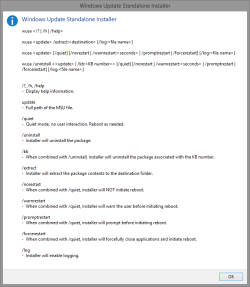
However ... the utility which actually executes the *.msu is WUSA.EXE, the Windows Standalone Update Installer.
So open a Command Prompt "As Administrator", and run this command:

WUSA <path>\Windows6.1-KB947821-v34-x64.msu

to install the update.

what do i select to run/open an .msu file? - Microsoft Community

I added the file name in that, as long as your path and file name are correct it should work for you.
 

Attachments

  • 2015-10-30_23h41_26.png
    2015-10-30_23h41_26.png
    11.5 KB · Views: 1

My Computer

Computer type
PC/Desktop
Computer Manufacturer/Model Number
Self Built
OS
Win 10 Pro x64
CPU
Intel I5-2500K @3.3GHz
Motherboard
Asrock P67 Extreme4
Memory
16GB G.Skill Ripjaws X (4x4GB)
Graphics Card(s)
EVGA GeForce 750 Ti SC 2GB
Sound Card
ASUS Xonar DG 5.1 Channels 24-bit 96KHz PCI Interface Sound
Monitor(s) Displays
auria eq2367
Screen Resolution
1920 x 1080
Hard Drives
250GB Samsung 850 EVO SSD
1TB WD Blue
1TB Hitachi
PSU
SeaSonic X 650W 80 Plus Gold
Case
Corsair Obsidian 750D
Cooling
Corsair H60, Three 140mm case fans
Keyboard
Logitech Wireless Keyboard K520
Mouse
Logitech Wireless Mouse M310
Internet Speed
Wave Broadband ~ 100 dn 5 up
Antivirus
Windows Defender, Malwarebytes Premium
Browser
Edge, IE11, Chrome
Other Info
Laptop specs: HP g7-1365dx /
CPU: AMD A6-3420M APU with Radeon(tm) HD Graphics /
RAM: Crucial 8Gb (2x4Gb) /
SSD: Crucial M4-CT128M4SSD2 ATA Device/ FW 000F /
GFX: AMD Radeon HD 6520G /
OS: Windows 10 Pro x64
However ... the utility which actually executes the *.msu is WUSA.EXE, the Windows Standalone Update Installer.
So open a Command Prompt "As Administrator", and run this command:

WUSA <path>\Windows6.1-KB947821-v34-x64.msu

to install the update.

what do i select to run/open an .msu file? - Microsoft Community

I added the file name in that, as long as your path and file name are correct it should work for you.

hey sorry I haven't replied, I've just been working all this week. I brought my laptop to work so I'll do this on my lunch break in a hour.
 

My Computer

Computer type
PC/Desktop
Computer Manufacturer/Model Number
ASUS
OS
64
Motherboard
AMD A6 3400M
Memory
8 GIG
Graphics Card(s)
Radeon HD 6720G2
Antivirus
Super Anti Spyware
Browser
Firefox
However ... the utility which actually executes the *.msu is WUSA.EXE, the Windows Standalone Update Installer.
So open a Command Prompt "As Administrator", and run this command:

WUSA <path>\Windows6.1-KB947821-v34-x64.msu

to install the update.
what do i select to run/open an .msu file? - Microsoft Community

I added the file name in that, as long as your path and file name are correct it should work for you.

I dropped the update folder in my OS (C : ) drive is that okay? im about to open it
 

My Computer

Computer type
PC/Desktop
Computer Manufacturer/Model Number
ASUS
OS
64
Motherboard
AMD A6 3400M
Memory
8 GIG
Graphics Card(s)
Radeon HD 6720G2
Antivirus
Super Anti Spyware
Browser
Firefox
However ... the utility which actually executes the *.msu is WUSA.EXE, the Windows Standalone Update Installer.
So open a Command Prompt "As Administrator", and run this command:

WUSA <path>\Windows6.1-KB947821-v34-x64.msu

to install the update.
what do i select to run/open an .msu file? - Microsoft Community

I added the file name in that, as long as your path and file name are correct it should work for you.

it told me access denied? : (
at first it said i couldn't find the file, now i did it and it said access denied.
my lunch break ends in half an hour so i'll be back soon
 

My Computer

Computer type
PC/Desktop
Computer Manufacturer/Model Number
ASUS
OS
64
Motherboard
AMD A6 3400M
Memory
8 GIG
Graphics Card(s)
Radeon HD 6720G2
Antivirus
Super Anti Spyware
Browser
Firefox
i did the DISM.exe /Online /Cleanup-image /Restorehealth

and it said error 87.

so i'll be back soon, my lunch break is over. :(
do you guys need my PC specs?
 

My Computer

Computer type
PC/Desktop
Computer Manufacturer/Model Number
ASUS
OS
64
Motherboard
AMD A6 3400M
Memory
8 GIG
Graphics Card(s)
Radeon HD 6720G2
Antivirus
Super Anti Spyware
Browser
Firefox
do you guys want the DISM.log error file I got after trying to use command prompt to open the MSU file?
 

My Computer

Computer type
PC/Desktop
Computer Manufacturer/Model Number
ASUS
OS
64
Motherboard
AMD A6 3400M
Memory
8 GIG
Graphics Card(s)
Radeon HD 6720G2
Antivirus
Super Anti Spyware
Browser
Firefox
Back
Top