
Hello all,
Yesterday, I plugged a pair of headphones into the front jack of my computer to check them out, (they did not work). They are no longer plugged in.
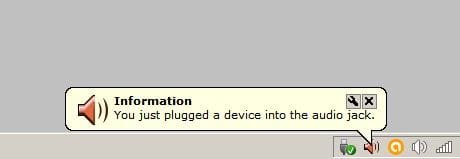
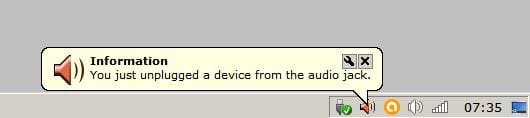
However, since then I get alternating, random notices popping up that I have just plugged in, then a few seconds later, that I have just un-plugged a device from the audio jack.
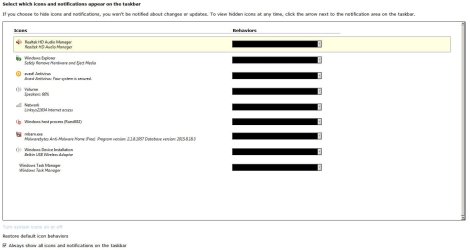
All options in "notification area icons" are grayed out and so cannot turn off the notifications.
This computer is six years old and I suspect by looking that the contacts in the jack are dirty. I have tried plugging and un-plugging the jack many times to try to clean it, but no luck so far.
Any input on turning off the notices greatly appreciated.
Yesterday, I plugged a pair of headphones into the front jack of my computer to check them out, (they did not work). They are no longer plugged in.
However, since then I get alternating, random notices popping up that I have just plugged in, then a few seconds later, that I have just un-plugged a device from the audio jack.
All options in "notification area icons" are grayed out and so cannot turn off the notifications.
This computer is six years old and I suspect by looking that the contacts in the jack are dirty. I have tried plugging and un-plugging the jack many times to try to clean it, but no luck so far.
Any input on turning off the notices greatly appreciated.
My Computer
- Computer type
- PC/Desktop
- Computer Manufacturer/Model Number
- ASUS PRO
- OS
- Windows 7, Pro, 64 bit, SP1
- CPU
- AMD A4-6300
- Motherboard
- ASUSTeK COMPUTER INC. D415MT_BM2DK (FM2+ )
- Memory
- 4.00GB Single-Channel DDR3 @ 797MHz (11-11-12-28)
- Graphics Card(s)
- 768MB ATI AMD Radeon HD 8370D
- Sound Card
- Realtek High Definition Audio
- Monitor(s) Displays
- SAMSUNG 1680 x 1050
- Hard Drives
- 465GB TOSHIBA DT01ACA050 SATA Disk Device (SATA)
- PSU
- ?
- Case
- ?
- Cooling
- ?
- Internet Speed
- 1.3 down load, .34 upload
- Antivirus
- N/A
- Browser
- Pale Moon
