Solved Can't transfer AppData to new computer

weybrew

New member
Member
Local time
2:15 PM
Messages
66
I'm setting up a new computer and am trying to transfer User\Name\AppData to the mew computer. Every time I try, the new computer crashes. The old computer also freezes up. Do I need to do something special to move this flle? I'm missing my Windows\Send to file and need it on my new PC. Because of my aborted efforts, I have AppData of some content on my new PC. I tried to delete this for a clean start-over but was unable to delete.

Old PC: Windows 7 32bit
New PC: Windows 7 64bit
 

My Computer

Computer type
PC/Desktop
Computer Manufacturer/Model Number
Toshiba
OS
Win 7(32)
CPU
Intel(R) Pentium(R) Dual CPU T3400 @ 2.16GHz
Motherboard
Base Board
Memory
Hynix 2 GB DDR-2
Graphics Card(s)
Mobile Intel(R) 4 Series Express Chipset Family
Sound Card
Realtek High Definition Audio
Hard Drives
WDC WD2500BEVS-26UST0 ATA Device
Antivirus
MS Security Essentials
Browser
Chrome
You should not attempt to copy that folder from one computer to another one.

You now have a "less than perfect" profile on the new computer.

IF and only IF you do not have any files of value (pictures, documents, ...) inside this "less than perfect" profile on the new computer - then you can remove it and start fresh.


I would create a new user:admin account/profile on your new computer.
(In my opinion, the username should not contain personal info like your name.)

Restart the new computer
Log onto the new admin account
(It should create a fresh profile - e.g. a new set of files.)

Right click on Computer
Select Properties from the context menu

Once the computer's propertied window displays...
...click on the link named Advanced system settings

The System Properties window should appear and the Advanced tab should be selected.

In the User Profiles area, click on the button named Settings...

Once the User Profiles window appears...
...CAREFULLY select the row for the "less than perfect" account
...confirm that you have selected the correct row
...click on the button named Delete.
...confirm the deletion process

Sometimes this deletion works without any errors. Other times you will get a notice something to the effect that "not all files were deleted - folder not empty". If you see such an error, restart the computer again, log on to an admin account and manually deleted the remaining files for the "less than perfect" account.


Now for your original issue:
I'm missing my Windows\Send to file and need it on my new PC.

Can you upload a screenshot from your old computer that shows what you want on your new computer? this tutorial might help with the screen capture and upload process: http://www.sevenforums.com/tutorials/9733-screenshots-files-upload-post-seven-forums.html
 

My Computer

Computer type
Laptop
Computer Manufacturer/Model Number
Employer provided Dell Latitude
OS
W7 Pro SP1 64bit
CPU
i7
Memory
8GB
Graphics Card(s)
Intel HD Graphics
Hard Drives
crappy SSD
Antivirus
Employer mandated Symantec Endpoint Protection
Browser
Pale Moon 64bit, IE11 64bit & Chrome 64bit
Thank you so much "UsernameIssues" for your reply and very detailed instuctions. I tried to start following them but hit a snag right off. I can't delete the less-than-perfect AppData file on the new PC. I get the warning that it is open in another program and to close first. Now what?
 

My Computer

Computer type
PC/Desktop
Computer Manufacturer/Model Number
Toshiba
OS
Win 7(32)
CPU
Intel(R) Pentium(R) Dual CPU T3400 @ 2.16GHz
Motherboard
Base Board
Memory
Hynix 2 GB DDR-2
Graphics Card(s)
Mobile Intel(R) 4 Series Express Chipset Family
Sound Card
Realtek High Definition Audio
Hard Drives
WDC WD2500BEVS-26UST0 ATA Device
Antivirus
MS Security Essentials
Browser
Chrome

My Computer

Computer type
Laptop
Computer Manufacturer/Model Number
Employer provided Dell Latitude
OS
W7 Pro SP1 64bit
CPU
i7
Memory
8GB
Graphics Card(s)
Intel HD Graphics
Hard Drives
crappy SSD
Antivirus
Employer mandated Symantec Endpoint Protection
Browser
Pale Moon 64bit, IE11 64bit & Chrome 64bit
Neither restarting nor SAFE mode would allow me to delete the AppData file from the new PC.
 

My Computer

Computer type
PC/Desktop
Computer Manufacturer/Model Number
Toshiba
OS
Win 7(32)
CPU
Intel(R) Pentium(R) Dual CPU T3400 @ 2.16GHz
Motherboard
Base Board
Memory
Hynix 2 GB DDR-2
Graphics Card(s)
Mobile Intel(R) 4 Series Express Chipset Family
Sound Card
Realtek High Definition Audio
Hard Drives
WDC WD2500BEVS-26UST0 ATA Device
Antivirus
MS Security Essentials
Browser
Chrome
Neither restarting nor SAFE mode would allow me to delete the AppData file from the new PC.
Let's make sure that we are talking about the same thing.
On the new computer, there should be a folder like this:
C:\Users
Under that folder, you should see a profile folder for each user...
...one of which should be:
C:\Users\"less than perfect"\AppData


When you follow the steps quoted below, which line item gives you trouble?

The only place that I've ever seen trouble is:
"...click on the button named Delete."

You should not attempt to copy that folder from one computer to another one.

You now have a "less than perfect" profile on the new computer.

IF and only IF you do not have any files of value (pictures, documents, ...) inside this "less than perfect" profile on the new computer - then you can remove it and start fresh.


I would create a new user:admin account/profile on your new computer.
(In my opinion, the username should not contain personal info like your name.)

Restart the new computer
Log onto the new admin account
(It should create a fresh profile - e.g. a new set of files.)

Right click on Computer
Select Properties from the context menu

Once the computer's propertied window displays...
...click on the link named Advanced system settings

The System Properties window should appear and the Advanced tab should be selected.

In the User Profiles area, click on the button named Settings...

Once the User Profiles window appears...
...CAREFULLY select the row for the "less than perfect" account
...confirm that you have selected the correct row
...click on the button named Delete.
...confirm the deletion process

Sometimes this deletion works without any errors. Other times you will get a notice something to the effect that "not all files were deleted - folder not empty". If you see such an error, restart the computer again, log on to an admin account and manually deleted the remaining files for the "less than perfect" account.


Now for your original issue:
I'm missing my Windows\Send to file and need it on my new PC.

Can you upload a screenshot from your old computer that shows what you want on your new computer? this tutorial might help with the screen capture and upload process: http://www.sevenforums.com/tutorials/9733-screenshots-files-upload-post-seven-forums.html
 

My Computer

Computer type
Laptop
Computer Manufacturer/Model Number
Employer provided Dell Latitude
OS
W7 Pro SP1 64bit
CPU
i7
Memory
8GB
Graphics Card(s)
Intel HD Graphics
Hard Drives
crappy SSD
Antivirus
Employer mandated Symantec Endpoint Protection
Browser
Pale Moon 64bit, IE11 64bit & Chrome 64bit
Since this is a new computer, why not restore it to factory state and start over again. This time don't move the AppData folder. You could try using Windows Easy Transfer to move/copy stuff from the old to the new though.
 

My Computer

Computer type
PC/Desktop
Computer Manufacturer/Model Number
Lenovo IdeaCenter 450
OS
Windows 10 Pro X64
CPU
Intel Quad Core i7-4770 @ 3.4Ghz
Memory
16.0GB PC3-12800 DDR3 SDRAM 1600 MHz
Graphics Card(s)
Intel Integrated HD Graphics
Sound Card
Realtek HD Audio
Monitor(s) Displays
HP 22" LCD
Screen Resolution
1680 x 1050
Hard Drives
250GB Samsung EVO SATA-3 SSD
2TB Seagate ST2000DM001 SATA-2
1.5TB Seagate ST3150041AS SATA
Keyboard
Dell USB
Mouse
Lenovo USB
Internet Speed
Cable via Road Runner 3MB Upload, 30MB Download
Antivirus
Windows Defender, MBAM Pro, MBAE
Browser
Seamonkey
Other Info
UEFI/GPT
PLDS DVD-RW DH16AERSH
Why import old settings many of which are defunct or corrupt into a fresh new install, thereby defeating the purpose of a truly clean reinstall.

32-bit is a different architecture than 64-bit anyway.

Look over these same steps which assure a perfect Clean Reinstall - Factory OEM Windows 7 for what works best based on tens of thousands of installs we've helped with here since before Win7 was even released.
 
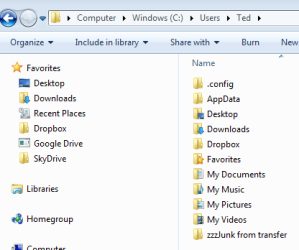
Thanks for hanging in there with me, UsernameIssues. Sorry to be such a newbie. I was trying to follow the steps you outlined before creating the new user. I tried to delete from C:\Users\"less than perfect"\AppData...no luck. Since I seemed to be stuck, my next thought was to create the new user and than try to delete the old "less than perfect" user account. Or, do a completely new install. The attached screen shot show the "less than perfect" PC which I think should be but without AppData.Capture1.PNG

Thank you, Ztruker, for your reply. I'm leaning toward this idea now. Will probably end up there.

Thank you, gregrocker, for your reply and the link. I'll be sure to check that out. And your comments cleared a few cobwebs for me.
 

My Computer

Computer type
PC/Desktop
Computer Manufacturer/Model Number
Toshiba
OS
Win 7(32)
CPU
Intel(R) Pentium(R) Dual CPU T3400 @ 2.16GHz
Motherboard
Base Board
Memory
Hynix 2 GB DDR-2
Graphics Card(s)
Mobile Intel(R) 4 Series Express Chipset Family
Sound Card
Realtek High Definition Audio
Hard Drives
WDC WD2500BEVS-26UST0 ATA Device
Antivirus
MS Security Essentials
Browser
Chrome
Thanks for hanging in there with me, UsernameIssues. Sorry to be such a newbie.
~~~
No problem with being new to this process, just try and follow the steps below one more time.

If you run into a problem, please tell me the problematic step number:


1) Create a new user:admin account/profile on your new computer.
(You might have already done this.)

2) Restart the new computer
(Do this again - right before step 3.)

3) Log onto the new admin account

4) Right click on Computer
Select Properties from the context menu

5) Once the computer's propertied window displays...
...click on the link named Advanced system settings

6) The System Properties window should appear and the Advanced tab should be selected.

7) In the User Profiles area, click on the button named Settings...

8) Once the User Profiles window appears...
8a) ...CAREFULLY select the row for the "less than perfect" account
8b) ...confirm that you have selected the correct row
8c) ...click on the button named Delete.
8d) ...confirm the deletion process
 

My Computer

Computer type
Laptop
Computer Manufacturer/Model Number
Employer provided Dell Latitude
OS
W7 Pro SP1 64bit
CPU
i7
Memory
8GB
Graphics Card(s)
Intel HD Graphics
Hard Drives
crappy SSD
Antivirus
Employer mandated Symantec Endpoint Protection
Browser
Pale Moon 64bit, IE11 64bit & Chrome 64bit
Since this is a new computer, why not restore it to factory state and start over again. This time don't move the AppData folder. You could try using Windows Easy Transfer to move/copy stuff from the old to the new though.
This is the very best suggestion in this case - and try not to muck with the system folders or you will be reinstalling very often. And if you do, make at least an image of the new installation before you start with the trial and error games. Then the reinstall is not so painful and takes only about 20 minutes.
 

My Computer

Computer Manufacturer/Model Number
HP, Dell, Gateway, Toshiba - 4 laptops and 2 desktops
OS
Vista, Windows7, Mint Mate, Zorin, Windows 8
CPU
from 1.6GHz Duo to i7
Monitor(s) Displays
2x HP w2207
Hard Drives
5x HDD, 7x SSD, 12x Externals
Keyboard
with trackball - no mices
Mouse
Trackball mice
Internet Speed
DSL 6000
Since this is a new computer, why not restore it to factory state and start over again. This time don't move the AppData folder. You could try using Windows Easy Transfer to move/copy stuff from the old to the new though.
This is the very best suggestion in this case - and try not to muck with the system folders or you will be reinstalling very often. And if you do, make at least an image of the new installation before you start with the trial and error games. Then the reinstall is not so painful and takes only about 20 minutes.
Since this thread now has two pages, I want to make sure that the OP sees this post:
http://www.sevenforums.com/installa...ransfer-appdata-new-computer.html#post2637561

The OP can return the computer to its factory (bloatware?) state, or follow gregrocker's plan - but I think that there is some value in the OP completing the 8 steps that I detailed. I (for one) would like to know how those steps can fail (other than the "folder not empty" issue that I mentioned the first time that I posted the steps).

There might be a file or two with barfed NTFS permissions in that "less than perfect" profile that the OP might have to remove via other steps - but what better opportunity to learn about doing that?


For my own learning - could someone please tell me if there is stuff left over after removing a user's profile in the manner that I described? In other words, if the only thing that was done to this new computer was:
to create a profile
mess it up
create a new profile
then delete the bad profile
...then wouldn't the computer be in its factory state?
Or, are there residual files and junk left over after such a profile deletion?
 

My Computer

Computer type
Laptop
Computer Manufacturer/Model Number
Employer provided Dell Latitude
OS
W7 Pro SP1 64bit
CPU
i7
Memory
8GB
Graphics Card(s)
Intel HD Graphics
Hard Drives
crappy SSD
Antivirus
Employer mandated Symantec Endpoint Protection
Browser
Pale Moon 64bit, IE11 64bit & Chrome 64bit
  • Like
Reactions: whs
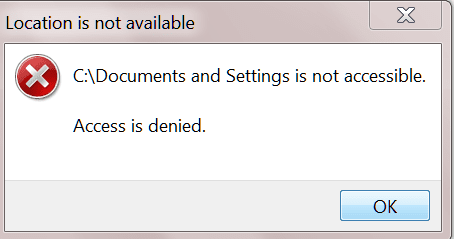
OK, I've followed your instructions without problems, but before I click on Delete please clear up a couple of things for me. My new Admin. user account doesn't include a new empty AppData folder. Shouldn't it? If not, where does it come from? I also don't have a C:/Documents and Settings/user/ account...I need the Send To folder to fix my Send To context menu. I don't have either of those in either my "less than perfect" user account or my new one. Do I need to do a new clean install to clear everything and start over?
 

My Computer

Computer type
PC/Desktop
Computer Manufacturer/Model Number
Toshiba
OS
Win 7(32)
CPU
Intel(R) Pentium(R) Dual CPU T3400 @ 2.16GHz
Motherboard
Base Board
Memory
Hynix 2 GB DDR-2
Graphics Card(s)
Mobile Intel(R) 4 Series Express Chipset Family
Sound Card
Realtek High Definition Audio
Hard Drives
WDC WD2500BEVS-26UST0 ATA Device
Antivirus
MS Security Essentials
Browser
Chrome
Hmm, Appdata is a hidden folder. Did you unhide the folders?

For the sendto folder typa shell:sendto into start search and hit Enter.

As to C:/Documents and Settings/user/ account - I don't think there is such a thing - at least you cannot access it.

.
 

Attachments

  • 2013-12-28_1513.png
    2013-12-28_1513.png
    7.8 KB · Views: 23

My Computer

Computer Manufacturer/Model Number
HP, Dell, Gateway, Toshiba - 4 laptops and 2 desktops
OS
Vista, Windows7, Mint Mate, Zorin, Windows 8
CPU
from 1.6GHz Duo to i7
Monitor(s) Displays
2x HP w2207
Hard Drives
5x HDD, 7x SSD, 12x Externals
Keyboard
with trackball - no mices
Mouse
Trackball mice
Internet Speed
DSL 6000
Thanks for the reply, whs. Once I did the "unhide" for the folders I found the illusive AppData folder! The other folder was in an article about fixing the empty Send To context menu. I found that, too, and not where I was directed. Sorry. But, things are looking up! Happy New Year!
 

My Computer

Computer type
PC/Desktop
Computer Manufacturer/Model Number
Toshiba
OS
Win 7(32)
CPU
Intel(R) Pentium(R) Dual CPU T3400 @ 2.16GHz
Motherboard
Base Board
Memory
Hynix 2 GB DDR-2
Graphics Card(s)
Mobile Intel(R) 4 Series Express Chipset Family
Sound Card
Realtek High Definition Audio
Hard Drives
WDC WD2500BEVS-26UST0 ATA Device
Antivirus
MS Security Essentials
Browser
Chrome
Hallelujah! Thanks so much, UsernameIssues, your instructions woked fine. My "less than perfect" is gone and I'm busy transferring my personal files...needless to say no OS files... to me new Admin user account. Whew, finally!
 

My Computer

Computer type
PC/Desktop
Computer Manufacturer/Model Number
Toshiba
OS
Win 7(32)
CPU
Intel(R) Pentium(R) Dual CPU T3400 @ 2.16GHz
Motherboard
Base Board
Memory
Hynix 2 GB DDR-2
Graphics Card(s)
Mobile Intel(R) 4 Series Express Chipset Family
Sound Card
Realtek High Definition Audio
Hard Drives
WDC WD2500BEVS-26UST0 ATA Device
Antivirus
MS Security Essentials
Browser
Chrome
That is good to hear.

Did you get the SendTo folder changed as desired?
 

My Computer

Computer type
Laptop
Computer Manufacturer/Model Number
Employer provided Dell Latitude
OS
W7 Pro SP1 64bit
CPU
i7
Memory
8GB
Graphics Card(s)
Intel HD Graphics
Hard Drives
crappy SSD
Antivirus
Employer mandated Symantec Endpoint Protection
Browser
Pale Moon 64bit, IE11 64bit & Chrome 64bit
Not necessary...the new Admin user account had a complete Send To drop down menu already, but i found the folder for future reference. Many thanks again.
 

My Computer

Computer type
PC/Desktop
Computer Manufacturer/Model Number
Toshiba
OS
Win 7(32)
CPU
Intel(R) Pentium(R) Dual CPU T3400 @ 2.16GHz
Motherboard
Base Board
Memory
Hynix 2 GB DDR-2
Graphics Card(s)
Mobile Intel(R) 4 Series Express Chipset Family
Sound Card
Realtek High Definition Audio
Hard Drives
WDC WD2500BEVS-26UST0 ATA Device
Antivirus
MS Security Essentials
Browser
Chrome
Back
Top