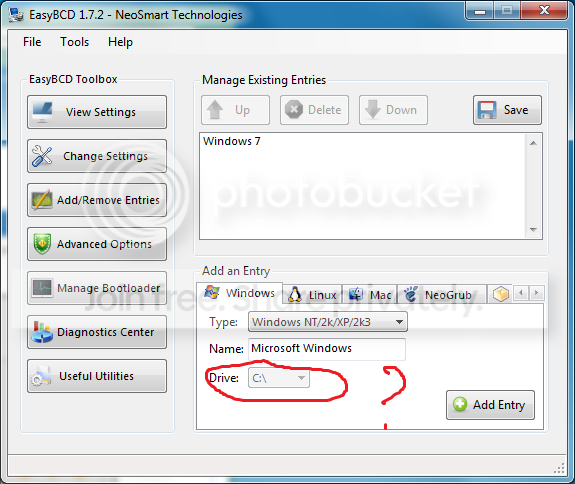
I recently installed Win Seven onto another harddrive because
I wanted to keep my xp installation and be able to choose on boot
which os I want to use.
Since my installation of seven it boot straight into seven without
giving me the choise of OS.
I tried using EasyBCD but I cant select the drive letter which contains
my xp installation, why is that ?
Could somebody tell me how to use this program before I do something
stupid here ?
Go into Disk Management and make sure your XP partition is assigned a drive letter.
BTW, the version of EasyBCD you are using is quite old. I have 2.0 beta 63.
My Computer
Computer Manufacturer/Model Number
Too many to list.
OS
XP, Seven, 2008R2
CPU
AMD, Intel, VIA
Motherboard
Various
Memory
Corsair, Kingston, etc.
Graphics Card(s)
ATI, NVIDIA
Monitor(s) Displays
Samsung
Hard Drives
Maxtor, Western Digital
Keyboard
qwerty
Internet Speed
22 Mb/s @ home, 1 Gb/s @ server
Other Info
All of my systems still run fastest on XP 32-bit for the most part. Win7 is fun to play with, but I still prefer XP for raw speed, security, and functionality.
My xp installation is assigned to D and is visible in the windows explorer.
My version of EasyBCD is the latest official one, you're using beta version
which I cant take because i'm not registered on their forum.
All of my systems still run fastest on XP 32-bit for the most part. Win7 is fun to play with, but I still prefer XP for raw speed, security, and functionality.
BTW, It can't hurt to try. Because the worst that will happen is you have one entry in the boot menu that doesn't work. You can still select Windows 7 from the menu and try again. There are tools included in Windows 7 that can create boot entries. It's called bcdedit
My Computer
Computer Manufacturer/Model Number
Too many to list.
OS
XP, Seven, 2008R2
CPU
AMD, Intel, VIA
Motherboard
Various
Memory
Corsair, Kingston, etc.
Graphics Card(s)
ATI, NVIDIA
Monitor(s) Displays
Samsung
Hard Drives
Maxtor, Western Digital
Keyboard
qwerty
Internet Speed
22 Mb/s @ home, 1 Gb/s @ server
Other Info
All of my systems still run fastest on XP 32-bit for the most part. Win7 is fun to play with, but I still prefer XP for raw speed, security, and functionality.
Tried it, works but somehow on first boot into old xp install it reinstalls all drivers
allthough i didn't add any hardware. My keyborad and mouse wont work because
it hangs on an unknown hardware installation and i cant continue since i got no
keyboard and mouse recognized. I tried plugin an old usb mouse but xp doesn't see
it and i cant connect my old ps2 keyboard since my mobo doesn't have any ps2 entry
it sounds to me like installing Windows 7 hosed your XP system. I had problems before but never this bad.
in XP, try running chkdsk c: /f /v and reboot
where c: is the drive letter of your XP partition
My Computer
Computer Manufacturer/Model Number
Too many to list.
OS
XP, Seven, 2008R2
CPU
AMD, Intel, VIA
Motherboard
Various
Memory
Corsair, Kingston, etc.
Graphics Card(s)
ATI, NVIDIA
Monitor(s) Displays
Samsung
Hard Drives
Maxtor, Western Digital
Keyboard
qwerty
Internet Speed
22 Mb/s @ home, 1 Gb/s @ server
Other Info
All of my systems still run fastest on XP 32-bit for the most part. Win7 is fun to play with, but I still prefer XP for raw speed, security, and functionality.
or you could try running checkdisk from Win7 but people have reported bugs in Win7 checkdisk utility... Booting from the XP install disc and using the command prompt might be a safer idea.
My Computer
Computer Manufacturer/Model Number
Too many to list.
OS
XP, Seven, 2008R2
CPU
AMD, Intel, VIA
Motherboard
Various
Memory
Corsair, Kingston, etc.
Graphics Card(s)
ATI, NVIDIA
Monitor(s) Displays
Samsung
Hard Drives
Maxtor, Western Digital
Keyboard
qwerty
Internet Speed
22 Mb/s @ home, 1 Gb/s @ server
Other Info
All of my systems still run fastest on XP 32-bit for the most part. Win7 is fun to play with, but I still prefer XP for raw speed, security, and functionality.