Can't uncheck read-only attribute

Eiji

New member
Local time
11:33 AM
Messages
11
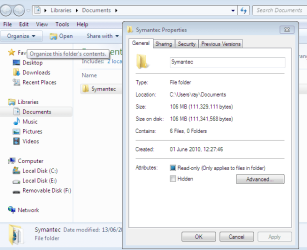
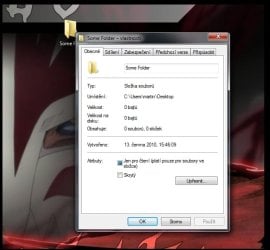
I got a major problem. All folders i create have automatically the read-only attribute (blue box, not checked), and i can't get rid of it. I searched the forum but didn't find anything that would be of much help. Can anyone help me please? :cry::sleepy:
 

My Computer

OS
Windows 7 Home Premium 64-bit

My Computer

Computer type
PC/Desktop
Computer Manufacturer/Model Number
Medion Erazer (note to self: insert model number) - with custom additions
OS
Windows 10 Pro x64
CPU
Intel Core i5 7400 @ 3.00GHz
Motherboard
OEM supllied with PC
Memory
8GB 2133Mhz DDR4 (OEM supplied)
Graphics Card(s)
Gygabyte Windforce GTX 1050Ti (Factory Overclocked)
Sound Card
Realtek
Monitor(s) Displays
Acer Al1980 + HKC
Screen Resolution
1360*768(HKC) / 1280*1024(Acer)
Hard Drives
1TB Toshiba
1TB WD Caviar Green
120GB Samsung Evo 840
PSU
OEM supplied (no power rating on case)
Case
OEM Supplied
Cooling
Stock
Keyboard
Logitech Wireless
Mouse
Logitect Wireless
Internet Speed
40Mb/s Down 10Mb/s Up
Antivirus
Defender
Browser
Firefox
Firstly, thanks for the quick response :D

Yes, i am the admin.

and i tried the ownership and the command line method. Didn't work :cry:
 

My Computer

OS
Windows 7 Home Premium 64-bit
I'm sure you have already tried this but I'll suggest it while I try and find you a solution:

when you take ownership it doesn't automatically give you full control, you will need to give yourself full control under properties>Security.

something to check while im thinking :)

also try this: http://support.microsoft.com/kb/326549 I've only skim read it so not sure how helpful it is

One Last thing: are the FILES inside the folders read only? or just the folders themselves?
 

My Computer

Computer type
PC/Desktop
Computer Manufacturer/Model Number
Medion Erazer (note to self: insert model number) - with custom additions
OS
Windows 10 Pro x64
CPU
Intel Core i5 7400 @ 3.00GHz
Motherboard
OEM supllied with PC
Memory
8GB 2133Mhz DDR4 (OEM supplied)
Graphics Card(s)
Gygabyte Windforce GTX 1050Ti (Factory Overclocked)
Sound Card
Realtek
Monitor(s) Displays
Acer Al1980 + HKC
Screen Resolution
1360*768(HKC) / 1280*1024(Acer)
Hard Drives
1TB Toshiba
1TB WD Caviar Green
120GB Samsung Evo 840
PSU
OEM supplied (no power rating on case)
Case
OEM Supplied
Cooling
Stock
Keyboard
Logitech Wireless
Mouse
Logitect Wireless
Internet Speed
40Mb/s Down 10Mb/s Up
Antivirus
Defender
Browser
Firefox
Just the Folders, the files are free to use
 

My Computer

OS
Windows 7 Home Premium 64-bit
Just the Folders, the files are free to use

Now that is good news :cool: You don't have a problem at all.... basically Windows ignores the Read only command on Folders it only applies it to Files. those folders are yours to do what you wish with :)
 

My Computer

Computer type
PC/Desktop
Computer Manufacturer/Model Number
Medion Erazer (note to self: insert model number) - with custom additions
OS
Windows 10 Pro x64
CPU
Intel Core i5 7400 @ 3.00GHz
Motherboard
OEM supllied with PC
Memory
8GB 2133Mhz DDR4 (OEM supplied)
Graphics Card(s)
Gygabyte Windforce GTX 1050Ti (Factory Overclocked)
Sound Card
Realtek
Monitor(s) Displays
Acer Al1980 + HKC
Screen Resolution
1360*768(HKC) / 1280*1024(Acer)
Hard Drives
1TB Toshiba
1TB WD Caviar Green
120GB Samsung Evo 840
PSU
OEM supplied (no power rating on case)
Case
OEM Supplied
Cooling
Stock
Keyboard
Logitech Wireless
Mouse
Logitect Wireless
Internet Speed
40Mb/s Down 10Mb/s Up
Antivirus
Defender
Browser
Firefox
There is a problem, i can't acces the files in the read only folders by programs that are not from microsoft
 

My Computer

OS
Windows 7 Home Premium 64-bit
Woops sorry obviously I misunderstood :o another quick question for you: where are you making these folders? also did you try what I said about changing permissions?
 

My Computer

Computer type
PC/Desktop
Computer Manufacturer/Model Number
Medion Erazer (note to self: insert model number) - with custom additions
OS
Windows 10 Pro x64
CPU
Intel Core i5 7400 @ 3.00GHz
Motherboard
OEM supllied with PC
Memory
8GB 2133Mhz DDR4 (OEM supplied)
Graphics Card(s)
Gygabyte Windforce GTX 1050Ti (Factory Overclocked)
Sound Card
Realtek
Monitor(s) Displays
Acer Al1980 + HKC
Screen Resolution
1360*768(HKC) / 1280*1024(Acer)
Hard Drives
1TB Toshiba
1TB WD Caviar Green
120GB Samsung Evo 840
PSU
OEM supplied (no power rating on case)
Case
OEM Supplied
Cooling
Stock
Keyboard
Logitech Wireless
Mouse
Logitect Wireless
Internet Speed
40Mb/s Down 10Mb/s Up
Antivirus
Defender
Browser
Firefox
the read only aplies on all folders created anywhere (desktop, C, D).

And i've got full control, and it still doesn't work :confused:
 

My Computer

OS
Windows 7 Home Premium 64-bit
I'm going to go and ask for some help from some of our Guru's hopefully someone can help :)
 

My Computer

Computer type
PC/Desktop
Computer Manufacturer/Model Number
Medion Erazer (note to self: insert model number) - with custom additions
OS
Windows 10 Pro x64
CPU
Intel Core i5 7400 @ 3.00GHz
Motherboard
OEM supllied with PC
Memory
8GB 2133Mhz DDR4 (OEM supplied)
Graphics Card(s)
Gygabyte Windforce GTX 1050Ti (Factory Overclocked)
Sound Card
Realtek
Monitor(s) Displays
Acer Al1980 + HKC
Screen Resolution
1360*768(HKC) / 1280*1024(Acer)
Hard Drives
1TB Toshiba
1TB WD Caviar Green
120GB Samsung Evo 840
PSU
OEM supplied (no power rating on case)
Case
OEM Supplied
Cooling
Stock
Keyboard
Logitech Wireless
Mouse
Logitect Wireless
Internet Speed
40Mb/s Down 10Mb/s Up
Antivirus
Defender
Browser
Firefox
ya thanks :(
 

My Computer

OS
Windows 7 Home Premium 64-bit
How are you trying to open the files?

I just checked on mine and any and all folders that I have created are marked read only as well, with whatever is in not. Also don't have the problem of opening them in anything, either from the program itself or by right clicking and using "open with". The only time anything for me opens in a Windows program (Paint, Notepad, etc) is by double clicking on it, and if that program is the default for the file's extension (txt, jpg, etc).
 

My Computer

Computer type
PC/Desktop
Computer Manufacturer/Model Number
Me
OS
Win 7 Ultimate x64
CPU
FX-8350 @ 4.6 GHz so far
Motherboard
Asus M5A97 EVO
Memory
ADATA XPG V1 Series Black 8GB DDR3 1600
Graphics Card(s)
Sapphire R9 270x Dual-X
Sound Card
Xonar DGX w/ Corsair Vengence 1300
Monitor(s) Displays
Acer S232HL Abid
Screen Resolution
1920x1080
Hard Drives
120 GB OCZ Vertex 3
500 GB Seagate 7200.12
PSU
Antec Earthwatts 650W Green
Case
Antec Three Hundred
Cooling
Cooler Master 212 EVO
Keyboard
Logitech G510
Mouse
Logitech G500s
Internet Speed
35000/3000
it's not english sry :o
something like this?
 

Attachments

  • Example.jpg
    Example.jpg
    39.6 KB · Views: 82

My Computer

OS
Windows 7 Home Premium 64-bit
How are you trying to open the files?

I just checked on mine and any and all folders that I have created are marked read only as well, with whatever is in not. Also don't have the problem of opening them in anything, either from the program itself or by right clicking and using "open with". The only time anything for me opens in a Windows program (Paint, Notepad, etc) is by double clicking on it, and if that program is the default for the file's extension (txt, jpg, etc).

I can open the files trough Total Commander, but i can't for example burn the files on a DVD.
 

My Computer

OS
Windows 7 Home Premium 64-bit

My Computer

Computer type
PC/Desktop
Computer Manufacturer/Model Number
Me
OS
Win 7 Ultimate x64
CPU
FX-8350 @ 4.6 GHz so far
Motherboard
Asus M5A97 EVO
Memory
ADATA XPG V1 Series Black 8GB DDR3 1600
Graphics Card(s)
Sapphire R9 270x Dual-X
Sound Card
Xonar DGX w/ Corsair Vengence 1300
Monitor(s) Displays
Acer S232HL Abid
Screen Resolution
1920x1080
Hard Drives
120 GB OCZ Vertex 3
500 GB Seagate 7200.12
PSU
Antec Earthwatts 650W Green
Case
Antec Three Hundred
Cooling
Cooler Master 212 EVO
Keyboard
Logitech G510
Mouse
Logitech G500s
Internet Speed
35000/3000
No, the problem is with windows, i ca normally open the files in Windows AND Total Commander. That with the bruning was just an example. The main problem is, the read only attribute. :confused:
 

My Computer

OS
Windows 7 Home Premium 64-bit
That with the bruning was just an example.

Seeing as that one example appears to be a known issue with Total Commander according to their own FAQ's, that rules that one out as a Windows problem. As soon as you introduce a 3rd party application into the mix, in this case a file manager, makes it kind of difficult tp determine if it is Windows problem or a problem with the 3rd party app.

Other than not being able to change folders from read only, do any of these problems occur if Total Commander isn't installed?

As for changing folders from read only, every single folder on my computer is read only and cannot be changed (and will be the same on every other computer), so not really sure what the problem with that is.
 

My Computer

Computer type
PC/Desktop
Computer Manufacturer/Model Number
Me
OS
Win 7 Ultimate x64
CPU
FX-8350 @ 4.6 GHz so far
Motherboard
Asus M5A97 EVO
Memory
ADATA XPG V1 Series Black 8GB DDR3 1600
Graphics Card(s)
Sapphire R9 270x Dual-X
Sound Card
Xonar DGX w/ Corsair Vengence 1300
Monitor(s) Displays
Acer S232HL Abid
Screen Resolution
1920x1080
Hard Drives
120 GB OCZ Vertex 3
500 GB Seagate 7200.12
PSU
Antec Earthwatts 650W Green
Case
Antec Three Hundred
Cooling
Cooler Master 212 EVO
Keyboard
Logitech G510
Mouse
Logitech G500s
Internet Speed
35000/3000
It appeared before installing Total Commander, and the problem is, that the read only attribute doesn't allow third-party software acces to my files (and i want that particular software to acces the particular files)

and sorry for any missunderstandings, I can't speak so good english. :o
 

My Computer

OS
Windows 7 Home Premium 64-bit
What software and what are the file extensions?
 

My Computer

Computer type
PC/Desktop
Computer Manufacturer/Model Number
Me
OS
Win 7 Ultimate x64
CPU
FX-8350 @ 4.6 GHz so far
Motherboard
Asus M5A97 EVO
Memory
ADATA XPG V1 Series Black 8GB DDR3 1600
Graphics Card(s)
Sapphire R9 270x Dual-X
Sound Card
Xonar DGX w/ Corsair Vengence 1300
Monitor(s) Displays
Acer S232HL Abid
Screen Resolution
1920x1080
Hard Drives
120 GB OCZ Vertex 3
500 GB Seagate 7200.12
PSU
Antec Earthwatts 650W Green
Case
Antec Three Hundred
Cooling
Cooler Master 212 EVO
Keyboard
Logitech G510
Mouse
Logitech G500s
Internet Speed
35000/3000
Back
Top