
Hello everyone,
I was trying to change the properties of a networked drives subfolder so that the subfolder and its files could not be deleted. I was following the instructions listed at Protect files from being deleted - Microsoft Community
However, when I completed all the steps and clicked okay I got an error message from Windows, I don't recall the exact message but it ended with "access denied". I tried doing the same steps over thinking something had gone wrong and ended up getting the same error message. Thing is, when I went into the subfolder in question and tried to delete the blank text document I'd created a message pops up that "file access denied, you need permission to perform this action. You require permission from PCH-200\nmt to make changes to this file" and below that message the properties of the file are listed.
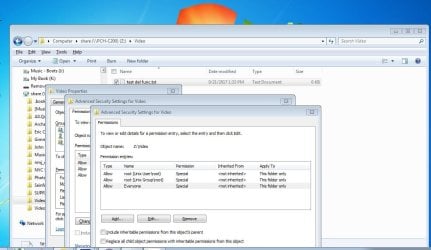
I then went to try to reverse the steps I took to add that deny permission but could not find it listed, under the Advanced Security Settings for video menu there are only 3 permissions listed which are all "allow" permissions. If I select Everyone and then click edit I see that all the boxes in the left side "allow" column are checked and none in the right side "deny".
I tried the same steps over again and again got an error message, this time stating "an error occurred while applying information to Z:\video. Access is denied." When I click the continue I got another error message saying "unable to save permission changes on Video, access is denied" with the option to retry or cancel, I clicked retry and the message disappeared and I noticed the Advanced Security Settings for video menu only had the 3 original allow permissions listed.
The folder I made the changes to was a seldom used empty folder. Before I go making this change to other folders I want to make sure I'm doing it right so any info you all can provide on this matter is greatly appreciated!
FYI, PCH-200\nmt refers to the hard drive inside my media player, the media player is a Popcorn Hour C-200 and the drive set up as a networked drive. I'm also using Windows 7.
FYI I've attached a screenshot of the folders current Advanced Security Settings.
I was trying to change the properties of a networked drives subfolder so that the subfolder and its files could not be deleted. I was following the instructions listed at Protect files from being deleted - Microsoft Community
However, when I completed all the steps and clicked okay I got an error message from Windows, I don't recall the exact message but it ended with "access denied". I tried doing the same steps over thinking something had gone wrong and ended up getting the same error message. Thing is, when I went into the subfolder in question and tried to delete the blank text document I'd created a message pops up that "file access denied, you need permission to perform this action. You require permission from PCH-200\nmt to make changes to this file" and below that message the properties of the file are listed.
I then went to try to reverse the steps I took to add that deny permission but could not find it listed, under the Advanced Security Settings for video menu there are only 3 permissions listed which are all "allow" permissions. If I select Everyone and then click edit I see that all the boxes in the left side "allow" column are checked and none in the right side "deny".
I tried the same steps over again and again got an error message, this time stating "an error occurred while applying information to Z:\video. Access is denied." When I click the continue I got another error message saying "unable to save permission changes on Video, access is denied" with the option to retry or cancel, I clicked retry and the message disappeared and I noticed the Advanced Security Settings for video menu only had the 3 original allow permissions listed.
The folder I made the changes to was a seldom used empty folder. Before I go making this change to other folders I want to make sure I'm doing it right so any info you all can provide on this matter is greatly appreciated!
FYI, PCH-200\nmt refers to the hard drive inside my media player, the media player is a Popcorn Hour C-200 and the drive set up as a networked drive. I'm also using Windows 7.
FYI I've attached a screenshot of the folders current Advanced Security Settings.
Attachments
My Computer
At a glance
Windows 7 Proffessional 64-biti 712 GB tape
- Computer type
- PC/Desktop
- Computer Manufacturer/Model Number
- Dell XPS
- OS
- Windows 7 Proffessional 64-bit
- CPU
- i 7
- Memory
- 12 GB tape

