Cant unformat email address hyperlink in Excel the way HELP says I can

tomseeley

New member
Local time
9:05 PM
Messages
17
I'm about to put my foot through my computer! I hate it when I go to a help screen, I understand the message I find, and the program won't behave the way the help screen says it will!

I'm running Excel 2010 which I'm comfortable with without being an expert. I've inherited a membership list file that has a column containing members' email addresses. Some of the members' email addresses in that column are formatted as a hyperlink format, so that they automatically launch my email program when I click on those entries. Some of the addresses in the same column are in a format that LOOKS like the typical hyperlink format (blue underlined etc) but which are actually simply text format. When I click on those addresses in that column, I do not launch my email program. That's how I want all the entries in that column to behave!

I do NOT want ANY of them to automatically launch my email program!!!!!!!!!!!!

I went to the Office online help and found a message for how to delete a hyperlink. It says I click and hold the cell containing the entry I do NOT want to be a hyperlink that will automatically launch my email, and the cursor will change from the pointer to a cross. OK. Been there done that. It then says Right click and in the context-sensitive drop down menu that appears, click "remove hyperlink". I can understand that, too.

But guess what! When I do that, the "remove hyperlink" entry in the drop down menu is grayed out!

What am I doing wrong?

How am I supposed to do what I want to when the program doesn't behave the way the help message says it does!
 

My Computer My Computer

At a glance

Win 7 home premium 64 bitAMD4 GBRadeon
Computer Manufacturer/Model Number
HP 6610f
OS
Win 7 home premium 64 bit
CPU
AMD
Motherboard
whatever's built in
Memory
4 GB
Graphics Card(s)
Radeon
Sound Card
whatever's built in
Monitor(s) Displays
ViewSonic
Hard Drives
whatever's built in
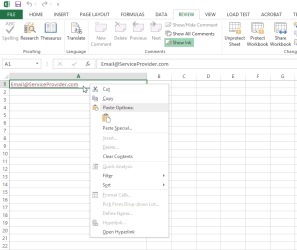
Whatever I try, I cannot reproduce your issue. Removing "mailto" hyperlinks works exactly as it should work both on Excel 2010 and 2013. Only way to not be able to select Remove Hyperlink in context menu is if the cell is protected, editing disabled, in which case the context menu does not even have the Remove Hyperlink item as this screenshot shows:

2014-01-23_02h33_17.png

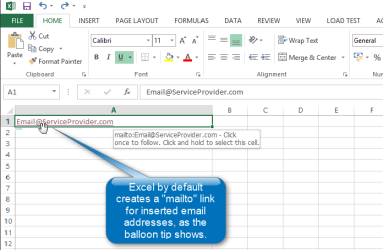
By default Excel adds a "mailto" hyperlink to each email address:

2014-01-23_02h19_51.png

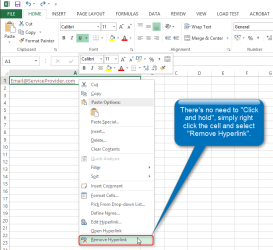
You do not need to Click and hold the cell, simply select it and right click, select Remove Hyperlink:

2014-01-23_02h23_39.png

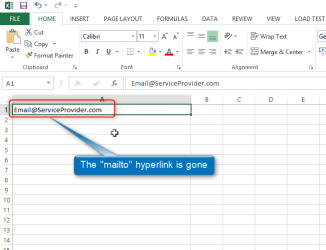
The email address no longer has a hyperlink:

2014-01-23_02h26_24.png


Kari
 

My Computer My Computer

At a glance

Windows 10 Pro x64 EN-GB1.6 GHz Intel Core i7-720QM Processor6 GBATI Mobility Radeon HD 5850 Graphics
Computer type
Laptop
Computer Manufacturer/Model Number
HP ENVY 17-1150eg
OS
Windows 10 Pro x64 EN-GB
CPU
1.6 GHz Intel Core i7-720QM Processor
Memory
6 GB
Graphics Card(s)
ATI Mobility Radeon HD 5850 Graphics
Sound Card
Beats sound system with integrated subwoofer
Monitor(s) Displays
17" laptop display, 22" LED and 32" Full HD TV through HDMI
Screen Resolution
1600*900 (1), 1920*1080 (2&3)
Hard Drives
Internal: 2 x 500 GB SATA Hard Disk Drive 7200 rpm
External: 2TB for backups, 3TB USB3 network drive for media
Cooling
As Envy runs a bit warm, I have it on a Cooler Master pad
Keyboard
Logitech diNovo Media Desktop Laser (bluetooth)
Mouse
Logitech Performance Mouse MX
Internet Speed
50/10 Mbps VDSL
Antivirus
Windows Defender 4.3.9431.0
Browser
Maxthon 3.5.2., IE11
Kari,

I wish I could duplicate YOUR environment! I'm not trying to argue or pick a fight, but I'll stand by what I said. When I do exactly what you said to do, the remove hyperlink is grayed out! I guess I'll have to live with it, even though it means I can't ever click on any of these offending cells or it will launch my email program in the middle of what else I'm trying to do without being interrupted by something I don't want!

Thx for trying.
 

My Computer My Computer

At a glance

Win 7 home premium 64 bitAMD4 GBRadeon
Computer Manufacturer/Model Number
HP 6610f
OS
Win 7 home premium 64 bit
CPU
AMD
Motherboard
whatever's built in
Memory
4 GB
Graphics Card(s)
Radeon
Sound Card
whatever's built in
Monitor(s) Displays
ViewSonic
Hard Drives
whatever's built in
Please test this:

Type an email address in an empty cell on a new workbook created just for this test, hit Enter. Select the cell, right click. Is the Remove Hyperlink item on context menu still grayed out?
 

My Computer My Computer

At a glance

Windows 10 Pro x64 EN-GB1.6 GHz Intel Core i7-720QM Processor6 GBATI Mobility Radeon HD 5850 Graphics
Computer type
Laptop
Computer Manufacturer/Model Number
HP ENVY 17-1150eg
OS
Windows 10 Pro x64 EN-GB
CPU
1.6 GHz Intel Core i7-720QM Processor
Memory
6 GB
Graphics Card(s)
ATI Mobility Radeon HD 5850 Graphics
Sound Card
Beats sound system with integrated subwoofer
Monitor(s) Displays
17" laptop display, 22" LED and 32" Full HD TV through HDMI
Screen Resolution
1600*900 (1), 1920*1080 (2&3)
Hard Drives
Internal: 2 x 500 GB SATA Hard Disk Drive 7200 rpm
External: 2TB for backups, 3TB USB3 network drive for media
Cooling
As Envy runs a bit warm, I have it on a Cooler Master pad
Keyboard
Logitech diNovo Media Desktop Laser (bluetooth)
Mouse
Logitech Performance Mouse MX
Internet Speed
50/10 Mbps VDSL
Antivirus
Windows Defender 4.3.9431.0
Browser
Maxthon 3.5.2., IE11
Suggest - Try ASAP Utilities add on

Hi,

Sorry to butt in but if you can't get Excel working the way it should be working there's a pretty good add in available for free with tons of utilities.

It can:

Remove all hyperlinks

I use it on my machine at work mainly for text manipulation and deduplication of records but it has so many other features too.
Hierarchical list of all ASAP Utilities (sub)menu items


This add on only works with MS Excel 32bit versions which is typically installed even on 64bit machines. Basically if you see MS Office listed in your Program Files x86 folder then you've got 32bit MS Office installed.
Download ASAP Utilities
 

My Computer My Computer

At a glance

Microsoft Windows 7 Home Premium 64-bit 7601 ...AMD C-60 APU with Radeon(tm) HD Graphics4.00 GBAMD Radeon HD 6290 Graphics
Computer type
Laptop
Computer Manufacturer/Model Number
ASUS
OS
Microsoft Windows 7 Home Premium 64-bit 7601 Multiprocessor Free Service Pack 1
CPU
AMD C-60 APU with Radeon(tm) HD Graphics
Motherboard
ASUSTeK COMPUTER INC. X501U
Memory
4.00 GB
Graphics Card(s)
AMD Radeon HD 6290 Graphics
Sound Card
(1) AMD High Definition Audio Device (2) Realtek High Defi
Screen Resolution
1366 x 768 x 32 bits (4294967296 colors) @ 60 Hz
Hard Drives
Hitachi HTS545050A7E380 SATA Disk Device
Antivirus
Comodo CIS & FW, SecureAplus App Whitelisting, Threatfire
Browser
Cyberfox 64bit, Opera 64bit, Airfox
Other Info
Spy-The-Spy, HitmanPro.Alert, Norton Connect Safe, MJRegWatcher, BitDefender TrafficLight, Voodoo Shield, Zemana AntiMalware
Kari,

First of all, let me say thank you for continuing to stay involved in this puzzle. For me, it's a PITA but it's not a showstopper! I'm curious but I'm not going to be obsessed about it much longer (I hope; knowing me, I might, though!).

Here's what I can report:

1. I copied a link from cell G7 in the orig file, which appears with a "mailto..." message as illustrated above, so I know it's a hyperlink in the orig file. I pasted this single sell into cell A1 in a new, blank workbook. At this point, it is still a hyperlink.

2. In the new workbook, I right click on cell A1 and the "remove hyperlink" choice is available.

3. I click "remove hyperlink" and cell A1 reverts to a normal cell. It is no longer a hyperlink. The "mailto.." thing is no longer present.

4. I then copy this modified not-a-hyperlink cell A1 back into cell G7 in the orig file. Cell G7 is still a hyperlink! The remove hyperlink choice is no longer available when I right click on cell G7!


Arrrggghhhhhhhhhhhhhh:mad:

Like I said, I can work around it, so feel free to ignore me from this point forward, unless it's got you puzzled enough too that you want to keep working on it!

Thanks again.

Tom
 

My Computer My Computer

At a glance

Win 7 home premium 64 bitAMD4 GBRadeon
Computer Manufacturer/Model Number
HP 6610f
OS
Win 7 home premium 64 bit
CPU
AMD
Motherboard
whatever's built in
Memory
4 GB
Graphics Card(s)
Radeon
Sound Card
whatever's built in
Monitor(s) Displays
ViewSonic
Hard Drives
whatever's built in
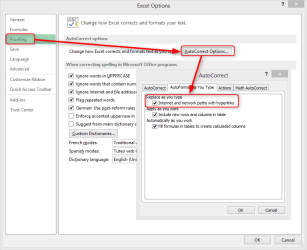
Check the Autoformat as you type option, if automatic links is enabled, disable it, close and reopen Excel and see if the Remove Hyperlinks is now visible.

2014-01-24_02h35_37.png
Kari
 

My Computer My Computer

At a glance

Windows 10 Pro x64 EN-GB1.6 GHz Intel Core i7-720QM Processor6 GBATI Mobility Radeon HD 5850 Graphics
Computer type
Laptop
Computer Manufacturer/Model Number
HP ENVY 17-1150eg
OS
Windows 10 Pro x64 EN-GB
CPU
1.6 GHz Intel Core i7-720QM Processor
Memory
6 GB
Graphics Card(s)
ATI Mobility Radeon HD 5850 Graphics
Sound Card
Beats sound system with integrated subwoofer
Monitor(s) Displays
17" laptop display, 22" LED and 32" Full HD TV through HDMI
Screen Resolution
1600*900 (1), 1920*1080 (2&3)
Hard Drives
Internal: 2 x 500 GB SATA Hard Disk Drive 7200 rpm
External: 2TB for backups, 3TB USB3 network drive for media
Cooling
As Envy runs a bit warm, I have it on a Cooler Master pad
Keyboard
Logitech diNovo Media Desktop Laser (bluetooth)
Mouse
Logitech Performance Mouse MX
Internet Speed
50/10 Mbps VDSL
Antivirus
Windows Defender 4.3.9431.0
Browser
Maxthon 3.5.2., IE11
No the remove hyperlink choice is still grayed out.
 

My Computer My Computer

At a glance

Win 7 home premium 64 bitAMD4 GBRadeon
Computer Manufacturer/Model Number
HP 6610f
OS
Win 7 home premium 64 bit
CPU
AMD
Motherboard
whatever's built in
Memory
4 GB
Graphics Card(s)
Radeon
Sound Card
whatever's built in
Monitor(s) Displays
ViewSonic
Hard Drives
whatever's built in
I have no more ideas. I'll keep looking, posting here if I stumble upon something.
 

My Computer My Computer

At a glance

Windows 10 Pro x64 EN-GB1.6 GHz Intel Core i7-720QM Processor6 GBATI Mobility Radeon HD 5850 Graphics
Computer type
Laptop
Computer Manufacturer/Model Number
HP ENVY 17-1150eg
OS
Windows 10 Pro x64 EN-GB
CPU
1.6 GHz Intel Core i7-720QM Processor
Memory
6 GB
Graphics Card(s)
ATI Mobility Radeon HD 5850 Graphics
Sound Card
Beats sound system with integrated subwoofer
Monitor(s) Displays
17" laptop display, 22" LED and 32" Full HD TV through HDMI
Screen Resolution
1600*900 (1), 1920*1080 (2&3)
Hard Drives
Internal: 2 x 500 GB SATA Hard Disk Drive 7200 rpm
External: 2TB for backups, 3TB USB3 network drive for media
Cooling
As Envy runs a bit warm, I have it on a Cooler Master pad
Keyboard
Logitech diNovo Media Desktop Laser (bluetooth)
Mouse
Logitech Performance Mouse MX
Internet Speed
50/10 Mbps VDSL
Antivirus
Windows Defender 4.3.9431.0
Browser
Maxthon 3.5.2., IE11
I haven't used Excel in a while, please excuse the rust.

Try this:
Save the spreadsheet as a .csv file (tab delimited)
>> If there is more than one sheet in the Excel file, just try one.
>> if this works, you can process any other sheets in the Excel file

Open the .csv file as a new Excel speadsheet (only tab delimited in the import dialog)
>> You should be able to double click the .csv file and it will open an import dialog in Excel

Are the eMail addresses still mailto:'s
Can you remove hyperlink from them in this version of the Excel file?
 

My Computer My Computer

At a glance

x64 (6.3.9600) Win8.1 Pro & soon dual boot x6...AMD A6-3420M APU with Radeon(tm) HD Graphics6.00 GBAMD Radeon(TM) HD 6520G
Computer type
Laptop
Computer Manufacturer/Model Number
HP Pavilion dv6-6c10us
OS
x64 (6.3.9600) Win8.1 Pro & soon dual boot x64 (6.1.7601) Win7_SP1 HomePrem
CPU
AMD A6-3420M APU with Radeon(tm) HD Graphics
Motherboard
Hewlett-Packard 1805
Memory
6.00 GB
Graphics Card(s)
AMD Radeon(TM) HD 6520G
Sound Card
(1) AMD High Definition Audio Device (2) IDT High Definiti
Monitor(s) Displays
HP W2072a 20" LCD (1600 x 900) @ 60 Hz
Screen Resolution
1366 x 768 x 32 bits (4294967296 colors) @ 60 Hz
Hard Drives
ST640LM0 00 HM641JI SATA Disk Device
Keyboard
Logitech k520 wireless KB
Mouse
Logitech m320 wireless mouse (bundled with KB)
Internet Speed
15/5 | 54 MB Wireless 'n'
Antivirus
Realtime: Defender or Avast | On-demand: Malwarebytes, ESET
Browser
IE 11 on Win8, IE 10 on win 7
Other Info
Media: [Gimp, Audacity, VLC] || Comm: [WEmail 2012, Skype] || Productivity: [OpenOffice,| Textpad] || Utils: [Sysinternals, cCleaner, Speccy, Defraggler]
Perhaps you could try this. Copy all those with the hyperlink active into a new workbook & change them to a normal cell. Then instead of copying them back to the previous workbook, copy the ones in the previous workbook to the new workbook.
Sounds stupid but it might work.:)
 

My Computer My Computer

At a glance

Windows 7 Home Premium 64 bit sp1Intel i5 3570 3.4Ghz Ivy Bridge SKT 1155 quad...G-Skill Rip Jaws 16Gb (8x2) DDR3 -1600 PC3 12...Gigabyte NVIDIA GT610 1Gb DDR3 810/1200 PCI-E...
Computer type
PC/Desktop
Computer Manufacturer/Model Number
Self built using existing case
OS
Windows 7 Home Premium 64 bit sp1
CPU
Intel i5 3570 3.4Ghz Ivy Bridge SKT 1155 quad core
Motherboard
Gigabyte Z77-HD3 SKT 1155 2xSata 3, 4x USB 3.0
Memory
G-Skill Rip Jaws 16Gb (8x2) DDR3 -1600 PC3 12800 CL 10 red
Graphics Card(s)
Gigabyte NVIDIA GT610 1Gb DDR3 810/1200 PCI-E 2.0 Silent
Sound Card
NVIDIA High Definition & Realtech High Definition Audio
Monitor(s) Displays
2 x Philips 226V4L 16:9 aspect ratio
Screen Resolution
1920 x 1080 HD
Hard Drives
Samsung 840 Pro 256gb SSD, SATA 3.
Hitachi Touro Portable 1tb, USB 3.0 HDD used for image b/ups.
PSU
Corsair VS450
Case
Codeng
Cooling
PSU fan & CPU fan
Keyboard
Logitech
Mouse
Logitech Wireless trackball M570
Internet Speed
Wireless 3G. 3mg down & 550kb up.
Antivirus
Bitdefender Internet Security 2020
Browser
Opera (Current Version) & Firefox
Other Info
MS Office 2013 Pro. Davis weather station software. MGE Nova 600 avr UPS.
Kari,

Hey thanks man! No problem! I really appreciate your help! But I think the issue has run its course, for at least 3 reasons: 1) It's not a big problem for me; it's only a curiosity, that I don't have to solve; and 2) I'm headed for Palm Springs, CA, for two weeks vacation! It's 19 deg here in SC right now, so this is something I'm really looking forward to! And I don't intend to take Excel issues along with me! and 3) I just tried what someone on another help forum suggested, and presto! I "copy/paste special-ed" and it works!
 

My Computer My Computer

At a glance

Win 7 home premium 64 bitAMD4 GBRadeon
Computer Manufacturer/Model Number
HP 6610f
OS
Win 7 home premium 64 bit
CPU
AMD
Motherboard
whatever's built in
Memory
4 GB
Graphics Card(s)
Radeon
Sound Card
whatever's built in
Monitor(s) Displays
ViewSonic
Hard Drives
whatever's built in
Hey SlartyBart, Thx for helping! I just posted a reply above, saying someone else suggested another way to copy/paste, which seems to work. I appreciate your help too.

By the way. Your screen name sounds vaguely familiar. Any chance it comes from the Hitchhiker's Guide...?
 

My Computer My Computer

At a glance

Win 7 home premium 64 bitAMD4 GBRadeon
Computer Manufacturer/Model Number
HP 6610f
OS
Win 7 home premium 64 bit
CPU
AMD
Motherboard
whatever's built in
Memory
4 GB
Graphics Card(s)
Radeon
Sound Card
whatever's built in
Monitor(s) Displays
ViewSonic
Hard Drives
whatever's built in
Does "I designed the fjords, all those squiggly lines"
or
All the flower pot could think of was "Oh no, not again!"
or
Come along or you'll be late!
Late for what?
Late as in the Late Arthur Dent.

answer your question re: my forum name? :p

Gee Tom, I feel kind of bad for you, having to go to Palm Springs, maybe I'll head sown to SC for a warm up.

temps.png

Before you go, How did you originally put the data in Excel? and Is this something you do with any regularity?
You might want to poke around in Excel to see if there is a way to prevent future issues with hyperlinks.

Anyway, enjoy your 2 weeks in Sunny CA.

Bill
 

My Computer My Computer

At a glance

x64 (6.3.9600) Win8.1 Pro & soon dual boot x6...AMD A6-3420M APU with Radeon(tm) HD Graphics6.00 GBAMD Radeon(TM) HD 6520G
Computer type
Laptop
Computer Manufacturer/Model Number
HP Pavilion dv6-6c10us
OS
x64 (6.3.9600) Win8.1 Pro & soon dual boot x64 (6.1.7601) Win7_SP1 HomePrem
CPU
AMD A6-3420M APU with Radeon(tm) HD Graphics
Motherboard
Hewlett-Packard 1805
Memory
6.00 GB
Graphics Card(s)
AMD Radeon(TM) HD 6520G
Sound Card
(1) AMD High Definition Audio Device (2) IDT High Definiti
Monitor(s) Displays
HP W2072a 20" LCD (1600 x 900) @ 60 Hz
Screen Resolution
1366 x 768 x 32 bits (4294967296 colors) @ 60 Hz
Hard Drives
ST640LM0 00 HM641JI SATA Disk Device
Keyboard
Logitech k520 wireless KB
Mouse
Logitech m320 wireless mouse (bundled with KB)
Internet Speed
15/5 | 54 MB Wireless 'n'
Antivirus
Realtime: Defender or Avast | On-demand: Malwarebytes, ESET
Browser
IE 11 on Win8, IE 10 on win 7
Other Info
Media: [Gimp, Audacity, VLC] || Comm: [WEmail 2012, Skype] || Productivity: [OpenOffice,| Textpad] || Utils: [Sysinternals, cCleaner, Speccy, Defraggler]
Excel 2003 had a habit of occasional corrupt files

As a newbie to Excell 2010 while rewriting an addin, my tiny experimental .xlsm file corrupted.
Yep ... Excel can do it sometimes.
 

My Computer My Computer

At a glance

XP Pro (x86) | 7 HP (x86) & (x64) | 7 Pro (x64)
Computer type
PC/Desktop
Computer Manufacturer/Model Number
Toshiba, Lenovo (laptops) + 4 rigs
OS
XP Pro (x86) | 7 HP (x86) & (x64) | 7 Pro (x64)
Did you first highlight the hyperling before you tried to remove it ?
 

My Computer My Computer

At a glance

Vista, Windows7, Mint Mate, Zorin, Windows 8from 1.6GHz Duo to i7
Computer Manufacturer/Model Number
HP, Dell, Gateway, Toshiba - 4 laptops and 2 desktops
OS
Vista, Windows7, Mint Mate, Zorin, Windows 8
CPU
from 1.6GHz Duo to i7
Monitor(s) Displays
2x HP w2207
Hard Drives
5x HDD, 7x SSD, 12x Externals
Keyboard
with trackball - no mices
Mouse
Trackball mice
Internet Speed
DSL 6000
Kari,

Hey thanks man! No problem! I really appreciate your help!
But I think the issue has run its course, for at least 3 reasons:
  1. It's not a big problem for me; it's only a curiosity, that I don't have to solve; and
  2. I'm headed for Palm Springs, CA, for two weeks vacation! It's 19 deg here in SC right now, so this is something I'm really looking forward to! And I don't intend to take Excel issues along with me! and
  3. I just tried what someone on another help forum suggested, and presto! I "copy/paste special-ed" and it works!
Thread Start is probably in Palm Springs by now. A workaround resolved the issue.
 

My Computer My Computer

At a glance

x64 (6.3.9600) Win8.1 Pro & soon dual boot x6...AMD A6-3420M APU with Radeon(tm) HD Graphics6.00 GBAMD Radeon(TM) HD 6520G
Computer type
Laptop
Computer Manufacturer/Model Number
HP Pavilion dv6-6c10us
OS
x64 (6.3.9600) Win8.1 Pro & soon dual boot x64 (6.1.7601) Win7_SP1 HomePrem
CPU
AMD A6-3420M APU with Radeon(tm) HD Graphics
Motherboard
Hewlett-Packard 1805
Memory
6.00 GB
Graphics Card(s)
AMD Radeon(TM) HD 6520G
Sound Card
(1) AMD High Definition Audio Device (2) IDT High Definiti
Monitor(s) Displays
HP W2072a 20" LCD (1600 x 900) @ 60 Hz
Screen Resolution
1366 x 768 x 32 bits (4294967296 colors) @ 60 Hz
Hard Drives
ST640LM0 00 HM641JI SATA Disk Device
Keyboard
Logitech k520 wireless KB
Mouse
Logitech m320 wireless mouse (bundled with KB)
Internet Speed
15/5 | 54 MB Wireless 'n'
Antivirus
Realtime: Defender or Avast | On-demand: Malwarebytes, ESET
Browser
IE 11 on Win8, IE 10 on win 7
Other Info
Media: [Gimp, Audacity, VLC] || Comm: [WEmail 2012, Skype] || Productivity: [OpenOffice,| Textpad] || Utils: [Sysinternals, cCleaner, Speccy, Defraggler]
I got it!

@TomSeeley - I was having exactly the same problem! Fixed it by: Un-sharing the workbook.

Let me know if this works for you, too!
 

My Computer My Computer

At a glance

Windows 7
Computer type
PC/Desktop
OS
Windows 7
Back
Top