Solved Can't uninstall Google Chrome

Roman5

New member
Member
VIP
Local time
8:34 PM
Messages
111
Location
London UK
Hi. I want to uninstall Chrome and then reinstall it as the thumbnail tabs are not working properly, ie, the tabs aren't showing the thumbnailed image of the saved webpages, they're just blank but with the the titles and working link to the pages. But I get this box with non sensical squares when I click uninstall Google Chrome in Control Panel. I click 'OK' and nothing happens. How can I remove Chrome?
 

Attachments
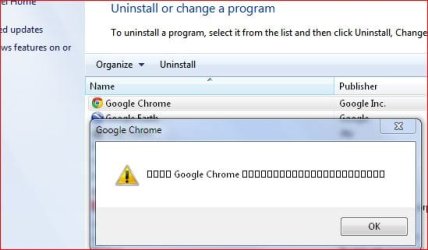
  • Google Chrome uninstalling box.JPG
    Google Chrome uninstalling box.JPG
    28.5 KB · Views: 17

My Computer

Computer type
PC/Desktop
OS
Windows 7 HP x64 SP1
CPU
Phenom II x2 550BE @3.1Ghz
Motherboard
GA-MA770-UD3 rev 2.0
Memory
Patriot Viper 2x2GB DDR2 6400
Graphics Card(s)
Sapphire HD5850 Extreme 1GB
Sound Card
Onboard Realtek
Monitor(s) Displays
Samsung 23" S23A700D * 120Hz * 3D * 2ms response
Screen Resolution
1920x1080
Hard Drives
SSD Samsung 830 128GB/Seagate 2TB (2 x single platter)/ WD 1TB Cav Black/ WD RE3 1TB /WD 320GB IDE/IBM 120GB IDE
PSU
XFX Pro 650w Core Edition
Case
Coolermaster CM690 Dominator
Cooling
TRUE Rev.C + Arctic Cooling MX-2 + various 12cm fans
Keyboard
Razer Lycosa
Mouse
Logitech MX518
Internet Speed
Fibre Optic 100MB Down * 6MB Up

My Computer

Computer type
PC/Desktop
Computer Manufacturer/Model Number
Self assembled
OS
Windows 10 Home 64Bit
CPU
Intel Core i5 10400 @ 2.90GHz
Motherboard
Intel Corporation DG41WV (PROCESSOR)
Memory
8.00GB Single-Channel Unknown @ 1329MHz (16-20-20-38)
Sound Card
Realtek High Definition Audio
Monitor(s) Displays
DELL E170S
Screen Resolution
1280x1024 pixels
Hard Drives
931GB TOSHIBA DT01ACA100 (SATA)
238GB TEAM TM8PS7256G (SATA SSD)
Case
Nothing Fancy
Cooling
Fans
Keyboard
A4 Tech Co LTD
Mouse
A4 Tech Co Ltd/Logitech
Internet Speed
25 Mbps

My Computer

Computer type
PC/Desktop
OS
Windows 7 HP x64 SP1
CPU
Phenom II x2 550BE @3.1Ghz
Motherboard
GA-MA770-UD3 rev 2.0
Memory
Patriot Viper 2x2GB DDR2 6400
Graphics Card(s)
Sapphire HD5850 Extreme 1GB
Sound Card
Onboard Realtek
Monitor(s) Displays
Samsung 23" S23A700D * 120Hz * 3D * 2ms response
Screen Resolution
1920x1080
Hard Drives
SSD Samsung 830 128GB/Seagate 2TB (2 x single platter)/ WD 1TB Cav Black/ WD RE3 1TB /WD 320GB IDE/IBM 120GB IDE
PSU
XFX Pro 650w Core Edition
Case
Coolermaster CM690 Dominator
Cooling
TRUE Rev.C + Arctic Cooling MX-2 + various 12cm fans
Keyboard
Razer Lycosa
Mouse
Logitech MX518
Internet Speed
Fibre Optic 100MB Down * 6MB Up
Keep us posted.
 

My Computer

Computer type
PC/Desktop
Computer Manufacturer/Model Number
Self assembled
OS
Windows 10 Home 64Bit
CPU
Intel Core i5 10400 @ 2.90GHz
Motherboard
Intel Corporation DG41WV (PROCESSOR)
Memory
8.00GB Single-Channel Unknown @ 1329MHz (16-20-20-38)
Sound Card
Realtek High Definition Audio
Monitor(s) Displays
DELL E170S
Screen Resolution
1280x1024 pixels
Hard Drives
931GB TOSHIBA DT01ACA100 (SATA)
238GB TEAM TM8PS7256G (SATA SSD)
Case
Nothing Fancy
Cooling
Fans
Keyboard
A4 Tech Co LTD
Mouse
A4 Tech Co Ltd/Logitech
Internet Speed
25 Mbps
Well you were right about rebooting. I then got an uninstall box all in japanese. Got it uninstalled including clear data, and reinstalled. Still don't understand why so many tabs aren't showing images of the visited pages. In fact the only two with images are websites but not the forums for those sites. Also, I've never really known how to get a visited site manually into a thumbnail tab, it just seems to do it randomly.
 

Attachments

  • Google Chrome tabs.JPG
    Google Chrome tabs.JPG
    51.7 KB · Views: 14

My Computer

Computer type
PC/Desktop
OS
Windows 7 HP x64 SP1
CPU
Phenom II x2 550BE @3.1Ghz
Motherboard
GA-MA770-UD3 rev 2.0
Memory
Patriot Viper 2x2GB DDR2 6400
Graphics Card(s)
Sapphire HD5850 Extreme 1GB
Sound Card
Onboard Realtek
Monitor(s) Displays
Samsung 23" S23A700D * 120Hz * 3D * 2ms response
Screen Resolution
1920x1080
Hard Drives
SSD Samsung 830 128GB/Seagate 2TB (2 x single platter)/ WD 1TB Cav Black/ WD RE3 1TB /WD 320GB IDE/IBM 120GB IDE
PSU
XFX Pro 650w Core Edition
Case
Coolermaster CM690 Dominator
Cooling
TRUE Rev.C + Arctic Cooling MX-2 + various 12cm fans
Keyboard
Razer Lycosa
Mouse
Logitech MX518
Internet Speed
Fibre Optic 100MB Down * 6MB Up
Well you were right about rebooting. I then got an uninstall box all in japanese. Got it uninstalled including clear data, and reinstalled. Still don't understand why so many tabs aren't showing images of the visited pages. In fact the only two with images are websites but not the forums for those sites. Also, I've never really known how to get a visited site manually into a thumbnail tab, it just seems to do it randomly.

Clear the history manually or with Ccleaner.

Browse the pages you usually browse several times.. and the thumbnail tabs should capture those images.

It happened with me too, but I stopped using chrome for certain reasons.
 

My Computer

Computer type
PC/Desktop
Computer Manufacturer/Model Number
Self assembled
OS
Windows 10 Home 64Bit
CPU
Intel Core i5 10400 @ 2.90GHz
Motherboard
Intel Corporation DG41WV (PROCESSOR)
Memory
8.00GB Single-Channel Unknown @ 1329MHz (16-20-20-38)
Sound Card
Realtek High Definition Audio
Monitor(s) Displays
DELL E170S
Screen Resolution
1280x1024 pixels
Hard Drives
931GB TOSHIBA DT01ACA100 (SATA)
238GB TEAM TM8PS7256G (SATA SSD)
Case
Nothing Fancy
Cooling
Fans
Keyboard
A4 Tech Co LTD
Mouse
A4 Tech Co Ltd/Logitech
Internet Speed
25 Mbps
I cleared everything with Ccleaner but still pictureless tabs except certain sites. The tab in the screenshot I posted above showing the thumbnail for this forum was blank earlier but just now it was showing the image of the page. Very odd behaviour, it's all a bit random. I'll stick with Chrome because it's still my favourite and it's fast, but this thumbnail business used to work much better in earlier versions. I also used to be able to drag a thumbnail and swap it with another in earlier chrome versions. Doesn't do that now, it just springs back in place.
 

My Computer

Computer type
PC/Desktop
OS
Windows 7 HP x64 SP1
CPU
Phenom II x2 550BE @3.1Ghz
Motherboard
GA-MA770-UD3 rev 2.0
Memory
Patriot Viper 2x2GB DDR2 6400
Graphics Card(s)
Sapphire HD5850 Extreme 1GB
Sound Card
Onboard Realtek
Monitor(s) Displays
Samsung 23" S23A700D * 120Hz * 3D * 2ms response
Screen Resolution
1920x1080
Hard Drives
SSD Samsung 830 128GB/Seagate 2TB (2 x single platter)/ WD 1TB Cav Black/ WD RE3 1TB /WD 320GB IDE/IBM 120GB IDE
PSU
XFX Pro 650w Core Edition
Case
Coolermaster CM690 Dominator
Cooling
TRUE Rev.C + Arctic Cooling MX-2 + various 12cm fans
Keyboard
Razer Lycosa
Mouse
Logitech MX518
Internet Speed
Fibre Optic 100MB Down * 6MB Up
I cleared everything with Ccleaner but still pictureless tabs except certain sites. The tab in the screenshot I posted above showing the thumbnail for this forum was blank earlier but just now it was showing the image of the page. Very odd behaviour, it's all a bit random. I'll stick with Chrome because it's still my favourite and it's fast, but this thumbnail business used to work much better in earlier versions. I also used to be able to drag a thumbnail and swap it with another in earlier chrome versions. Doesn't do that now, it just springs back in place.

I guess you should use an older version then. :)

And maybe this would help you: http://www.howtogeek.com/howto/34690/refresh-most-visited-page-icons-in-google-chrome/
 

My Computer

Computer type
PC/Desktop
Computer Manufacturer/Model Number
Self assembled
OS
Windows 10 Home 64Bit
CPU
Intel Core i5 10400 @ 2.90GHz
Motherboard
Intel Corporation DG41WV (PROCESSOR)
Memory
8.00GB Single-Channel Unknown @ 1329MHz (16-20-20-38)
Sound Card
Realtek High Definition Audio
Monitor(s) Displays
DELL E170S
Screen Resolution
1280x1024 pixels
Hard Drives
931GB TOSHIBA DT01ACA100 (SATA)
238GB TEAM TM8PS7256G (SATA SSD)
Case
Nothing Fancy
Cooling
Fans
Keyboard
A4 Tech Co LTD
Mouse
A4 Tech Co Ltd/Logitech
Internet Speed
25 Mbps

Attachments

  • Google Chrome tabs2.JPG
    Google Chrome tabs2.JPG
    30.6 KB · Views: 2
Last edited:

My Computer

Computer type
PC/Desktop
OS
Windows 7 HP x64 SP1
CPU
Phenom II x2 550BE @3.1Ghz
Motherboard
GA-MA770-UD3 rev 2.0
Memory
Patriot Viper 2x2GB DDR2 6400
Graphics Card(s)
Sapphire HD5850 Extreme 1GB
Sound Card
Onboard Realtek
Monitor(s) Displays
Samsung 23" S23A700D * 120Hz * 3D * 2ms response
Screen Resolution
1920x1080
Hard Drives
SSD Samsung 830 128GB/Seagate 2TB (2 x single platter)/ WD 1TB Cav Black/ WD RE3 1TB /WD 320GB IDE/IBM 120GB IDE
PSU
XFX Pro 650w Core Edition
Case
Coolermaster CM690 Dominator
Cooling
TRUE Rev.C + Arctic Cooling MX-2 + various 12cm fans
Keyboard
Razer Lycosa
Mouse
Logitech MX518
Internet Speed
Fibre Optic 100MB Down * 6MB Up

My Computer

Computer type
PC/Desktop
Computer Manufacturer/Model Number
Self assembled
OS
Windows 10 Home 64Bit
CPU
Intel Core i5 10400 @ 2.90GHz
Motherboard
Intel Corporation DG41WV (PROCESSOR)
Memory
8.00GB Single-Channel Unknown @ 1329MHz (16-20-20-38)
Sound Card
Realtek High Definition Audio
Monitor(s) Displays
DELL E170S
Screen Resolution
1280x1024 pixels
Hard Drives
931GB TOSHIBA DT01ACA100 (SATA)
238GB TEAM TM8PS7256G (SATA SSD)
Case
Nothing Fancy
Cooling
Fans
Keyboard
A4 Tech Co LTD
Mouse
A4 Tech Co Ltd/Logitech
Internet Speed
25 Mbps

My Computer

Computer type
PC/Desktop
OS
Windows 7 HP x64 SP1
CPU
Phenom II x2 550BE @3.1Ghz
Motherboard
GA-MA770-UD3 rev 2.0
Memory
Patriot Viper 2x2GB DDR2 6400
Graphics Card(s)
Sapphire HD5850 Extreme 1GB
Sound Card
Onboard Realtek
Monitor(s) Displays
Samsung 23" S23A700D * 120Hz * 3D * 2ms response
Screen Resolution
1920x1080
Hard Drives
SSD Samsung 830 128GB/Seagate 2TB (2 x single platter)/ WD 1TB Cav Black/ WD RE3 1TB /WD 320GB IDE/IBM 120GB IDE
PSU
XFX Pro 650w Core Edition
Case
Coolermaster CM690 Dominator
Cooling
TRUE Rev.C + Arctic Cooling MX-2 + various 12cm fans
Keyboard
Razer Lycosa
Mouse
Logitech MX518
Internet Speed
Fibre Optic 100MB Down * 6MB Up
Wow nice. I installed Google Chrome '14.835.202' 04 October, 2011 which was the last version I had where tabs still swapped and it's all working properly again, thumbnails getting memorised properly and quickly, pretty much instantly. It doesn't have that nice sheen to the thumbnails of the later versions, but I don't care as long as it works well. I really don't know what happened with later versions but google seems to have messed up with them. At least for me, as I don't know how well they work for others.
 

My Computer

Computer type
PC/Desktop
OS
Windows 7 HP x64 SP1
CPU
Phenom II x2 550BE @3.1Ghz
Motherboard
GA-MA770-UD3 rev 2.0
Memory
Patriot Viper 2x2GB DDR2 6400
Graphics Card(s)
Sapphire HD5850 Extreme 1GB
Sound Card
Onboard Realtek
Monitor(s) Displays
Samsung 23" S23A700D * 120Hz * 3D * 2ms response
Screen Resolution
1920x1080
Hard Drives
SSD Samsung 830 128GB/Seagate 2TB (2 x single platter)/ WD 1TB Cav Black/ WD RE3 1TB /WD 320GB IDE/IBM 120GB IDE
PSU
XFX Pro 650w Core Edition
Case
Coolermaster CM690 Dominator
Cooling
TRUE Rev.C + Arctic Cooling MX-2 + various 12cm fans
Keyboard
Razer Lycosa
Mouse
Logitech MX518
Internet Speed
Fibre Optic 100MB Down * 6MB Up
Glad!

Feel free to mark the thread as solved if you feel it is.
 

My Computer

Computer type
PC/Desktop
Computer Manufacturer/Model Number
Self assembled
OS
Windows 10 Home 64Bit
CPU
Intel Core i5 10400 @ 2.90GHz
Motherboard
Intel Corporation DG41WV (PROCESSOR)
Memory
8.00GB Single-Channel Unknown @ 1329MHz (16-20-20-38)
Sound Card
Realtek High Definition Audio
Monitor(s) Displays
DELL E170S
Screen Resolution
1280x1024 pixels
Hard Drives
931GB TOSHIBA DT01ACA100 (SATA)
238GB TEAM TM8PS7256G (SATA SSD)
Case
Nothing Fancy
Cooling
Fans
Keyboard
A4 Tech Co LTD
Mouse
A4 Tech Co Ltd/Logitech
Internet Speed
25 Mbps
Yeah I'll do that. For now, I can use version 14. But I've also joined the chrome forum and asked them why I get these problems with the latest versions. Ideally, it would be nice to use the latest because of certain features not in version 14. Thanks for your help koolkat. :)
 

My Computer

Computer type
PC/Desktop
OS
Windows 7 HP x64 SP1
CPU
Phenom II x2 550BE @3.1Ghz
Motherboard
GA-MA770-UD3 rev 2.0
Memory
Patriot Viper 2x2GB DDR2 6400
Graphics Card(s)
Sapphire HD5850 Extreme 1GB
Sound Card
Onboard Realtek
Monitor(s) Displays
Samsung 23" S23A700D * 120Hz * 3D * 2ms response
Screen Resolution
1920x1080
Hard Drives
SSD Samsung 830 128GB/Seagate 2TB (2 x single platter)/ WD 1TB Cav Black/ WD RE3 1TB /WD 320GB IDE/IBM 120GB IDE
PSU
XFX Pro 650w Core Edition
Case
Coolermaster CM690 Dominator
Cooling
TRUE Rev.C + Arctic Cooling MX-2 + various 12cm fans
Keyboard
Razer Lycosa
Mouse
Logitech MX518
Internet Speed
Fibre Optic 100MB Down * 6MB Up
Yeah I'll do that. For now, I can use version 14. But I've also joined the chrome forum and asked them why I get these problems with the latest versions. Ideally, it would be nice to use the latest because of certain features not in version 14. Thanks for your help koolkat. :)

I feel what you're saying,
you're welcome :)
 

My Computer

Computer type
PC/Desktop
Computer Manufacturer/Model Number
Self assembled
OS
Windows 10 Home 64Bit
CPU
Intel Core i5 10400 @ 2.90GHz
Motherboard
Intel Corporation DG41WV (PROCESSOR)
Memory
8.00GB Single-Channel Unknown @ 1329MHz (16-20-20-38)
Sound Card
Realtek High Definition Audio
Monitor(s) Displays
DELL E170S
Screen Resolution
1280x1024 pixels
Hard Drives
931GB TOSHIBA DT01ACA100 (SATA)
238GB TEAM TM8PS7256G (SATA SSD)
Case
Nothing Fancy
Cooling
Fans
Keyboard
A4 Tech Co LTD
Mouse
A4 Tech Co Ltd/Logitech
Internet Speed
25 Mbps
Back
Top