Can't use additional voices for Text to Speech using Microsoft Speech

skt

New member
Local time
1:27 PM
Messages
25
Hi

I'm trying to install additional voices for Windows 7 narrator and other Text to Speech Programs.

I have downloaded and installed this:
Download: Microsoft Speech Platform - Runtime (Version 11) - Microsoft Download Center - Download Details
and then few of these:
Download: Microsoft Speech Platform - Runtime Languages (Version 11) - Microsoft Download Center - Download Details

(I am using Windows 7 64Bit Ultimate on a desktop PC)

But I am not able to find the option to use these newly instlled voices for text to speech.

Do I have to install something else? Or am I doing something wrong?
How could I resolve this issue.

I would greatly appreciate your help.
Skt


P.S.
I have looked through these,
http://www.sevenforums.com/general-discussion/56256-additional-voices-text-speech.html
Add TTS Voice To Windows 7 and Set AS Default
But they didin't help me.
 

My Computer My Computer

OS
Windows 7 Ultimate x64
Any idea, guys?
 

My Computer My Computer

OS
Windows 7 Ultimate x64
Sorry for the Necro...

I hate to start this thread back up, but I've viewed over 75 different threads on this subject and only found one that might help...but it requires editing my registry, so...thanks, but no thanks. Has anyone looked into this at all? Found any solutions?
I've tried everything listed above and in several other threads, so any thoughts would help. I'm also running Windows 7 Ultimate, 64 bit. I've tried looking at both the 32 and 64 bit versions of the cpi, but neither of them have the voices in the drop down. One post mentioned that you need to install the voices somewhere specific, but the installers don't give you an installation location option and I was unable to edit the installer. Any support on this would be most appreciated...
 

My Computer My Computer

Computer type
PC/Desktop
OS
Windows 7 Ultimate x64
TTS Voices

Well I'm no expert on the subject but on my own machine I've installed an additional voice and can set it as the default voice using information in the link you provided:

https://social.technet.microsoft.co...ows-7-and-set-as-default?forum=w7itproinstall

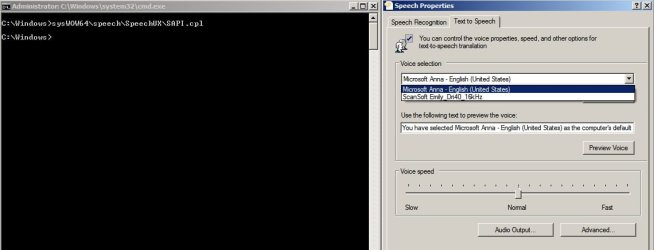
See screenshot:

Voices.jpg

Shows default "Anna" voice and extra installed "Emily" voice is available. I only ever managed to get SAPI5 voices to work in Windows 7. Also I prefer Balabolka Text To Speech software over MS Narrator.

I have never managed to find any quality free SAPI5 voices other than those listed unded "Voices Download" here:

Dimio's Tools - only the RealSpeak voices.
 

My Computer My Computer

Computer type
Laptop
Computer Manufacturer/Model Number
ASUS
OS
Microsoft Windows 7 Home Premium 64-bit 7601 Multiprocessor Free Service Pack 1
CPU
AMD C-60 APU with Radeon(tm) HD Graphics
Motherboard
ASUSTeK COMPUTER INC. X501U
Memory
4.00 GB
Graphics Card(s)
AMD Radeon HD 6290 Graphics
Sound Card
(1) AMD High Definition Audio Device (2) Realtek High Defi
Screen Resolution
1366 x 768 x 32 bits (4294967296 colors) @ 60 Hz
Hard Drives
Hitachi HTS545050A7E380 SATA Disk Device
Antivirus
Comodo CIS & FW, SecureAplus App Whitelisting, Threatfire
Browser
Cyberfox 64bit, Opera 64bit, Airfox
Other Info
Spy-The-Spy, HitmanPro.Alert, Norton Connect Safe, MJRegWatcher, BitDefender TrafficLight, Voodoo Shield, Zemana AntiMalware
Well I'm no expert on the subject but on my own machine I've installed an additional voice and can set it as the default voice using information in the link you provided:

https://social.technet.microsoft.co...ows-7-and-set-as-default?forum=w7itproinstall
Just to clarify, you we only able to get the voices to work by doing the editing the registry, correct? If so, did you run into any issues during the process? I'm VERY hesitant to edit my registry, but if that's what needs to be done and there is no other option...
Also, you said
I only ever managed to get SAPI5 voices to work in Windows 7...I have never managed to find any quality free SAPI5 voices other than those listed unded "Voices Download" here:

Dimio's Tools - only the RealSpeak voices.
Does that mean the voice you managed to get working was not one of the ones that skt and I downloaded from Microsoft's page: Download: Microsoft Speech Platform - Runtime Languages (Version 11) - Microsoft Download Center - Download Details
I'm just asking because these are the voices I was trying to use. I'm too much of a n00b to know if they are SAPI5 or not...
 

My Computer My Computer

Computer type
PC/Desktop
OS
Windows 7 Ultimate x64
TTS Voices

Well I'm no expert on the subject but on my own machine I've installed an additional voice and can set it as the default voice using information in the link you provided:

https://social.technet.microsoft.co...ows-7-and-set-as-default?forum=w7itproinstall
Just to clarify, you we only able to get the voices to work by doing the editing the registry, correct? If so, did you run into any issues during the process? I'm VERY hesitant to edit my registry, but if that's what needs to be done and there is no other option...

No I didn't edit the registry to get them to work. I tried SAPI5and SAPI4 voices from links posted here:

Dimio's Tools

The SAPI4 voices were okay but not as good as SAPI5 so I removed them then hunted around for other free SAPI5 voices without any luck so if you find any let us know.

You would also need the SAPI4 and SAPI5 speech engines from links on the same page. I wouldn't bother with SAPI4 though.

I only ever managed to get SAPI5 voices to work in Windows 7...I have never managed to find any quality free SAPI5 voices other than those listed unded "Voices Download" here:

Dimio's Tools - only the RealSpeak voices.

Does that mean the voice you managed to get working was not one of the ones that skt and I downloaded from Microsoft's page: Download: Microsoft Speech Platform - Runtime Languages (Version 11) - Microsoft Download Center - Download Details
I'm just asking because these are the voices I was trying to use. I'm too much of a n00b to know if they are SAPI5 or not...

Yes that's what it means. I never tried the Microsoft Speech Platform download and registry edit method. However I can change the default voice using the method decribed here:

https://social.technet.microsoft.co...ows-7-and-set-as-default?forum=w7itproinstall
 

My Computer My Computer

Computer type
Laptop
Computer Manufacturer/Model Number
ASUS
OS
Microsoft Windows 7 Home Premium 64-bit 7601 Multiprocessor Free Service Pack 1
CPU
AMD C-60 APU with Radeon(tm) HD Graphics
Motherboard
ASUSTeK COMPUTER INC. X501U
Memory
4.00 GB
Graphics Card(s)
AMD Radeon HD 6290 Graphics
Sound Card
(1) AMD High Definition Audio Device (2) Realtek High Defi
Screen Resolution
1366 x 768 x 32 bits (4294967296 colors) @ 60 Hz
Hard Drives
Hitachi HTS545050A7E380 SATA Disk Device
Antivirus
Comodo CIS & FW, SecureAplus App Whitelisting, Threatfire
Browser
Cyberfox 64bit, Opera 64bit, Airfox
Other Info
Spy-The-Spy, HitmanPro.Alert, Norton Connect Safe, MJRegWatcher, BitDefender TrafficLight, Voodoo Shield, Zemana AntiMalware
Thank you, that is very helpful. I will continue to research and see if I can find any others that are free to download, perhaps avoiding the special third party downloaders as I found a virus in one of them...I will update if I'm successful...
 

My Computer My Computer

Computer type
PC/Desktop
OS
Windows 7 Ultimate x64
Back
Top