Solved Can't Write In Another Language

Chris Nicola

New member
Power User
VIP
Local time
7:17 AM
Messages
170
I have installed the Greek language and keyboard in Windows but when I select the language in the taskbar (EL) I can only write in English in any application whether word, live mail or a text document. What am I doing wrong?

Your advice would be appreciated.

Kind Regards

Chris
 

My Computer

Computer type
PC/Desktop
Computer Manufacturer/Model Number
Desktop Custom built, Laptop Lenovo G575 Model 20081
OS
Desktop Win 10 Pro 64 bit, Laptop Win 7 Home 64 bit
CPU
Desktop Intel i7 4790 CPU 3.6 GHz, Laptop AMD C-50 1GHz
Motherboard
ASUS H81 Gamer
Memory
Desktop 16 Gbt, Laptop 4 Gbt
Graphics Card(s)
Desktop nvidea GeForce NTX960, Laptop AMD Raedon HD 6250M
Sound Card
Desktop onboard Realtec high definition audio nvidea HD aud
Monitor(s) Displays
BENQ G900 Digital 19 inch
Screen Resolution
1024 x 768
Hard Drives
Silicon Power SSD SATA 3.0 450b Gbt
Seagate 4 Tbt SSHD
PSU
Thermaltake 1000W
Case
Thermaltake
Cooling
Onboard case fans
Keyboard
Standard PS/2
Mouse
A4 Tech optical wireless PS/2
Internet Speed
10 Mbps
Antivirus
Microsoft Security Essentials
Other Info
DVD Samsung TSST corp CDDVDW - SATA
I have installed the Greek language and keyboard in Windows but when I select the language in the taskbar (EL) I can only write in English in any application whether word, live mail or a text document. What am I doing wrong?

Your advice would be appreciated.

Kind Regards

Chris

What version of win 7 do you have (starter, pro, ultimate, etc)?
 

My Computer

Computer Manufacturer/Model Number
HP Pavillion dv-7 1005 Tx
OS
Win 8 Release candidate 8400
CPU
[email protected]
Memory
4 gigs
Graphics Card(s)
Nvidia 9600M
Sound Card
HD built-in
Monitor(s) Displays
17" Wxga
Screen Resolution
1440x900
Cooling
none
Internet Speed
45Mb down 5Mb up
Thanks for your reply. I am using Windows 7 Ultimate English version. Also Office 2010. Region set to United Kingdom. I have the following languages installed:

English USA - keyboard IBM Greek Latin 319/USA/USA International
English (UK) - keyboard IBM Greek Latin 319 /UK keyboard
Greek - keyboard IBM Greek Latin 319.

I suspect when I change the language from the taskbar something is happing to prevent it starting.

Kind Regards

Chris
 

My Computer

Computer type
PC/Desktop
Computer Manufacturer/Model Number
Desktop Custom built, Laptop Lenovo G575 Model 20081
OS
Desktop Win 10 Pro 64 bit, Laptop Win 7 Home 64 bit
CPU
Desktop Intel i7 4790 CPU 3.6 GHz, Laptop AMD C-50 1GHz
Motherboard
ASUS H81 Gamer
Memory
Desktop 16 Gbt, Laptop 4 Gbt
Graphics Card(s)
Desktop nvidea GeForce NTX960, Laptop AMD Raedon HD 6250M
Sound Card
Desktop onboard Realtec high definition audio nvidea HD aud
Monitor(s) Displays
BENQ G900 Digital 19 inch
Screen Resolution
1024 x 768
Hard Drives
Silicon Power SSD SATA 3.0 450b Gbt
Seagate 4 Tbt SSHD
PSU
Thermaltake 1000W
Case
Thermaltake
Cooling
Onboard case fans
Keyboard
Standard PS/2
Mouse
A4 Tech optical wireless PS/2
Internet Speed
10 Mbps
Antivirus
Microsoft Security Essentials
Other Info
DVD Samsung TSST corp CDDVDW - SATA
I have installed the Greek language and keyboard in Windows but when I select the language in the taskbar (EL) I can only write in English in any application whether word, live mail or a text document. What am I doing wrong?

Your advice would be appreciated.

Kind Regards

Chris

Hi there
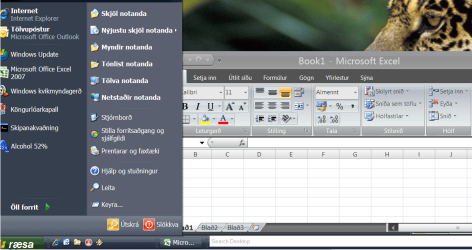
you need to install the Languge packs (lip) for Office as well as for Windows

For example Here's EXCEL with Icelandic Interface (.LIP) -- Similar should be available in most other languages.

Don't forget also to change the Language locale in Control panel

Region and Language ==>Keyboards and Languages

Change display Language

Then also go to Adminitrative

Copy Settings

click boxes Welcome screen and user accounts
New user accounts


Cheers
jimbo
 

Attachments

  • officelang.png
    officelang.png
    96.2 KB · Views: 39

My Computer

Computer type
PC/Desktop
Computer Manufacturer/Model Number
Custom built, several laptops HP/ASUS
OS
Linux CENTOS 7 / various Windows OS'es and servers
CPU
Intel i7 Intel i5
Memory
8GB, 16GB
Graphics Card(s)
On Motherboard
Sound Card
Realtek HD audio
Monitor(s) Displays
Apple Cinema display, Samsung LCD
Screen Resolution
1920 X 1080
Hard Drives
4 X 1TB SATA
Mouse
Toshiba wireless laser
Internet Speed
> 20MB up
Thank you very much for this information Jimbo. If this is the only way to do it then I will try that. However I do not wish to change the interface language in Windows or use the proofing tools in Word. I just need to change the language I type with in any application from time to time. I remember with Win 98 and XP I just had to change the language in the taskbar and that was all that was needed. I wonder if there is something simple that I am missing or perhaps ther is an issue with Win7 Ultimate?

KInd Regards

Chris
 

My Computer

Computer type
PC/Desktop
Computer Manufacturer/Model Number
Desktop Custom built, Laptop Lenovo G575 Model 20081
OS
Desktop Win 10 Pro 64 bit, Laptop Win 7 Home 64 bit
CPU
Desktop Intel i7 4790 CPU 3.6 GHz, Laptop AMD C-50 1GHz
Motherboard
ASUS H81 Gamer
Memory
Desktop 16 Gbt, Laptop 4 Gbt
Graphics Card(s)
Desktop nvidea GeForce NTX960, Laptop AMD Raedon HD 6250M
Sound Card
Desktop onboard Realtec high definition audio nvidea HD aud
Monitor(s) Displays
BENQ G900 Digital 19 inch
Screen Resolution
1024 x 768
Hard Drives
Silicon Power SSD SATA 3.0 450b Gbt
Seagate 4 Tbt SSHD
PSU
Thermaltake 1000W
Case
Thermaltake
Cooling
Onboard case fans
Keyboard
Standard PS/2
Mouse
A4 Tech optical wireless PS/2
Internet Speed
10 Mbps
Antivirus
Microsoft Security Essentials
Other Info
DVD Samsung TSST corp CDDVDW - SATA

My Computer

Computer Manufacturer/Model Number
HP Pavilion Elite 495UK
OS
Windows 7 Ultimate SP1 64-Bit
CPU
Intel Core i7 870 @ 2.93GHz
Motherboard
MSI 2A9C (CPU1)
Memory
8Gb Dual-Channel DDR3 @ 664MHz
Graphics Card(s)
nVidia GeForce GTX 460 1024MB dedicated RAM
Sound Card
Realtek HD Audio
Monitor(s) Displays
HP2310i
Screen Resolution
1920 x 1080
Hard Drives
1x1954GB Hitachi HDS22020ALA 330 (RAID), 1x1954GB Hitachi External for backup and storage
PSU
460W
Case
HP Elite
Cooling
Air cooled
Keyboard
Logitech K750 solar-powered keyboard
Mouse
Logitech Wireless M180 mouse
Internet Speed
2Mb
Other Info
Pure Avanti Flow Internet Radio with iPod Dock, 64Gb iPod, HP USB Speakers, Sony MDR-V500 Headphones, Sony Vaio F-Series Laptop
believ, if you select the taskbar option, you are only changing the input language and locale, not the kb layout.
Try one or other of these shortcuts.

Left Alt+Shift
Switch the input language when multiple input languages are enabled
or:
Ctrl+Shift
Switch the keyboard layout when multiple keyboard layouts are enabled
 

My Computer

Computer Manufacturer/Model Number
Three desktops and one laptop with good specs..
OS
Vista and now 7 in 32 and 64 bit.
Thanks for sharing this Seavixen. However this would not be compatible with my existing keyboard IBM Grerk Latin 319. Also I would not be able to select and deselect it from the taskbar language options when switching languages in Word.

Kind Regards

Chris
 

My Computer

Computer type
PC/Desktop
Computer Manufacturer/Model Number
Desktop Custom built, Laptop Lenovo G575 Model 20081
OS
Desktop Win 10 Pro 64 bit, Laptop Win 7 Home 64 bit
CPU
Desktop Intel i7 4790 CPU 3.6 GHz, Laptop AMD C-50 1GHz
Motherboard
ASUS H81 Gamer
Memory
Desktop 16 Gbt, Laptop 4 Gbt
Graphics Card(s)
Desktop nvidea GeForce NTX960, Laptop AMD Raedon HD 6250M
Sound Card
Desktop onboard Realtec high definition audio nvidea HD aud
Monitor(s) Displays
BENQ G900 Digital 19 inch
Screen Resolution
1024 x 768
Hard Drives
Silicon Power SSD SATA 3.0 450b Gbt
Seagate 4 Tbt SSHD
PSU
Thermaltake 1000W
Case
Thermaltake
Cooling
Onboard case fans
Keyboard
Standard PS/2
Mouse
A4 Tech optical wireless PS/2
Internet Speed
10 Mbps
Antivirus
Microsoft Security Essentials
Other Info
DVD Samsung TSST corp CDDVDW - SATA
Thany you for the suggestion davehc. In the case of the Greek language there is only one keyboard installed so it will be selected by default.

Kind Regards

Chris
 

My Computer

Computer type
PC/Desktop
Computer Manufacturer/Model Number
Desktop Custom built, Laptop Lenovo G575 Model 20081
OS
Desktop Win 10 Pro 64 bit, Laptop Win 7 Home 64 bit
CPU
Desktop Intel i7 4790 CPU 3.6 GHz, Laptop AMD C-50 1GHz
Motherboard
ASUS H81 Gamer
Memory
Desktop 16 Gbt, Laptop 4 Gbt
Graphics Card(s)
Desktop nvidea GeForce NTX960, Laptop AMD Raedon HD 6250M
Sound Card
Desktop onboard Realtec high definition audio nvidea HD aud
Monitor(s) Displays
BENQ G900 Digital 19 inch
Screen Resolution
1024 x 768
Hard Drives
Silicon Power SSD SATA 3.0 450b Gbt
Seagate 4 Tbt SSHD
PSU
Thermaltake 1000W
Case
Thermaltake
Cooling
Onboard case fans
Keyboard
Standard PS/2
Mouse
A4 Tech optical wireless PS/2
Internet Speed
10 Mbps
Antivirus
Microsoft Security Essentials
Other Info
DVD Samsung TSST corp CDDVDW - SATA
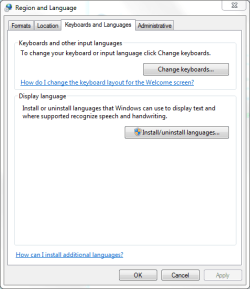
Perhaps a longshot, but have you tried setting things up in the Control Panel rather than your language taskbar?

Language.PNG
 

My Computer

Computer Manufacturer/Model Number
HP Pavilion Elite 495UK
OS
Windows 7 Ultimate SP1 64-Bit
CPU
Intel Core i7 870 @ 2.93GHz
Motherboard
MSI 2A9C (CPU1)
Memory
8Gb Dual-Channel DDR3 @ 664MHz
Graphics Card(s)
nVidia GeForce GTX 460 1024MB dedicated RAM
Sound Card
Realtek HD Audio
Monitor(s) Displays
HP2310i
Screen Resolution
1920 x 1080
Hard Drives
1x1954GB Hitachi HDS22020ALA 330 (RAID), 1x1954GB Hitachi External for backup and storage
PSU
460W
Case
HP Elite
Cooling
Air cooled
Keyboard
Logitech K750 solar-powered keyboard
Mouse
Logitech Wireless M180 mouse
Internet Speed
2Mb
Other Info
Pure Avanti Flow Internet Radio with iPod Dock, 64Gb iPod, HP USB Speakers, Sony MDR-V500 Headphones, Sony Vaio F-Series Laptop
Perhaps a longshot, but have you tried setting things up in the Control Panel rather than your language taskbar?

Thanks Seavixen.

I installed the Win 7 Greek language pack and that did not solve the issue although it may help me in the future with other things so I thank Jimbo45 for this good suggestion.

Following your suggestion Seavixen I tried an experiment and deleted the Greek language and keyboard IBM Greek Latin 319 from the control panel and then added it again with 4 other keyboards as well:
Greek Language - keyboard Greek/Greek 319/Greek 319 Latin/Greek

After testing it with Word it seems that the Greek and Greek 319 keyboards can indeed write in Greek but the Greek 319 Latin and Greek do not and only write in English characters. I have no idea if this is normal or not. However the problem was that an incompatible keyboard was selected. Since the Greek 319 keyboard resembles my keyboard layout I will stick with that.

I wish to thank you all for your replies and for helping me to solve this issue.

Kind Regards

Chris
 

My Computer

Computer type
PC/Desktop
Computer Manufacturer/Model Number
Desktop Custom built, Laptop Lenovo G575 Model 20081
OS
Desktop Win 10 Pro 64 bit, Laptop Win 7 Home 64 bit
CPU
Desktop Intel i7 4790 CPU 3.6 GHz, Laptop AMD C-50 1GHz
Motherboard
ASUS H81 Gamer
Memory
Desktop 16 Gbt, Laptop 4 Gbt
Graphics Card(s)
Desktop nvidea GeForce NTX960, Laptop AMD Raedon HD 6250M
Sound Card
Desktop onboard Realtec high definition audio nvidea HD aud
Monitor(s) Displays
BENQ G900 Digital 19 inch
Screen Resolution
1024 x 768
Hard Drives
Silicon Power SSD SATA 3.0 450b Gbt
Seagate 4 Tbt SSHD
PSU
Thermaltake 1000W
Case
Thermaltake
Cooling
Onboard case fans
Keyboard
Standard PS/2
Mouse
A4 Tech optical wireless PS/2
Internet Speed
10 Mbps
Antivirus
Microsoft Security Essentials
Other Info
DVD Samsung TSST corp CDDVDW - SATA
You're very welcome Chris.

I'm pleased we were of some help and thanks for letting us know.
 

My Computer

Computer Manufacturer/Model Number
HP Pavilion Elite 495UK
OS
Windows 7 Ultimate SP1 64-Bit
CPU
Intel Core i7 870 @ 2.93GHz
Motherboard
MSI 2A9C (CPU1)
Memory
8Gb Dual-Channel DDR3 @ 664MHz
Graphics Card(s)
nVidia GeForce GTX 460 1024MB dedicated RAM
Sound Card
Realtek HD Audio
Monitor(s) Displays
HP2310i
Screen Resolution
1920 x 1080
Hard Drives
1x1954GB Hitachi HDS22020ALA 330 (RAID), 1x1954GB Hitachi External for backup and storage
PSU
460W
Case
HP Elite
Cooling
Air cooled
Keyboard
Logitech K750 solar-powered keyboard
Mouse
Logitech Wireless M180 mouse
Internet Speed
2Mb
Other Info
Pure Avanti Flow Internet Radio with iPod Dock, 64Gb iPod, HP USB Speakers, Sony MDR-V500 Headphones, Sony Vaio F-Series Laptop
Back
Top