Can't write to Win7 c: Drive across network

Fenshome

New member
Member
Local time
7:56 PM
Messages
34
Hi

Can't write to Win7 C: Drive across Network from another PC even though the Permissions allow read/write under the Security Tab in C: Drive properties. But I can read from the C: Drive.

Can you point me in the right direction.
 

My Computer My Computer

At a glance

Win 74 GBs
Computer Manufacturer/Model Number
HP Dx 2810 MT
OS
Win 7
Memory
4 GBs
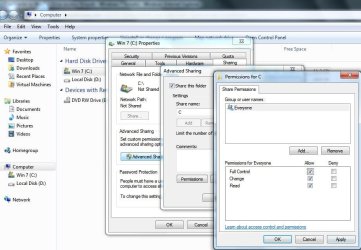
Apart from the Everyone Group to be Full Control. Can you also put in the Permission section the username, you used to log onto the machine with the C drive shared with.

Noname.jpg
 

My Computer My Computer

At a glance

Windows 7 Ultimate 64BitGenuineIntel Intel(R) Core(TM) DuoCore T2400 ...2.00 GBMobile Intel(R) 945 Express Chipset
Computer Manufacturer/Model Number
Lenovo ThinkPad T60
OS
Windows 7 Ultimate 64Bit
CPU
GenuineIntel Intel(R) Core(TM) DuoCore T2400 @ 1.83GHz
Motherboard
Intel(R) 82801G (ICH7 Family)
Memory
2.00 GB
Graphics Card(s)
Mobile Intel(R) 945 Express Chipset
Sound Card
SoundMAX Integrated Digital HD Audio
Monitor(s) Displays
ThinkPad Display
Screen Resolution
1400x1050
Hard Drives
100Gb SATA
Keyboard
Standard Keyboard
Mouse
HID-compliant Mouse
Internet Speed
Cable Broadband - 54Mbps
Other Info
Intel(R) PRO/1000 PL Network Connection
11a/b/g Wireless LAN Mini PCI Express Adapter
Both are in and permissions as you show
 

My Computer My Computer

At a glance

Win 74 GBs
Computer Manufacturer/Model Number
HP Dx 2810 MT
OS
Win 7
Memory
4 GBs
Sorry Here's the screen dump
 

My Computer My Computer

At a glance

Win 74 GBs
Computer Manufacturer/Model Number
HP Dx 2810 MT
OS
Win 7
Memory
4 GBs
I showed Permission, not security tab.
 

My Computer My Computer

At a glance

Windows 7 Ultimate 64BitGenuineIntel Intel(R) Core(TM) DuoCore T2400 ...2.00 GBMobile Intel(R) 945 Express Chipset
Computer Manufacturer/Model Number
Lenovo ThinkPad T60
OS
Windows 7 Ultimate 64Bit
CPU
GenuineIntel Intel(R) Core(TM) DuoCore T2400 @ 1.83GHz
Motherboard
Intel(R) 82801G (ICH7 Family)
Memory
2.00 GB
Graphics Card(s)
Mobile Intel(R) 945 Express Chipset
Sound Card
SoundMAX Integrated Digital HD Audio
Monitor(s) Displays
ThinkPad Display
Screen Resolution
1400x1050
Hard Drives
100Gb SATA
Keyboard
Standard Keyboard
Mouse
HID-compliant Mouse
Internet Speed
Cable Broadband - 54Mbps
Other Info
Intel(R) PRO/1000 PL Network Connection
11a/b/g Wireless LAN Mini PCI Express Adapter
Setup the same as yours
 

My Computer My Computer

At a glance

Win 74 GBs
Computer Manufacturer/Model Number
HP Dx 2810 MT
OS
Win 7
Memory
4 GBs
I have mentioned this in my previous post

"Apart from the Everyone Group to be Full Control. Can you also put in the Permission section the username, you used to log onto the machine with the C drive shared with."
 

My Computer My Computer

At a glance

Windows 7 Ultimate 64BitGenuineIntel Intel(R) Core(TM) DuoCore T2400 ...2.00 GBMobile Intel(R) 945 Express Chipset
Computer Manufacturer/Model Number
Lenovo ThinkPad T60
OS
Windows 7 Ultimate 64Bit
CPU
GenuineIntel Intel(R) Core(TM) DuoCore T2400 @ 1.83GHz
Motherboard
Intel(R) 82801G (ICH7 Family)
Memory
2.00 GB
Graphics Card(s)
Mobile Intel(R) 945 Express Chipset
Sound Card
SoundMAX Integrated Digital HD Audio
Monitor(s) Displays
ThinkPad Display
Screen Resolution
1400x1050
Hard Drives
100Gb SATA
Keyboard
Standard Keyboard
Mouse
HID-compliant Mouse
Internet Speed
Cable Broadband - 54Mbps
Other Info
Intel(R) PRO/1000 PL Network Connection
11a/b/g Wireless LAN Mini PCI Express Adapter
OK it took me some time to work out what to do, and now working. When you said username, I thought it was the real user and not the PC name.

I didn't realise that you had to apply permissions in the sharing area. I just assumed it was all done in the security area.

Is this granular, i.e. on each folder?

Many thanks
 

My Computer My Computer

At a glance

Win 74 GBs
Computer Manufacturer/Model Number
HP Dx 2810 MT
OS
Win 7
Memory
4 GBs
Back
Top