JavaScript is disabled. For a better experience, please enable JavaScript in your browser before proceeding.
You are using an out of date browser. It may not display this or other websites correctly.
You should upgrade or use an
alternative browser .
Capture application window to picture?
Master of Technology
Power User
Is there any program (3rd party ok) that can capture just a program window (like in OSX)?
Computer Manufacturer/Model Number Toshiba Satellite L505D-S9565 OS Windows 7 Home Premium x64, Mac OS X 10.6.2 x64 CPU AMD Athlon X2 Dual-Core 2.1 GHz Motherboard Toshiba Built-In with Insyde H20 BIOS 1.40 Memory 4 GB DDR2 800 MHz Graphics Card(s) ATI Radeon HD Mobility 3100 Graphics 256MB to 1468 MB Shared Sound Card Realtek Mobile ALC272 HD Audio Monitor(s) Displays 15.6" TFT LCD with TruBrite, Samsung 1080p HDTV Screen Resolution 1366x768, 1920x1080 Hard Drives ❶:Main: Toshiba 250 GB SATA 5400 RPM PSU N/A Case N/A Cooling Built-in/Open window in winter :P Keyboard Built-in Mouse Build-in Symantics SmartTouch Pad Internet Speed 55 MB/sec Down, 9 MB/sec Up Other Info ❷:Backup: Seagate FreeAgent Desk USB 2.0 5400 RPM
The pђθεИ!x is BACK!
Guru
VIP
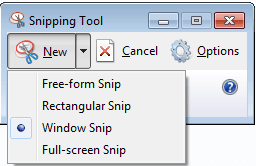
You don't need a third party program in Windows 7. You have the Snipping Tool .Snipping Tool. 2.Select New -> Window Snip and select the window you want to capture.
Computer type Laptop Computer Manufacturer/Model Number HP EliteBook 8530w Mobile Workstation OS Windows 7 Ultimate x64 (XP, 98SE, 95, 3.11, DOS 7.10 on VM) + Ubuntu 10.04 LTS Lucid Lynx CPU Intel Core 2 Duo Processor P8600 (2.40 GHz, 3 MB L2 cache) Motherboard Mobile Intel PM45 Express Chipset ICH9M-Enhanced Memory 4GB 800 MHz DDR2 SDRAM Graphics Card(s) ATI Mobility FireGL V5700 with 256 MB Sound Card SoundMAX Integrated Digital HD Audio Monitor(s) Displays 15.4-inch WXGA anti-glare (1280 x 800 resolution) Screen Resolution 1280 x 800 Hard Drives 500GB + 1TB Mouse Synaptics PS/2 Port Touchpad, USB Mouse Internet Speed 4 Mbps Antivirus MSE Browser Firefox, Chrome, IE Other Info Authentec AES2810 Fingerprint Reader
You don't need a third party program in Windows 7. You have the Snipping Tool .Snipping Tool. 2.Select New -> Window Snip and select the window you want to capture.
Nice suggestion , Bro !
There is another you to get screenshot, though not as handy as snipping tools.
1. Press "Print Screen SysRq" button on your keyboard (generally situated between F12 and Scroll Lock)
2. Open up Paint and paste there (paste button is on the top left corner of the paint window).
So now you have two screen capture mechanism in windows 7. But if you want a capture in video mode, You must to get a third party program like
Camtasia Studio, TechSmith's Screen Recording Software .
Computer type PC/Desktop Computer Manufacturer/Model Number Self Assembled OS Microsoft Windows 10 Pro Insider Preview 64-bit CPU Intel(R) Core(TM) i3-4130 CPU @ 3.40GHz Motherboard Gigabyte Technology Co., Ltd. B85M-D3H Memory Corsair Vengence 4GB x2 (8.00GB Dual-Channel DDR3 @ 798MHz) Graphics Card(s) 2047MB GeForce GTS 450 (ZOTAC International) Sound Card Onboard (Realtek High Definition Audio) Monitor(s) Displays LG Flatron E2040T Screen Resolution 1600x900 Hard Drives Western Digital 1 TB PSU Corsair VS550 Case Cooler Master K380 Cooling Cooler Master Seidon 120V Plus Keyboard Logitech MK260r Mouse Logitech MK260r Internet Speed PMPL Broadband Antivirus Windows Defender + MBAM Browser Firefox Other Info Dell Studio 15" Laptop
Master of Technology
Power User
Thread Starter
Yea I know about print screen and snipping tool. Have any of you ever used Snow Leopard?
Computer Manufacturer/Model Number Toshiba Satellite L505D-S9565 OS Windows 7 Home Premium x64, Mac OS X 10.6.2 x64 CPU AMD Athlon X2 Dual-Core 2.1 GHz Motherboard Toshiba Built-In with Insyde H20 BIOS 1.40 Memory 4 GB DDR2 800 MHz Graphics Card(s) ATI Radeon HD Mobility 3100 Graphics 256MB to 1468 MB Shared Sound Card Realtek Mobile ALC272 HD Audio Monitor(s) Displays 15.6" TFT LCD with TruBrite, Samsung 1080p HDTV Screen Resolution 1366x768, 1920x1080 Hard Drives ❶:Main: Toshiba 250 GB SATA 5400 RPM PSU N/A Case N/A Cooling Built-in/Open window in winter :P Keyboard Built-in Mouse Build-in Symantics SmartTouch Pad Internet Speed 55 MB/sec Down, 9 MB/sec Up Other Info ❷:Backup: Seagate FreeAgent Desk USB 2.0 5400 RPM
New member
Guru
Gold Member
SF Team
You can use Snipping Tool, and have it capture only the window in focus. Is that what you are talking about?
Computer Manufacturer/Model Number Custom OS Windows 7 Professional x64 CPU Intel i7 2600K OC'd @ 4620 MHz Motherboard Asus P8Z68-V Pro Memory 16GB GSkill Sniper 2133 Mhz (4x4GB) Graphics Card(s) EVGA GeForce GTX 480 SuperClocked+ Sound Card Realtek High Definition Audio Monitor(s) Displays 2x Acer S273HLbmii 27" Screen Resolution 2 x 1920x1080 Hard Drives 64GB Crucial M4 SSD PSU Corsair HW Series 750w (modular) Case Cooler Master HAF 932 Advanced Blue Edition Cooling CM Hyper 212+ CPU cooler, 3x 230mm + 1x 140mm case fans Keyboard Logitech MK320 (wireless) Mouse Logitech MK320 (wireless) Internet Speed 30 Mb/s : 2 Mb/s
An Angry Old Man
Guru
VIP
SF Team
Snipping Tool does just that. Open it, choose Windows Snip, and click the app windows in question to place it on Clipboard.
snipping.PNG
5.5 KB
· Views: 270
Computer type Laptop Computer Manufacturer/Model Number HP ENVY 17-1150eg OS Windows 10 Pro x64 EN-GB CPU 1.6 GHz Intel Core i7-720QM Processor Memory 6 GB Graphics Card(s) ATI Mobility Radeon HD 5850 Graphics Sound Card Beats sound system with integrated subwoofer Monitor(s) Displays 17" laptop display, 22" LED and 32" Full HD TV through HDMI Screen Resolution 1600*900 (1), 1920*1080 (2&3) Hard Drives Internal: 2 x 500 GB SATA Hard Disk Drive 7200 rpm Cooling As Envy runs a bit warm, I have it on a Cooler Master pad Keyboard Logitech diNovo Media Desktop Laser (bluetooth) Mouse Logitech Performance Mouse MX Internet Speed 50/10 Mbps VDSL Antivirus Windows Defender 4.3.9431.0 Browser Maxthon 3.5.2., IE11
Master of Technology
Power User
Thread Starter
Yea i like that. But what about the shadow?
ex: a captured window in OS X
It has the shadow and transparency.
Computer Manufacturer/Model Number Toshiba Satellite L505D-S9565 OS Windows 7 Home Premium x64, Mac OS X 10.6.2 x64 CPU AMD Athlon X2 Dual-Core 2.1 GHz Motherboard Toshiba Built-In with Insyde H20 BIOS 1.40 Memory 4 GB DDR2 800 MHz Graphics Card(s) ATI Radeon HD Mobility 3100 Graphics 256MB to 1468 MB Shared Sound Card Realtek Mobile ALC272 HD Audio Monitor(s) Displays 15.6" TFT LCD with TruBrite, Samsung 1080p HDTV Screen Resolution 1366x768, 1920x1080 Hard Drives ❶:Main: Toshiba 250 GB SATA 5400 RPM PSU N/A Case N/A Cooling Built-in/Open window in winter :P Keyboard Built-in Mouse Build-in Symantics SmartTouch Pad Internet Speed 55 MB/sec Down, 9 MB/sec Up Other Info ❷:Backup: Seagate FreeAgent Desk USB 2.0 5400 RPM
An Angry Old Man
Guru
VIP
SF Team
Maybe Mac would be a better OS to you, considering that the shadow in your clips is so important.
Computer type Laptop Computer Manufacturer/Model Number HP ENVY 17-1150eg OS Windows 10 Pro x64 EN-GB CPU 1.6 GHz Intel Core i7-720QM Processor Memory 6 GB Graphics Card(s) ATI Mobility Radeon HD 5850 Graphics Sound Card Beats sound system with integrated subwoofer Monitor(s) Displays 17" laptop display, 22" LED and 32" Full HD TV through HDMI Screen Resolution 1600*900 (1), 1920*1080 (2&3) Hard Drives Internal: 2 x 500 GB SATA Hard Disk Drive 7200 rpm Cooling As Envy runs a bit warm, I have it on a Cooler Master pad Keyboard Logitech diNovo Media Desktop Laser (bluetooth) Mouse Logitech Performance Mouse MX Internet Speed 50/10 Mbps VDSL Antivirus Windows Defender 4.3.9431.0 Browser Maxthon 3.5.2., IE11
New member
Guru
Gold Member
VIP
Computer type PC/Desktop Computer Manufacturer/Model Number Alienware Aurora ALX R4 OS Windows 10 Pro (x64) CPU Intel Core i7-3930K (3.2GHz - 4.5GHz) Motherboard Alienware Aurora-R4 x79 Memory 4x Samsung 4GB PC3-12800 DDR3 (16GB 1600MHz) Graphics Card(s) Nvidia Geforce GTX 690 Sound Card SteelSeries Siberia Elite Monitor(s) Displays Dell UltraSharp U3011 Screen Resolution 2560x1600 Hard Drives Samsung 850 Pro 256 GB, Seagate 1TB Desktop Hybrid HDD, 2x Western Digital 4TB Green HDD PSU 875W Some Dell PSU <.< Case Alienware Aurora ALX Cooling Custom Liquid Cooling (EK CPU & GPU blocks) dual EK 480RAD Keyboard Logitech G710+ Mechanical Mouse Logitech G700s Internet Speed Verizon Fios (50 mbps average) Other Info Server: Intel NUC D54250WYK: i5-4250U, 16GB, 256 GB mSATA, Windows Server 2012 R2
New member
Guru
Gold Member
VIP
Maybe Mac would be a better OS to you, considering that the shadow in your clips is so important.
Computer Manufacturer/Model Number HP, Dell, Gateway, Toshiba - 4 laptops and 2 desktops OS Vista, Windows7, Mint Mate, Zorin, Windows 8 CPU from 1.6GHz Duo to i7 Monitor(s) Displays 2x HP w2207 Hard Drives 5x HDD, 7x SSD, 12x Externals Keyboard with trackball - no mices Mouse Trackball mice Internet Speed DSL 6000
Master of Technology
Power User
Thread Starter
Maybe Mac would be a better OS to you, considering that the shadow in your clips is so important.
I do have a MacBook Pro 13".
Computer Manufacturer/Model Number Toshiba Satellite L505D-S9565 OS Windows 7 Home Premium x64, Mac OS X 10.6.2 x64 CPU AMD Athlon X2 Dual-Core 2.1 GHz Motherboard Toshiba Built-In with Insyde H20 BIOS 1.40 Memory 4 GB DDR2 800 MHz Graphics Card(s) ATI Radeon HD Mobility 3100 Graphics 256MB to 1468 MB Shared Sound Card Realtek Mobile ALC272 HD Audio Monitor(s) Displays 15.6" TFT LCD with TruBrite, Samsung 1080p HDTV Screen Resolution 1366x768, 1920x1080 Hard Drives ❶:Main: Toshiba 250 GB SATA 5400 RPM PSU N/A Case N/A Cooling Built-in/Open window in winter :P Keyboard Built-in Mouse Build-in Symantics SmartTouch Pad Internet Speed 55 MB/sec Down, 9 MB/sec Up Other Info ❷:Backup: Seagate FreeAgent Desk USB 2.0 5400 RPM
YTS GEEK
Guru
Gold Member
SF Team
Computer type PC/Desktop OS 7 X64 CPU i5 8400 Motherboard gigabyte b365m ds3h Memory 2x8gb 3200mhz Hard Drives various PSU pure power 11 400w cm Case Coolermaster Cooling cryorig m9i
Computer type PC/Desktop OS 7x64 CPU g5400 Motherboard ga b365m ds3h Memory 8gb ddr4 2400 PSU xfx pro 450w
Master of Technology
Power User
Thread Starter
I kinda like the Windows Clippings better. Just might buy it, since i just won a 20$ bet with my friend.
Computer Manufacturer/Model Number Toshiba Satellite L505D-S9565 OS Windows 7 Home Premium x64, Mac OS X 10.6.2 x64 CPU AMD Athlon X2 Dual-Core 2.1 GHz Motherboard Toshiba Built-In with Insyde H20 BIOS 1.40 Memory 4 GB DDR2 800 MHz Graphics Card(s) ATI Radeon HD Mobility 3100 Graphics 256MB to 1468 MB Shared Sound Card Realtek Mobile ALC272 HD Audio Monitor(s) Displays 15.6" TFT LCD with TruBrite, Samsung 1080p HDTV Screen Resolution 1366x768, 1920x1080 Hard Drives ❶:Main: Toshiba 250 GB SATA 5400 RPM PSU N/A Case N/A Cooling Built-in/Open window in winter :P Keyboard Built-in Mouse Build-in Symantics SmartTouch Pad Internet Speed 55 MB/sec Down, 9 MB/sec Up Other Info ❷:Backup: Seagate FreeAgent Desk USB 2.0 5400 RPM