card artifacts?

Sabotage

New member
Member
Local time
2:40 PM
Messages
53
Location
Wellandport, ON
the last few days i ahve been getting these artifacts while playing some games. I've never had a problem like this before with my graphics card ( i think that's the problem)

i have been getting these types of artifacts (minecraft) - Pics

also similar artifacts in Company of Heroes

i didn't get any while playing Mafia 2 or Counter Strike Source.
 

My Computer

Computer Manufacturer/Model Number
Custom
OS
Windows 7 Home Prem. 64-bit
CPU
Intel ivybridge something or rather...
Motherboard
MSi Z77A G43
Memory
8gb ddr3 g.skill
Graphics Card(s)
PNY 560 Ti
Monitor(s) Displays
Samsung SyncMaster 2253LW
Screen Resolution
1680x1050
Hard Drives
Seagate Barracuda 7200.11 750Gb
Seagate Barracuda 7200.11 1.5Tb
PSU
ULTRA 750watt
Case
white something and such
Cooling
Corsair H60
Keyboard
Logitech G15
Mouse
Logitech wireless contraption
Internet Speed
500kb/s~
I'm not seeing what you are referring to as artifacts, then again I've always thought minecraft looked like digital noise to begin with. .
Generally they are a indication that the hardware is going bad, or that the memory has overheated at some point.

If they are caused by damage, the probably will more than likely get progressively worse.
 

My Computer

Computer Manufacturer/Model Number
Insane hobo technologies. ;-)
OS
Windows 7 x64
CPU
Intel i7 2600k
Motherboard
Asrock z68 extreme 4 gen 3
Memory
G.skill Ripjaw 16gigs @ 1866
Graphics Card(s)
Nvidia gtx580 (evga)
Sound Card
Integrated HD audio + hdmi
Monitor(s) Displays
24" ASUS widescreen + 42" insignia
Screen Resolution
1080p (1920x1080)
Hard Drives
128 Samsung 830
256 Samsung 840
3 x 1tb storage drive (various)
1 western digital 1tb (eSATA)
1 Seagate 1tb (eSATA)
PSU
1 kilowatt SLI/Crossfire rated Silverstone modular
Case
NZXT Phantom + additional 220 fan
Cooling
Zalmann
Keyboard
Microsoft wireless 3000 (v2)
Mouse
MS - wireless 5000 (bluetrack)
Internet Speed
depends on if you ask me or my provider.
Other Info
The above information is provided as is, and the author assumes no responsibility for issues it may cause with your sanity or fanboyism.
I'm not seeing what you are referring to as artifacts, then again I've always thought minecraft looked like digital noise to begin with. .
Generally they are a indication that the hardware is going bad, or that the memory has overheated at some point.

If they are caused by damage, the probably will more than likely get progressively worse.

the long black lines and the one red one, aren't normal.
 

My Computer

Computer Manufacturer/Model Number
Custom
OS
Windows 7 Home Prem. 64-bit
CPU
Intel ivybridge something or rather...
Motherboard
MSi Z77A G43
Memory
8gb ddr3 g.skill
Graphics Card(s)
PNY 560 Ti
Monitor(s) Displays
Samsung SyncMaster 2253LW
Screen Resolution
1680x1050
Hard Drives
Seagate Barracuda 7200.11 750Gb
Seagate Barracuda 7200.11 1.5Tb
PSU
ULTRA 750watt
Case
white something and such
Cooling
Corsair H60
Keyboard
Logitech G15
Mouse
Logitech wireless contraption
Internet Speed
500kb/s~
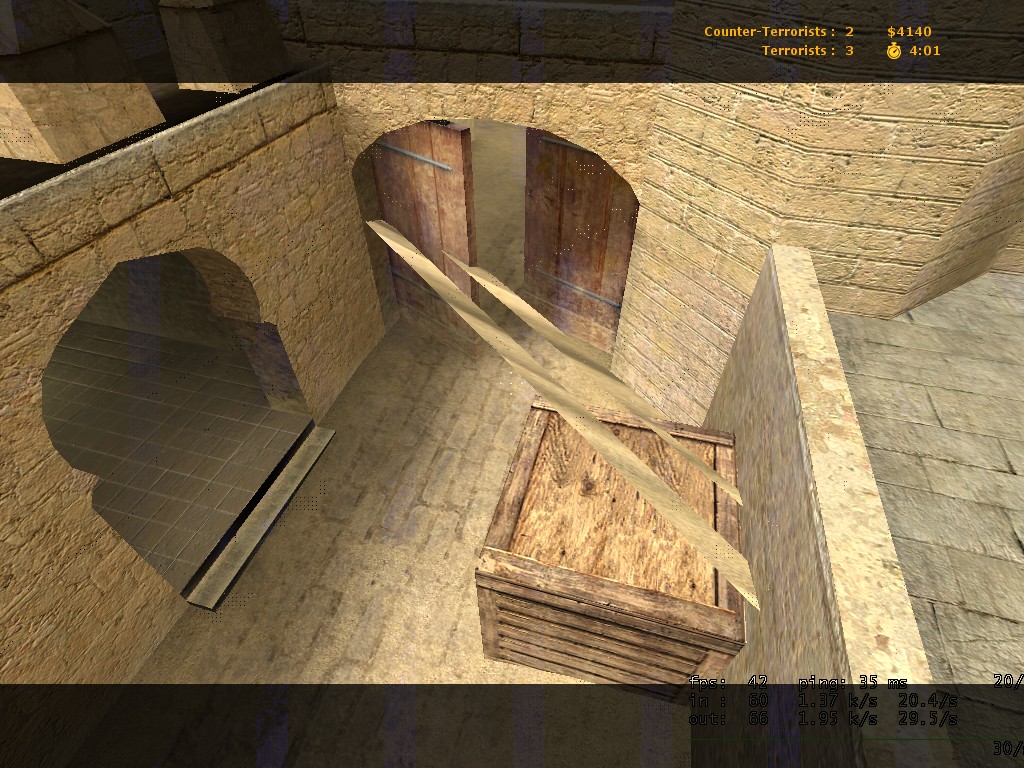
Ah okay see the game is so blocky they didn't really stand out to me not being familiar with it.
That's typical artifacting though.
See it here in counter strike.

de_dust20002.jpg


Anyhow here's a link with some examples of different kind of artifacts and possible causes for them.
Diagnose video card problems by comparing with example corrupted screens

given the diagnosis on that page my initial 'the video ram has overheated' seems fairly accurate.
If you have overclocked your graphics card this is also a possible result from pushing the memory too hard.
 

My Computer

Computer Manufacturer/Model Number
Insane hobo technologies. ;-)
OS
Windows 7 x64
CPU
Intel i7 2600k
Motherboard
Asrock z68 extreme 4 gen 3
Memory
G.skill Ripjaw 16gigs @ 1866
Graphics Card(s)
Nvidia gtx580 (evga)
Sound Card
Integrated HD audio + hdmi
Monitor(s) Displays
24" ASUS widescreen + 42" insignia
Screen Resolution
1080p (1920x1080)
Hard Drives
128 Samsung 830
256 Samsung 840
3 x 1tb storage drive (various)
1 western digital 1tb (eSATA)
1 Seagate 1tb (eSATA)
PSU
1 kilowatt SLI/Crossfire rated Silverstone modular
Case
NZXT Phantom + additional 220 fan
Cooling
Zalmann
Keyboard
Microsoft wireless 3000 (v2)
Mouse
MS - wireless 5000 (bluetrack)
Internet Speed
depends on if you ask me or my provider.
Other Info
The above information is provided as is, and the author assumes no responsibility for issues it may cause with your sanity or fanboyism.
Ah okay see the game is so blocky they didn't really stand out to me not being familiar with it.
That's typical artifacting though.
See it here in counter strike.


Anyhow here's a link with some examples of different kind of artifacts and possible causes for them.
Diagnose video card problems by comparing with example corrupted screens

given the diagnosis on that page my initial 'the video ram has overheated' seems fairly accurate.
If you have overclocked your graphics card this is also a possible result from pushing the memory too hard.

i haven't really played with anything clock speed wise, a few times i manually turned the fan up to 60% from 40% (seems to always stay on 40% set to auto)
 

My Computer

Computer Manufacturer/Model Number
Custom
OS
Windows 7 Home Prem. 64-bit
CPU
Intel ivybridge something or rather...
Motherboard
MSi Z77A G43
Memory
8gb ddr3 g.skill
Graphics Card(s)
PNY 560 Ti
Monitor(s) Displays
Samsung SyncMaster 2253LW
Screen Resolution
1680x1050
Hard Drives
Seagate Barracuda 7200.11 750Gb
Seagate Barracuda 7200.11 1.5Tb
PSU
ULTRA 750watt
Case
white something and such
Cooling
Corsair H60
Keyboard
Logitech G15
Mouse
Logitech wireless contraption
Internet Speed
500kb/s~
It would be odd that it's showing up in a game that's as easy on the graphics as minecraft but not some of the more intense games also.

The fact remains that the distortion you are seeing is fairly typical of a video ram problem though. ..Or possibly even just a heat problem, when was the last time you got a can of compressed air and gave the system a good clean up?

I also suggest removing the cpu overclock just for the purpose of troubleshooting.
 

My Computer

Computer Manufacturer/Model Number
Insane hobo technologies. ;-)
OS
Windows 7 x64
CPU
Intel i7 2600k
Motherboard
Asrock z68 extreme 4 gen 3
Memory
G.skill Ripjaw 16gigs @ 1866
Graphics Card(s)
Nvidia gtx580 (evga)
Sound Card
Integrated HD audio + hdmi
Monitor(s) Displays
24" ASUS widescreen + 42" insignia
Screen Resolution
1080p (1920x1080)
Hard Drives
128 Samsung 830
256 Samsung 840
3 x 1tb storage drive (various)
1 western digital 1tb (eSATA)
1 Seagate 1tb (eSATA)
PSU
1 kilowatt SLI/Crossfire rated Silverstone modular
Case
NZXT Phantom + additional 220 fan
Cooling
Zalmann
Keyboard
Microsoft wireless 3000 (v2)
Mouse
MS - wireless 5000 (bluetrack)
Internet Speed
depends on if you ask me or my provider.
Other Info
The above information is provided as is, and the author assumes no responsibility for issues it may cause with your sanity or fanboyism.
It would be odd that it's showing up in a game that's as easy on the graphics as minecraft but not some of the more intense games also.

The fact remains that the distortion you are seeing is fairly typical of a video ram problem though. ..Or possibly even just a heat problem, when was the last time you got a can of compressed air and gave the system a good clean up?

I also suggest removing the cpu overclock just for the purpose of troubleshooting.

i dust out my system with an air compressor every 3-4 months. i try removing the overclocks later today.
 

My Computer

Computer Manufacturer/Model Number
Custom
OS
Windows 7 Home Prem. 64-bit
CPU
Intel ivybridge something or rather...
Motherboard
MSi Z77A G43
Memory
8gb ddr3 g.skill
Graphics Card(s)
PNY 560 Ti
Monitor(s) Displays
Samsung SyncMaster 2253LW
Screen Resolution
1680x1050
Hard Drives
Seagate Barracuda 7200.11 750Gb
Seagate Barracuda 7200.11 1.5Tb
PSU
ULTRA 750watt
Case
white something and such
Cooling
Corsair H60
Keyboard
Logitech G15
Mouse
Logitech wireless contraption
Internet Speed
500kb/s~
Back
Top