In another just resolved thread I increased the machine RAM from 2-->4GB on a Thinkpad T61 with Win7 32 bit.
I was advised in advance that the 32 bit (vs 64) would take a large overhead hit out of the memory. Further that the size of the video RAM would have a direct impact on the degree of the hit.
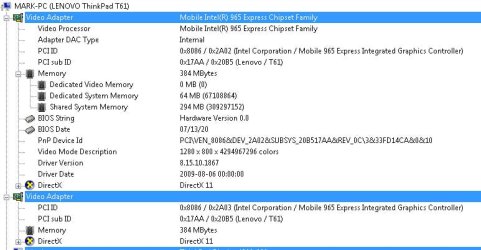
The machine has the Intel video combined versus a separate system and that RAM according to a diagnostic is ~367Mb.
My resulting total machine RAM is now 3062 per Task Manager.
2 points of clarification:
1. Why would the video RAM subtract from Machine RAM? It's my understanding that video RAM means RAM on the video card/processor that is separate from machine RAM and is so for the purpose of not interfering with one's installed machine RAM?
2. Plus, comments in the previous thread were indicating that with a video RAM of ~500Mb one would be left with ~3.2GB of machine RAM (32 bit OS) and yet I have less video RAM and less total RAM?
I'm delighted with my performance increase and should have increased the RAM far sooner. I'm simply needing a better understanding of this process going forward.
Mark
I was advised in advance that the 32 bit (vs 64) would take a large overhead hit out of the memory. Further that the size of the video RAM would have a direct impact on the degree of the hit.
The machine has the Intel video combined versus a separate system and that RAM according to a diagnostic is ~367Mb.
My resulting total machine RAM is now 3062 per Task Manager.
2 points of clarification:
1. Why would the video RAM subtract from Machine RAM? It's my understanding that video RAM means RAM on the video card/processor that is separate from machine RAM and is so for the purpose of not interfering with one's installed machine RAM?
2. Plus, comments in the previous thread were indicating that with a video RAM of ~500Mb one would be left with ~3.2GB of machine RAM (32 bit OS) and yet I have less video RAM and less total RAM?
I'm delighted with my performance increase and should have increased the RAM far sooner. I'm simply needing a better understanding of this process going forward.
Mark
My Computer
- Computer type
- PC/Desktop
- OS
- Windows 7 & Windows 10