Solved Case is too small, is this a problem?

Mythical

New member
Local time
2:52 PM
Messages
21
Hello everyone, I am new here. So please, don't be mad if I don't put this thread in the correct area.

I recently aqcuired a card from a friend. He recently had purchased a newer Graphic card and had given me his old Graphic/Video(unsure which) card. I made absolutely sure the connecters were correct and that my PSU would handle it.

However, there was a slight problem when it was finally here and I was ready to plug it in. I started to insert it in the correct slot, but I found my case was too small! The only way I can think of that wouldn't require me to purchase a whole new case would be for me to cut this small piece of iron that is on the back of my computer. Unfortunately, I'm not sure if it is wise to do so.

Please, can anyone tell me if it is a good idea to do so or should I attempt to purchase a larger case in the future?

If you would like me to take a picture of the case, I can do so. Just ask! c:
 

My Computer

Computer Manufacturer/Model Number
Hewlett-Packard/p6-2026
OS
Windows 7 Home Premium 64bit
CPU
Intel Core i3-2120
Motherboard
Ver: CAR_714.ROM vCAR7.14
Memory
8 GB(8192MB RAM)
Graphics Card(s)
Intel HD Graphics
Monitor(s) Displays
Acer A231H
Case
Some Generica HP Pavillion
Cooling
About 2 fans
A pic of the case, and where it is that you would cut would be great. Moding a case is not uncommon, I would say go for it, pending pics though.
 

My Computer

Computer Manufacturer/Model Number
HP Dv3-2137tx
OS
7 Home Premium x64
CPU
Core 2 P8700 2.53ghz
Motherboard
Compaq
Memory
4gb DDR2
Graphics Card(s)
Nvidia GeForce 105M
Sound Card
Integrated
Monitor(s) Displays
13" 1366x768
Hard Drives
500gb 5400rpm
Cooling
Stock
if you purchased a video card for example like this:

VC 2.jpg

it is usually have an extra plate for smaller casing like this:

vc2.jpg

EDIT: ask your friend maybe he kept the small one somewhere :)
 

My Computer

Computer type
PC/Desktop
Computer Manufacturer/Model Number
Gigabyte Technology Co. Ltd.
OS
Windows 10 Pro 64-Bit
CPU
Intel(R) Core(TM) i5-4460 CPU @ 3.20 GHz(4CPU's), ~3.2GHz
Motherboard
Gigabyte B85M-HD3-A
Memory
8192 RAM
Graphics Card(s)
NVIDIA GeForce 710
Sound Card
Integrated High Definition audio with Realtek ALC888 codec
Monitor(s) Displays
Acer V183HV Ab 18.5" LCD Display
Screen Resolution
1366 x 768
Keyboard
HP
Mouse
HP
Internet Speed
100mbps
Antivirus
Microsoft Security Essentials
Browser
Chrome, Firefox
Unfortunately, as you are about to see, the slot is just too close to my case for it to matter whether I have one of those or not. But thank you for the info anyway timbog.

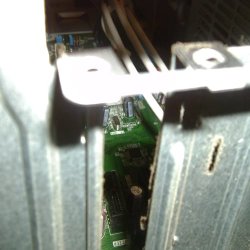
Here are the pictures I promised.

Here is what the situation looks like.

http://i.imgur.com/aX2DZ.jpg

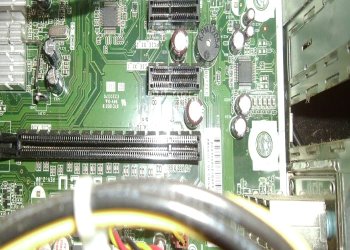
Here is how close the slot is to my case.

http://i.imgur.com/Is7Fg.jpg

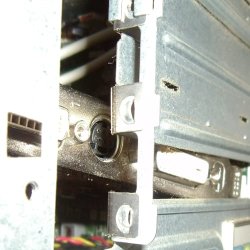
And here is how far I can insert the card before the case starts to be a butt and be too small.

http://i.imgur.com/1HxMH.jpg

Please tell me if I need to take more pictures.
 

My Computer

Computer Manufacturer/Model Number
Hewlett-Packard/p6-2026
OS
Windows 7 Home Premium 64bit
CPU
Intel Core i3-2120
Motherboard
Ver: CAR_714.ROM vCAR7.14
Memory
8 GB(8192MB RAM)
Graphics Card(s)
Intel HD Graphics
Monitor(s) Displays
Acer A231H
Case
Some Generica HP Pavillion
Cooling
About 2 fans

My Computer

Computer type
PC/Desktop
Computer Manufacturer/Model Number
Gigabyte Technology Co. Ltd.
OS
Windows 10 Pro 64-Bit
CPU
Intel(R) Core(TM) i5-4460 CPU @ 3.20 GHz(4CPU's), ~3.2GHz
Motherboard
Gigabyte B85M-HD3-A
Memory
8192 RAM
Graphics Card(s)
NVIDIA GeForce 710
Sound Card
Integrated High Definition audio with Realtek ALC888 codec
Monitor(s) Displays
Acer V183HV Ab 18.5" LCD Display
Screen Resolution
1366 x 768
Keyboard
HP
Mouse
HP
Internet Speed
100mbps
Antivirus
Microsoft Security Essentials
Browser
Chrome, Firefox
Oh I'm sorry, here, let me try again.

They're in the same order, I think.
 

Attachments

  • 038.JPG
    038.JPG
    51.1 KB · Views: 11
  • 039.JPG
    039.JPG
    106.9 KB · Views: 9
  • 040.JPG
    040.JPG
    60.5 KB · Views: 11

My Computer

Computer Manufacturer/Model Number
Hewlett-Packard/p6-2026
OS
Windows 7 Home Premium 64bit
CPU
Intel Core i3-2120
Motherboard
Ver: CAR_714.ROM vCAR7.14
Memory
8 GB(8192MB RAM)
Graphics Card(s)
Intel HD Graphics
Monitor(s) Displays
Acer A231H
Case
Some Generica HP Pavillion
Cooling
About 2 fans
Are you sure your video card is compatible with your mobo?

EDIT:

If it is compatible, then you need that Small Metal Holder and replace the big one on your video card.

That should solve your problem.
 

My Computer

Computer type
PC/Desktop
Computer Manufacturer/Model Number
Gigabyte Technology Co. Ltd.
OS
Windows 10 Pro 64-Bit
CPU
Intel(R) Core(TM) i5-4460 CPU @ 3.20 GHz(4CPU's), ~3.2GHz
Motherboard
Gigabyte B85M-HD3-A
Memory
8192 RAM
Graphics Card(s)
NVIDIA GeForce 710
Sound Card
Integrated High Definition audio with Realtek ALC888 codec
Monitor(s) Displays
Acer V183HV Ab 18.5" LCD Display
Screen Resolution
1366 x 768
Keyboard
HP
Mouse
HP
Internet Speed
100mbps
Antivirus
Microsoft Security Essentials
Browser
Chrome, Firefox
I believe it is compatible..

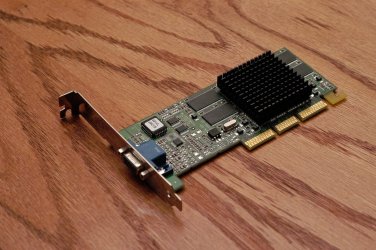
Here is the card type.

Radeon x1600 xt 256MB.

Also, if you can find out, what is the recommended power supply for such a card? Thanks.

Also, there is another problem, the metal bit doesn't have any holes for the monitor inputs.
 

My Computer

Computer Manufacturer/Model Number
Hewlett-Packard/p6-2026
OS
Windows 7 Home Premium 64bit
CPU
Intel Core i3-2120
Motherboard
Ver: CAR_714.ROM vCAR7.14
Memory
8 GB(8192MB RAM)
Graphics Card(s)
Intel HD Graphics
Monitor(s) Displays
Acer A231H
Case
Some Generica HP Pavillion
Cooling
About 2 fans
I believe it is compatible..

Here is the card type.

Radeon x1600 xt 256MB.

Also, if you can find out, what is the recommended power supply for such a card? Thanks.

Also, there is another problem, the metal bit doesn't have any holes for the monitor inputs.

As far as i know 350watts is fine. The metal holder should have slot for monitor. If you dont have that small metal holder I think Its better to change your casing.
 

My Computer

Computer type
PC/Desktop
Computer Manufacturer/Model Number
Gigabyte Technology Co. Ltd.
OS
Windows 10 Pro 64-Bit
CPU
Intel(R) Core(TM) i5-4460 CPU @ 3.20 GHz(4CPU's), ~3.2GHz
Motherboard
Gigabyte B85M-HD3-A
Memory
8192 RAM
Graphics Card(s)
NVIDIA GeForce 710
Sound Card
Integrated High Definition audio with Realtek ALC888 codec
Monitor(s) Displays
Acer V183HV Ab 18.5" LCD Display
Screen Resolution
1366 x 768
Keyboard
HP
Mouse
HP
Internet Speed
100mbps
Antivirus
Microsoft Security Essentials
Browser
Chrome, Firefox
Well darn, it seems my PSU is lacking anyway. I'm pretty sure 300watts is too low, haha.

I kind of don't understand what you mean by a slot for the monitor. Do you mean someplace else or do you mean the metal bit that covers that hole normally?
 

My Computer

Computer Manufacturer/Model Number
Hewlett-Packard/p6-2026
OS
Windows 7 Home Premium 64bit
CPU
Intel Core i3-2120
Motherboard
Ver: CAR_714.ROM vCAR7.14
Memory
8 GB(8192MB RAM)
Graphics Card(s)
Intel HD Graphics
Monitor(s) Displays
Acer A231H
Case
Some Generica HP Pavillion
Cooling
About 2 fans
Well darn, it seems my PSU is lacking anyway. I'm pretty sure 300watts is too low, haha.

I kind of don't understand what you mean by a slot for the monitor. Do you mean someplace else or do you mean the metal bit that covers that hole normally?

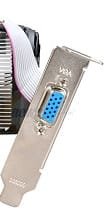
I mean that metal holder should have hole like this:

vc2.jpg


If you dont have that small metal holder to replace the long metal in your video card you have to try to look for it in some computer shops or you have to replace your casing.
 

My Computer

Computer type
PC/Desktop
Computer Manufacturer/Model Number
Gigabyte Technology Co. Ltd.
OS
Windows 10 Pro 64-Bit
CPU
Intel(R) Core(TM) i5-4460 CPU @ 3.20 GHz(4CPU's), ~3.2GHz
Motherboard
Gigabyte B85M-HD3-A
Memory
8192 RAM
Graphics Card(s)
NVIDIA GeForce 710
Sound Card
Integrated High Definition audio with Realtek ALC888 codec
Monitor(s) Displays
Acer V183HV Ab 18.5" LCD Display
Screen Resolution
1366 x 768
Keyboard
HP
Mouse
HP
Internet Speed
100mbps
Antivirus
Microsoft Security Essentials
Browser
Chrome, Firefox
Oh, but, I can't do that since the slot for the card is so close to the case. Even if I could put the card in, it'd still be too small.

That's why I took this picture.
 

Attachments

  • 039.JPG
    039.JPG
    106.9 KB · Views: 8

My Computer

Computer Manufacturer/Model Number
Hewlett-Packard/p6-2026
OS
Windows 7 Home Premium 64bit
CPU
Intel Core i3-2120
Motherboard
Ver: CAR_714.ROM vCAR7.14
Memory
8 GB(8192MB RAM)
Graphics Card(s)
Intel HD Graphics
Monitor(s) Displays
Acer A231H
Case
Some Generica HP Pavillion
Cooling
About 2 fans
You don't have a problem between your mobo and the video card since your mobo Supports PCI Express x16 graphics cards. It's better to replace your casing since you dont have that small metal holder to replace the long one in your video card. I think thats the only way to solve your problem :)
 

My Computer

Computer type
PC/Desktop
Computer Manufacturer/Model Number
Gigabyte Technology Co. Ltd.
OS
Windows 10 Pro 64-Bit
CPU
Intel(R) Core(TM) i5-4460 CPU @ 3.20 GHz(4CPU's), ~3.2GHz
Motherboard
Gigabyte B85M-HD3-A
Memory
8192 RAM
Graphics Card(s)
NVIDIA GeForce 710
Sound Card
Integrated High Definition audio with Realtek ALC888 codec
Monitor(s) Displays
Acer V183HV Ab 18.5" LCD Display
Screen Resolution
1366 x 768
Keyboard
HP
Mouse
HP
Internet Speed
100mbps
Antivirus
Microsoft Security Essentials
Browser
Chrome, Firefox
Darn!

Oh well, thank you for trying timbog!
 

My Computer

Computer Manufacturer/Model Number
Hewlett-Packard/p6-2026
OS
Windows 7 Home Premium 64bit
CPU
Intel Core i3-2120
Motherboard
Ver: CAR_714.ROM vCAR7.14
Memory
8 GB(8192MB RAM)
Graphics Card(s)
Intel HD Graphics
Monitor(s) Displays
Acer A231H
Case
Some Generica HP Pavillion
Cooling
About 2 fans
Well darn, it seems my PSU is lacking anyway. I'm pretty sure 300watts is too low, haha.

I kind of don't understand what you mean by a slot for the monitor. Do you mean someplace else or do you mean the metal bit that covers that hole normally?

Your snapshots confuse me, but it appears that the PC may only accept low-profile graphics cards.

I just measured a spare full-sized slot cover: it's about 4 3/4" (120mm) tall. A low-profile barcket is about 3 3/16" (80 mm). What size is the one from your PC?

If you need low profile, some are available:

Newegg.com - Computer Hardware, Video Cards & Video Devices, Desktop Graphics Cards, DirectX 10, Low Profile, Low Profile Ready, DirectX 10.1, Direct...

(ships only to the US and Canada).

The better ones want a power supply larger than 300W, though.

If your monitor requires a VGA style connection (DB-15 connector), there are adapters (cheap ones) from DVI to VGA. (There are a variety of DVI outputs in existence, but it's very unlikely that the X1600 has any that don't support an analog output.)

The X1600 has "legacy" status at AMD. That means that support for it is limited.

ATI Catalyst

Even if the X1600 fit, it may not be a good choice for an upgrade.
 
Last edited:

My Computer

Computer Manufacturer/Model Number
homegrown
OS
Windows 7 Pro X64 SP1
CPU
Intel Core I7-3930k
Motherboard
Asus P9X79 Pro
Memory
16 GB Gskill DDR3-2133
Graphics Card(s)
eVGA GTX680
Sound Card
Creative X-Fi Titanium
Monitor(s) Displays
As PA246Q
Screen Resolution
1920 X 1200
Hard Drives
Corsair Force GT, 120 GB
WDC 1.5TB Caviar Black
PSU
PCP&C Silencer 750 Crossfire
Case
Silverstone FT02
Cooling
Noctua NH-D14
Keyboard
cheap Logitech USB
Mouse
Microsoft Intellimouse Explorer (old optical) USB
Internet Speed
6Mb cable
Other Info
Pioneer BDR-205
Samsung SH-203B
Monsoon 5.1 speakers
Don't cut the back of the computer. You need the back to remain intact. You might cut the other end, towards the front, if it's just a matter of removing some of the hard drive cage.

Are your hard drives out of the way, where the long card won't interfere with them?
 

My Computer

Computer Manufacturer/Model Number
Home Built
OS
Win 7 Pro
CPU
Intel i7 2600K
Motherboard
Asus P8Z68-V LX
Memory
16 GB 1333 Crucial Hyper-X Blu I think
Graphics Card(s)
Integrated
Sound Card
Integrated
Monitor(s) Displays
Dual LCD IPS panels
Screen Resolution
1980x1200, 1980x1080
Hard Drives
3 SATA: 250, 160, 2000 GB, External USB 3TB
PSU
OCZ modular 500W
Case
Antec 300
Cooling
Case: 2 Stock fans, CPU: CoolerMaster Evo 212; PSU: fan
Keyboard
Dell Logitech wireless
Mouse
Logitech Wireless 510
Internet Speed
1.0 Mbps down, 448 Kbps up
Other Info
Case is too small.
I will suggest you to go for a new case. Modding the case might result in some other issue. you can try coolermaster. Eite 430 is good buy.
 

My Computer

Computer type
PC/Desktop
Computer Manufacturer/Model Number
Custom Bulid/Self made
OS
Windows 11 x64
CPU
i5 2500K @ 3.3 GHz
Motherboard
ASUS P8 Z77 V pro
Memory
16 GB DDR 3 @ 1600Mhz
Graphics Card(s)
MSI 1050TI 4GB OC version
Sound Card
On Board (Realtek HD audio)
Monitor(s) Displays
Samsung 22" LCD
Screen Resolution
1920*1080
Hard Drives
Seagate 1 TB, WD 1TB, Seagate 2 TB ( I use a lot of space)
PSU
coolermaster 750 W
Case
Coolermaster HAF912
Cooling
Coolermaster hyper 212 EVO
Keyboard
Samsung
Mouse
Dell Wireless
Internet Speed
Wireless 50 Mbps
Antivirus
AVG 2016 Internet Security
Browser
Google Chrome
Well darn, it seems my PSU is lacking anyway. I'm pretty sure 300watts is too low, haha.

I kind of don't understand what you mean by a slot for the monitor. Do you mean someplace else or do you mean the metal bit that covers that hole normally?

I mean that metal holder should have hole like this:

View attachment 212668


If you dont have that small metal holder to replace the long metal in your video card you have to try to look for it in some computer shops or you have to replace your casing.

The card he has is a full size pci-e and there is no low profile bracket for it since the 2 dvi connectors are soldered to the board.
Swapping cases is your only option if you want to use that card.
 

My Computer

Computer Manufacturer/Model Number
HAL-9000
OS
Windows 7 Ultimate 64bit
CPU
Intel i7 3770K
Motherboard
Asus Sabertooth Z77
Memory
16GB DDR3 1333 Corsair XMS3
Graphics Card(s)
XFX HD6950 2GB EyeFinity
Sound Card
Logitech G35 & Sennheiser PC135 & VIA HD
Monitor(s) Displays
23" HP 2310e, 23" Samsung B2230, 21.5" Viewsonic
Screen Resolution
5760x1080
Hard Drives
16TB of Storage
128GB & 256GB Crucial M4 SSD's, 2X 1TB WD Black, 3x 2TB WD, 3x 2TB Samsung F4, 1.5TB Seagate, WD 500GB,
PSU
Antec True Power New 650watt
Case
Cooler Master HAF-932
Cooling
Corsair H60 Hydro Cooler, 3x 230mm Fans, 2x120mm Fan
Keyboard
Logitech G15 and G13
Mouse
Logitech G700 Gaming Mouse
Internet Speed
50/10 Mbit
Other Info
Speakers : Alesis M1 Active Mk2 Studio Monitors , APC RS 1200 UPS, HP 4500DN Color Laser, HP P1006 mono Laser, Kodak 8500 Dye-Sub, Epson 1280 inkjet, Epson Worforce 610 MFC
Back
Top