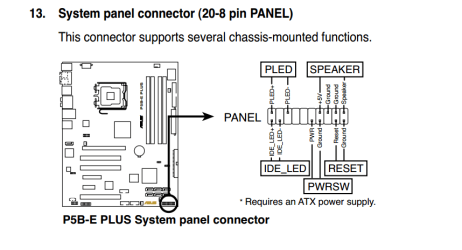
Hi, I have a problem and wondered if anyone can help. It isn't specific to window 7 but I am building a computer to run 7 using old parts. My Antec case has two HDD LED cables but my Asus mono only has one input socket. Also the speaker cable only has a red and black cable in a four pin plug but the mobo socket has four pins marked speaker/ground/ground/+5v. If I use two HDD's how do I get both LEDs to work and will the speaker work with just the two cables instead of four. Any help would be appreciated. Thanks.
Need some system specs, make/model of all hardware. I'm not sure what you're referring to with 2 HDD LED cables for your case. All the cases I've ever seen have one HDD light and that's the activity light. As for the socket to plug into, again not sure what your talking about. HDD's have 2 cables for attaching to the system, power and data and depending on age of HDD, as to what kind of cables those would be. Old IDE HDD's have the 20 pin or 40 pin ribbon cable for data and a 4 pin molex connector for power. Modern drives have SATA connections for both power and data.
If your mobo supports IDE HDD's you will only have one slot on the mobo for connection. You will need a 20/40 pin ribbon cable with master and slave connections. There are also IDE to SATA adapters to go from old style IDE to SATA if your mobo has SATA ports.
Hi, thanks for your reply. I'm not referring to the HDD wiring which is all sorted out. I forgot the proper name for the cables which as you say are to the activity lights on the front panel of the case. This case has two of these cables and I assume that they are for 2 HDDs which is what I have but there is only one socket on the mobo. Likewise the other cable I asked about again is connected to the front panel of the case and is is a black and red twisted cable labeled speaker which I understand sounds the bleeps from the motherboard. Hope I have made it clearer to understand, Mike
The two leds on the front of the case are not for two hard drives. #1 is an activity light for ALL drives and #2 is usually a 2 color power/sleep/hibernate light. they should be marked on the lead that attaches to the mobo at the front panel buss.
Internal speaker should work just fine with that widely separated plug.
I have 2 of those cases sitting here. the leads are marked pw led (power led) and HDD LED (hard drive Led)
Your MOBO pinout is here under downloads/ manuals. it shows where to plug in the leads on the header for the front panel http://www.asus.com/Motherboards/P5BE_Plus/#support_Download
Last edited:
My Computer
Computer type
PC/Desktop
Computer Manufacturer/Model Number
Custom Build MPCBS AMII
OS
Windows 7 Professional x64
CPU
AMD Athlon II x4 3.00 GHz
Motherboard
MSI GF615M-p33
Memory
16GB Kingston DDR3
Graphics Card(s)
Nvidia 8600 (dual DVI out for 2 monitors)
Sound Card
Onboard
Monitor(s) Displays
Acer H233H 23", ASUS 23"
Screen Resolution
1366 x 768
Hard Drives
(2) WD Blue 1 TB 3 partitions, (1) Seagate 7200 500GB with 2 partitions for useless and frequently deleted data Looking forward do an ssd for os soon.
PSU
Corsair 1100Watt
Case
Apevia HAF
Cooling
HAF AMD High Profile Heat sink and fan
Keyboard
wireless Logitech
Mouse
wireless Logitech
Internet Speed
16 mbps
Antivirus
eSet, AVG, Clam and Clamwin (depends on machine)
Browser
Firefox
Other Info
(9) Win 7 machines all x64 (POS Updated to Windows 7 pro YEA), (4) Linux machines x64 and x86 including a v3000 compaq lappy brought back to life with Mint 9 used to scan drives, (1) Linux Machine dual boot XP Pro (for testing and destroying), (1) Win 7 pro x64/Win 8.1 Lenovo Laptop Dual Boot.
Thanks for your reply. You have answered the question about the speaker cable but there are definately two identical cables both made up of one orange and one white wire with a black two pin plug on the end marked HDD LED. As I said only one socket on the mobo. So when I've plugged in the one socket in the correct place I have another hanging about without anywhere to go. That is the problem. Why are there two HDD LED cables. By the way there are four leds on the front of the case. Mike
Plug one in and disregard the other and if not happy switch the connectors. Very odd you would have two as most all mobo's only provide for the one?
My Computer
Computer type
PC/Desktop
Computer Manufacturer/Model Number
A blend of brains, brawn and dumb luck.
OS
Windows 7 Ultimate 64
CPU
i7 3770k OC'd 4.6 @ 1.17v, also FX 8120 & i5 miniITX
Motherboard
MSI P67A-GD80 b3
Memory
32 gb G.Skill Sniper DDR3 10-12-12-31 @ 2133
Graphics Card(s)
XFX Radeon 7870 2GB DDR5
Sound Card
Sound Blaster Z Series Card
Monitor(s) Displays
(2) LG LED 23" 1920 x 1080 2ms Monitors via mini d-port
Screen Resolution
1680 X 1050 p
Hard Drives
Samsung 256 gb 830 SSD sata III
(1) 1 tb WD Black
(2) 1 tb Hitachi deskmates/sata II
(2) 1 tb WD green/sata II
(2) 3 tb Seagate Barracuda
(1) 120 gb OCZ Vertex SS
(1) Drobo 5N w/5 Seagate 3tb
PSU
EVGA modular 1000G2 80% gold rating & APC 1200 RS
Case
CoolerMaster Storm Styker
Cooling
7 case fans 140mm & 120mm, NZXT Kraken X60
Keyboard
(2) Logitech Illuminated Keyboards (1) usb (1) wireless
Mouse
Logitech G700 & T-BC21 - nano nx for the laptop
Internet Speed
Basic 120mbps down
Antivirus
Trend Micro Titanium Max Security & Malwarebytes Premium
Browser
Chrome and IE 10
Other Info
5 Noctua case fans + 3 Noctua in p/p on NZXT cooler
Integrated hot swap drive bays for 2.5" Drives
(2) Lite-on dvd/cd/Blu Ray optical 22X
Integrated fan controller and led on/off
HP Officejet Pro 8630 all-n-one
Hot-swappable 3.5" hard drive bay
Netgear Nighthawk router
Asus USB 3 & sata 6 PCIe card
Vantec IDE to sata adptr./Ultra sata adptr
Lenovo L420 i5 lappy with m sata
Drobo 5N advanced NAS
I am assuming you are talking about this case? Antec - Support
I have tw0 of them. each has two lights on the front. I am not sure what you have. Any chance of a photo? Most Mobo's do not support multiple activity lights so I am not sure what the purpose would be as any drive activity from a floppy, cd, dvd and/or hdd will cause drive activity. perplexed here as in 22 years I have not seen this. I will back out now and hopefully someone will understand what you have.
My Computer
Computer type
PC/Desktop
Computer Manufacturer/Model Number
Custom Build MPCBS AMII
OS
Windows 7 Professional x64
CPU
AMD Athlon II x4 3.00 GHz
Motherboard
MSI GF615M-p33
Memory
16GB Kingston DDR3
Graphics Card(s)
Nvidia 8600 (dual DVI out for 2 monitors)
Sound Card
Onboard
Monitor(s) Displays
Acer H233H 23", ASUS 23"
Screen Resolution
1366 x 768
Hard Drives
(2) WD Blue 1 TB 3 partitions, (1) Seagate 7200 500GB with 2 partitions for useless and frequently deleted data Looking forward do an ssd for os soon.
PSU
Corsair 1100Watt
Case
Apevia HAF
Cooling
HAF AMD High Profile Heat sink and fan
Keyboard
wireless Logitech
Mouse
wireless Logitech
Internet Speed
16 mbps
Antivirus
eSet, AVG, Clam and Clamwin (depends on machine)
Browser
Firefox
Other Info
(9) Win 7 machines all x64 (POS Updated to Windows 7 pro YEA), (4) Linux machines x64 and x86 including a v3000 compaq lappy brought back to life with Mint 9 used to scan drives, (1) Linux Machine dual boot XP Pro (for testing and destroying), (1) Win 7 pro x64/Win 8.1 Lenovo Laptop Dual Boot.
Thanks very much for your replies and help. I was just nervous of doing damage to the mobo. I have built a pc in the past but that was with all new and matching parts so it was easy. This one has been more complex but I think that I can mark it as solved. Once more thanks a lot.
Samsung 128GB 840 Pro SSD (1),
Samsung 4TB 850 EVO SSDs (4)
Samsung 4TB 850 EVO SSDs (16) external backup drives used in 2.5" hot swap bays in the computer.
PSU
Corsair HX750w
Case
Antec Two Hundred v2 (modified)
Cooling
Cooler Master GeminII S524 120mm (fan replaced with a 140mm)

 Hi, I have a problem and wondered if anyone can help. It isn't specific to window 7 but I am building a computer to run 7 using old parts. My Antec case has two HDD LED cables but my Asus mono only has one input socket. Also the speaker cable only has a red and black cable in a four pin plug but the mobo socket has four pins marked speaker/ground/ground/+5v. If I use two HDD's how do I get both LEDs to work and will the speaker work with just the two cables instead of four. Any help would be appreciated. Thanks.