Cataloging Music CDs

motim

New member
Local time
3:55 AM
Messages
109
Hello,
For some time I am looking for a cataloging program to catalog my cds. Like when I insert a music cd in windows media player, I get in moments the names of the tracks, but I cannot copy the names into a simple database. I tried some programs found on the internet - they are too much complicated, too many tables to fill. The goal of the database is to help find a piece of music and on which cd, where I can make a sort by the composer.
Can you advise of such a simple program, and if it is portable its better. (I prefer to avoid installation).
Answers will be appreciated
Thanks
Motim
 

My Computer

Computer type
PC/Desktop
Computer Manufacturer/Model Number
custom built
OS
Windows 7 Pro 32 bit
CPU
intel celeron 2.66GH 2.56GH
Memory
2.00 GB
Graphics Card(s)
Nvidia fx5500
Hard Drives
Western digital
Antivirus
AVG
Browser
firefox
I use MediaMonkey. It can be used to just catalogue your CDs like you want (including sorting) but also has an excellent player.

You can also use it to rip your CDs to various formats, then use MediaMonky like a jukebox to play all your music at will without having to insert your CDs one at a time. You can set up playlists with any number of tracks (you can pick and choose individual tracks or use entire CDs to fill a playlist).
 

My Computer

Computer type
PC/Desktop
Computer Manufacturer/Model Number
Custom Build
OS
Win 7 Ultimate 64 bit
CPU
Intel i7-3930K
Motherboard
ASUS P9X79 WS
Memory
Kingston HyperX Genesis 32GB Kit (8x4GB Modules) 1600MHz DDR
Graphics Card(s)
MSI R7850 Twin Frozr 2GD5/OC Radeon HD 7850 2GB 256-bit GDDR
Sound Card
Asus Xonar Essence STX
Monitor(s) Displays
3x Asus VG248QE 24", Vizio 32" TV
Screen Resolution
1920 x 1080, ?
Hard Drives
Samsung 128GB 840 Pro SSD (1),
Samsung 4TB 850 EVO SSDs (4)
Samsung 4TB 850 EVO SSDs (16) external backup drives used in 2.5" hot swap bays in the computer.
PSU
Corsair HX750w
Case
Antec Two Hundred v2 (modified)
Cooling
Cooler Master GeminII S524 120mm (fan replaced with a 140mm)
Keyboard
Logitech G510s
Mouse
Logitech M525 (two in use)
Internet Speed
=< 32Mbps down, 8Mbps up
Antivirus
AVAST!, MBAM, SAS, Spybot S&D (all but MBAM free) Glary Util
Browser
IE11
Other Info
LSI 9211-8i HBA card (8 SATA III ports), 2.5" & 3.5" Hot Swap Bays, HooToo HT-CR001 PCI-E to USB 3.0 Internal Hub + 6 Slot Card Reader, and LG Model CH12LS28 BD-ROM Optical Drive. Also, ScanSnap S1500 ADF duplexing scanner, Canon 9000F flat bed scanner, Corsair SP2500 2.1 speakers, Samsung CLP 415nw laser color printer, Cyberpower PP2200SW UPS
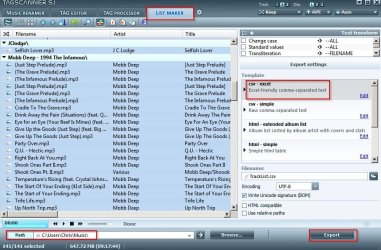
If I understand correctly it would be better to import tracks to your music library then use something like TagScanner to export the album/ track list in csv file format that any database application should be able to import. You don't say which database application you use.

On the download page you'll find a portable version of TagScanner that can be downloaded.

TagScanner.jpg

Choose file format to export.

TagScanner check VT.jpg
 

My Computer

Computer type
Laptop
Computer Manufacturer/Model Number
ASUS
OS
Microsoft Windows 7 Home Premium 64-bit 7601 Multiprocessor Free Service Pack 1
CPU
AMD C-60 APU with Radeon(tm) HD Graphics
Motherboard
ASUSTeK COMPUTER INC. X501U
Memory
4.00 GB
Graphics Card(s)
AMD Radeon HD 6290 Graphics
Sound Card
(1) AMD High Definition Audio Device (2) Realtek High Defi
Screen Resolution
1366 x 768 x 32 bits (4294967296 colors) @ 60 Hz
Hard Drives
Hitachi HTS545050A7E380 SATA Disk Device
Antivirus
Comodo CIS & FW, SecureAplus App Whitelisting, Threatfire
Browser
Cyberfox 64bit, Opera 64bit, Airfox
Other Info
Spy-The-Spy, HitmanPro.Alert, Norton Connect Safe, MJRegWatcher, BitDefender TrafficLight, Voodoo Shield, Zemana AntiMalware
I don't think you will have much luck unless you get the songs off of CD and onto your hard drive--one way or another, in one file format or another.

I use Media Monkey to play and catalog and everything I have is in mp3 format. About 27,000 individual songs. I also use Excel separately to keep track of what I have.

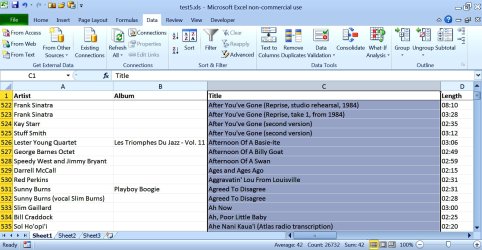
You can use Media Monkey's "create report" function to export everything in it's database to Excel. Once the songs are listed in Excel, they can be sorted by any of the columns.

Whether or not you have a populated composer field shown in Media Monkey depends on your tags. I don't care about composer, so my composer tags are poor and typically blank. But I am very careful about artist, title, and length tags and you can see that those columns are fully populated in this screen shot.

This screen shot is of the Media Monkey report as exported to Excel, showing a sort by title (Column C, shown in blue). You could just as easily sort by any other column.

I'd guess any semi-competent media player has some sort of report maker that can export to Excel.
 

Attachments

  • title sort.jpg
    title sort.jpg
    221.4 KB · Views: 0
Last edited:

My Computer

Computer type
PC/Desktop
Computer Manufacturer/Model Number
Ignatz Special; 4 speed manual gearbox; factory air conditioning; one of one
OS
Windows 7 Home Premium SP1, 64-bit
CPU
Intel Skylake i5-6600K, not overclocked
Motherboard
AsRock Z170M Extreme 4, micro ATX
Memory
8 GB HyperX DDR4-2666 (2 x 4 GB)
Graphics Card(s)
none; graphics are integrated on CPU
Sound Card
onboard: Realtek ALC1150; external: USB Behringer UF0-202
Monitor(s) Displays
Dell S2340M 23 inch IPS
Screen Resolution
1600 x 900
Hard Drives
System: Crucial MX100 series SSD, 128 GB;
Data: Samsung Spinpoint 103SJ, 1 TB;
Backup: WD Caviar Green WD30EZRX-00D8PB0, 3 TB
PSU
Rosewill SilentNight 500 watt fanless, semi-modular
Case
Antec Solo II
Cooling
Noctua NH-U12S; Noctua F12 intake, Noctua S12A exhaust
Keyboard
Microsoft 200 6JH-00001 USB
Mouse
Dell or Microsoft optical wired; USB
Antivirus
Microsoft Security Essentials and Malwarebytes Premium
Browser
Pale Moon
Other Info
All fans PWM; speeds at idle: CPU circa 500 rpm; intake circa 600 rpm; exhaust circa 600 rpm; CPU temps 27 idle and 47 C load in a warm room (27 C/81 F) when running Intel Extreme Tuning Utility stress test.
Cataloging CDs

Hello.
Thanks for the answers.
Recently I have tested some cataloging programs, but when I insert a cd, windows media player opens, starts to play and displays the info of the cd, But when connected to the internet it retrieves the info of the cd, on some occasions the info is wrong (checked and double checked) - the info displayed is not what really is on the disc - it does not match the list on the cd envelope. When being off-line the display is only Track-1, Track-2 and so on.
However, First, cannot copy data (title, as text)) from windows media player into any table, because of the above - sometimes it is not reliable info.
Second - I started to build my own catalog using microsoft office excel, its a lot of typing, some day it will be done.
Thanks
Motim
 

My Computer

Computer type
PC/Desktop
Computer Manufacturer/Model Number
custom built
OS
Windows 7 Pro 32 bit
CPU
intel celeron 2.66GH 2.56GH
Memory
2.00 GB
Graphics Card(s)
Nvidia fx5500
Hard Drives
Western digital
Antivirus
AVG
Browser
firefox
But when connected to the internet it retrieves the info of the cd, on some occasions the info is wrong (checked and double checked) - the info displayed is not what really is on the disc - it does not match the list on the cd envelope...............


Second - I started to build my own catalog using microsoft office excel, its a lot of typing, some day it will be done.

The info from the Internet is always problematic and prone to errors. I don't rely on it at all.

Music playback, management, and cataloging is much easier if the music is on your hard drive rather than on CD and that's the first choice you have to make.
 

My Computer

Computer type
PC/Desktop
Computer Manufacturer/Model Number
Ignatz Special; 4 speed manual gearbox; factory air conditioning; one of one
OS
Windows 7 Home Premium SP1, 64-bit
CPU
Intel Skylake i5-6600K, not overclocked
Motherboard
AsRock Z170M Extreme 4, micro ATX
Memory
8 GB HyperX DDR4-2666 (2 x 4 GB)
Graphics Card(s)
none; graphics are integrated on CPU
Sound Card
onboard: Realtek ALC1150; external: USB Behringer UF0-202
Monitor(s) Displays
Dell S2340M 23 inch IPS
Screen Resolution
1600 x 900
Hard Drives
System: Crucial MX100 series SSD, 128 GB;
Data: Samsung Spinpoint 103SJ, 1 TB;
Backup: WD Caviar Green WD30EZRX-00D8PB0, 3 TB
PSU
Rosewill SilentNight 500 watt fanless, semi-modular
Case
Antec Solo II
Cooling
Noctua NH-U12S; Noctua F12 intake, Noctua S12A exhaust
Keyboard
Microsoft 200 6JH-00001 USB
Mouse
Dell or Microsoft optical wired; USB
Antivirus
Microsoft Security Essentials and Malwarebytes Premium
Browser
Pale Moon
Other Info
All fans PWM; speeds at idle: CPU circa 500 rpm; intake circa 600 rpm; exhaust circa 600 rpm; CPU temps 27 idle and 47 C load in a warm room (27 C/81 F) when running Intel Extreme Tuning Utility stress test.
Back
Top