hey all. i have just installed the catalyst control center 12-2 after downloading from amd site. i have a mobility radeon hd4250 and radeon hd 5650 on my laptop. the problem is after installation went successfully(as said by installer) i ran ccc and it said that:
"no amd graphics driver is installed, or the amd driver is not fuctionning properly. please reinstall the amd driver appropriate for your amd hardware"
i have windows 7 64 bit with amd cpu
i look in device manager and find 2 display adapters as usual:
"AMD M880G with ATI mobility radeon hd 4250"
"ati mobility radeon hd 5650"
what should i do to get ccc running correctly? i already restarted after install
I would say uninstall drivers and rollback to the version before that was working fine until amd releases another new set of drivers that are more stable.
My Computer
Computer type
PC/Desktop
Computer Manufacturer/Model Number
custom build
OS
Windows 10 64bit
CPU
AMD Phenom II X4 925 (Deneb)(2.8GHz) OC 3.4GHz
Motherboard
M5A78L-MLX Plus
Memory
Corsair Vengeance DDR3 4GBX2 (8192MB)
Graphics Card(s)
XFX HD 6870 1GB (OC)- 940MHz core, mem 1150MHz
Monitor(s) Displays
Vizio 26' 1920x1080 / Acer 1336x768
Screen Resolution
1920x1080 60Hz /1336x768
Hard Drives
Kingston Digital 60GB SSDNow V300/500gb HDD Western Digital 7200rpm (/WD 160GB HDD 7200rpm
ok right now i'm uninstalling these ccc suite and will try to uninstall the previous one
it works fine again but says instead of 5650 6500M/5600/5700 series. the same with 4250 but will be fixed after the optionnal windows update im doing for my adapters
EDIT: worked (i'm sticking with the older ccc)
i installed the Catalyt CC just because the avaliable driver one the site of hp for the ati mobilty hd5650 is to old ......for a time everything was fine but after the version 11.8 i had always problems with CCC
i guess ihave to try to fin a new separate driver somwere else or just whait for another stabile version of CCC ...
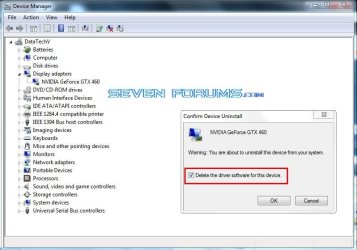
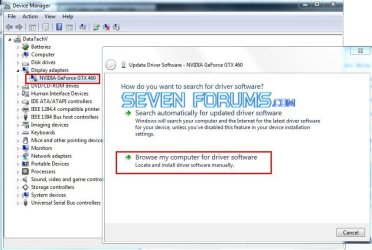
Try these steps to install only the graphics driver.
1.Download the preferred driver and save it to the desktop.
2.Double click the installer and you will see a screen where it will be extracted to, change that to your desktop.
3.Open Device Manager through Control Panel.
4.Expand Display adapters and right click the name for yours and choose update driver\Browse my Computer. select the driver folder you just saved on the desktop. Click Next.
5. Your system should say "Windows has successfully updated your driver software".
If you get a window saying you already have the most current driver, go back to step 4 and choose Uninstall Driver software instead. Then restart from step 3.
My Computer
Computer type
PC/Desktop
Computer Manufacturer/Model Number
Home Built Desktop By DataTech
OS
Windows 7 Ultimate X64 SP1
CPU
Intel i5-2550K, Differing ~4.4-4.8GHz No built in GPU
Motherboard
ASUS P8Z68-V PRO/GEN3
Memory
16GB G.Skill Sniper 1866MHz @ 2133MHz 2x8GB
Graphics Card(s)
ASUS GTX650TIB-DC2OC-2GD5, (650TI Boost)
Sound Card
Onboard Realtek 5-1
Monitor(s) Displays
Samsung P2570HD
Screen Resolution
1920x1080
Hard Drives
Samsung 840 Pro 256GB SSD for OS, 500GB Seagate Constellation (Enterprise drive) for Data
PSU
Corsair HX650W
Case
Inwin Dragon Rider
Cooling
Hyper 212 EVO w/two Noctua fans, push-pull, @1300 RPM
Keyboard
E-Z Eyes, bright yellow keys with large characters
Mouse
steelseries SENSEI Laser Pro Gaming
Internet Speed
48-51Mbs Mbs down, 11 Mbs up Xfinity Cable
Antivirus
Norton Internet Security 2013
Browser
IE 10, Opera, Pale Moon if needed
Other Info
4 case fans, LG BluRay-RE, ASUS DVD-RW, Mr. Fusion power supply, 1.21 gigawatts.